Performance Efficiency for Design
One common analogy used to describe system performance is the flow of water through a pipe.
If we compare water flow to performance, the amount of flow is determined by the water’s speed and the pipe’s diameter.
The system’s performance is similar. The speed of water corresponds to response time, and the pipe’s diameter corresponds to the number of tasks that can be processed concurrently.
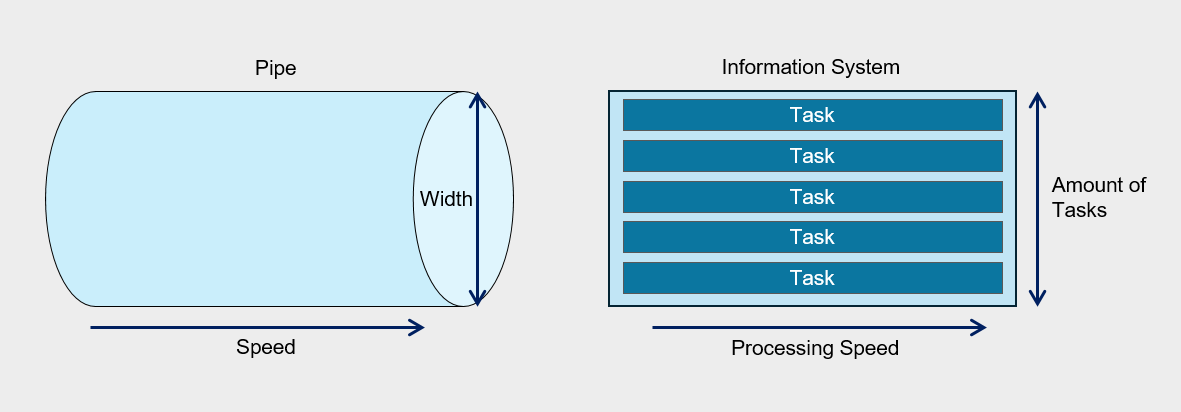
If the fluid flowing through the pipe is not water but viscous oil, even when using a pipe of the same diameter, the amount that flows in the same amount of time will differ.
Similarly, in information systems, processing speed can vary depending on the nature of the tasks being performed, and consequently, performance inevitably varies as well.
Therefore, the required performance level can vary depending on the user’s characteristics and environment, and even with the same performance, satisfaction may differ among users.
This means that there is no standard that can be uniformly applied to all systems and users.
Considering these points, ‘performance’ can be defined as the amount of work that can process a user’s request within the expected time for a specific task.
In traditional IT environments, the focus was on maximizing throughput within limited physical resources for performance management, and the work centered on optimizing each component of the information system.
However, recent IT environments focus on efficiently meeting growing service demand and technical requirements by leveraging application infrastructure and resources based on cloud technology, rather than on partial optimization.
Considerations for Performance Efficiency
Consider cost and performance trade-offs
If you pre-deploy resources or over-provision to meet performance requirements, unexpected costs may arise.
Also, when adopting an over-provisioning strategy, if demand spikes and exceeds the limits of the pre-provisioned resources, resource adjustments become necessary during the incident response phase.
When designing the architecture, incorporating a demand-driven resource adjustment strategy enables elasticity that flexibly scales the size of workload components, thereby contributing to improved performance efficiency of cloud workloads.
Auto-Scaling is an effective means of horizontally scaling computing resources to match demand, but if the scaling policy is not configured properly, unnecessary scaling may occur, or it may fail to provide sufficient performance when needed.
By analyzing demand load and establishing policies that match its characteristics, you can reduce cost waste and secure the required computing performance.
Implementing a caching strategy also requires a sophisticated design.
Caching is a technique for delivering frequently used content with low latency, but if the content is not frequently accessed or the caching retention period (Time-To-Live, TTL) is not suitable for the use case, it can incur unnecessary costs or fail to achieve latency improvements.
- Configure the Auto-Scaling policy to match user demand.
- Improve performance efficiency through proper caching implementation.
Selecting a cloud service that meets the requirements
Select an appropriate cloud service that aligns with the workload’s performance goals and future capacity requirements.
Select a service that can meet the performance goals of the requirements. Samsung Cloud Platform provides various computing options such as Virtual Machine, Bare Metal, and Serverless Computing. For example, when you need to build a database that requires high‑availability, high‑performance OLTP, instead of deploying the database on a Virtual Server or using a DBaaS service, you can configure two Bare Metal Servers with redundant database servers and connect Block Storage (BM) using a Multi‑Attach method.
Meets regulatory compliance and restriction requirements. The cloud offers a variety of services, but selection may be limited due to specific regulations or restrictive requirements. For example, even if you want to use DBaaS for performance and operational reasons, if compliance requirements mandate applying a specific encryption module that DBaaS does not support when storing data, using the service may be difficult.
Consider the organization’s capabilities. Microservice Architecture can be a strategy that maximizes efficiency in terms of performance and operations, but implementing it requires the organization’s technical capabilities, processes, and culture to be supportive. Attempting technological innovation without preparation increases the likelihood of failure.
Overall service flow design considering performance
Flow (flow) refers to a series of steps that perform a specific task within a workload.
When a user’s request event is generated, the message that processes it is delivered to the server, and the sequence of handling the response and sending a reply can be referred to as a flow.
To optimize an information system’s performance, it is essential to understand all flows. Analyzing the workload in individual flow units allows you to identify bottlenecks and resource usage inefficiencies.
To do this, we apply analysis and tracking tools to each component, set performance metrics, and collect data over a defined period.
Based on the data collected in this way, we identify key flows and prioritize them for performance improvement.
A critical flow refers to a system and data flow that is either the customer’s primary user flow or a core task within the workload.
As in the business impact analysis covered by the reliability design principles (for more details, Reliability Design Principles > I. Business Impact Analysis and Recovery Objective Definition > 1. Business Impact Analysis (BUSINESS IMPACT ANALYSIS)), we evaluate business impact to identify critical flows and analyze performance metrics to establish improvement goals.
For identified critical flows, we provide dedicated resources and sufficient capacity to ensure a stable computing environment.
Dedicated resource configuration for critical flow The critical flow must be configured to operate independently without interference from other processes, and you can use a separate VPC or subnet for this.
Software-level flow isolation Separate flows by VM (Virtual Machines) or container units to minimize interference from other flows.
Securing dedicated resources and capacity For critical flows, minimize resource sharing and allocate dedicated resources or capacity to ensure stable execution.
The following is an example of an issue that occurred in an important flow.
The company operates a high-availability three-tier website architecture for online recruitment.
However, the HR team is experiencing problems with smooth application submissions due to a sudden surge in traffic at certain times.
During the hiring season, tens of thousands of applicants converge, but in the off-season, system load is significantly lower.
In on-premises environments, additional equipment must be purchased to handle this load, but after the hiring season, the equipment becomes idle, increasing management burden and reducing cost efficiency.
These issues can be solved through a cloud environment.
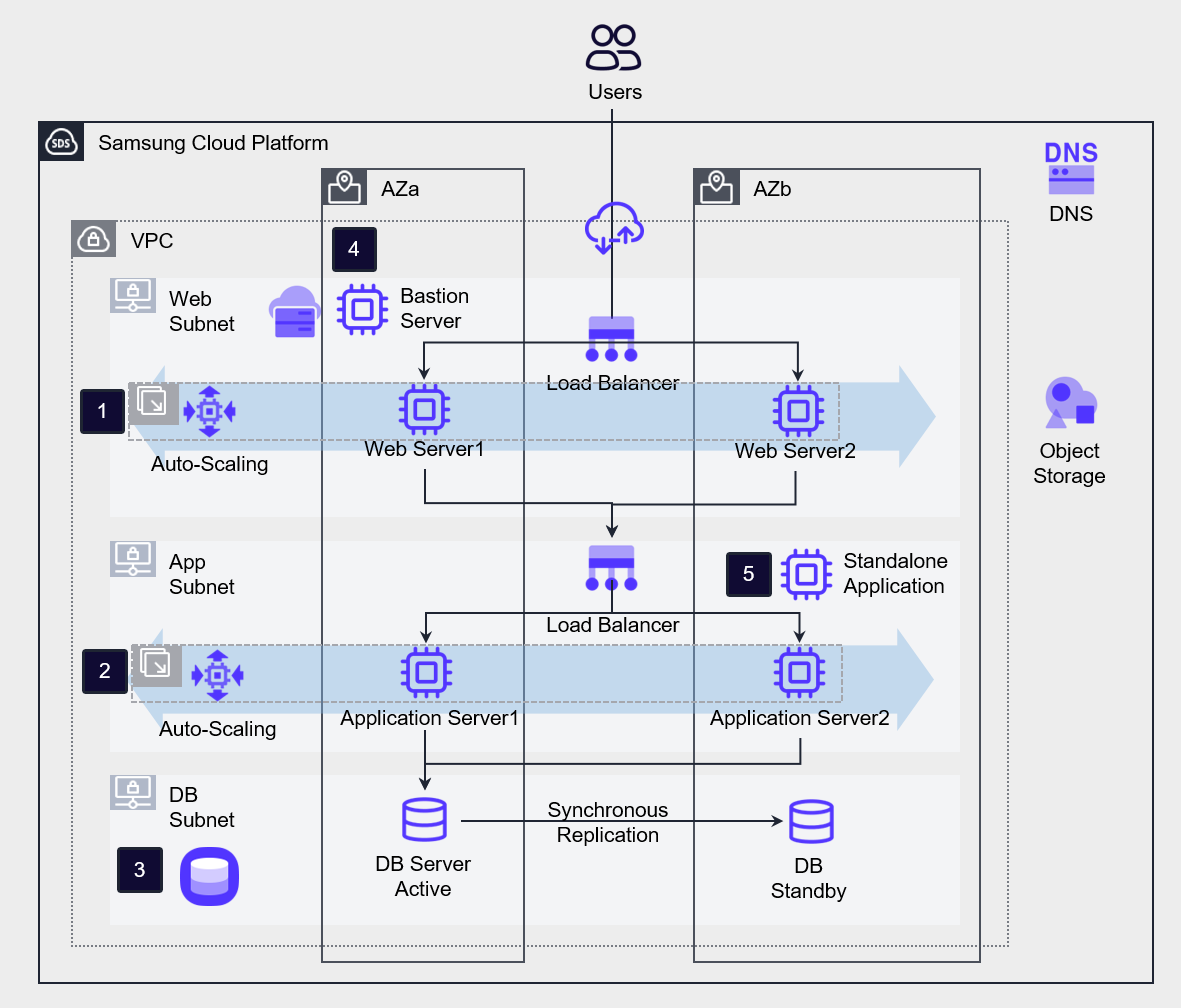
Implemented Auto-Scaling for the workloads of ❶Web Server and ❷Application Server, and ❸Implemented high availability for the database using DBaaS.
In contrast, the non-primary flow ❹Bastion Server and ❺Standalone Application servers are configured as standalone servers.
Cloud Performance Improvement Area
Latency
Latency refers to the time it takes to transmit data over a network.
If the distance between the end user and the information system is short and the system’s response speed is fast, latency is low. Conversely, if the distance is long or the response speed is slow, latency is high.
When network latency increases, Application performance degrades, and if it rises beyond a certain level, it can lead to system failures.
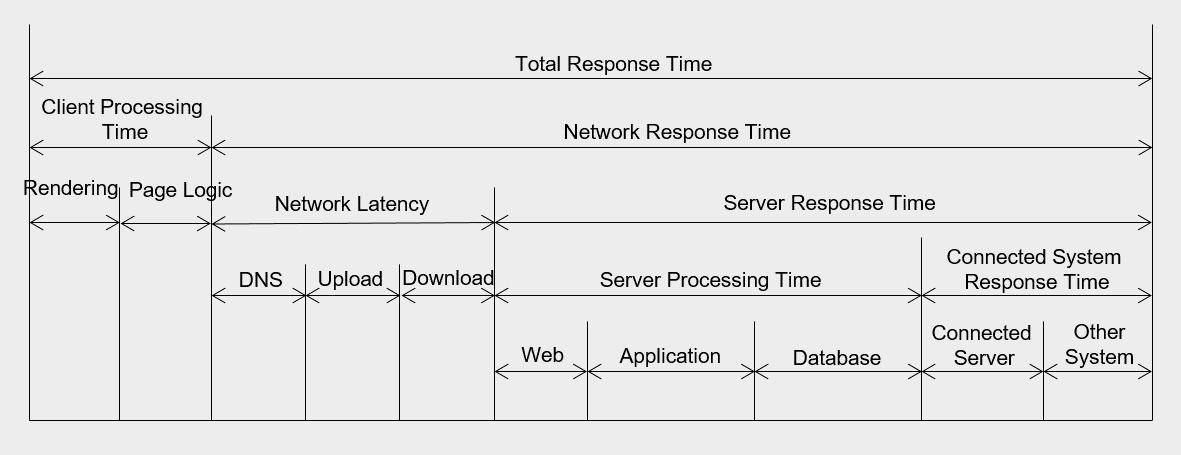
Network latency occurs due to various factors.
First, latency may be introduced by network links and intermediary devices such as routers between the request and destination locations.
The routers that a data packet traverses from source to destination are called hops (hop), and the more hops there are, the higher the latency.
Additionally, delays can occur within the data center due to boundary protection devices such as firewalls and internal network equipment.
Delays can also occur due to the operating mechanisms within the server farm between the web, application, and database, or within the server itself.
Additionally, delays can also occur when the application must interact with another server to return a response.
The most fundamental way to reduce latency is to shorten the network distance between the client and the server.
You can either place the server in a region that is geographically close to the client, or configure a CDN to handle responses directly on edge servers.
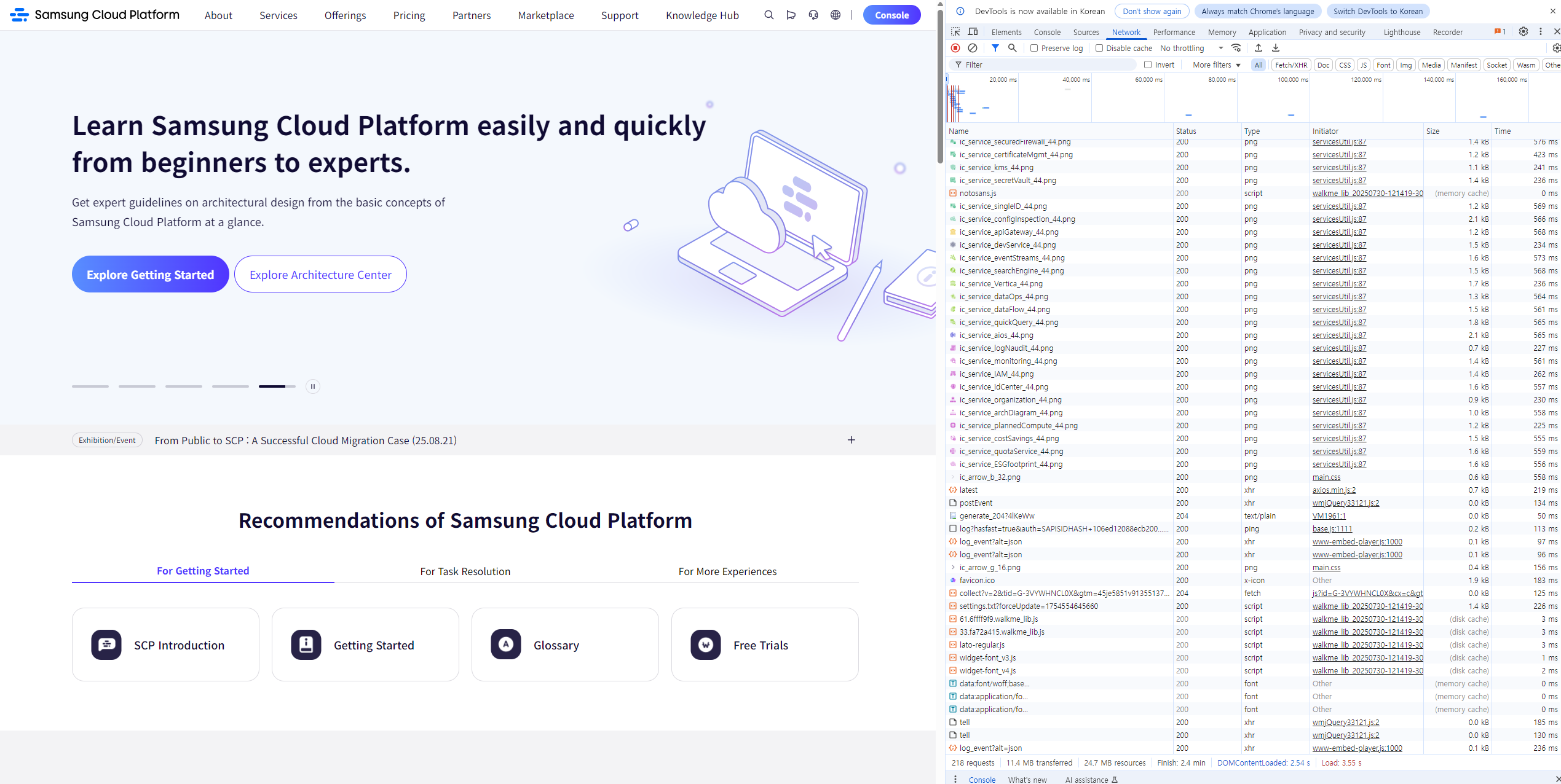
The figure below shows the inbound traffic latency for a website with diverse content.
The fewer network hops, the lower the latency on the far right.
Throughput(Throughput)
Designs that reduce the distance between users and servers to shorten latency, along with increasing network throughput, are also one way to improve network performance.
Throughput means the amount of work processed per unit time.
Throughput and latency are closely related.
Being able to transmit more data in a short time means that latency is low and throughput is high.
Network throughput is expressed as the amount of data transmitted per second (Bytes/second or bits/second).
At the operating system level, throughput is determined by the amount of data transferred per second between the CPU and memory. In the database domain, it is expressed as the number of transactions that can be processed per second (operations/second or Transactions/second).
When defining performance requirements, throughput requirements are expressed as the number of concurrent users and concurrent throughput, which is further covered in II. Computing Design > 1. Computing Services, Server Types, and Sizing.
The following measures can be considered to increase throughput.
Transmission Server Expansion You can increase the overall service throughput by placing computing nodes that perform the same task in parallel behind a load balancer.
Transmission Method Change If the application connection is implemented using an API-based approach rather than a session-based method, resource utilization can be increased.
Hybrid Connection Configuration If Direct Connect is required, you can consider a hybrid connection to select an appropriate bandwidth.
Capacity Planning
Capacity planning is the process of making decisions about resource capacity by considering future workload demands and usage patterns.
Predict usage changes based on business schedules such as seasonal variations or new product launches, and incorporate them into capacity planning.
These proactive strategies can prevent service interruptions and improve performance efficiency.
By analyzing past usage trends and growth data, you can forecast short‑term and long‑term capacity requirements, identify bottlenecks and Auto‑Scaling issues in advance, and ensure consistent workload performance.
Analyze long-term accumulated data. By analyzing usage rates, performance data, and workload pattern logs accumulated for over a year, we identify seasonal and periodic demand and incorporate the load during demand spikes into capacity planning.
Identify bottlenecks. Set up a test environment separate from the production environment, generate load to measure and improve bottlenecks, thereby enhancing overall performance.
Implement automatic expansion. Configure an automated scaling approach instead of manual scaling.
Set up schedule-based Auto-Scaling, or use the cloud service’s managed offerings to leverage built-in capacity scaling.
Define performance goals, measure, and improve
Define performance goals, measurement, and improvement process
Performance requirements are a core element needed to provide users with an optimized information system service and to ensure stable operation and maintenance.
It specifically describes how quickly and efficiently the system can perform its functions.
Additionally, performance requirements describe the required time, throughput, and maximum resource usage when performing a function under specific conditions.
Performance requirements are important because they significantly affect the system quality perceived by end users.
System processing speed, screen response time, page errors, and downtime can become critical sources of dissatisfaction in service level management.
Therefore, these items must be explicitly specified in the request for proposal, and the performance targets must be met by linking equipment performance testing during system implementation.
The performance requirement items are as follows, and specific performance targets are established for each item.
| Category | Item | Requirement items | example |
|---|---|---|---|
| General Performance | General Performance | General Performance |
|
| Processing speed and time performance requirements | Response time | Online task response time | The first result must be returned within 3 seconds of the user request. |
| Processing speed and time performance requirements | Response time | Online batch processing response time | You must respond with the result within 3 minutes for online batch work requests. |
| Processing speed and time performance requirements | Response time | Batch task response time | The daily batch job must be processed within 10 minutes. |
| Processing speed and time performance requirements | Response time | Web page display time | Each web page must be displayed within a few seconds. |
| Processing speed and time performance requirements | Response time | Error response time | The message for any error must be presented within 3 seconds after entering the information. |
| Throughput requirements | Concurrent user count | Number of concurrent users | It should support an average of at least 200 concurrent users without performance degradation. |
| Throughput requirements | concurrent processing capability | concurrent processing capability | The system must process 50 user basic information entries per second under maximum load. |
| Resource usage requirements | CPU usage | CPU usage | The average CPU utilization during service availability must not exceed 60%. |
| Resource usage requirements | Memory usage | Memory usage | The average memory usage during service uptime must not exceed 60%. |
While the existing information system used the USE methodology for performance measurement, the RED methodology is also being used as cloud‑native application development has become widespread.
USE Methodology(The USE Method)
It is a methodology proposed by Brendan Gregg, used to analyze system bottlenecks in the early stages of performance review.
The USE methodology can be defined as follows.
“Check utilization, saturation, and errors for all resources.”
The definitions of each term are as follows in the table below.
| term | Definition | example |
|---|---|---|
| Resource (resource) | All physical server components | CPU, Disk, Memory, Network, etc. |
| Utilization (utilization rate) | The proportion of time a resource spent performing work during a given period | Disk usage=90% |
| Saturation (Saturation) | Additional work that the resource could not process | CPU average run queue length=4 |
| Errors (Error) | Number of errors that occurred | 50 late collisions occurred on this network interface. |
The procedure of the USE methodology is as follows.
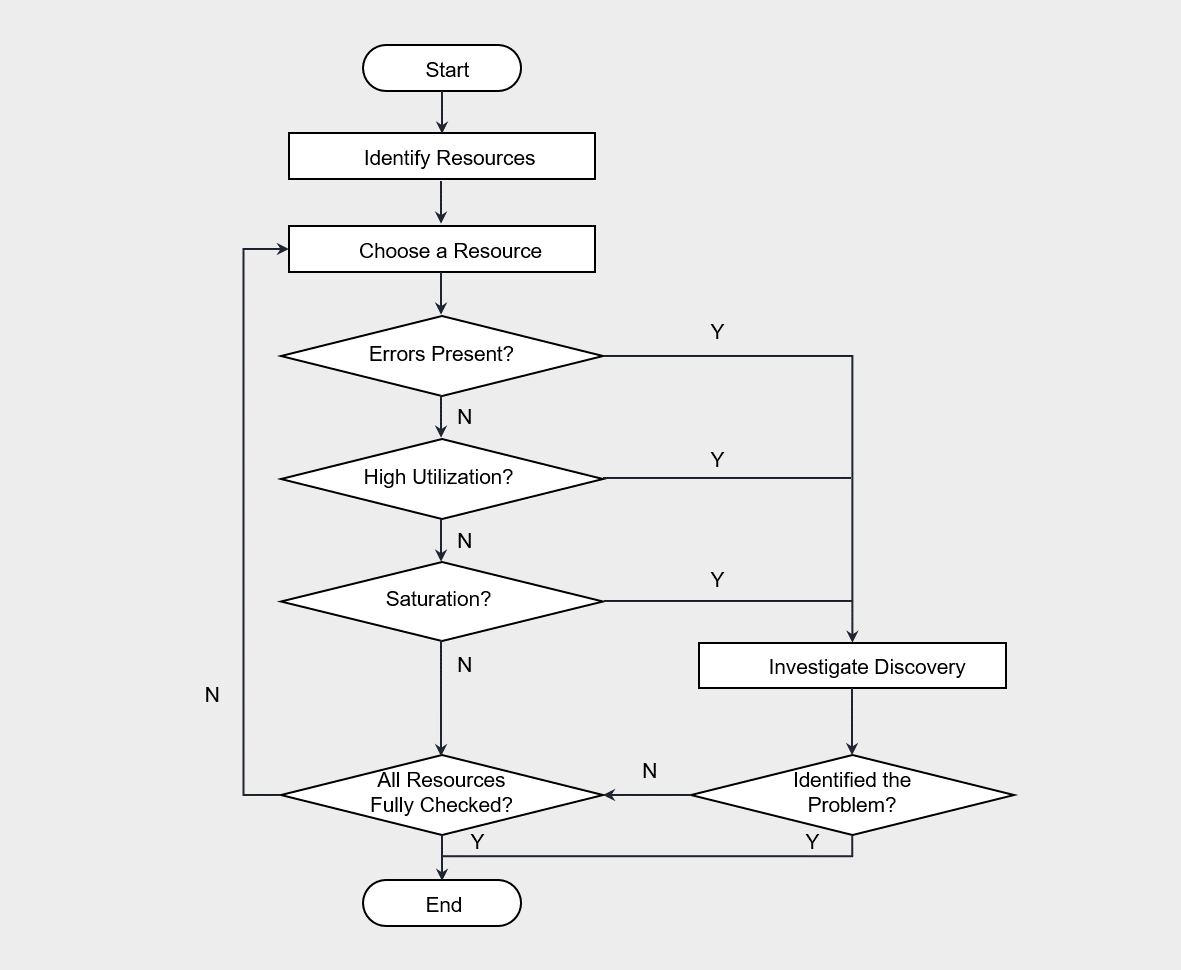
The USE methodology is performed by first checking for errors according to the flowchart, then sequentially verifying usage rate and saturation.
Generally, errors can be identified intuitively, so checking for errors first and then analyzing the remaining items is effective for saving time.
For example, if the CPU usage is 100%, that point is likely a bottleneck.
When checking these metrics, you should also consider the metrics’ update frequency.
The minimum metric update interval for Cloud Monitoring is 1 minute, and it checks whether a VM’s 100% utilization occurs continuously or only temporarily.
The USE methodology can be applied mechanically without deep understanding of the software, and it has been effectively used not only in on‑premises environments but also in cloud environments.
In this methodology, physical hardware resources are primarily monitored, and software corresponds to the basic resources commonly used across most systems.
Therefore, it does not depend on software logic and can be applied regardless of which software is used.
However, there are limitations to applying the Microservice architecture that partitions physical resources.
In such cases, it is appropriate to use the RED methodology.
RED methodology(The RED Method)
This is the method proposed by Tom Wilkie for performance analysis in a microservice environment. (The RED Method: How to Instrument Your Services | Grafana Labs)
“Monitor the rate, errors, and duration for all services.”
The metrics of the RED methodology are all composed of items based on requests (request).
The definitions of each term are as follows.
| term | Definition | example |
|---|---|---|
| Rate (request count) | Requests per second | Disk usage = 90% |
| Errors (error) | Number of request failures | CPU average run queue length = 4 |
| Duration (processing time) | Request processing time | 50 late collisions occurred on this network interface. |
If the USE methodology is hardware metric‑centric, the RED methodology focuses on service‑request‑centric metrics.
In a microservice environment, the RED methodology is useful when analyzing response latency or errors of a web application.
The RED methodology can also be applied easily without dismantling or analyzing the internal structure of hardware or software.
However, since Cloud Monitoring cannot collect RED metrics, using tools such as Prometheus is effective.
Continuous optimization and improvement
Continuous performance optimization means a series of processes that involve monitoring and analyzing system performance and continuously carrying out improvement activities.
The goal of performance efficiency is to adjust resources according to demand fluctuations, providing responses within the time users expect.
The performance of an information system can degrade over time.
Therefore, various variables inside and outside the system, such as demand fluctuations and the complexity resulting from increased functions and interfaces, must be considered.
To achieve performance efficiency goals despite ongoing changes, the following optimization and improvement strategies are required.
- Review and apply new cloud technologies.
- Specify the improvement priority.
- Automate performance optimization.
We review and apply new cloud technologies. Cloud providers continuously adopt new technologies in their infrastructure and software platforms. Therefore, these technologies should be regularly reviewed and applied. If technical support or updates for previous platform versions are discontinued, it can negatively affect performance as well as security and availability.
Specify improvement priority. Over time, technologies that were optimized during implementation may become inefficient. For example, a specific query may have been used as a critical flow in the database, but changes in trends can make another query more important. Initially, resources and queries may have been optimized according to a specific workflow to meet performance targets. However, as trends evolve, if newly load‑intensive queries and resource plans are not optimized, overall performance can degrade. In such cases, it is necessary to adjust priorities and modify query and resource capacity planning.
Automate performance optimization. Automation can eliminate repetitive and time‑consuming manual processes, reducing the possibility of errors and ensuring consistency. To this end, we apply automation to tasks such as performance testing, deployment, and monitoring. Even when applying the USE methodology or the RED methodology, you must set thresholds for the performance metrics to be monitored and configure the system to send automatic alerts to the administrator immediately when a specific event occurs. Additionally, we establish a preemptive plan to respond quickly through automated scripts when an emergency event occurs.