Compute Design
Computing services, server types, and sizing
Choosing a computing service suitable for the workload
The specifications of the computing services provided by Samsung Cloud Platform are as follows.
| Product | Type | CPU | Memory | Option | Option |
|---|---|---|---|---|---|
| Virtual Server | Standard | 1/2/4/6/8/10 vCore | 2~160GB | Max Network Bandwidth | 10Gbps |
| Virtual Server | Standard | 12/14/16 vCore | 24~256GB | Max Network Bandwidth | 12.5Gbps |
| Virtual Server | High Capacity | 24/32/48/64/72/96/128 vCore | 48~1,536GB | Max Network Bandwidth | 25Gbps |
| GPU Server | A100(80G) | 16/32/64/128 vCore | 240~1,920GB | GPU | 1~8 |
| GPU Server | H100(80G) | 12/24/48/96 vCore | 240~1,920GB | GPU | 1~8 |
| Bare Metal Sever(3thGen) | 16/32/64/96/128 vCore | 64~2,048GB | Physical CPU | 8~64 |
※ You can check the latest server types by visiting the site below. Virtual Server : https://cloud.samsungsds.com/serviceportal/services/compute/virtualServer.html GPU Server : https://cloud.samsungsds.com/serviceportal/services/compute/gpuServer.html Bare Metal Server : https://cloud.samsungsds.com/serviceportal/services/compute/baremetal.html
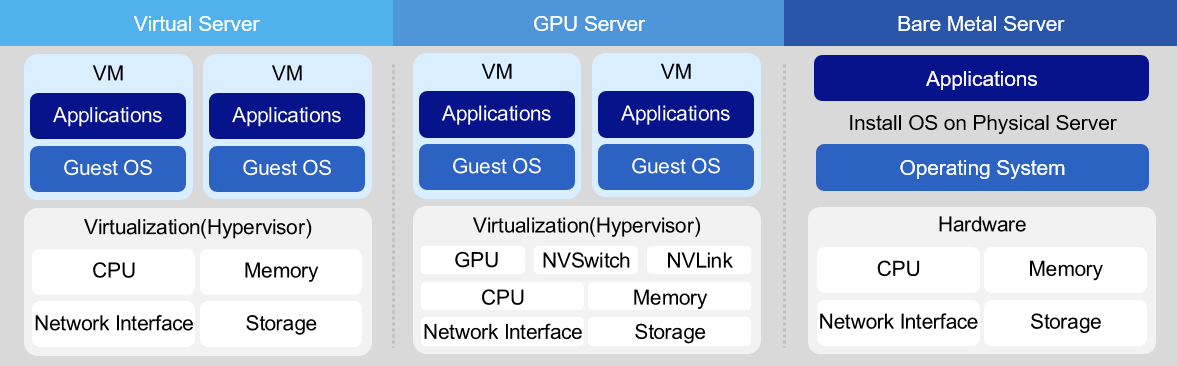
Virtual Server Virtual Server offers a Standard (s1) type of up to 16 vCore and a High Capacity (h2) type of 24 vCore or more. The Standard type uses an Intel Ice Lake CPU, and the minimum specification is 1 vCore/2 GB. From 2 vCores up to 16 vCores, CPU:Memory combinations are offered in ratios of 1:2, 1:4, 1:8, and 1:16. The High Capacity type uses Intel Sapphire Rapids CPUs and is offered with CPU:Memory ratios of 1:2, 1:4, 1:8, and 1:12, ranging from 24vCore to 128vCore. The operating systems include RHEL, Ubuntu, Alma, Rocky, Oracle Linux, and Windows Server, and you can configure Kubernetes images, Data Service Console images, and other components. A Virtual Server can be used for various purposes, such as development, testing, and running applications, depending on the user’s computing needs.
Bare Metal Server A Bare Metal Server is a high‑performance cloud computing service that does not use virtualization technology and allocates physically isolated computing resources such as CPU and memory exclusively. The third-generation service using Intel Sapphire Rapids is currently being offered. The CPU:Memory ratios offered for the server types are 1:4, 1:8, and 1:16. The default internal disk for the OS is 480 GB × 2 for 16 vCore, 960 GB × 2 for 32 vCore, and 1.92 TB × 2 for 96/128 vCore. Bare Metal Server is suitable for workloads that require high capacity and high performance, such as real-time (Real-Time) systems, HPC (High Performance Computing), and servers that demand excessive I/O usage. Additionally, you can use the Multi-Attach feature to build databases that require active-active high availability.
Server sizing
After selecting a computing service suitable for the workload, you must determine the server specifications and quantity based on availability and performance requirements.
In on-premises environments, determining server specifications and quantity was very important, but in cloud environments, it can become a flexible task that can be changed at any time.
Because it can be adjusted later even if there is a difference between the initially set specifications and the actual required specifications.
Nevertheless, server sizing is important because we need to calculate the workload operating cost (monthly fee) in the cloud and, based on that, derive the TCO (Total Cost of Ownership) compared to on‑premises deployment.
To estimate the hardware scale of an information system, the following three methodologies can be considered.
| Category | Concept | Advantage | Disadvantage |
|---|---|---|---|
| Expression calculation method | Method for calculating capacity figures based on factors such as user count for sizing estimation and applying correction factors. | It can clearly present the basis for estimating the scale and can do so more simply than other methods. | If the correction factor is incorrect, a large discrepancy from the desired value occurs, and providing accurate supporting data for the correction factor is difficult. |
| Reference method | Based on the workload (number of users, database size), we estimate a comparable system scale by comparing approximate sizes using baseline data. | Since it can be compared with the existing implemented business system, a relatively safe scale estimation is possible. | Because it relies on comparison rather than a calculation-based approach, the justification is weak. |
| simulation method | Model the workload for the target task, simulate it, and estimate its scale. | Relatively accurate values can be obtained. | It requires a lot of time and cost. |
The formula calculation method and reference method extract various metrics to estimate the resource usage of servers built on the cloud.
Typically, cloud capacity sizing identifies the capacity equilibrium point by adjusting through simulation methods or operational tuning.
However, sizing is often required for reasons such as establishing a usage fee budget or making proposals.
The formula-based calculation method can provide an objective capacity design standard because it estimates server capacity using multiple metrics.
Web/WAS CPU sizing using the formula calculation method
First, estimate the CPU capacity of the Web/WAS server using the formula calculation.
| Calculation items | Basis for estimation | Scope | default value |
|---|---|---|---|
| Number of concurrent users | Users who simultaneously use software or systems over a network | - | calculated value |
| Number of operations per user | Number of business logic operations generated per second by a single user | 3 ~ 6 | 5 |
| Basic OPS correction | A correction factor to adapt the OPS(Operation Per Second) measured in the test environment to a complex real-world environment (the default OPS correction applies a factor of 3) | - | 3 |
| Business use adjustment | Correction factor based on the type of target system (0.7: web server, 2: WAS server) | - |
|
| Interface load compensation | Correction factor that accounts for the load on the interface when communicating between servers (commonly using a value of 1.1) | 1.1 ~ 1.2 | 1.1 |
| Peak-time load correction | Adjustment to resolve load caused by a sudden surge of connections | 1.2 ~ 1.5 | 1.3 |
| Load coupling correction | Adjustment accounting for the workload generated by integration with other systems | 1 ~ 1.3 | 1 |
| Cluster calibration | Adjustment factor for failure scenarios in a cluster environment (applied according to the number of nodes) |
|
|
| System Spare Ratio | Adjustment for stable system operation ※ Additional buffer to account for unexpected workload increases, etc. | 1.3 | - |
| System target utilization | Maximum CPU utilization target based on stable system operation | 0.7 | - |
| Unit correction | Conversion factor for converting the calculation result to max-OPS units | 24~31 | - |
| calculation formula | CPU(max-jOPS) = (concurrent users * operations per user * base OPS correction * business purpose correction * interface load correction * peak time load correction * integration load correction * cluster correction * system margin) / (system target utilization * unit correction) | ||
| Core calculation | Estimated jOPS / Standard performance per core jOPS
|
- Concurrent Users A concurrent user refers to a user who simultaneously uses software or a system over a network, and is generally defined based on a session (from the request for a business service to the termination of the service). Generally, for an existing web system in operation, the estimation of concurrent users can be obtained relatively easily based on operational data. In contrast, the new system must determine the number of concurrent users through estimation. First, calculate the total number of users in the system. The total number of users typically refers to the total users registered in the system, generally meaning users who have access rights. However, for the web, an unspecified many can access, so an estimate is required. Then, compute the number of active users as a certain proportion of the total user count. A connected user is a user who is online; they may generate transactions or operations, or they may simply be connected. Finally, you can estimate the number of concurrent users by multiplying the number of connected users by a certain factor. In a three-tier web application, the number of users on the Web server, WAS server, and DB server are closely related. The number of concurrent users on the WAS server will not exceed that of the Web server, and the number of concurrent users on the DB server will not exceed that of the WAS server. Considering these relationships, you can estimate the number of concurrent users for each layer. The table below shows the estimated number of concurrent users in a typical information system.
| Category | concept | |
|---|---|---|
| Web server | External service | Estimate the number of connected users as roughly 1%–10% of the total user base, and estimate the number of concurrent users as roughly 5%–30% of the connected users. |
| Web server | Large Content Service | Estimate the number of connected users as about 30% ~ 50% of the total user count, and estimate the number of concurrent users as 40% ~ 70% of the connected user count. |
| WAS server | Calculated within the range of 50% to 100% of the estimated concurrent users of the Web server, with a typical value of 75%. | |
| DB server | Calculated within the range of 50% to 100% of the estimated concurrent users of the WAS, with a typical value of 75%. |
- User-specific operation count The number of operations per user is the number of business logic operations a single user generates per second, and depending on the type of work, it is assumed to be about 3 to 6.
| Applied value | Explanation |
|---|---|
| 3 | Web service–focused tasks (referring to query‑oriented work rather than complex application logic) |
| 4 | Web service and application logic are mixed, but the work primarily focuses on the web service. |
| 5 | Web services and application logic |
| 6 | Application-logic-focused work |
Basic OPS correction The OPS figures provided by SPEC(Standard Performance Evaluation Corporation) are measured under optimal conditions and differ from actual production environments. Therefore, the OPS values measured in the experimental environment must be corrected to apply them to complex real-world environments; this is called the basic OPS correction. The default OPS correction applies a fixed value of 3.
Business purpose adjustment There is a relative difference in workload between the web server and the WAS server. Considering these differences, we apply different correction factors based on the system type; this is called operational-use correction. The business-use adjustment is applied differently depending on whether the calculation target is a Web server or a WAS server. For a Web server, apply a correction factor of 0.7, and for a WAS server, apply a correction factor of 2.
| Applied value | Explanation |
|---|---|
| 0.7 | Web server |
| 2 | WAS |
- Peak Time Load Compensation To increase work efficiency and obtain accurate, immediate results, the system must operate reliably during peak times when work is most concentrated. Therefore, when sizing the system, you should use peak time as the basis. Generally, the system experiences about 20% to 50% more load during peak times compared to normal operation. Based on this, we apply a weighting factor of 1.2–1.5× to the estimated capacity to adjust the system capacity.
| Category | Applied value | description |
|---|---|---|
| Award | 1.5 | When an excessively high load occurs at a specific time or on a specific day. |
| middle | 1.4 | When excessive load occurs on a specific deadline |
| Do | 1.3 | When there is a peak time daily or weekly during a specific time slot. |
| Other | 1.2 | When a peak time exists but there is no load difference. |
- Cluster Calibration Cluster calibration is applied when two systems are configured as a single cluster (one-to-one configuration). When a server experiences a failure, the remaining servers must bear the entire load that the application must handle. In this situation, without a system redundancy ratio, overload can impede normal operation, so an additional redundancy margin should be allocated. This reserve ratio varies depending on the cluster’s configuration. In an Active-Active architecture, each counterpart system should be set to a 100% reserve ratio, but this is uneconomical and inefficient, so a value of 1.3 to 1.5 is applied. The applied value varies depending on the number of Nodes, with 1.4 ~ 1.5 applied to a 2-Node configuration and 1.3 applied to a 3-Node configuration. In an Active-Standby architecture, the actual service runs on one device while the other is used as a standby system for fault tolerance. In the event of a failure, the entire functionality of the equipment is transferred to a standby device, where the function is executed. In this Active-Standby architecture, you do not need to apply a separate cluster correction factor.
| Clustering | Node | Applied value |
|---|---|---|
| Active-Active | 2-Node | 1.4 ~ 1.5 |
| Active-Active | 3-Node | 1.3 |
| Active-Standby | Active-Standby | 1 |
- Linked Load Compensation This is a correction factor that accounts for the workload generated from integration with other systems, rather than the load caused by the number of concurrent users. Generally, inter-system integration is performed on the WAS server rather than the Web server, so we apply a correction factor of 1 to the Web server. In contrast, the WAS server can apply a separate correction factor as follows, depending on the frequency and processing complexity of the linked transactions.
| Category | Applied value | description |
|---|---|---|
| Web server | 1 | In the case of a web server |
| WAS | 1 | When there are no linked tasks among all WAS tasks (0%) |
| WAS | 1.1 | When the integrated tasks within the entire WAS workload consist only of simple query operations (10% of total load) |
| WAS | 1.2 | When the only linked task among all WAS operations is internal update work (20% of total load) |
| WAS | 1.3 | When the integrated tasks within the overall WAS workload include internal/external update tasks (30% of the total load) |
System Utilization The system margin is a correction factor that ensures stable operation even during unexpected workload spikes or abnormal traffic conditions. On-premise systems typically apply an additional margin of 30%, i.e., a correction factor of 1.3.
System Goal Utilization Generally, information systems are designed with a target utilization rate of 100%, but to ensure stable operation, the actual utilization is kept below 100%. The maximum CPU utilization for stable system operation is called the system target utilization, and typically a maximum of 70% (coefficient 0.7) is applied.
Unit correction Unit correction is a correction factor applied according to the server’s configuration. When applying max-jOPS in composite form, you can set 29 for X86 servers, 31 for Unix servers, and the default value is 30. When applying max-jOPS in a MultiJVM configuration, you can set 24 for X86 servers, 26 for Unix servers, and the default value is 25.
| Category | Applied value | description |
|---|---|---|
| Composite SPECjbb2015 | 29 | X86 server |
| Composite SPECjbb2015 | 30 | Server type unspecified (default) |
| Composite SPECjbb2015 | 31 | Unix server |
| MultiJVM SPECjbb2015 | 24 | X86 server |
| MultiJVM SPECjbb2015 | 25 | Server type unspecified (default) |
| MultiJVM SPECjbb2015 | 26 | Unix server |
DB server CPU sizing based on the calculation method
Now we estimate the DB server’s CPU capacity using the formula.
Unlike Web/WAS servers, DB servers derive and calculate tpmC based on the number of transactions per minute.
| Calculation items | Calculation basis | Apply | Calculation items |
|---|---|---|---|
| Transactions per minute | Sum of estimated per‑minute transaction occurrences on the assessed servers | - |
|
| Default tpmC calibration | Adjustment factor for applying the tpmC values measured in the experimental environment to complex real-world conditions | - | 5 |
| Peak-time load correction | A correction factor that accounts for peak times to ensure the system operates smoothly during periods of heavy workload. | 1.2 ~1.5 | 1.3 |
| Database size calibration | Adjustment factor considering the number of records in the database table and the overall database volume | 1.5 ~ 2.0 | 1.7 |
| Application structure correction | Adjustment factor considering performance differences based on the application’s architecture and required response time | 1.1 ~ 1.5 | 1.2 |
| Application Load Compensation | Correction factor that considers cases where batch jobs and other processes run simultaneously during peak times of online operations. | 1.3 ~ 2.2 | 1.7 |
| Linkage Load Correction | Adjustment factor considering the workload generated by integration with other systems | 1 ~ 1.2 | 1 |
| Cluster calibration | Adjustment factor for handling failures in a cluster environment |
|
|
| System spare capacity | Additional buffer to account for unexpected workload increases, etc. | 1.3 | - |
| System target utilization | Maximum CPU utilization target based on stable system operation | 0.7 | |
| calculation formula | CPU(tpmC unit) = (transactions per minute * base tpmC correction * peak-time load correction * DB size correction * application architecture correction * application load correction * integration load correction * cluster correction * system buffer ratio) / system target utilization | ||
| Core calculation | Estimated tpmC / Performance per core tpmC
|
Transactions per minute In client/server environments, tasks generally occur on a per-transaction basis. Therefore, in an OLTP (Online Transaction Processing) environment, estimating the number of transactions per application becomes the key criterion for sizing the system. There are three methods for calculating transactions per minute: investigating transactions in the existing system, estimating based on concurrent user count, and estimating based on client count.
Investigation of Transactions in the Existing System This approach examines transactions of a running system on an annual or monthly basis and converts them into transactions per minute for utilization. Generally, because the existing system already retains annual and monthly transaction data for Application usage, it is effective to start the calculation based on this data, taking into account the number of days and times transactions occur. At this point, an analysis of the occurrence patterns should also be performed, such as whether transactions occur daily throughout a month, only during approximately 20 days excluding weekends, or for 8 hours versus 24 hours each day.
Concurrent user count usage When there are no previously surveyed transactions, such as when introducing a new system, we use an estimation method based on concurrent user count. In other words, this applies when it is difficult to estimate the expectations for the system and the specific details of the application to be developed in the future. To apply this method, first estimate the total number of users and calculate the concurrent user count. Then, considering the anticipated task types and characteristics, we estimate the number of transactions per minute that a single concurrent user is expected to generate. This value is calculated as “number of tasks × transactions per task”, and ultimately the transactions per minute = concurrent users × transactions per user can be derived.
Client count usage This is a method that can be used when only the client count is available. In this case, we need to consider how the client connects to the server and requests tasks, but this will be reflected in the later refinement stage. By default, we assume that all clients exist on the same LAN. Then, after estimating the number of concurrently used clients from the total number of clients, we calculate the transactions per minute based on the concurrent user method described earlier.
Basic tpmC Calibration The tpmC figures provided by the TPC are measured under optimal conditions, which differ from real-world operating environments. Therefore, the tpmC values measured in the experimental environment must be corrected to apply them to the complex real-world environment; this is called the basic tpmC correction. The default tpmC correction value uses a fixed value of 5.
Peak Time Load Compensation To increase work efficiency and obtain accurate, immediate results, the system must operate reliably during peak times when work is most concentrated. Therefore, when sizing the system, you should use peak time as the basis. Generally, the system experiences about 20%–50% more load during peak times compared to normal operation. Considering this, we adjust the system capacity by applying a weight factor of 1.2 to 1.5.
| Category | applied value | description |
|---|---|---|
| Award | 1.5 | When an excessively high load occurs at a specific time or on a specific day |
| middle | 1.4 | When excessive load occurs on a specific deadline |
| do | 1.3 | When there is a peak time daily or weekly during a specific time slot. |
| Other | 1.2 | When a peak time exists but there is no load difference. |
- Database Size Calibration The correction factor based on database size is determined by considering the record count of the largest table in the DB and the overall DB volume. When the databases are the same size, the one with more records receives a higher weight; if the record counts are equal, the one with the larger DB volume gets the higher weight. However, if an accurate value cannot be derived from a detailed analysis of the actual business system, applying a weight is difficult, so we use the default value of 1.7.
| Record count \ DB size | ~ 8 | ~ 32 | ~ 128 | ~ 256 | 256 or more |
|---|---|---|---|---|---|
| under 50Gbyte | 1.50 | 1.55 | 1.60 | 1.65 | 1.70 |
| less than 500Gbyte | 1.60 | 1.65 | 1.70 | 1.75 | 1.80 |
| less than 1 Tbyte | 1.70 | 1.75 | 1.80 | 1.85 | 1.90 |
| under 2Tbyte | 1.80 | 1.85 | 1.90 | 1.95 | 1.95 |
| 2 TB or more | 1.85 | 1.90 | 1.90 | 1.95 | 2.00 |
- Application Structure Adjustment Application structure correction is an adjustment factor that takes into account performance differences based on Application response time. Response time refers not to the server’s response time but to the user’s service response time. The applied values are as shown in the table below, and they are not applied if they exceed 5 seconds.
| Response time | 1 second | 2 seconds | 3 seconds | 4 seconds |
|---|---|---|---|---|
| Applied value | 1.50 | 1.35 | 1.20 | 1.10 |
- Application Load Compensation Application load correction is a correction factor that takes into account cases where batch jobs, etc., occur simultaneously during peak times when online tasks are performed. When additional tasks are performed beyond the designated online work (such as batch tasks like reporting or backup, or when using external systems), the required processing capacity must be adjusted accordingly. Therefore, this application load adjustment is applied based on the proportion of batch job occurrences. As shown in the table below, when there are many additional tasks such as batch jobs, you can apply up to the maximum of 2.2; when there are no additional tasks like batch jobs beyond online transactions, you can apply down to the minimum of 1.3, and a typical value of 1.7 can be used.
| Category | applied value | description |
|---|---|---|
| Award | 1.9 ~ 2.2 | When many additional tasks such as batch jobs are performed. |
| middle | 1.6 ~ 1.8 | When certain batch operations are performed within an online transaction |
| do | 1.3 ~ 1.5 | When there are no additional tasks such as batch jobs besides online transactions. |
- Cascaded Load Compensation It is a correction factor that accounts for workload generated not by the number of concurrent users but by integration with other systems. The DB server can be configured differently based on the transaction level and other aspects of the integrated workload.
| applied value | description |
|---|---|
| 1 | If there is no associated task among the entire DB server workload (not reflected) |
| 1.1 | If the DB server integration work consists of simple queries and data update integration (10% of total load) |
| 1.2 | If the DB server integration task involves large-volume queries and data update integration (20% of total load) |
- Cluster Calibration Cluster calibration is applied when two systems are configured as a single cluster (One-to-one configuration). When a server experiences a failure, the remaining servers must bear the entire load that the application must handle. In this situation, without a system redundancy ratio, overload can hinder normal operation, so an additional redundancy margin should be allocated. This reserve ratio varies according to the cluster’s configuration. In an Active-Active architecture, each counterpart system should be set to a 100% reserve ratio, but this is uneconomical and inefficient, so a value of 1.3 to 1.5 is applied. The applied value varies depending on the number of Nodes; use 1.4–1.5 for a 2-Node configuration and 1.3 for a 3-Node configuration. In an Active-Standby architecture, the actual service runs on one device while the other is used as a standby system for fault tolerance. In the event of a failure, the entire functionality of the equipment is transferred to a standby device, where the function is then executed. In this Active-Standby architecture, you do not need to apply a separate cluster correction factor.
| Clustering-Node | Applied value |
|---|---|
| Active-Active - 2 Node | 1.3 ~ 1.5 |
| Active-Active - 3 Node | 1.3 |
| Active-Standby | 1 |
System Utilization The system buffer ratio is a correction factor that ensures stable operation even during unexpected workload spikes or abnormal traffic conditions. On-premise systems typically apply an additional margin of 30%, i.e., a correction factor of 1.3.
System Target Utilization Generally, information systems are designed with a target utilization rate of 100%, but to ensure stable operation, the actual utilization is kept below 100%. The maximum CPU utilization for stable system operation is called the system target utilization, and typically a maximum of 70% (coefficient 0.7) is applied.
CPU sizing through reference method
The following is CPU sizing using the reference method.
The reference method estimates the capacity of the system to be built based on the resources of the existing business system.
The method for estimating capacity using the reference method is shown in the table below.
| Calculation items | content | Scope | default value |
|---|---|---|---|
| Existing CPU core count | Number of cores of the target server in the existing information system (CPU * cores per CPU) | - | estimated value |
| Layered Architecture | Apply hierarchical correction factor relative to the original CPU core count | 0.5~3.0 | |
| Redundant configuration | Apply redundancy configuration correction factor | 0.7~2.0 | |
| Server type | Apply correction factor according to existing x86 server (physical/virtualized)
| ||
| CPU average utilization | Average CPU utilization of the existing information system (apply 0.5 when it is 50%) | 1%~100% | - |
| CPU idle usage rate | Adjustment factor for stable system operation | 1.3 | - |
| calculation formula | Capacity estimate = existing CPU core count * hierarchical configuration correction factor * redundancy configuration correction factor * server type correction factor * average CPU utilization * spare utilization correction factor | ||
| Core calculation | Existing CPU count(4) * No change in tier configuration(1) * A-A redundancy configuration(0.7) * Server type physical → virtual(1.2) * Average CPU utilization 30%(0.3) * Spare utilization 30%(1.3) = approximately 1.3 cores
|
Existing CPU core count The calculation is based on the CPU cores utilized by the existing information system server. This reference method does not consider the CPU’s own performance, but calculates based on the number of CPUs and the number of cores per CPU.
Hierarchical Structure When the hierarchical configuration of the existing server changes, we calculate a correction factor considering load balancing. When the hierarchy increases or decreases, calculate the correction factor separately.
| Hierarchy change | applied value | content |
|---|---|---|
| 1→2, 2→3 | 0.7 | (Web/WAS/DB)→(Web),(WAS/DB) or (Web/WAS),(DB) (Web),(WAS/DB) or (Web/WAS),(DB)→(Web),(WAS),(DB) |
| 1→3 | 0.5 | (Web/WAS/DB)→(Web),(WAS),(DB) |
| 2→1, 3→2 | 2.0 | (Web),(WAS/DB) or (Web/WAS),(DB)→(Web/WAS/DB) (Web),(WAS),(DB)→(Web),(WAS/DB) or (Web/WAS),(DB) |
| 3→1 | 3.0 | (Web),(WAS),(DB)→(Web/WAS/DB) |
- Redundant configuration When the hierarchical configuration of the existing server changes, calculate the correction factor considering load balancing. Calculate the correction factor separately when the hierarchy increases or decreases.
| Hierarchy change | applied value | content |
|---|---|---|
| 1→2 | 0.7 | Active–Active redundancy configuration correction factor |
| 1→2 | 1.0 | Active–Standby redundancy configuration correction factor: no correction |
| 2→1 | 2.0 | Change from an Active–Active redundant configuration to a single configuration |
- Server type Apply correction factors, taking into account whether the existing information system server is a physical server or a virtual server. When migrating from a physical server to the cloud, apply a correction factor considering virtualization overhead.
| existing server | applied value | content |
|---|---|---|
| Physical server | 1.2 | Apply the physical-to-virtual conversion correction factor due to cloud virtualization. |
| virtual server | 1.0 | Virtualization – no correction applied because it is a virtualization transition |
CPU average usage Measure the computing usage of the existing server, considering the average CPU utilization of the existing information system server.
CPU idle usage rate Apply a correction factor that takes the target CPU utilization into account when configuring a new server. For example, if the target average CPU utilization is 70%, a correction factor of 1.3 is applied, accounting for a 30% margin.
Server Memory Sizing by Formula Calculation
Estimating memory size using a formula-based calculation is much simpler than for the CPU.
We use strategies to reduce memory usage through various methods such as programming languages or thread, depending on the system being built.
According to this strategy, the sizing methods differ slightly, and the number of processes running on the system and the amount of memory those processes use have a significant impact on memory sizing.
However, this guideline estimates memory size based on the purpose and architecture of a typical system, without considering programming languages, thread usage, or reflecting memory configuration characteristics of specific systems.
| Calculation items | Calculation basis | Scope | default value |
|---|---|---|---|
| System Area | OS, DBMS engine, middleware engine, and other utilities required space | - | Calculated value |
| Memory required per user | Memory per user required for using Application, middleware, and DBMS | 1MB~3MB | 2MB |
| Number of concurrent users | Users who simultaneously use software or systems over a network | - | Calculated value |
| OS buffer cache correction | Correction factor for a memory location that temporarily stores a certain amount of data to improve processing speed. | 1.1~1.3 | 1.15 |
| Application required memory | Cache areas used by middleware, such as the DBMS shared memory and the WAS heap size. | - | Calculated value |
| System utilization rate | Adjustment factor for stable system operation | 1.3 | - |
| calculation formula | Memory (in MB) = {system area + (memory required per user * number of users) + Application required memory} * buffer cache adjustment * system margin | ||
| Memory estimation example | {System area 256MB + (memory required per user 64KB * number of users 3,000) + Application required memory 300MB} * buffer cache correction 1.15 * system margin 30% (1.3)
|
System Area The system area refers to the memory space required for the execution of operating software (operating system, network daemon (Daemon), database engine, middleware, utilities, etc.), and it is calculated based on the memory each software requires when running. In particular, this area must be applied differently according to the number of licenses for the software, such as databases, and is typically calculated by incorporating the required memory recommended by each software vendor.
Memory required per user The required memory per user refers to the amount of memory needed per user, depending on the use of applications, middleware, DBMS, and similar components. This value is determined by considering various factors. For example, the required memory per user can vary depending on the application implementation, middleware deployment, the I/O structure of the user process, the DBMS vendor’s architecture, and other factors. However, if calculation is not possible, you can arbitrarily apply a value between 1MB and 3MB.
Concurrent Users A concurrent user refers to a user who simultaneously uses software or a system over a network. The number of concurrent users from a memory perspective is not calculated separately; the estimated concurrent user count based on CPU from the previous step is applied as is.
OS Buffer Cache Calibration A computer gathers a certain amount of data and processes it all at once to improve processing speed, and the storage area where the data is collected is called a buffer cache (buffer cache). This correction factor, taking this into account, is called OS buffer cache correction. OS buffer cache correction can use values from 1.1 to 1.3, and the default value is 1.15.
Application required memory The required memory for the application refers to the cache area used by middleware, such as the DBMS shared memory and the WAS heap size (Heap Size). The size of this memory is determined by the requirements of each middleware such as DBMS, WAS, etc.
System Spare Capacity This is a correction factor for stable system operation due to an unexpected increase in workload. For on-premises systems, a typical additional margin of 30% (correction factor 1.3) is considered.
Container Application Review
Containers are one of the most widely used tools for application modernization.
When you package the application and runtime into a container, you can deploy to any operating system platform, and by providing platform‑independent capabilities, you simplify software development, testing, and deployment processes and facilitate automation.
Containers are effective for building complex multi-tier applications.
For example, when you need to run an application server, a database, and a message queue together, you can run each as a separate container image in parallel and configure communication between them.
Even if library versions differ across layers, they can be run on the same computing server without conflicts through containers.
Kubernetes is a platform that can efficiently manage and control multiple containers in production environments.
Kubernetes provides horizontal scaling capabilities and blue‑green deployment features that minimize downtime.
It also allows you to distribute user traffic load across containers and manage storage shared among multiple containers.
GPU Application Review
GPU Server can be configured as a virtual server by selecting the GPU card type and quantity based on the project’s purpose and scale, and it provides a high‑performance GPU server at the physical‑server level using the Pass‑through method.
The specifications of the NVIDIA GPUs offered are listed below, and the operating systems RHEL and Ubuntu are provided.
| Category | V100 Type | A100 Type | H100 SXM |
|---|---|---|---|
| Service Delivery Method | Pass-through | Pass-through | Pass-through |
| GPU Performance | NVIDIA Volta | NVIDIA Ampere | NVIDIA Hopper |
| 32GB | 80GB | 80GB |
| 21.1 billion 12nm TSMC | 54 billion 7nm TSMC | 80 billion 4N TSMC |
| 125 TFLOPs | 312 TFLOPs | 1,979 TFLOPs |
| 900 GB/sec | 2,000 GB/sec | 3.35 TB/sec HBM3 |
| 5,120 Cores | 6,912 Cores | 16,896 Cores |
| 640 (1st Generation) | 1,024 (3rd generation) | 528 (4th generation) |
| NVLink Performance | NVLink 2 | NVLink 3 | NVLink 4 |
| 300 GB/s | 600 GB/s | 900 GB/s |
| 25 Gbps | 50 Gbps | 25 Gbps (x18) |
| NVSwitch performance | - | NVSwitch 2 | NVSwitch 3 |
| - | 600 GB/s | 900 GB/s |
| - | 9.6 TB/s | 7.2TB/s |
| Linked Storage | Block Storage - SSD | Block Storage - SSD | Block Storage - SSD |
GPU servers equipped with Nvidia V100, A100, H100 are provided as server types with 1/2/4/8 GPUs, NVSwitch, and NVLink mounted on virtualized computing resources.
The CPU:Memory ratios for the provided server types are offered as 1:8 for V100, 1:15 for A100, and 1:20 for H100.
GPU servers are suitable for tasks that require fast computation speed, such as AI model experimentation, prediction, and inference, and you can flexibly select and use resources with optimized performance according to the type and scale of the work.