Operational Design
Resource Management and Optimization
Cloud Resource Management
Optimizing cloud resource management is redefined as a continuous activity that goes beyond mere technical capacity management to maximize cost efficiency relative to business performance.
Pay-as-you-go cloud models can lead to unnecessary cost waste if not properly managed, so a strategic approach that combines technical expertise with financial operations (FinOps) is required.
It is important to consider elastic design from the early design stage so that applications and infrastructure can respond flexibly to changes in demand, and to reduce unnecessary resource allocation while improving cost efficiency.
Elastic design leverages the scalability of cloud environments to provide flexibility that allows resources to be quickly scaled up or down as needed.
Continuous optimization is a core component of cloud operations, identifying resource usage patterns through ongoing monitoring and analysis, and addressing inefficiencies.
To achieve this, we use automated tools and processes to monitor resource usage in real time, reduce unnecessary costs, and optimize resource allocation through data-driven decision making.
FinOps emphasizes the financial aspects of cloud resource management and achieves business objectives through cost management and budget control.
Manage cloud costs transparently, create maximum value relative to cost, utilize resources efficiently, operate within budget, and minimize unnecessary spending.
Through this, we maintain the organization’s financial soundness and strengthen cost management and financial accountability in the cloud environment. (※ FinOps is covered in more detail in Cost Optimization Principles.)
This approach helps efficiently manage cloud resources, maximize cost efficiency, and improve business outcomes.
Cloud Resource Management
Most cloud providers, including Samsung Cloud Platform, set capacity limits on resources.
These restrictions appear as limits on the use of specific resources such as storage capacity and the number of services that can be created, and they are measures to prevent any particular customer or project from monopolizing resources.
When designing a cloud architecture, you must consider the following factors and verify the capacity limits.
Identify the project’s capacity requirements in advance to prevent unexpected resource consumption limits.
Develop an automatic resource scaling plan considering the possibility of a sudden load increase.
The capacity limits are reviewed regularly to keep them up to date.
You can check service quotas in the Samsung Cloud Platform console (Console > Management > Quota Service).
Some services may request an increase in allocated capacity. Review the limited capacity before resource deployment, and if capacity adjustment is possible, submit the request in advance.
Analysis of average usage trend and capacity adjustment
Unlike on-premises environments, in cloud environments the cloud provider directly manages the physical equipment and facilities.
Consequently, users can reduce the time spent on purchasing and installing equipment, enabling them to focus on service deployment and utilization.
By leveraging the cloud, you don’t need to pre-provision or maintain unnecessary idle resources, and you can respond flexibly by creating or scaling virtual machines (VM) as needed.
Because the cost structure is pay-as-you-go, you can optimize expenses by including only the excess capacity required during peak traffic periods.
However, in such environments, because you can create and use the required capacity instantly, efficiently managing resource usage is very important.
To achieve this, a procedure for analyzing the average usage trend must be included.
To start this analysis, first identify the major cloud workloads.
To assess the average and peak utilization of the workload, as well as current and future capacity requirements, you must have a thorough understanding of the department’s workflow and planning processes that use the workload.
Additionally, analyzing past load patterns is also required.
For example, you can derive patterns by using data such as the peak usage over the past three months, the peak usage by time of day, and the peak usage per minute.
By using Cloud Monitoring tools, you can analyze the following load patterns.
- Average and peak utilization
Rapid changes in usage patterns
(due to changes in business circumstances) a surge during a specific period
If a load surge event is planned in advance, it is advisable to review over‑provisioning beforehand to smoothly handle the increase in traffic.
Additionally, a procedure is needed to verify that a setting is in place to automatically send notifications to the administrator when resource usage approaches the limit.
Cloud Resource Optimization
Cloud resource optimization is a continuous habit and process for operational excellence, a strategy that enhances cost efficiency, maintains service performance, and maximizes the benefits of the cloud environment.
To achieve this, we must approach from various aspects such as computing, storage, idle resource management, and cost model optimization.
Computing optimization is not just based on average CPU utilization; it involves selecting the optimal instance type for a given workload by using statistically significant metrics.
For example, we use metrics such as a P95 CPU utilization below 30% over the past 14 days to reduce unnecessary costs and use resources efficiently.
At this point, the P95 CPU utilization refers to the ‘95th percentile (Percentile)’ in CPU performance testing or monitoring, which is an indicator representing the performance of the slowest 5% of the total CPU usage data, measuring the system’s ‘stability under maximum load’.
It shows how much the actual user response time and system load increase when the CPU is operating at its maximum (near 100% utilization). While a P95 in the 80–90% range can be typical, values approaching 100% may indicate bottlenecks or overload.
Idle resource management is the process of identifying and eliminating resources that are not used but only incur costs.
Establish a policy to delete Unattached Disks/Volumes, Old Snapshots/Images, etc., through regular inspections to reduce costs.
Finally, cost model optimization is a strategy that obtains discounts on the bill itself through financial optimization (FinOps) after technical optimization.
Combine various purchase options such as on-demand usage, commitment plans, and bulk resource discounts to reduce costs.
By continuously monitoring and improving these strategies, you can increase cost efficiency through cloud resource optimization, maintain service performance, and fully leverage the advantages of the cloud environment.
Automation Process Design
IT operations have the characteristic of needing to proactively adapt to the rapid technological changes in hardware and software provided by various vendors.
Many organizations are building hybrid cloud or multi‑cloud systems, and cases of operating both on‑premises and cloud environments simultaneously are increasing.
In recently developed systems, technologies such as Microservice run together, and a structure where millions of devices connect to these services over the Internet is becoming commonplace.
In such a complex environment, IT operators must perform multiple tasks simultaneously, making it practically impossible to handle all tasks manually.
Because the operations team is responsible for continuously running the service and quickly restoring it when events occur, it is essential to have a pre‑established response system.
Rather than responding after a failure occurs, it is more effective to predict the possibility of failures in advance and take proactive measures.
For stable and rapid operations, it is advisable to automate processes, and the operational areas where automation can be implemented can be identified through the table below.
| area | Explanation |
|---|---|
| Pipeline definition, execution, and management | Automate CI/CD pipelines and execution using DevOps Service |
| Deployment | Automate infrastructure deployment and updates using IaC (Infrastructure as Code) tools such as Terraform. |
| test | In the DevOps Service pipeline, you can reduce workload by automating tests using SonarQube. |
| Resize | Use Auto-Scaling or Kubernetes Engine Node Pool auto-scaling to automatically adjust the infrastructure size when the load increases or decreases. |
| Monitoring and Alerts | Configure Cloud Monitoring to register threshold-based events so that alerts are triggered when a metric exceeds the threshold range. |
To maximize cloud-based operational efficiency, it is necessary to implement container-based automation at the infrastructure level and to build pipelines for coding, building, integration, release, and deployment stages at the application level.
A representative process that promotes the implementation of such automation is DevOps, a methodology that helps continuously deliver products or services through collaboration between development and operations teams.
DevOps aims for a structure where development and operations teams collaborate, share responsibility, and exchange continuous feedback throughout the entire application lifecycle, from building to deployment.
In such a DevOps environment, the following tools and automation components are utilized.
code-based infrastructure management
Centralized code repository
- CI/CD (continuous integration and continuous deployment) pipeline
First, let’s examine the code type infrastructure.
Code-based infrastructure provisioning and management
The operations team can significantly improve work efficiency by leveraging automation technology.
Especially when using a code-based infrastructure (Infrastructure as Code, IaC) approach, you can automate tasks such as launching new servers or starting and stopping services, reduce repetitive infrastructure management work, and allocate more time to strategic planning.
When deploying and managing IaC, declarative tools are considered more suitable for production environments than imperative tools.
Declarative tools specify the desired deployment state in a definition file and operate by maintaining that state.
Even if a failure occurs during deployment, it repeatedly performs tasks to achieve the declared state, and if changes occur due to an incident, it automatically restores the original state.
These characteristics reduce the need for operator intervention and enable stable infrastructure operation.
In contrast, directive tools instruct the deployment process step by step, so operators often have to intervene directly in case of failures or changes.
Samsung Cloud Platform supports code-driven infrastructure operations and offers a CLI and Open API.
By leveraging this, you can automate resource deployment with the IaC tool Terraform as shown in the figure below.
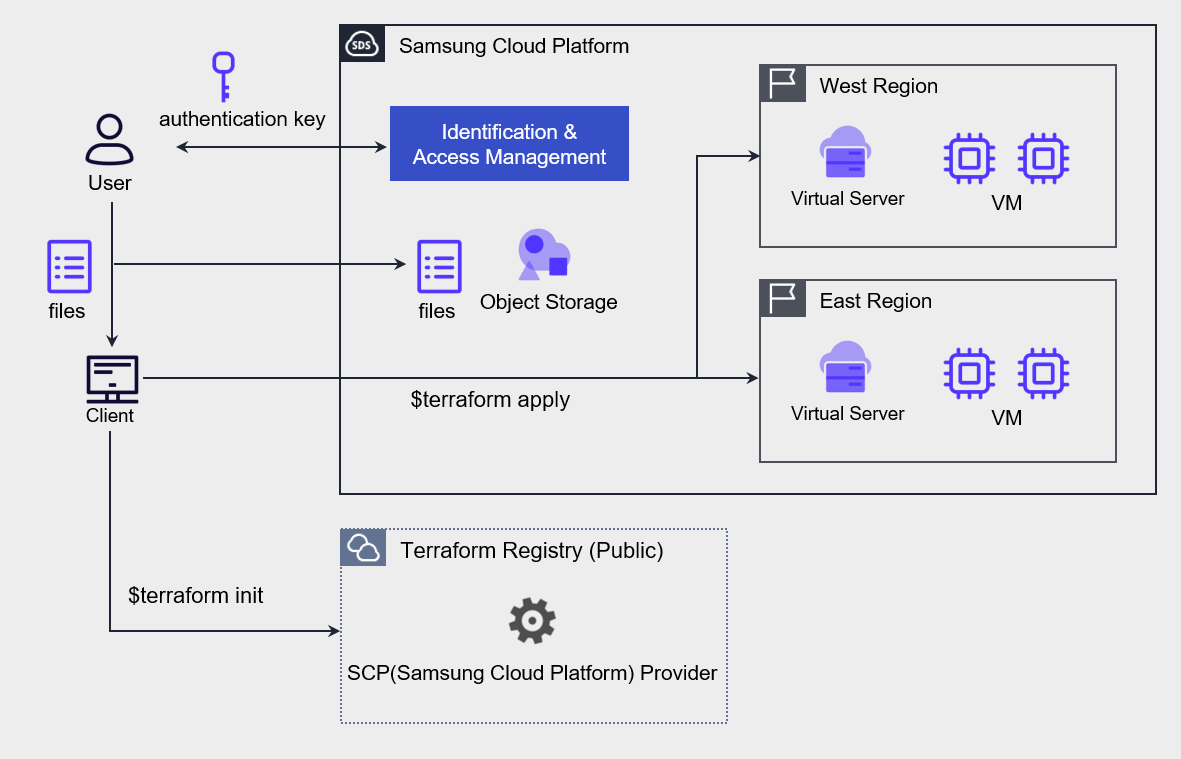
After generating an authentication key for Terraform tasks and completing the environment setup on Samsung Cloud Platform, write the resources and environment configuration as code, and deploy VMs to the kr-west1 and kr-east1 regions using Terraform commands.
Central Code Repository Implementation
The DevOps Service of Samsung Cloud Platform includes a tool that allows users to store source code and perform configuration management.
You can set up a private Git repository for each project and configure user-specific access permissions, enabling secure sharing of source code, collaborative development, and CI/CD environment setup.
The following diagram represents the application deployment automation architecture using DevOps Service.
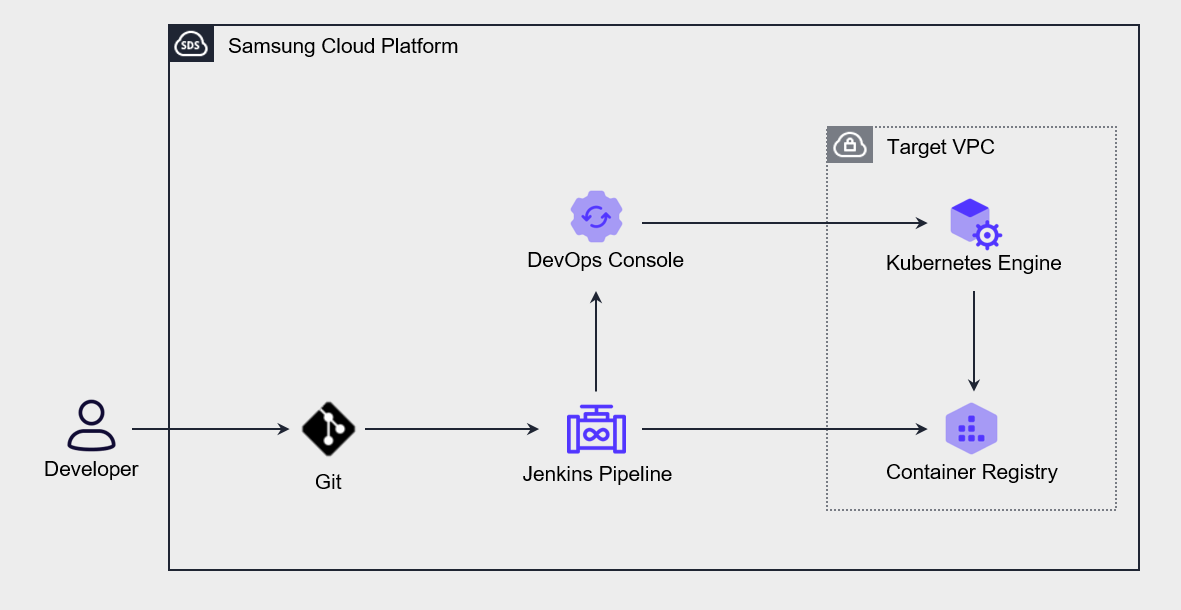
When a user pushes source code to Git, the Jenkins pipeline is triggered, and the built application or container object configuration declaration file is automatically deployed to the Kubernetes Engine.
If you store not only source code but also infrastructure configuration declaration files in a central repository and perform operational management, you can manage changes centrally, and the version control features also allow you to restore to a previous state when needed.
Use Continuous Integration and Deployment (CI/CD)
Through Continuous Integration (Continuous Integration, CI), developers frequently commit to the code repository and automatically perform builds and tests.
During this process, unit tests and integration tests are run automatically, and both automated and manual tests are performed before deployment to the production environment.
Deployment to Staging and production environments is allowed only if all tests pass.
Continuous Integration (CI) refers to the process that automates the build and unit test stages in the software development lifecycle, and every update committed to the code repository triggers automated builds and tests.
Continuous Deployment (Continuous Deployment, CD) extends the continuous integration process and includes procedures that automatically deploy builds that have passed testing to the production environment.
The following diagram shows the CI/CD process of the Samsung Cloud Platform.
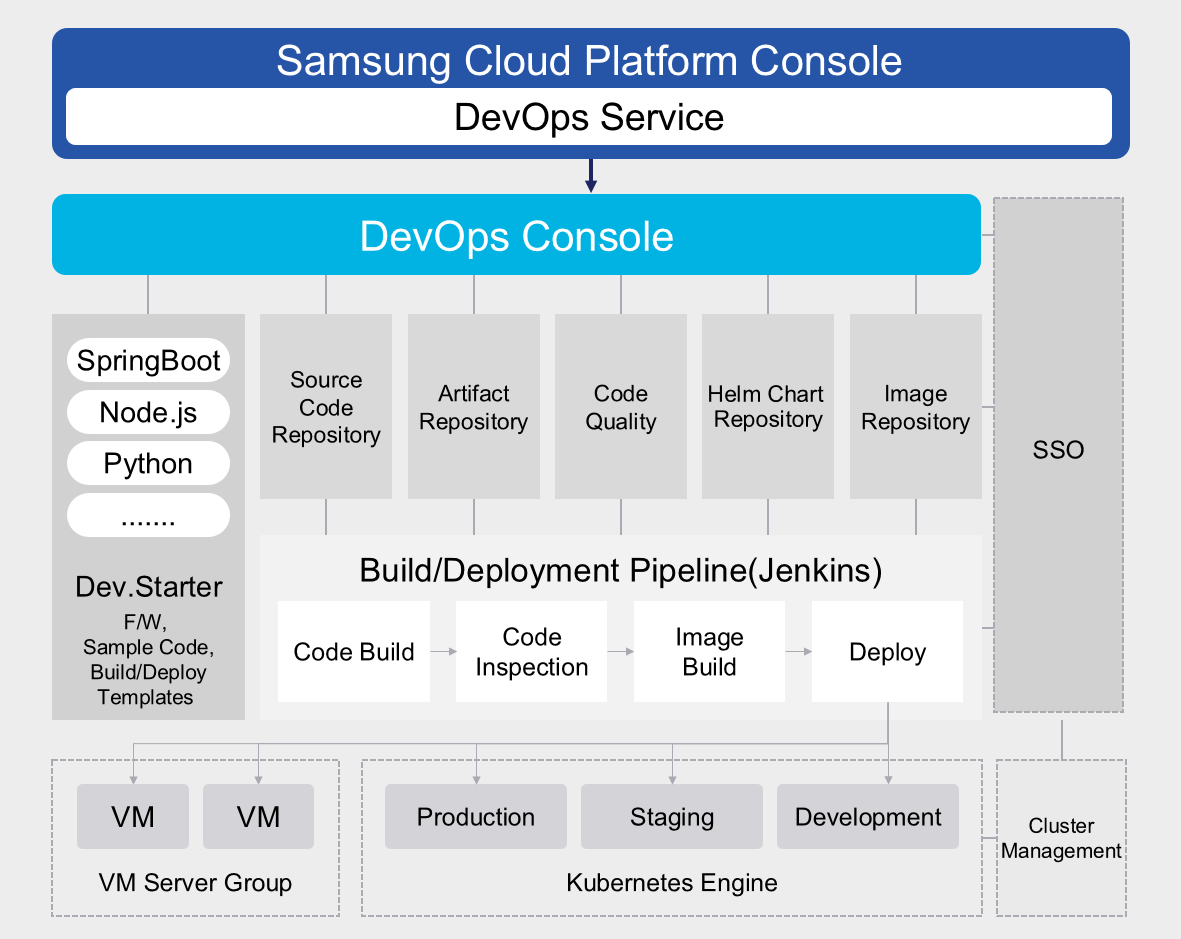
In real CI/CD, multiple people collaborate on code, and every developer must work based on the latest build.
To achieve this, we need to set up a central code repository to manage multiple versions of the code and enable developers to access and work on it collaboratively.
Developers check out the code from this repository, make changes or write new code in a local copy, test it, and then commit back to the repository.
Continuous integration (CI) automates most of the software release process, but the final deployment to the production environment is typically triggered manually by developers.
Continuous deployment (CD) is a concept that extends continuous integration (CI) by automatically deploying all code changes to a test or production environment after the build stage.
The diagram below illustrates the CI/CD architecture for development, testing, and production environments implemented on the Samsung Cloud Platform.
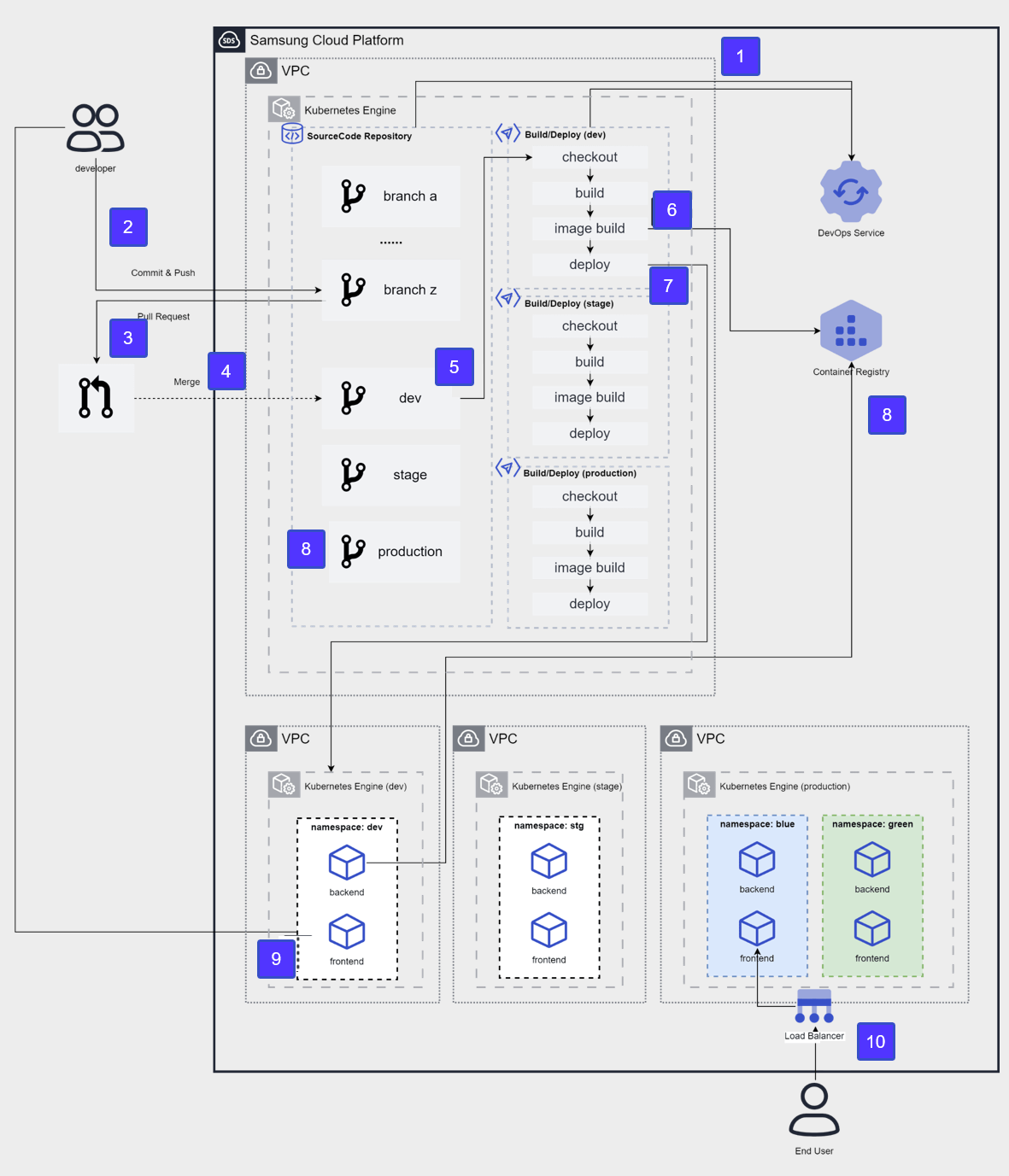
After applying for the DevOps Service, configure a source code repository and CI/CD tools in the user area and integrate them with the DevOps Console.
The developer pushes the development source code to the developer branch of the source code repository.
To deploy source code to the development environment, submit a pull request from the developer branch to the Dev branch.
Merge into the Dev branch after the review stage.
After merging the Dev branch, the CI/CD build pipeline runs, performing source code checkout → build → container image build.
The built container image is stored in the Container Registry.
A new version image will be deployed to the container of the target cluster (dev).
The developer accesses the frontend container to verify the deployment results.
After verifying Dev → Stage, merge into the Production branch for the operational release, and repeat steps 4 through 8 on the Production cluster.
We perform releases using the blue-green deployment method and provide services to the End User.
Cloud Deployment
Cloud deployment is a core process for applying system changes and is one of the main causes of failures.
Operational excellence is largely determined by how you design and execute these fault‑free deployments.
For this, systematic strategies and tools such as automation, monitoring, and rollback capabilities are essential.
By building continuous integration (CI) and continuous deployment (CD) pipelines, you can efficiently manage the process from development to deployment and apply changes quickly and safely.
This plays a crucial role in maintaining the system’s availability and reliability.
Blue‑green deployment and canary deployment are widely used as deployment strategies.
Blue‑green deployment runs the new version and the existing version simultaneously, and if a problem occurs, it can quickly switch back to the previous version, providing high reliability.
Canary deployment has the advantage of gradually applying a new version to a small group of users, allowing early detection and resolution of issues.
These strategies must be designed with the elasticity and scalability of cloud environments in mind.
In a cloud environment, you must ensure system stability through resource allocation, load balancing, and disaster recovery planning.
Additionally, you must establish a deployment process that meets security and compliance requirements to ensure data protection and regulatory compliance.
By comprehensively considering these factors and designing and executing cloud deployments, you can maximize operational efficiency and service quality.
Infrastructure and Application deployment strategy establishment
After configuring infrastructure and Application deployment automation, you need to review the deployment strategy.
The most commonly used deployment strategies are as follows.
| Deployment strategy | description |
|---|---|
| In-place deployment In-place deployment | Performing update on the current server |
| Rolling deployment Rolling deployment | Gradually deploy the new version to the existing server group. |
| Blue-green deployment Blue-green deployment | Gradually replace the existing server with a new server. |
| Red-black deployment Red-black deployment | Immediately switch from the existing server to the new server. |
| Immutable deployment Immutable deployment | Built a completely new server set |
In-place deployment
In-place deployment is a method of directly deploying a new Application version to the existing set of servers.
Because the update is performed in a single deployment operation, a certain amount of downtime may occur.
However, because little infrastructure change is needed and there is no need to modify existing DNS records, the deployment process itself proceeds relatively quickly.
If the deployment fails, redeployment is the only way to recover.
Rolling deployment
Rolling deployment is a method that divides a set of servers into multiple groups and updates them sequentially.
Since there is no need to update all servers simultaneously, the previous and new versions can coexist even during deployment.
As a result, it can minimize downtime and is regarded as a strategy advantageous for achieving zero downtime.
Even if the new version deployment fails, only some servers are affected, so it does not significantly impact the overall service.
However, the deployment time may be slightly longer than the in-place method.
Blue-Green Deployment
In a blue-green deployment strategy, ‘blue’ refers to the existing production environment that receives actual user traffic, and ‘green’ refers to the parallel environment where the new code version is applied.
When deploying, you switch user traffic from the blue environment to the green environment, and if a problem occurs in the green environment, you can roll back by returning the traffic to the blue environment.
DNS cutover and Auto-Scaling group policies are commonly used to shift traffic in blue‑green deployments.
By using the Auto-Scaling policy, you can gradually replace existing instances with VMs that host the new version of the Application as the Application scales.
This approach is especially suitable for minor releases and small code changes.
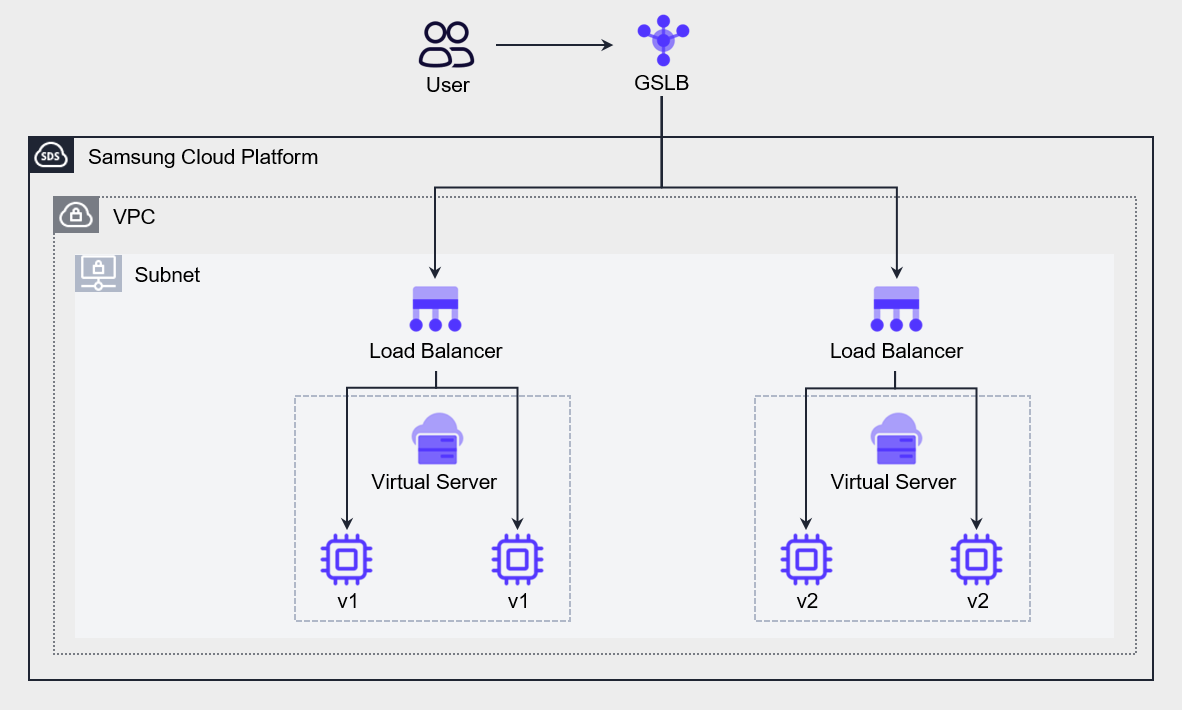
Another approach is to use GSLB policies to switch between different versions of the application.
The figure below shows an architecture that creates an environment hosting a new version of the Application and uses GSLB to shift some traffic to the new environment.
We configure GSLB policies using a Ratio algorithm and adjust weight ratios to gradually transition from a blue environment to a green environment.
Red-Black deployment
Red‑black deployment is similar to blue‑green deployment, but it differs in the DNS switching method.
Red‑Black deployment switches to the new version by changing DNS all at once, without a gradual rollout.
As a result, in blue‑green deployments the previous and new versions coexist for a period of time, whereas in red‑black deployments only a single version is active.
It is a strategy suitable for cases that require rapid switching.
Immutable Deployment
Immutable deployment is an appropriate strategy when there are unknown dependencies in the application or when the infrastructure is complex.
An application that was built a long time ago and has undergone repeated updates becomes increasingly difficult to upgrade over time.
In immutable deployment, the existing VM is terminated and a new VM is deployed while releasing a new version.
When designing infrastructure and Application deployment strategies, you must consider not only downtime but also cost.
Estimate the cost based on the number of VMs to replace and the deployment frequency, and, taking the budget and downtime into account, choose the most appropriate deployment approach.
For high-quality deployments, Application testing must be performed at every stage, and this requires considerable effort.
The CI/CD pipeline discussed earlier can help automate the testing process and improve the quality and frequency of feature releases.
Use version control
Automating infrastructure and application deployment increases deployment speed and frequency.
While this is a desirable development in terms of business agility, it requires the operations team to perform more meticulous work in managing deployments.
Issues such as failures or losses, or the need to track the history of past releases, may arise, and it is important to establish a management system for this.
Version control helps reduce the risk of loss by allowing recovery to a normal state or previous data.
In Samsung Cloud Platform, version control can be configured at the following three levels.
Data version management based on Object Storage
In Samsung Cloud Platform’s Object Storage, you can enable versioning for object storage.
You can restore the object to its previous state even when it is overwritten or deleted.
Object Storage versioning is similar to backup or synchronization in that it preserves data, but it differs in the way it retains existing data.
Backup preserves data at a specific point in time, while synchronization reflects all data changes to the replica but does not retain the existing data.
Object Storage versioning stores a new version whenever an object is changed by receiving POST, PUT, or DELETE HTTP methods, while preserving the existing version.
Source code version control based on Git
You can perform source code configuration management using the Git tool.
You can manage the version of development code using all types of Git commands and features, such as saving source code, commit history, changes, checking history, and change notifications.
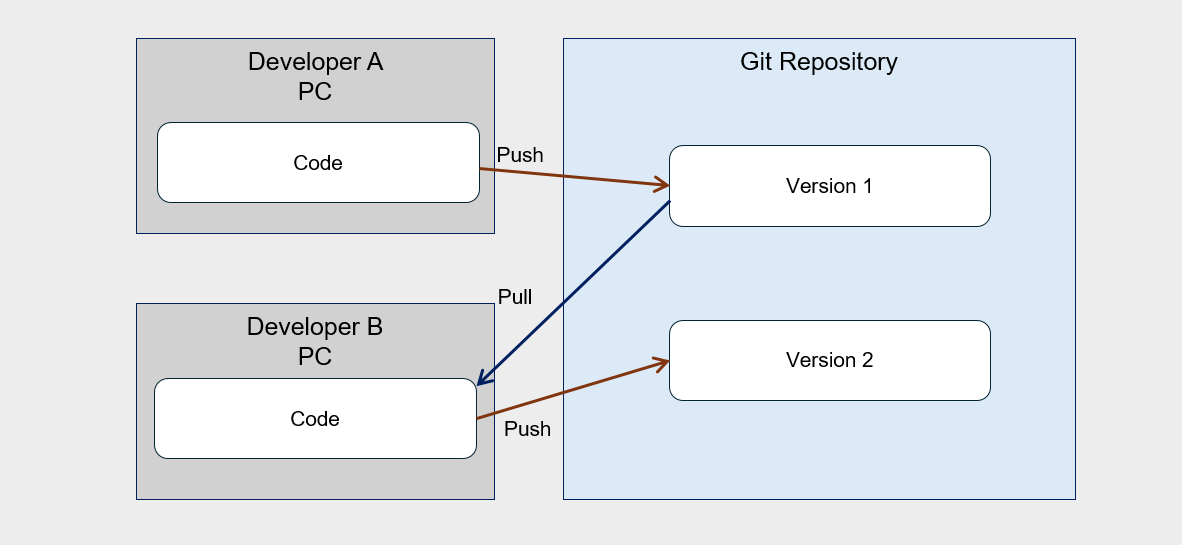
Developers fetch source code from the Git tool, work on it on their local PC, and when the work is complete, they commit to the repository.
When multiple developers collaborate, changes can be tracked through version control as shown in the following diagram.
Server Image Version Management
By managing the images of a Virtual Server, you can systematically manage server versions.
You can use this image to deploy a new Virtual Server at a specific point in time, and you can also register it in a Launch Configuration to use it as an Auto-Scaling server.
Container images used by Kubernetes Engine are stored in Container Registry, and these images are used when deploying pods internally.
When an update occurs in the Application, you can register it as a new version and use it for deployment.
You can also store and manage previous versions in the Registry, and, if necessary, view and restore images from earlier versions.
Test and rollback automation
Operational optimization is a core process that must be performed continuously.
Continuous effort is required to verify and improve changes, and achieving operational excellence in this regard is not a short‑term goal but a continuous journey.
Changes are inevitable when maintaining workloads, and system changes occur for various reasons such as applying security patches, upgrading software, and reflecting compliance requirements.
You must design workloads so that all system components can be updated regularly, enabling you to stay current and incorporate critical updates.
To avoid major impact, you need to automate the process so that small changes can be applied.
All changes must be reversible, allowing the system to be restored even if problems arise.
Applying such small-scale changes makes testing easier and helps improve overall system stability.
Additionally, we must automate change management to reduce human errors and achieve operational excellence.
The following diagram is an example of an environment configuration for testing a new version of the application, illustrating a case where an A/B test provides two or more feature versions to different user groups.
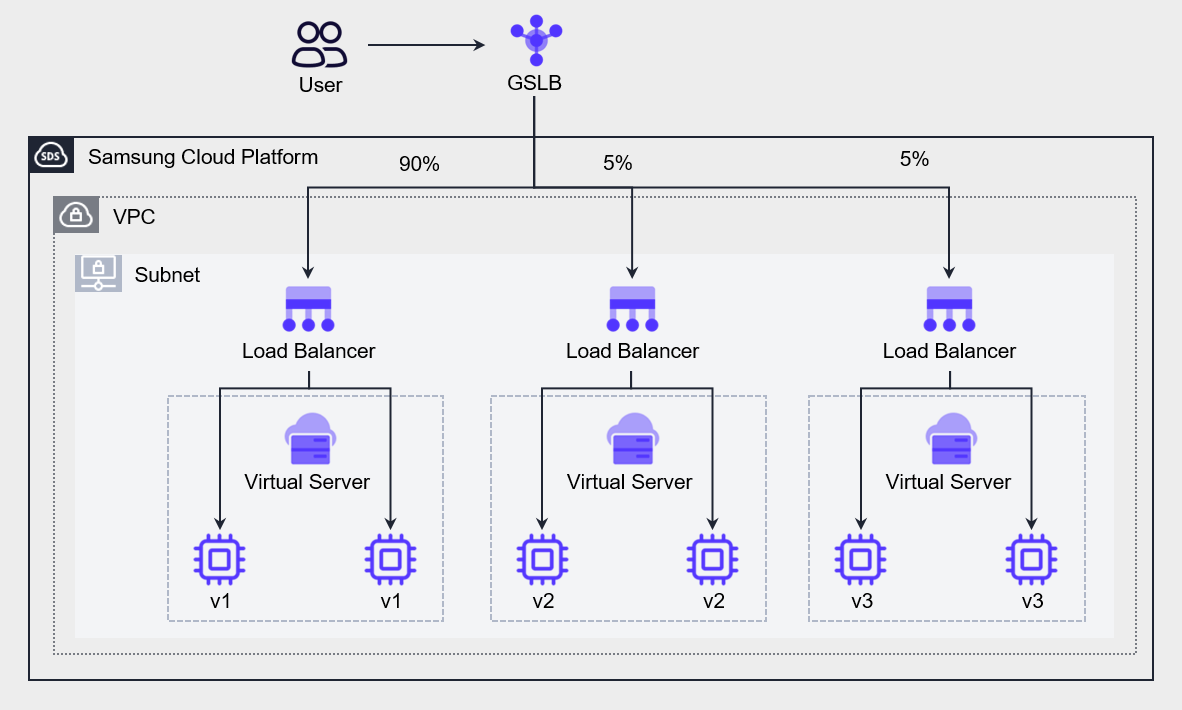
You can configure the GSLB with a Ratio algorithm to send 90% of all requests to the existing application (v1) and distribute 5% each to the newly developed v2 and v3 for user testing.
Through this, you can verify the stability of the application and server infrastructure.
You can use the same method even during full-scale deployment.
By choosing a blue‑green deployment strategy, you can send a portion of user requests to the green environment to test the impact; this is called Canary analysis.
If there is a problem with the new version (v2), you can immediately notify users and switch traffic back to the existing version (v1) before it severely impacts them.
Test the green environment to determine whether it can handle load while gradually increasing traffic.
By monitoring the green environment, detecting issues, and providing an opportunity to reroute traffic, it limits the blast radius.
If all metrics are normal, terminate the blue environment (v1) and release the resources.
Blue‑green deployment sets downtime to zero, provides easy rollback, and allows users to specify deployment time as needed.
Cloud monitoring and log analysis
Cloud monitoring and log analysis are essential tools for understanding system status and troubleshooting issues.
Traditional monitoring simply tells you what is broken (e.g., CPU 100% usage), whereas modern cloud observability provides deep data that enables debugging the root cause of failures.
Through this, you can understand the system’s complexity, identify the root cause, and respond quickly and accurately.
Monitoring and log analysis contribute to enhancing the efficiency, reliability, and security of cloud operations.
By analyzing resource usage patterns, you can optimize costs, eliminate performance bottlenecks, and identify security threats early.
Additionally, by leveraging automation tools and AI to perform real-time log collection and analysis, you can achieve operational optimization more quickly and accurately.
This approach effectively manages the dynamic and complex characteristics of cloud environments, supporting business continuity and innovation.
Monitoring and Alert Configuration
Operational excellence is determined by the ability to respond swiftly and recover from failures through monitoring.
To do this, it is important to understand the workload’s operational state by identifying the impact of events and their corresponding responses on the workload, and to assess the system’s operational state using event metrics and dashboards.
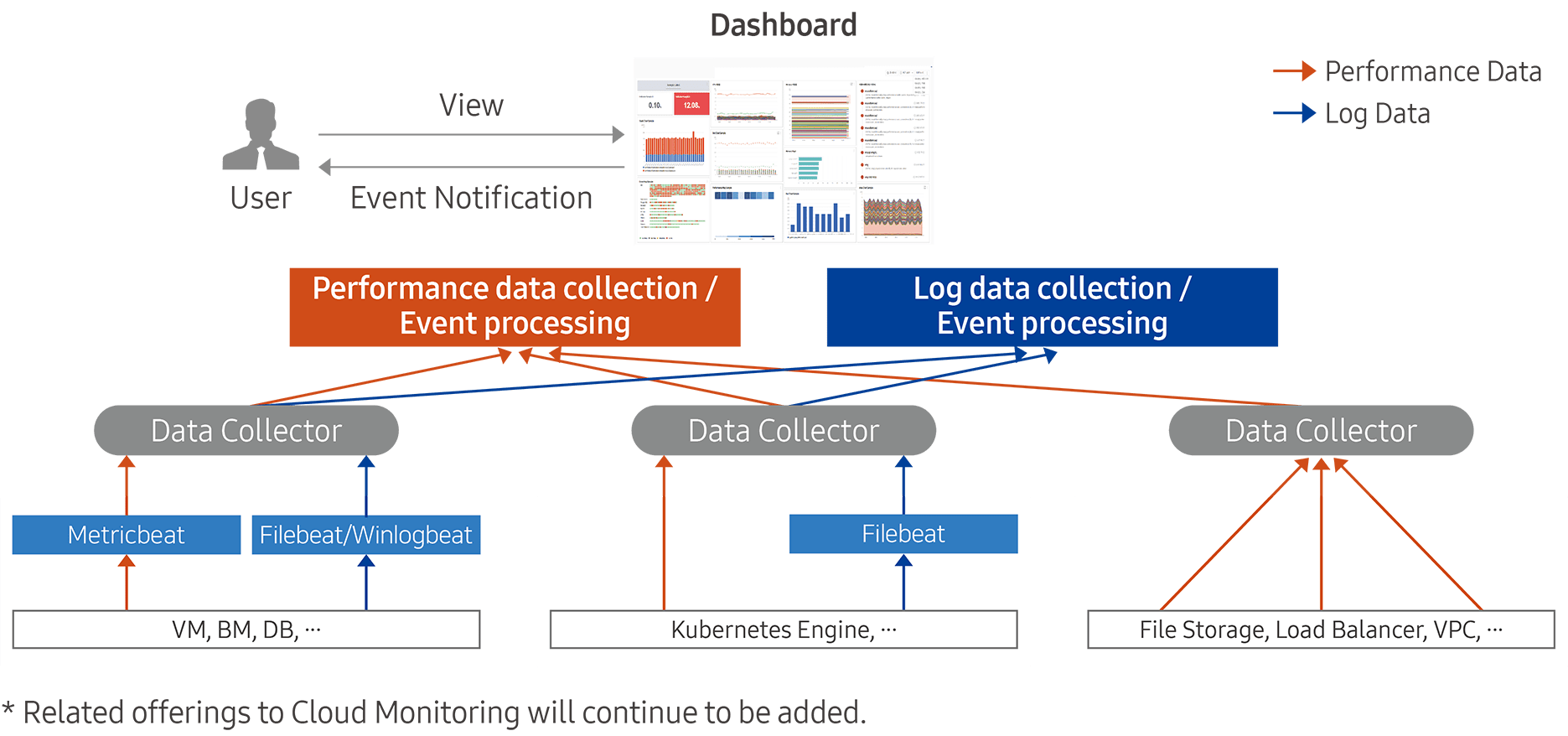
The Cloud Monitoring service of Samsung Cloud Platform collects usage status, change information, logs, and other data from operational infrastructure resources, and generates events to notify when configured thresholds are exceeded.
Through these features, users can respond quickly to performance degradation or failure situations, and can predict when resource capacity expansion is needed to maintain a stable computing environment.
The instrumentation capabilities provided by Cloud Monitoring are broadly divided into two categories: performance data collection and event processing, and log data collection and event processing.
Tracking system status is an essential element for understanding workload behavior.
The operations team uses system status monitoring to detect component anomalies and takes appropriate actions accordingly.
Generally, monitoring is often thought to be limited to the infrastructure layer, such as tracking server CPU and memory usage, but in reality, monitoring must be applied to every layer of the architecture, including the application, network, and database.
The following table lists services that can be configured for monitoring by connecting to Cloud Monitoring.
| Category | service group | service |
|---|---|---|
| Performance monitoring | Compute | Virtual Server, GPU Server, Bare Metal Server, Multi-node GPU Cluster |
| Performance Monitoring | Storage | Block Storage(VM), Block Storage(BM), File Storage, Object Storage |
| Performance Monitoring | Database | EPAS, PostgreSQL, MariaDB, MySQL, MS SQL, CacheStore |
| Performance Monitoring | Container | Kubernetes Engine, Container Registry |
| Performance Monitoring | Networking | VPC, Load Balancer, VPN, Global CDN, Direct Connect, Cloud WAN |
| Performance Monitoring | Data Analytics | Search Engine, Event Streams, Vertica |
| Log monitoring | Compute | Virtual Server, GPU Server, Bare Metal Server, Multi-node GPU Cluster |
| Log monitoring | Database | EPAS, PostgreSQL, MariaDB, MySQL, MS SQL, CacheStore |
| Log monitoring | Container | Kubernetes Engine |
| Log monitoring | Data Analytics | Search Engine, Event Streams, Vertica |
To configure alerts in Cloud Monitoring of Samsung Cloud Platform, you must define events.
An event is a configuration that notifies the user when a performance metric of the monitored target reaches a predefined threshold.
When configuring an event, specify the monitoring target, performance metric, measurement type/unit, severity, and threshold.
You can also designate the recipients of the notification and send it.
Log recording and collection
Log collection and analysis are performed to enable post‑incident response when issues arise.
This is because an approach that analyzes the cause of the problem provides the quickest clue for solving it.
If you can correctly identify the problem, you can find and apply an efficient solution.
Samsung Cloud Platform provides 1 GB of storage for log collection, and if this limit is exceeded, older logs are automatically deleted.
To set up log collection in Cloud Monitoring, the log agent must be installed on the collection target.
Network Logging collects logs from the firewall, security group, and NAT, stores them in object storage, and enables analysis of traffic moving between the inside and outside of the VPC.
If Cloud Monitoring and Network Logging record system-related activities, Logging & Audit records cloud and user activities.
For example, if a user logs into the Console and creates a Virtual Server, these activities are recorded in Logging&Audit.
If you configure a Trail, you can retain these logs long‑term without any time constraints.
Collecting data from diverse resources to make decisions and predict potential problems is not a mandatory condition for operations, but it contributes decisively to enhancing operational quality.
This helps anticipate potential future failures in advance and prepares the team to respond appropriately.
Implement a mechanism that collects logs of various activities across job events and workloads, as well as infrastructure changes, to create detailed activity tracing and retain activity records for audit purposes.
In large organizations, a massive amount of log data is generated across many systems, and to derive insights from this data, a mechanism for collecting and storing log and event data over a certain period is required.
Log Analysis and Improvement Activities
By analyzing the monitoring logs built using the tools and solutions of Samsung Cloud Platform, improvements can be pursued.
Through regular log analysis, you can improve the efficiency of cloud operations, optimize costs, and strengthen security.
In cloud environments, various resources are dynamically created and deleted, generating large volumes of log data. By effectively analyzing this log data, you can identify potential issues early and derive improvements that optimize operations.
First, by analyzing cloud logs to identify resource usage patterns, you can optimize costs.
For example, if data shows that unused resources remain active or costs surge due to unexpected traffic spikes, you can reset the Auto-Scaling policy or reduce costs through committed pricing based on that data.
Next, it can also be used to improve performance.
Log analysis in cloud environments plays a crucial role in monitoring and optimizing system performance.
By analyzing log data, you can identify the application’s response time, database query speed, network bandwidth usage, and similar metrics, and use this information to locate sections where performance degradation occurs, eliminate bottlenecks, or optimize resource allocation, thereby improving the overall system performance.
Log analysis is also essential for identifying and responding to security threats.
Trail logs contain user access and activity records, and VPC log analysis can detect abnormal network activity.
Continuously analyzing log data enables rapid detection of abnormal login attempts, data exfiltration attempts, and malicious activity, allowing early identification of anomalies and the implementation of appropriate response measures to minimize security threats.
Short-term log analysis can be performed with existing tools, but to gain better insights, you can use specialized log analysis tools or artificial intelligence.
By performing log analysis using automation tools and artificial intelligence (AI), you can achieve operational optimization more quickly and accurately.
By leveraging these log analysis tools, you can collect and analyze logs in real time, and provide immediate alerts when issues occur or automatically perform remediation.
Event Response
Event Grade Definition
The impact on tasks is evaluated through task structuring, identification of key tasks, and analysis of task interrelationships (see 안정성 설계 원칙 for details), and based on this, the importance of events can be defined for the identified major systems.
In Cloud Monitoring, you can set up events and classify them by severity.
Severity can be set to Fatal (the highest level), Warning (the intermediate level), or Information (the lowest level), and you can visualize event occurrence frequency according to each severity.
By configuring events, you can ensure you capture all essential monitoring information without missing anything.
For example, if you configure an event to trigger whenever a performance metric related to overload exceeds a certain threshold, a notification will be sent to the user each time there is a risk of overload during resource operation.
Operators can proactively respond before issues arise based on this.
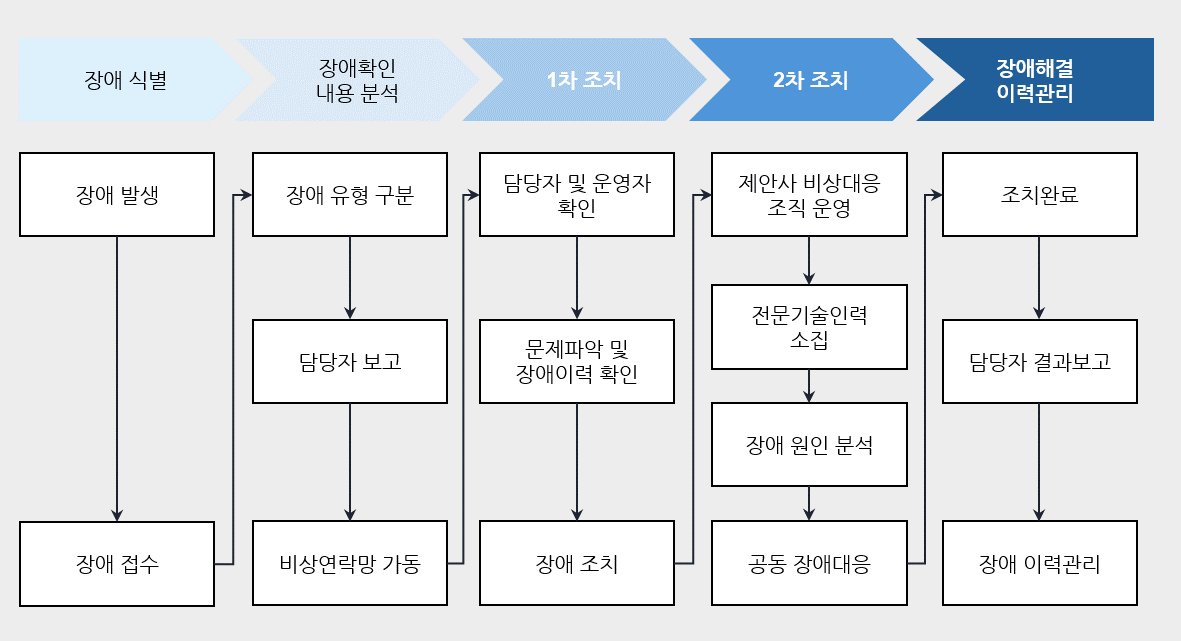
Event Management Process
If a failure occurs, or even if it does not result in an actual outage, a corresponding urgent (Fatal) event must be dealt with promptly.
To achieve this, the event management process must be defined in advance, enabling rapid identification of issues and appropriate response actions.
The following figure is an example of the fault management process described in the reliability design principles.
Event response automation
To enable rapid event response, perform response actions based on predefined processes, and by configuring event response automation, you can reduce the time required from fault identification to response.
For example, assuming that a DDoS attack on the server has been initiated by an external attacker as shown in the figure below, the goal of a DDoS attack is to generate excessive traffic on the server, causing a denial of service that prevents legitimate users from accessing the service.
In such cases, the most desirable approach is to configure DDoS Protection to detect and defend against attacks.
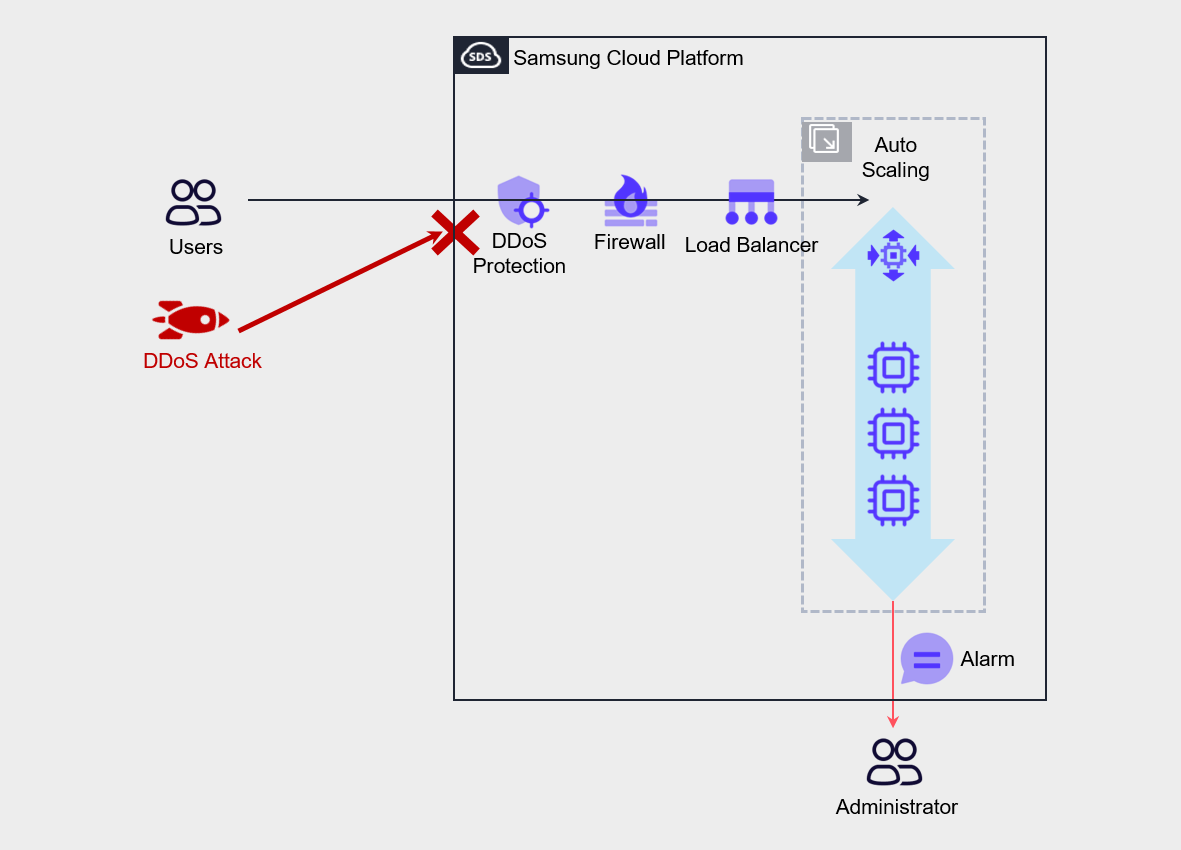
The architectural approach to counter these attacks is to configure Auto-Scaling on the Virtual Server and create a policy that increases the number of servers based on load.
Through this, we implement automated measures to prevent the complete blocking of legitimate users’ service usage.
Also, configure threshold settings and alerts for metrics such as Network In or CPU usage in Cloud Monitoring so that notifications are sent to administrators.
While the administrator receives notification of the attack and takes action, the automated measures of Auto-Scaling ensure service continuity, and the administrator can quickly identify the attacker’s IP and protect the service by configuring a deny policy for that IP address in the firewall.