Resource Selection and architecture Design
Resource selection criteria
Resource selection based on billing model
When designing an architecture, the service’s billing model is an important consideration, and the billing model can vary depending on how cloud resources are deployed.
Provisioning is a method of deploying resources by specifying particular specifications or services.
In this case, charges are incurred according to the billing cycle (hourly, daily, monthly) even if no actual resources are used.
In contrast, the Pay-as-you-go model does not incur any cost until resources are actually used, and billing is based on the amount of usage, the number of calls, and similar factors.
There are services that bill by mixing the provisioning model with the pay-as-you-go model.
| service | Deployment method | Billing model |
|---|---|---|
| Virtual Server, GPU Server, Bare Metal Server, Multi-node GPU Cluster, Virtual Server DR | Provisioning | Per Hour |
| Cloud Functions (computing time seconds‑GB calculated together) | Pay-as-you-go | Per Call |
| Block Storage | Provisioning | Per Hour |
| Object Storage, File Storage, Archive Storage, Backup | Pay-as-you-go | Per Usage(GB) |
| DBaaS | Provisioning | Per Hour |
| Kubernetes Engine | Provisioning | Per Hour |
| Container Registry | Pay-as-you-go | Per Usage(GB) |
| Public IP, NAT Gateway, VPC Endpoint, Direct Connect, SASE, Load Balancer, GSLB, Transit Gateway (calculated together with the per-GB transfer fee) | Provisioning | Per Hour |
| DNS | Provisioning | Per Day |
| VPN (calculated together with Internet Outbound charges) | Provisioning | Per Month |
| Internet Outbound Traffic, VPC Peering, Global CDN | Pay-as-you-go | Per Usage(GB) |
| DDoS Protection, IPS, Secured Firewall | Provisioning | Per Hour |
| WAF, Config Inspection | Provisioning | Per Month |
| Secured VPN | Provisioning | Per Year |
| SingleID | Provisioning | Per User |
| Secret Vault, Key Management Service (key count + per-call calculation) | Pay-as-you-go | Per Call |
| Event Streams, Search Engine, Vertica(DBaaS), Data Ops, Data Flow | Provisioning | Per Hour |
| Data Query | Pay-as-you-go | Per Usage(GB) |
| API Gateway | Pay-as-you-go | Per Call |
| AI/MLOps Platform, Cloud ML | Provisioning | Per Hour |
| DevOps Service (Workflow is calculated per occurrence) | Pay-as-you-go | Per User |
| Trail | Pay-as-you-go | Per Event |
| Edge Server | Provisioning | Per 3/5years |
The two architectures shown in the figure below are examples of implementing a mobile application that provides an image service using a provisioning model and a pay-as-you-go model.
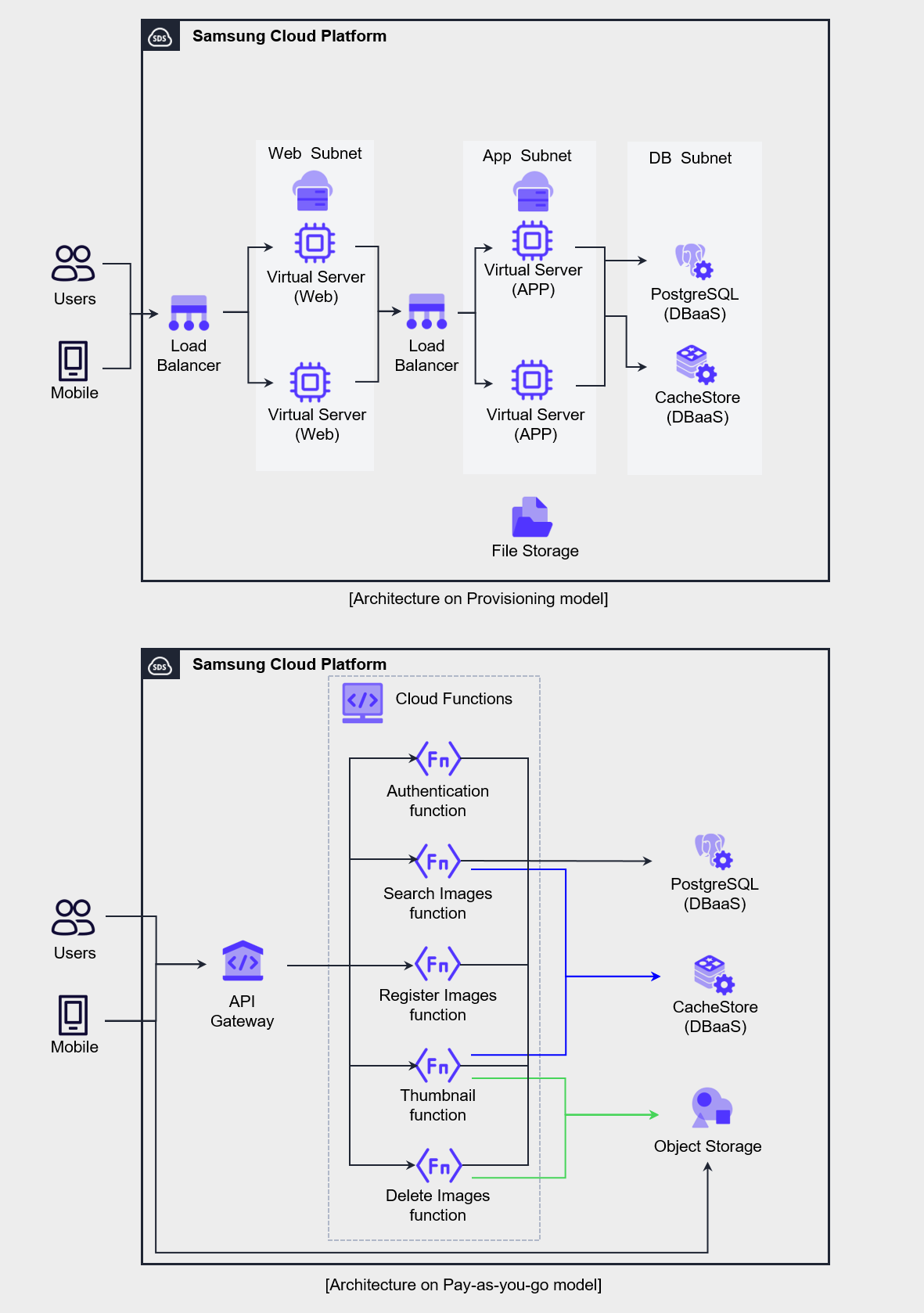
The three-tier web application approach based on the provisioning model on the left is a traditional architecture familiar to developers and operators, and it is the configuration typically chosen when migrating an existing application or developing a new one.
Since this architecture incurs a fixed monthly cost regardless of usage, applying it to workloads with low load variability can improve cost efficiency.
The architecture on the right is primarily composed of Serverless Computing services that are billed per request, in contrast to the left’s Virtual Server‑centric configuration.
Serverless Computing architecture requires an understanding of API routing in API Gateway, function processing in Cloud Functions, and the operation of REST APIs in Object Storage, and involves technical challenges.
However, because billing is per call or per volume, costs are charged only when actual usage occurs.
Therefore, in environments where request load periodically increases or load prediction is difficult, applying this architecture allows you to handle the load cost‑effectively.
When selecting resources like this, you must consider both the use case and the organization’s technical capabilities.
Since cloud resources provide various billing models depending on service characteristics, you should design the architecture to appropriately leverage them and optimize costs.
Select resource type, size, quantity
In on-premises environments, hardware sizing must be determined after carefully forecasting future demand during the early stages of system construction, and because changes are difficult once a purchase is completed, the initial design is extremely important.
In contrast, in a cloud environment, resources can be scaled up or down at any time, allowing you to start with minimal initial capital investment.
To leverage these cloud characteristics for greater cost efficiency, it is advantageous to choose technologies with high resource efficiency and agility, such as resources or containers billed per request.
However, adopting Serverless Computing or container technologies requires that the organization’s internal technical capabilities be supported, so the associated costs and risks must also be considered.
When selecting a server type, it is preferable to start on a small scale rather than beginning with a large scale, and then gradually increase specifications or expand the number of deployments.
In a cloud environment, you can change the server type at any time, so it is common to initially deploy a small-capacity server and go through a step of adjusting specifications to ensure the software and code operate reliably.
After optimizing the capacity of the individual server, we perform the task of scaling the number of servers through load testing.
From the perspective of management and application integration, deploying multiple software on one or two servers may be convenient, but in a cloud environment, using many small-capacity servers is more advantageous in terms of cost and scalability.
For example, using three small servers instead of two large servers provides higher availability and resource utilization, and can support rapid scaling.
Select a pricing model
Pricing Plan Selection
In Samsung Cloud Platform, you can select and apply plans such as a committed pricing plan, Cost Savings, and Planned Compute.
The table below describes the plans and the services that correspond to each plan.
| Pricing plan | Explanation | Applied Service |
|---|---|---|
| Cost Savings | Discount on fees conditional on committing to an hourly usage amount for 1 year or 3 years | Virtual Server, GPU Server, Bare Metal Server, Multi-node GPU Cluster, Database, Event Streams, Search Engine, Vertica(DBaaS) |
| Planned Compute | Discounted rates for committing to a 1‑year or 3‑year instance type usage. | Virtual Server, GPU Server, Bare Metal Server, Multi-node GPU Cluster, Database, Event Streams, Search Engine, Vertica(DBaaS) |
The pricing plans for applying discounts consist of Cost Savings and Planned Compute.
When you contract Cost Savings and Planned Compute, discounts are applied to the applicable services, and you can receive discounts by selecting a 1‑year or 3‑year term.
In particular, Planned Compute contracts are made based on the instance type, and discounts can be applied to the corresponding non‑committed instances.
To view rates with no‑contract, 1‑year or 3‑year discounts for each service, you can use the rate calculator.
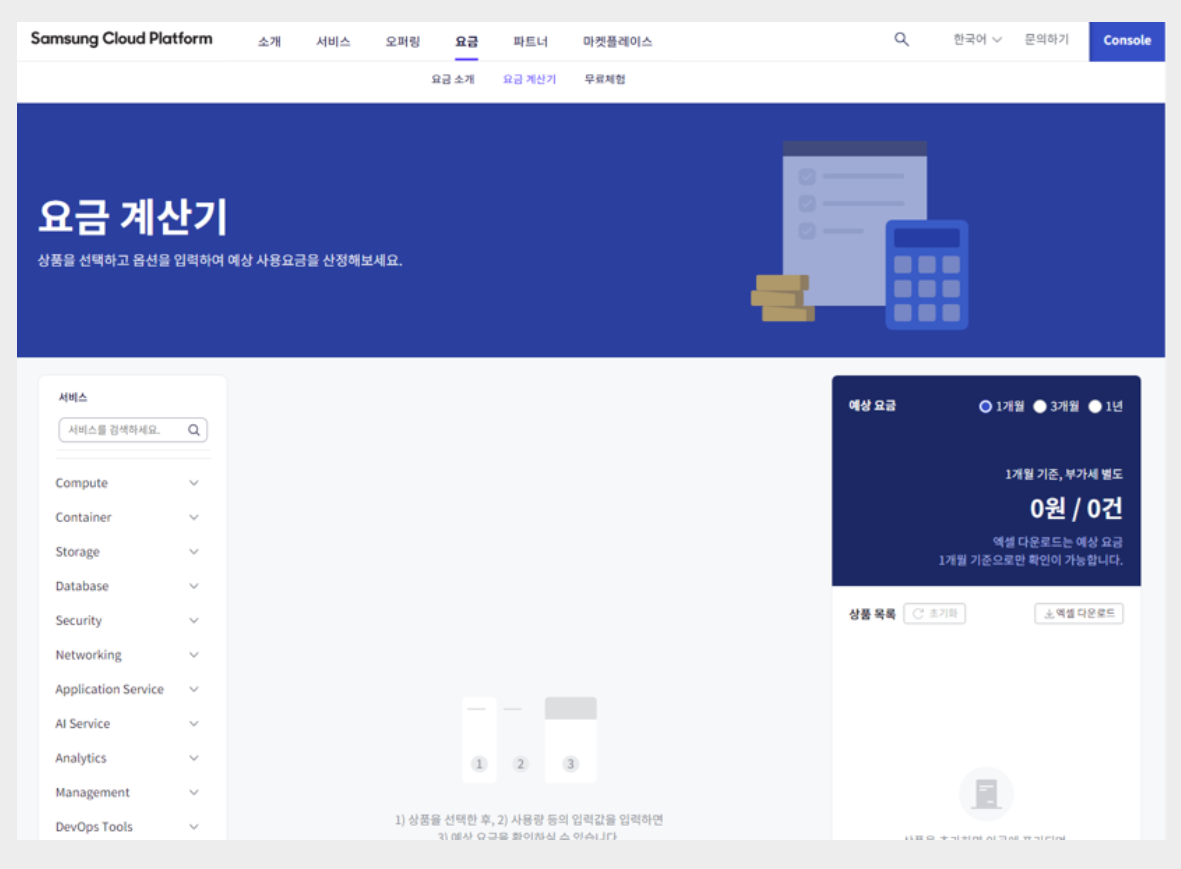
If the average monthly usage over the past year is as shown below, and we assume the usage for the next year will be the same, we can design the pricing plan as shown in the table below.
| Service (server type) | quantity | Operation pattern | Apply pricing plan |
|---|---|---|---|
| Virtual Server (s2v2m16) | 2 | Continuous operation (730 hours) | 1-year contract |
| Virtual Server (s2v2m4) | 2 | Irregular (54 hours) | Cost Savings |
| Virtual Server (s2v4m32) | 3 | Irregular (365 hours) | Cost Savings |
| GPU Server (g2v48h4) | 1 ~ 4 | Regular variation (1,460 hours) | Planned Compute |
| Virtual Server Auto-Scaling (s2v2m4) | Min(2) | Regular operation (586 hours) | Cost Savings |
| Virtual Server Auto-Scaling (s2v2m4) | Max(8) | Periodic load (144 hours) | No contract |
| MySQL(DBaaS) (db2v4m32) | HA(2) | Continuous operation (730 hours) Vertical scalability possible | Cost Savings |
| MySQL(DBaaS) (db2v4m32) | Replica(1) | Continuous operation (730 hours) Scale replicas as needed | Cost Savings |
The always-on Virtual Server listed in the table has been discounted through a contract pricing plan.
GPU Server(g2v48h4) is used from a minimum of 1 unit to a maximum of 4 units, and the total monthly usage time is 1,460 hours.
In such cases, you can apply a discount to the server type through a Planned Compute commitment.
For Virtual Servers that run irregularly, Auto-Scaling VMs that handle regular loads, and databases with vertical scaling potential, apply the Cost Savings pricing plan to all.
When applying Cost Savings, the point to note is that the contract amount should be determined conservatively.
If you set the amount excessively, you may end up paying for something you didn’t use, so it is advisable to start conservatively and then optimize gradually.
Software License
As mentioned earlier, the strategy of handling workloads with multiple small servers rather than a few large servers is also cost-effective from a software licensing perspective.
The application server typically has high software usage, and in on-premises environments, it was common to simplify integration by installing multiple software packages on large servers to reduce hardware costs.
However, in a cloud environment, this approach can be inefficient.
If you separate and install the software on a small server, lower server specifications won’t be an issue, and you can also reduce software license purchase costs.
Additionally, an additional factor to consider in software licensing is BYOL (Bring Your Own License).
Samsung Cloud Platform supports BYOL software in services such as Database and Analytics, and you must review the server deployment plan after confirming the licensing conditions of the software to be deployed to avoid unexpected budget overruns in the future.
Additionally, reviewing the license and technical support packs for 3rd‑party software available for purchase in the marketplace is a good way to improve cost efficiency not only in terms of license fees but also in terms of technology implementation.
Architecture selection
Demand-based elastic resource composition architecture design
Samsung Cloud Platform can configure Auto-Scaling to elastically adjust servers.
Through Auto-Scaling, you can build a demand-based cost model that allows resources to be used according to demand.
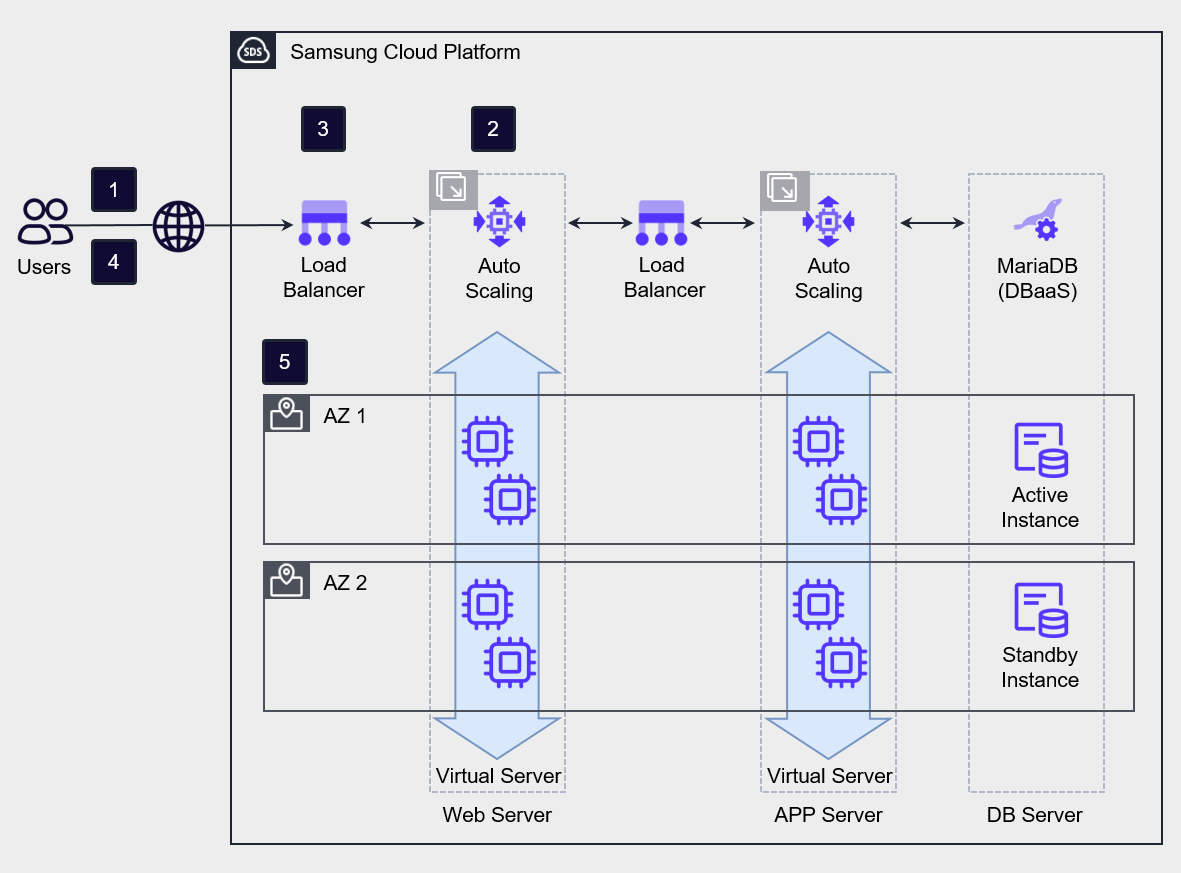
Auto-Scaling provides threshold-based and schedule-based horizontal scaling and shrinking policies.
Threshold-based scaling policies adjust the number of servers by setting thresholds based on the minimum, maximum, and average values of metrics such as CPU usage, memory usage, and network in/out.
When setting policies, it is common to start scaling up quickly to proactively address load, and to delay scaling down to prepare for a potential load increase.
Serverless Computing handling temporary load through architecture
Auto-Scaling is a suitable computing architecture when the rate of load increase is slower than the VM creation rate.
If the load increase rate is faster than the VM creation speed, you should consider alternatives other than Auto-Scaling-based VMs.
In this case, the primary alternative to consider is the managed service Serverless Computing architecture.
When it is difficult to predict the rate or scale of load increase, using managed services to reduce the burden of operating highly available infrastructure is effective.
Resources provided by the cloud cannot handle unlimited load, but they can serve as an alternative for ensuring stable availability against unpredictable demand.
The figure below shows an architecture that adds a Serverless Computing component to Auto-Scaling to handle temporary load.
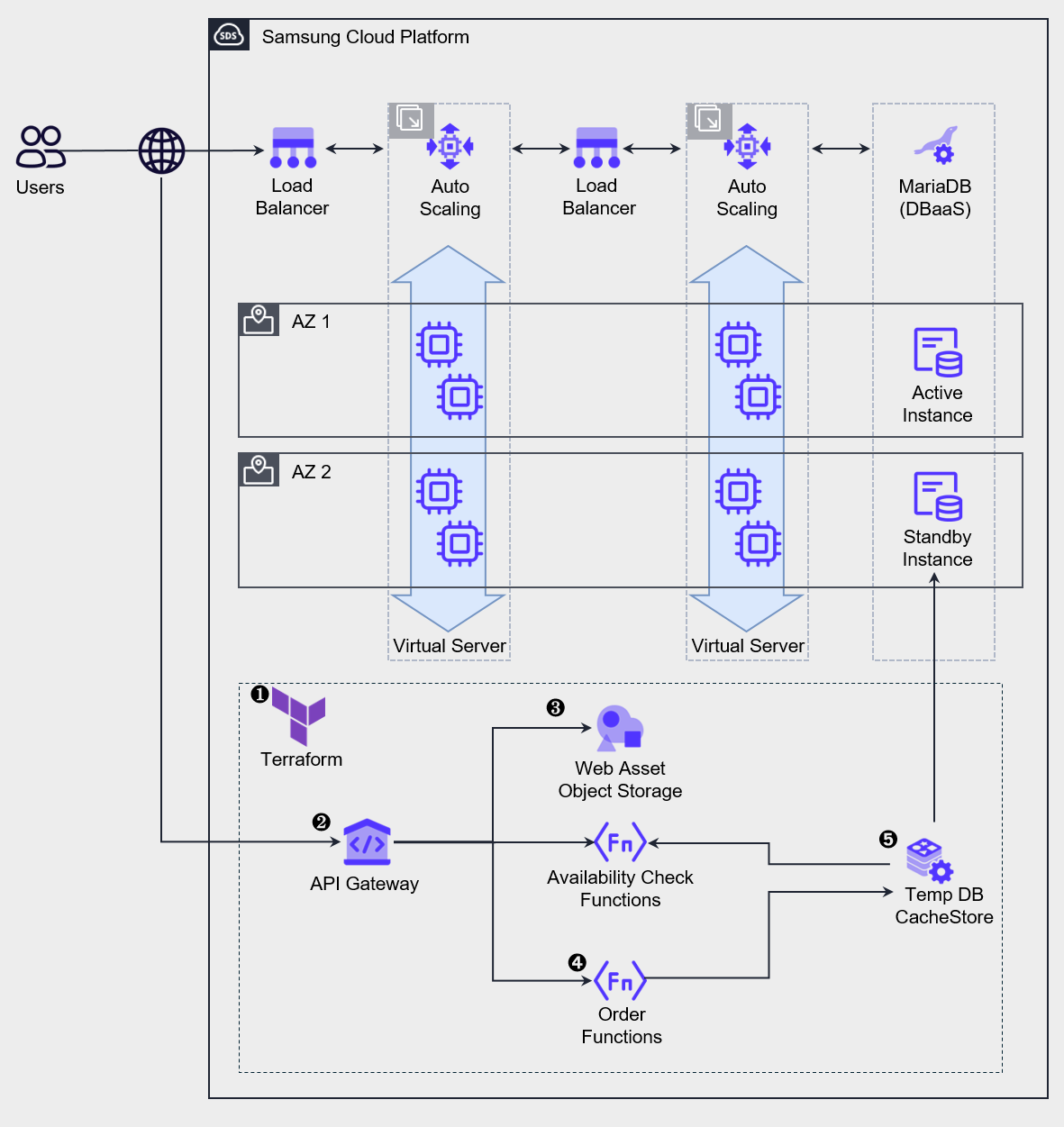
During normal operation, the load is handled by the top Auto-Scaling, and sudden load spikes are managed by activating the bottom temporary service.
This architecture is used in situations where, like limited-product promotions on online shopping malls or ticket reservations for popular performances, the load spikes instantly at the start of an event and then decreases once inventory or seats are sold out.
We deploy or run services using IaC tools such as Terraform or the CLI. Some services use a request-based billing model, so they can be pre‑deployed, but services that require provisioning, such as CacheStore (DBaaS), need to be newly deployed in advance and kept in a stopped state for preparation. One thing to note when deploying a service for a temporary workload is that a certain amount of lead time is needed before the load starts. Services such as Cloud Functions require a pre-warming period called a Cold Start to handle requests. When deploying the service, you should take this uptime into account and ensure that preparation is completed before the request start time.
Requests are distributed through the API Gateway.
Web requests are served using web assets stored in an Object Storage bucket.
Inventory checks and order processing are performed via Cloud Functions.
To enable fast queries and order storage, we use CacheStore(DBaaS) as a temporary data store, and after all processing is complete, we batch the data into the primary Database.
After all processing is complete, delete or shut down resources to minimize costs.
Minimizing Data Transfer Cost Network Design
During the early stages of cloud design and deployment, you must pay attention to compute resources.
This is because compute resources account for the largest share of actual cloud costs, and improper design can lead to excessive expenses.
After operations start, unforeseen expenses can occur, with Internet Outbound Traffic costs being a prime example.
Data can be requested from a server inside the VPC over the Internet, and a server within the VPC can also transmit and receive data to and from the Internet.
At this point, you should note that charges apply to data transmitted outside the VPC.
When designing network architecture, especially a multi‑VPC architecture, you must take care to minimize traffic that traverses the Internet.
When connections between servers in multiple VPCs are required, avoid routing through the Internet and instead use VPC Peering (a connection between two VPCs) or a Transit Gateway to establish private communication, which can optimize costs.
Furthermore, private connections enhance the security of the link between the two site networks.
Common Service Area Configuration
When operating multiple information systems based on multiple VPCs or multiple projects, there may be services that are commonly used across systems even though each system’s functions differ.
In such cases, the architecture can be designed by organizing common services in a separate domain and having each information system share and use them.
In particular, servers with commercial software installed can maximize economic efficiency by configuring them as a shared service area.
For example, you can consider a scenario where an organization with multiple branches nationwide integrates the headquarters and branch websites into the cloud through a unified migration.
Each branch’s website server can operate independently, but by consolidating the components required for web services into a common service and designing them as a shared zone, cost savings can be achieved.
The following diagram is an example architecture that places common services in a shared VPC to reduce cloud costs.
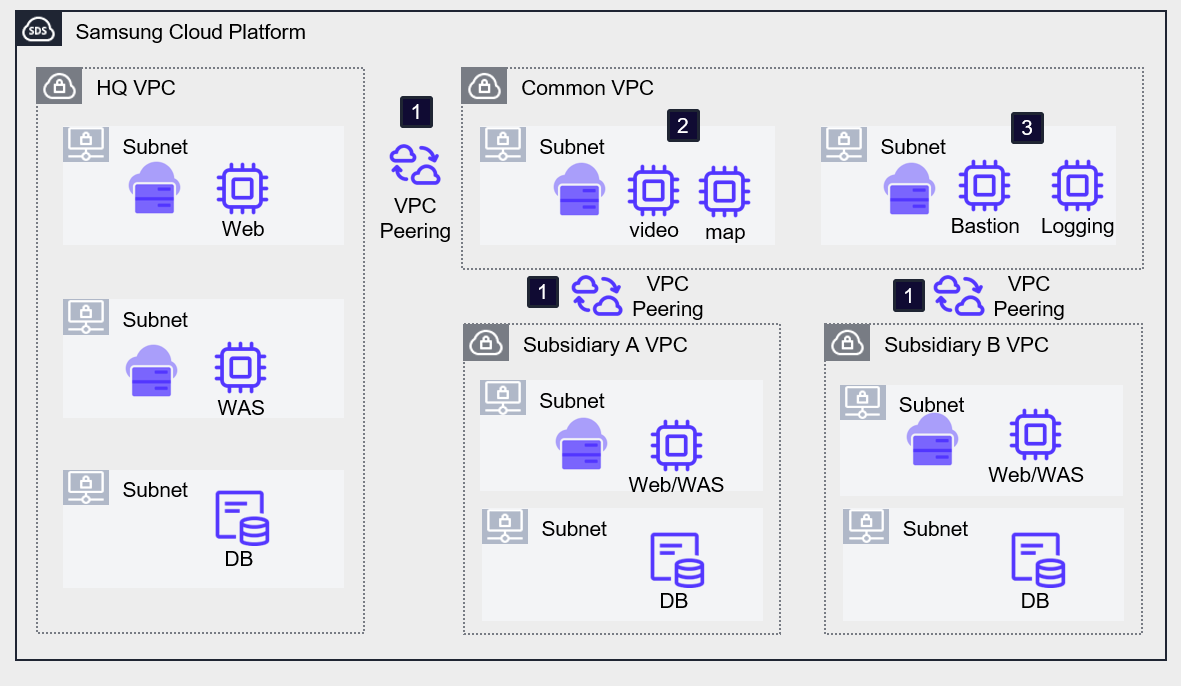
Deploy the headquarters, branch A, and branch B systems in separate VPCs, and configure an additional VPC for shared services. The headquarters and branch VPCs establish VPC peering with the common services VPC using a hub-and-spoke (Hub-and-Spoke) architecture.
By installing the commonly required software on VMs in each VPC, we reduce costs by configuring all systems to share it. In the example architecture, the video and map services used by each website were configured as common services.
By setting up separate management servers such as a Bastion Server or Logging server for external access or information security purposes, you can unify external entry points. However, this single point of contact requires preparation against external breaches, and because it can become a single security vulnerability, caution is required.
In projects that host multiple systems with similar workloads, using a common-service-based architecture can prevent duplicate investment in resources and license costs.
Additionally, you can gain further benefits in terms of ease of management and architectural scalability.