Resource Selection and Architecture Design
Resource Selection and Architecture Design
Resource Selection Criteria
Resource selection based on the billing model
When designing architecture, the service’s billing method acts as an important consideration, and the billing method can vary depending on the deployment method of cloud resources.
Provisioning method is a way of distributing resources by specifying particular specifications or services.
In this case, even if the actual resources are not used, charges will be billed according to the billing cycle (hour, day, month).
On the other hand, the Pay-as-you-go model incurs no cost until resources are actually used, and charges are based on the amount used or the number of calls, etc.
There are also services that charge by mixing the Provisioning method and the Pay-as-you-go method.
| Service | Deployment method | Billing model |
|---|---|---|
| Virtual Server, GPU Server, Bare Metal Server, Multi-node GPU Cluster, Virtual Server DR | Provisioning | Per Hour |
| Cloud Functions (computing time seconds-GB combined calculation) | Pay-as-you-go | Per Call |
| Block Storage | Provisioning | Per Hour |
| Object Storage, File Storage, Archive Storage, Backup | Pay-as-you-go | Per Usage(GB) |
| DBaaS | Provisioning | Per Hour |
| Kubernetes Engine | Provisioning | Per Hour |
| Container Registry | Pay-as-you-go | Per Usage(GB) |
| Public IP, NAT Gateway, VPC Endpoint, Direct Connect, SASE, Load Balancer, GSLB, Transit Gateway (calculated together with per-GB transfer fees) | Provisioning | Per Hour |
| DNS | Provisioning | Per Day |
| VPN (calculated together with Internet Outbound fee) | Provisioning | Per Month |
| Internet Outbound Traffic, VPC Peering, Global CDN | Pay-as-you-go | Per Usage(GB) |
| DDoS Protection, IPS, Secured Firewall | Provisioning | Per Hour |
| WAF, Config Inspection | Provisioning | Per Month |
| Secured VPN | Provisioning | Per Year |
| SingleID | Provisioning | Per User |
| Secret Vault, Key Management Service (Number of keys + per call together) | Pay-as-you-go | Per Call |
| Event Streams, Search Engine, Vertica(DBaaS), Data Ops, Data Flow | Provisioning | Per Hour |
| Data Query | Pay-as-you-go | Per Usage(GB) |
| API Gateway | Pay-as-you-go | Per Call |
| AI/MLOps Platform, Cloud ML | Provisioning | Per Hour |
| DevOps Service (Workflow is calculated per count) | Pay-as-you-go | Per User |
| Trail | Pay-as-you-go | Per Event |
| Edge Server | Provisioning | Per 3/5years |
The two architectures presented in the figure below are examples of implementing a mobile application that provides image services using the Provisioning method and the Pay-as-you-go method.
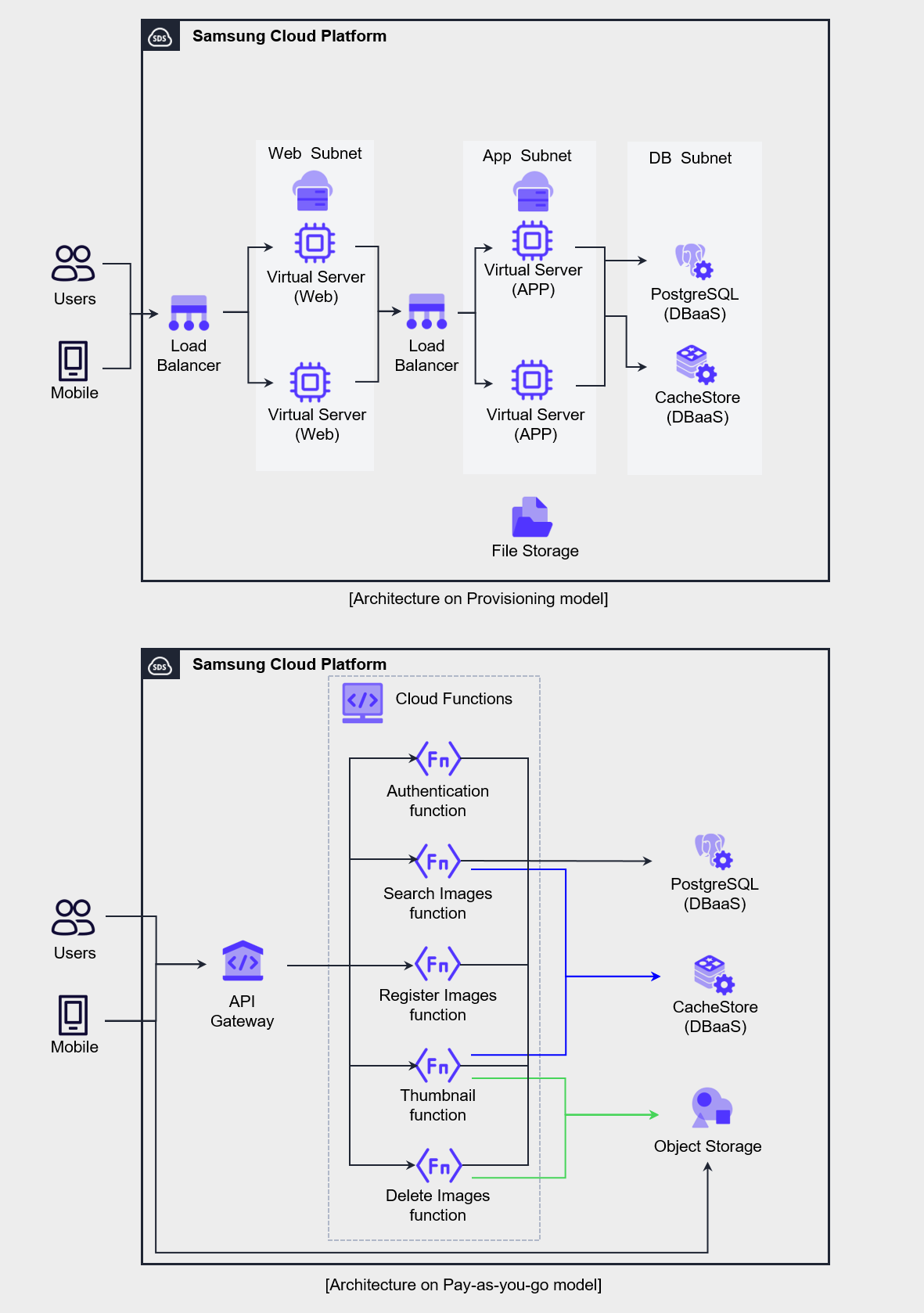
The 3-tier web Application method based on the Provisioning model on the left is a traditional construction method familiar to developers and operators, and it is a configuration commonly selected when converting existing applications or developing new applications.
This architecture charges a fixed monthly fee regardless of usage, so applying it to workloads with low load variability can increase cost efficiency.
The right architecture is mostly composed of Serverless Computing services billed per request, in contrast to the left’s Virtual Server-centric configuration.
Serverless Computing architecture requires understanding of API Gateway’s API routing, Cloud Functions’ function processing, and Object Storage’s REST API operation, and involves technical challenges.
However, since billing is per call or per capacity, costs are only charged when actual usage occurs.
Therefore, in environments where request load periodically increases or load prediction is difficult, applying this architecture can handle the load cost-effectively.
When selecting resources like this, you must consider both the use case and the organization’s technical capabilities.
Since cloud resources provide various billing models depending on service characteristics, you need to design the architecture to appropriately utilize them to optimize costs.
Resource type, size, quantity selection
In on-premises environments, you must carefully forecast future demand in the early stages of system construction and then determine the hardware scale, and because changes are difficult once a purchase is completed, the initial design is very important.
On the other hand, in a cloud environment, resources can be expanded or reduced at any time, minimizing the burden of initial asset investment and allowing you to start.
To leverage these cloud characteristics and increase cost efficiency, it is advantageous to choose technologies with high resource efficiency and agility, such as resources or containers billed per request.
However, to adopt Serverless Computing or container technology, the organization’s internal technical capabilities must be supported, so the costs and risks associated with this must also be considered.
When selecting a server type, it is preferable to start on a small scale rather than beginning with a large scale, and then gradually increase specifications or increase the number of deployments.
In a cloud environment, you can change the server type at any time, so it is common to initially deploy a small-capacity server and go through a step of adjusting specifications to ensure the software and code operate stably.
After optimizing the capacity of the unit server, we perform the task of scaling the number of servers through load testing.
In terms of management and application integration, deploying multiple software on one or two servers may be convenient, but in a cloud environment, using many small-capacity servers is more advantageous in terms of cost and scalability.
For example, using three small servers instead of two large servers provides higher availability and resource utilization, and can support rapid scaling.
Select pricing model
Plan Selection
In Samsung Cloud Platform, you can select and apply plans such as contract plans, Cost Savings, and Planned Compute.
The table below describes the plans and the services corresponding to the plans.
| Plan | Description | Applicable Service |
|---|---|---|
| Cost Savings | Fee discount on condition of committing to hourly usage amount for 1 year or 3 years | Virtual Server, GPU Server, Bare Metal Server, Multi-node GPU Cluster, Database, Event Streams, Search Engine, Vertica(DBaaS) |
| Planned Compute | Discounted rates by committing to instance types for 1 year or 3 years | Virtual Server, GPU Server, Bare Metal Server, Multi-node GPU Cluster, Database, Event Streams, Search Engine, Vertica(DBaaS) |
The plan to apply the discount consists of Cost Savings, Planned Compute.
If you contract Cost Savings and Planned Compute, a discount is applied to the applicable service, and you can select a 1-year or 3-year term to receive a discount.
In particular, Planned Compute contracts are based on the instance type, and discounts can be applied to the corresponding on-demand instances.
If you want to check the rates with no contract, 1-year/3-year discounts applied per service, you can use the rate calculator.
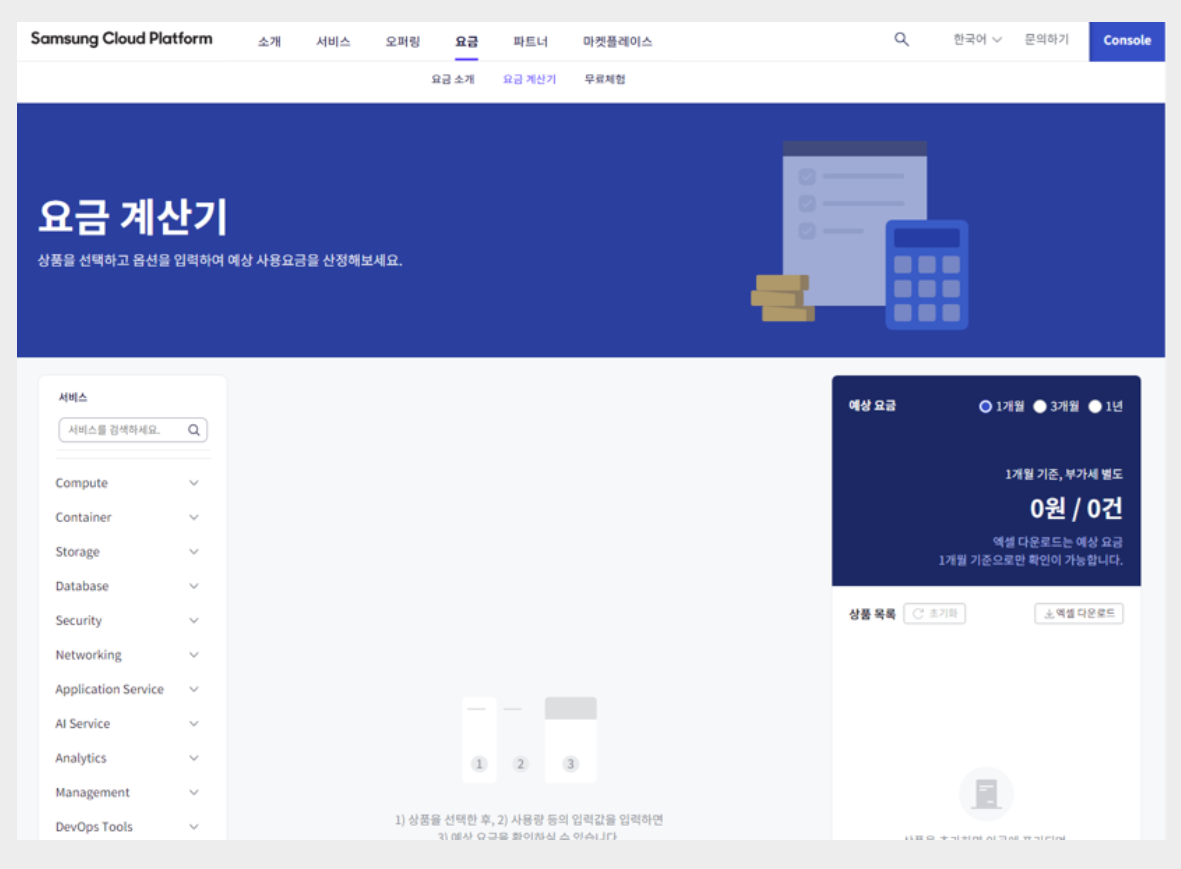
The average monthly usage time over the past year is as follows, and assuming the usage for the next year will be the same, a plan can be designed as shown in the table below.
| Service (Server Type) | Quantity | Operating Pattern | Plan Applied |
|---|---|---|---|
| Virtual Server (s2v2m16) | 2 | Always on (730 hours) | 1-year contract |
| Virtual Server (s2v2m4) | 2 | Irregular (54 hours) | Cost Savings |
| Virtual Server (s2v4m32) | 3 | Irregular (365 hours) | Cost Savings |
| GPU Server (g2v48h4) | 1 ~ 4 | Periodic change (1,460 hours) | Planned Compute |
| Virtual Server Auto-Scaling (s2v2m4) | Min(2) | Regular Operation (586 hours) | Cost Savings |
| Virtual Server Auto-Scaling (s2v2m4) | Max(8) | Regular load (144 hours) | No contract |
| MySQL(DBaaS) (db2v4m32) | HA(2) | Always on (730 hours) Vertical scaling possible | Cost Savings |
| MySQL(DBaaS) (db2v4m32) | Replica(1) | Continuous operation (730 hours) Expand replica as needed | Cost Savings |
The always-on Virtual Server listed in the table has a discount applied through a contract plan.
GPU Server(g2v48h4) is used from a minimum of 1 unit to a maximum of 4 units, and the total monthly usage time is shown as 1,460 hours.
In such cases, you can apply a discount for the server type through a Planned Compute contract.
For Virtual Server that operates irregularly, Auto-Scaling VM that handles regular load, and Database with vertical scaling potential, we apply the Cost Savings pricing plan to all.
When applying Cost Savings, the point to be careful about is that the contract amount should be decided conservatively.
If you set the amount excessively, you may end up having to pay for something you didn’t even use, so it is advisable to start conservatively and then gradually optimize.
Software License
As mentioned earlier, the strategy of handling workloads with multiple small servers rather than several large servers is also cost-effective from a software license perspective.
Application server has relatively high software usage, and in on-premise environments, it was common to simplify integration by installing multiple software on large servers to reduce hardware costs.
However, in a cloud environment, this approach can actually be inefficient.
If you separate and install the software on a small server, lower server specifications won’t be a problem, and you can also reduce software license purchase costs.
And, an additional factor to consider in software licensing is BYOL (Bring Your Own License).
Samsung Cloud Platform supports BYOL software in services such as Database and Analytics, and after confirming the licensing conditions of the software to be deployed, you need to review the server deployment plan to avoid unexpected budget overruns in the future.
Also, reviewing the license and technical support packs for 3rd Party software that can be purchased from the marketplace is a good way to improve cost efficiency not only in terms of license costs but also in terms of technology implementation.
Architecture Selection
Demand-based Elastic Resource Composition Architecture Design
Samsung Cloud Platform can configure Auto-Scaling that can elastically adjust servers.
Through Auto-Scaling, you can configure a demand-based cost model that allows resources to be used according to demand.
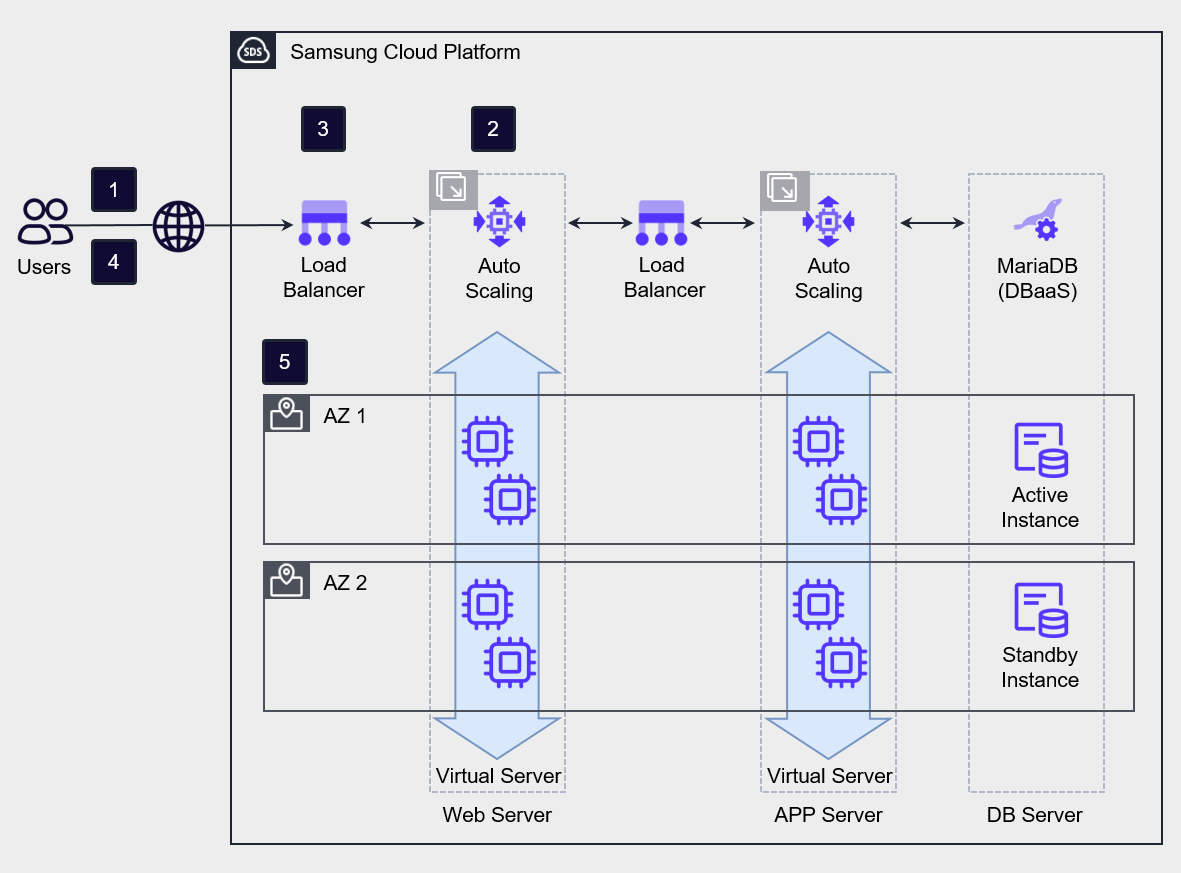
Auto-Scaling provides threshold-based and schedule-based horizontal scaling and reduction policies.
Threshold-based scaling policies adjust the number of servers by setting thresholds based on minimum, maximum, and average values for metrics such as CPU usage, memory usage, and network in/out.
When setting policies, it is common to start scaling up quickly to proactively respond to load, and to delay scaling down to prepare for a possible load increase.
Temporary load handling through Serverless Computing architecture
Auto-Scaling is a suitable computing architecture when the rate of load increase is slower than the VM creation speed.
If the load increase rate is faster than the VM creation rate, you should consider alternatives other than Auto-Scaling based VMs.
In this case, the alternative that can be reviewed first is the managed service Serverless Computing architecture.
If it is difficult to predict the speed or scale of load increase, it is effective to use managed services to reduce the burden of operating high-availability infrastructure.
Resources provided in the cloud cannot handle unlimited load, but they can be an alternative that ensures stable availability for unpredictable loads.
The figure below is an architecture that adds a Serverless Computing component to Auto-Scaling to handle temporary load.
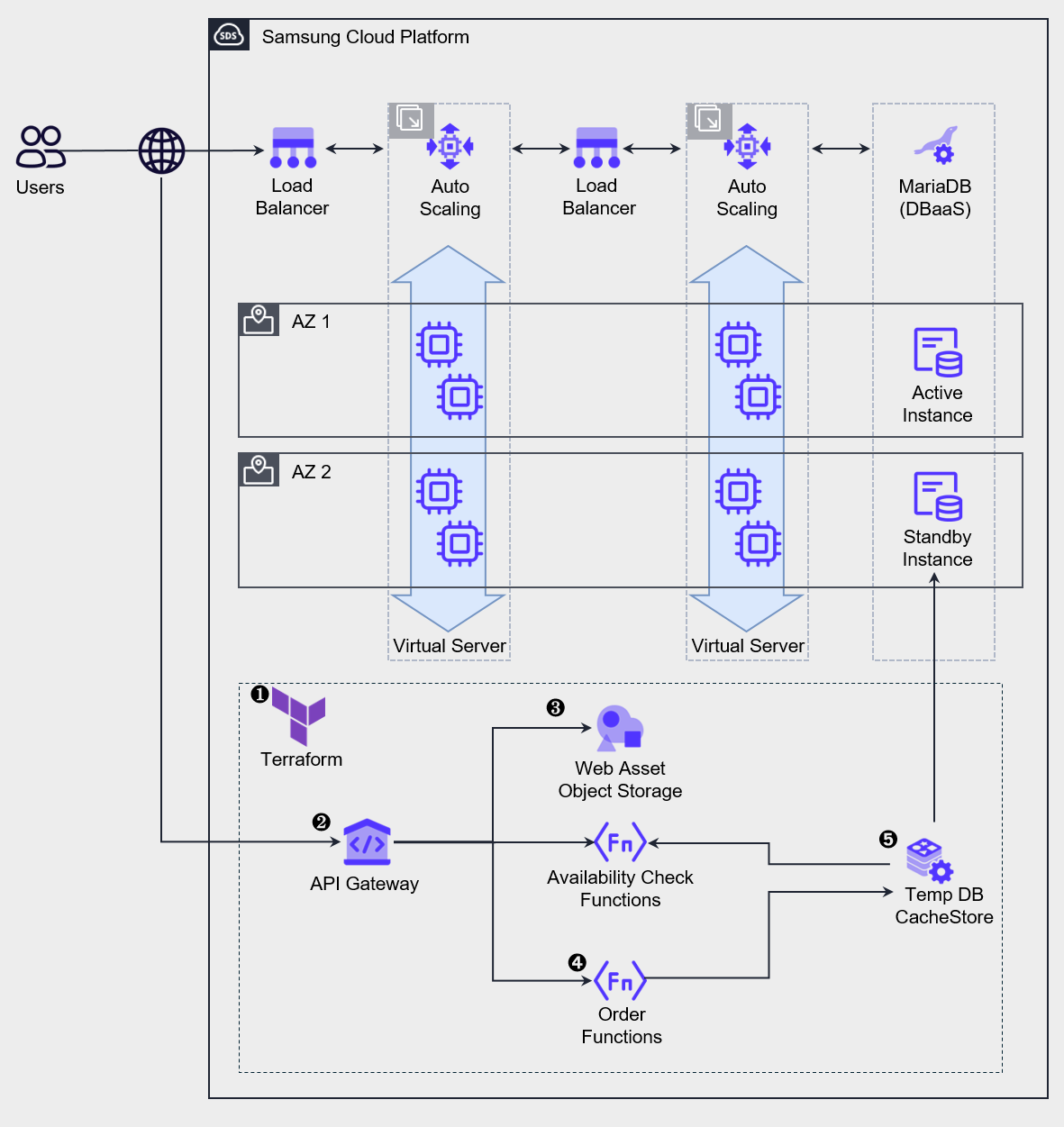
During normal operation, the load is handled by the top Auto-Scaling, and sudden load spikes are handled by activating the lower temporary service.
Such architecture is used in situations where, like limited product promotions on online shopping malls or ticket reservations for popular performances on ticket booking sites, the load spikes instantly at the start of an event and then decreases when inventory or seats are sold out.
Deploy or operate services using IaC tools such as Terraform or CLI. Some services apply a request-based billing model, so they can be pre-deployed, but services that require provisioning, such as CacheStore (DBaaS), need to be newly deployed in advance and kept in a stopped state for preparation. The point to note in deploying a service for temporary workloads is that some buffer time is needed before the load generation starts. Services like Cloud Functions require a pre-warm time called Cold Start to process requests. When deploying the service, you must consider this uptime and ensure that preparation is completed before the request start time.
Distribute requests through the API Gateway.
Web requests are responded to through Web assets stored in the bucket of Object Storage.
Stock verification and order processing are performed through Cloud Functions.
For fast query and order storage, use CacheStore (DBaaS) as a temporary data store, and after all processing is completed, batch store the data to the main Database.
After all processing is completed, we delete or stop resources to minimize cost expenditure.
Data Transmission Cost Minimization Network Design
In the early stages of cloud design and construction, attention must be paid to compute resources.
This is because compute resources account for the largest share of actual cloud costs, and if designed incorrectly, excessive costs can occur.
After operations begin, unexpected costs may arise, with a typical example being Internet Outbound Traffic costs.
Data can be requested from a server inside the VPC over the Internet, and a server inside the VPC can also send and receive data to the Internet.
At this time, you should note that charges are applied to data transmitted outside the VPC.
When configuring network architecture, especially when designing a multi-VPC architecture, you must be careful to minimize traffic that traverses the internet.
If you need to connect servers across multiple VPCs, it is advisable to avoid routing through the Internet and instead connect via VPC Peering (connection between two VPCs) or a Transit Gateway to set up private communication, which can be a way to optimize costs.
In addition, security of the connection between the two site networks is improved through a private connection.
Common Service Area Configuration
When operating multiple information systems based on multiple VPCs or multiple projects, there may be services that are commonly used even though each system’s functions differ.
In such cases, you can design the architecture by configuring common services as a separate domain and having each information system share and use them.
Especially, servers with commercial software installed can maximize economic efficiency by configuring them as a common service area.
For example, you can assume a case where an organization with multiple branches nationwide integrates the headquarters and branch websites into the cloud through a unified migration.
Each branch’s homepage server can operate independently, but by grouping the components required for web services into a common service and designing it as a shared zone, cost reduction effects can be expected.
The following diagram is an example architecture that places common services in a common VPC to reduce cloud costs.
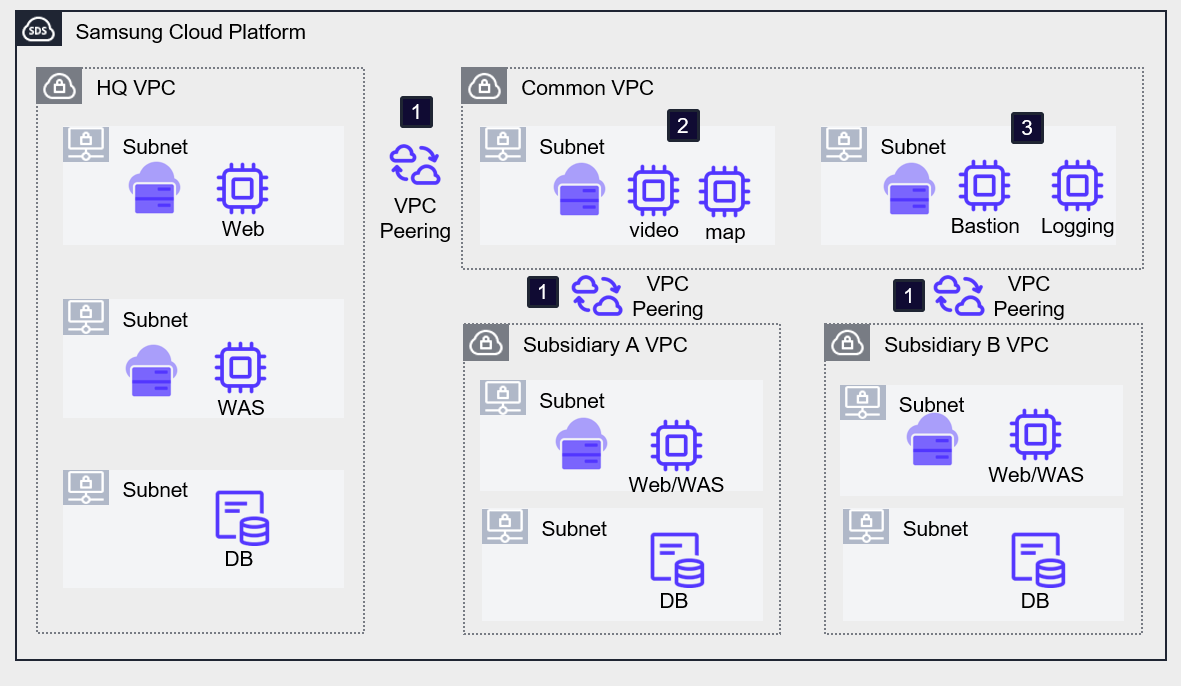
Deploy the systems of the headquarters, branch A, and branch B in separate VPCs, and set up an additional VPC for common services. Headquarters and branch VPCs establish VPC peering with the common service VPC using a hub-and-spoke method.
By installing the commonly required software on VMs in each VPC, we reduce costs by configuring all systems to share it. In the example architecture, the video and map services used on each homepage were configured as common services.
Bastion Server, Logging server, etc. can be configured separately as management servers for external access or information security purposes, allowing the external touchpoints to be unified. However, this single point requires preparation against external intrusion, and since it can become a single security vulnerability, caution is required.
In projects that host multiple systems with similar workloads, using a common service-based architecture can prevent duplicate investment in resources and license costs.
Additionally, you can obtain additional advantages in terms of ease of management and architectural scalability.