Availability Goal
Availability refers to the ability to reliably provide functions and performance that meet users’ expectations when they attempt to use IT resources or services.
When designing or building IT services in an on‑premises environment, first review the service’s availability requirements, then analyze each component’s failure factors to design and implement either a single configuration or redundancy/multiplicity solutions.
Identify High-Availability Implementation Targets
Task importance assessment
To identify tasks for high-availability implementation, we assess task importance based on the following criteria.
| Evaluation criteria | Content |
|---|---|
| Business impact |
|
| Customer Service Impact |
|
| Compliance |
|
We sometimes use impact analysis to evaluate task importance.
Business Impact Analysis (Business Impact Analysis) is covered in more detail in the reliability design principles.
High Availability Requirements and Countermeasures
To achieve high availability, you must be able to establish appropriate failure mitigation measures based on the components or causes of failures.
The table below shows the high-availability implementation requirements for failure or disaster scenarios and examples of how to implement them in a cloud environment.
| Category | Requirement example | Implementation plan example |
|---|---|---|
| Cloud data center outage or disaster |
| Multi-AZ-based redundant configuration |
| Cloud service outage |
| Active-Active or Active-Standby high-availability implementation |
| Demand surge |
| Auto-Scaling or managed service implementation |
| Attack/Intrusion |
| DDoS Protection configuration Auto-Scaling configuration |
Service Level Metrics and Goal Setting
When designing for availability, applying high availability to every component can involve various constraints such as budget and operational staff.
When specifying availability requirements for critical systems, customers typically demand a “high availability” or “redundancy” level.
However, the implication of this customer requirement is not merely that components should be duplicated; it also means that the system must be designed so that the entire service does not stop even if a single component fails.
When analyzing high-availability requirements, it is necessary to derive objective metrics that enable systematic management of the customer’s comprehensive high-availability demands, and to set goals based on them.
The key management items and metrics related to this can be found in the table below.
| Item | Content |
|---|---|
| Service Level Agreement(SLA) Service Level Agreement |
|
| Service Level Objective(SLO) Service Level Objective |
|
| Service Level Indicator(SLI) Service Level Indicator |
|
| Mean Time to Detection(MTTD) average detection time |
|
| Mean Time to Repair(MTTR) average recovery time |
|
| Mean Time To Failure(MTTF) Mean time between failures |
|
The relationship among MTTD, MTTR, and MTTF can be understood from the diagram below.
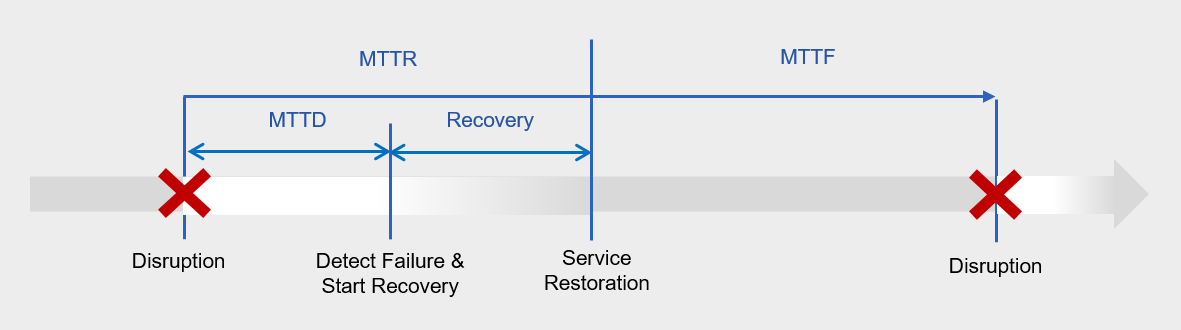
Earlier, we expressed the availability metric, availability rate, as 1 - {sum of downtime (minutes)}/{sum of total service usage time (minutes)}.
If we express availability using the above metric, it can be represented as MTTF/(MTTF + MTTR).
To increase availability, minimizing MTTR, i.e., the mean time to recovery, is essential.
MTTR consists of MTTD and recovery time, where MTTD refers to the time elapsed from a failure occurring to its detection and the start of recovery actions.
High availability means that MTTD and recovery actions are performed automatically without human intervention, and this is a primary review item of this availability design principle.
To improve availability, you must configure monitoring, alerts, and response automation to detect failures and enable automatic remediation, thereby minimizing MTTD.
Additionally, by automating redundant resource configuration and resource scaling, we can automate incident response, minimize MTTR, and improve availability.
Samsung Cloud Platform Availability
In cloud environments, we design and implement either a single configuration or redundancy/multi-redundancy according to service availability requirements. However, failure analysis is performed based on the availability specified in the Service Level Agreement (SLA) provided by the cloud provider.
In Samsung Cloud Platform, the SLA provides the monthly availability rate (%) for each service.
The table below shows the monthly availability calculation formulas and term definitions for each service provided by Samsung Cloud Platform.
There are services that calculate availability based on uptime, and services that calculate availability based on the number of requests or incidents.
| service | Disability definition | Monthly availability (%) | Definition of downtime |
|---|---|---|---|
| Common* | If the customer’s running instance or individual services cannot secure external connections and access. | [1 - {sum of downtime (minutes) / sum of total service usage time per month (minutes)}] * 100 | Total outage duration for the month caused by the company (SDS) |
| Virtual Server DR | If, after completing a simulation exercise or disaster failover in the DR Recovery Plan, customer service access is unavailable or the requested failover does not occur. | [1 - {sum of outage time (minutes) / sum of total service usage time per month (minutes)}] * 100 | Total downtime for the month caused by the company (SDS) |
| DBaaS, Event Streams, Search Engine | If all running multi‑instances or individual services fail to maintain external connections and access for more than 5 minutes. | [1 - {sum of outage time (minutes) / sum of total service usage time per month (minutes)}] * 100 | Total outage time for the month caused by the company (SDS) |
| Kubernetes Engine | If external connections and access to the control plane cannot be secured for more than 5 minutes. | [1 - {sum of outage time (minutes) / sum of total service usage time per month (minutes)}] * 100 | Total outage duration for the month caused by the company (SDS) |
| Container Registry | When all connection requests to the Container Registry Endpoint fail for 5 minutes. | [1 - {sum of outage time (minutes) / sum of total service usage time per month (minutes)}] * 100 | Total outage duration for the month caused by the company (SDS) |
| DDoS Protection, Secured VPN, Secured Firewall, WAF, IPS, SASE | If the security equipment supplied by the company malfunctions or fails to operate, leading to a failure to monitor and detect customer services. | [1 - {sum of outage time (minutes) / sum of total service usage time per month (minutes)}] * 100 | Total downtime for the month caused by the company (SDS) |
| File Storage, Block Storage | If a timeout of more than 15 seconds occurs from Compute to Storage. | [1 - {sum of outage time (minutes) / sum of total service usage time per month (minutes)}] * 100 | Total downtime for the month caused by the company (SDS) |
| Transit Gateway, Direct Connect | Port is down, or network errors in the connection segment prevent information transmission and reception for more than 120 seconds. | [1 - {sum of downtime (minutes) / sum of total service usage time per month (minutes)}] * 100 | Total outage duration for the month caused by the company (SDS) |
| Edge Server | Customer service failure due to inability to access Edge Manager or Edge Server outage | [1 - {sum of outage time (minutes) / sum of total service usage time per month (minutes)}] * 100 | Total downtime for the month due to the company’s (SDS) reasons |
| Private Cloud | When a customer’s running instance or individual service fails to obtain CMP access. | [1 - {sum of downtime (minutes) / sum of total service usage time per month (minutes)}] * 100 | Total downtime for the month caused by the company (SDS) |
| Cloud Functions | Return a 500 or 503 error code for the request (excluding custom errors) | [1 - (sum of outage time and count)/(sum of total service usage month time and count)] * 100 | Sum of failure duration and incident count for each 5‑minute period |
| Object Storage, Archive Storage | Return 500 error for Storage request Failure rate: rate of failure requests Average failure rate: monthly average failure rate | 100% - average failure rate | - |
| API Gateway | Return a 500 or 503 error code for the request | [1 - (total failures)/(total service usage months)] * 100 | Total number of error requests per 5‑minute interval |
| Quick Query | When an SQL query request fails to secure an external connection and access for more than 5 minutes. | [1 - (sum of failure counts)/(sum of total service usage month counts)] * 100 | Total number of incidents that occurred in the month due to company reasons |
| Backup | Customer-requested backup failure (exclude if re-execution succeeds) | [1 - (sum of failure counts)/(sum of total service usage month counts)] * 100 | Total number of incidents that occurred in the month due to company reasons |
*Common representative services include Virtual Server, Bare Metal Server, Load Balancer, GSLB, VPN, SingleID, DevOps Service, AIOS, etc.
Samsung Cloud Platform’s Well-Architected design principles provide design guidelines on availability (Availability) and reliability (Reliability) from the perspective of fault tolerance and resilience.
The availability design principle focuses on designing the architecture around automated response measures to ensure that the service does not become unavailable even in the event of a component failure or an unexpected surge in load.
The reliability design principle focuses on minimizing data loss and enabling rapid service recovery in the event of unplanned failures or disasters.
The core of availability design lies in implementing high availability (High Availability) by deploying services redundantly so that, even if a component fails, other components continue to operate normally, preventing service interruption.
Additionally, securing scalability (Scalability) to prevent bottlenecks in specific components caused by increased demand, which can delay or interrupt service responses, is also an important goal of availability design.