Availability Design
Availability Design
Architecture considerations for high availability
To implement a high-availability architecture, it is necessary not only to design and build high-availability at the infrastructure level using cloud services, but also to configure the application itself to support high availability.
Even if you configure lower-level infrastructure such as servers and networks for high availability, to prevent service interruption when a single device fails, you must have a structure at the application level that can detect and respond to failures.
This is also true when you want to increase throughput via Auto-Scaling during a surge in demand.
Application should be designed to respond flexibly to expansion, so that stable service expansion can be expected.
Simple Application Configuration
A simple Application reduces unforeseen failures and enables stable operation.
On the other hand, when many functions gather in an application and complexity increases, the likelihood of configuration errors or unforeseen interactions occurring grows, and the resulting inefficiency also increases.
A simple structure reduces the area to be controlled, minimizing operational overhead.
This helps build a workload architecture equipped with resilience, reusability, scalability, manageability, etc.
For these reasons, each workload has various business requirements such as availability, scalability, data consistency, disaster recovery, etc., which become the core criteria for architecture design.
For example, whether tens of thousands of users access the application simultaneously, whether traffic is steady or spikes at certain times, and whether service interruption is permissible and to what extent are important considerations in architectural design.
If you configure the application in a complex way to handle the workload, you can provide more features and flexibility.
However, this requires more investment in coordination and communication management between components, which can actually have a negative impact on availability.
Therefore, if high availability is an essential requirement for the workload, it is desirable to reduce complexity as much as possible and minimize management points.
- Add the minimal essential components required by business requirements to the architecture.
- Use PaaS (Platform as a Service) to build an application optimized for the cloud environment.
- Process simple repetitive operations using Serverless Computing with minimal code.
To ensure high availability, it is important to implement the application with only the minimal essential components, reducing management points, and strengthening scalability and repeatability.
Also, it is preferable to use PaaS rather than code based on IaaS, because it can reduce the burden of infrastructure management and the complexity of high-availability configuration.
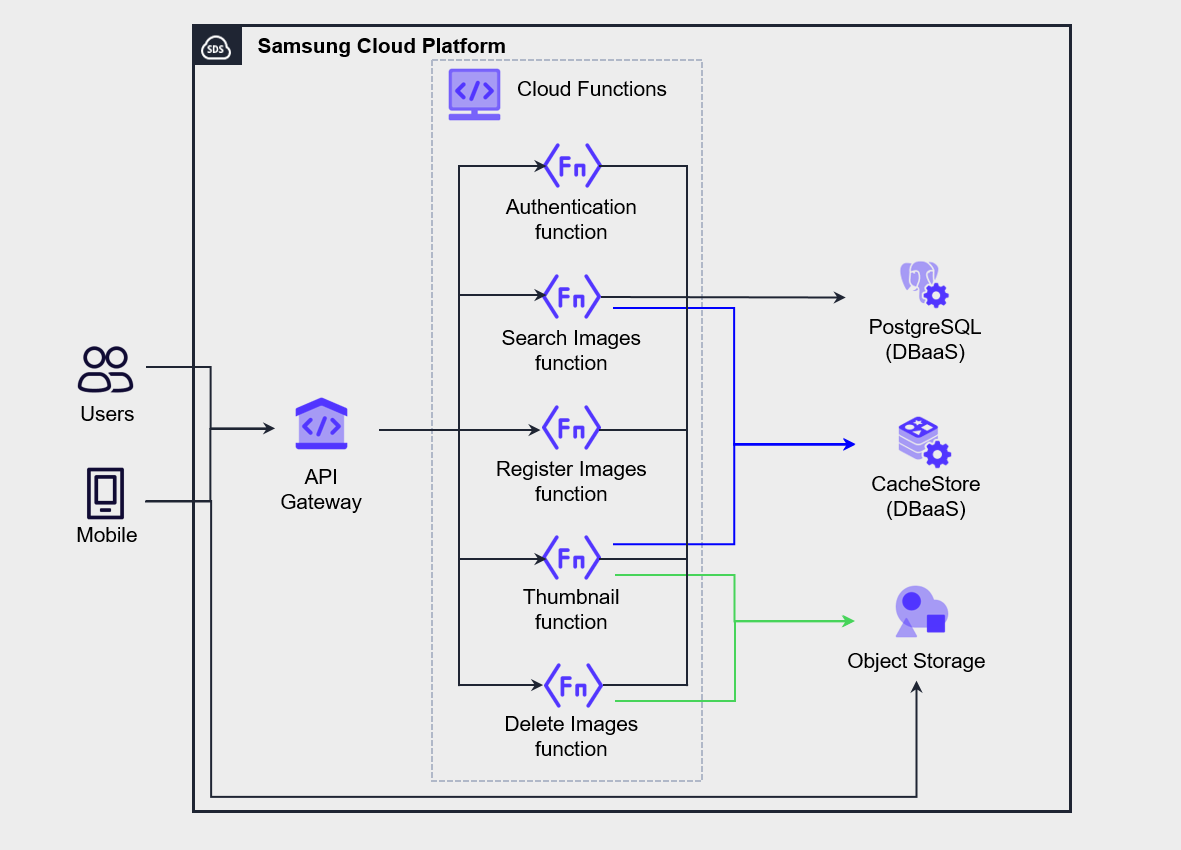
The architecture in the figure below is an example of implementing a mobile photo management service using Serverless Computing by utilizing API Gateway and Cloud Functions.
Authentication, Search, Register, Thumbnail, Delete functions were implemented by separating them into independent functions of Cloud Functions.
When the user performs a task in the mobile app, the request is passed to the function via API Gateway and processed.
In this architecture, all functions operate independently, so modifying one function does not affect other functions.
After separating functions to ensure simplicity, it is important to secure service observability through service monitoring.
In Cloud Functions, it provides monitoring features for call count, execution time, current task count, success/failure call count, memory usage, etc., and you can also view function execution logs.
Application Decoupling and Dependency Management
To implement a high-availability application, you must properly manage the dependencies of the components.
Managing component dependencies means identifying whether each component operates independently or has a dependency relationship with other elements, and carefully reviewing the availability of dependent elements.
Ultimately, the core of implementing high availability lies in designing and managing to ensure that a failure of a single component does not lead to a total service interruption.
Therefore, the management measures for the component with the lowest availability among the interdependently connected components should be given top priority in high-availability design and operation.
As a result, the availability of a service cannot exceed the level of the least available component among its dependent components.
- Maintain a list of all dependencies.
- Minimize critical dependency items to reduce the possibility that a failure of one component affects the entire system.
- Important dependencies are configured redundantly.
- Use a Load Balancer or asynchronous messaging to decouple requests and responses (decoupling).
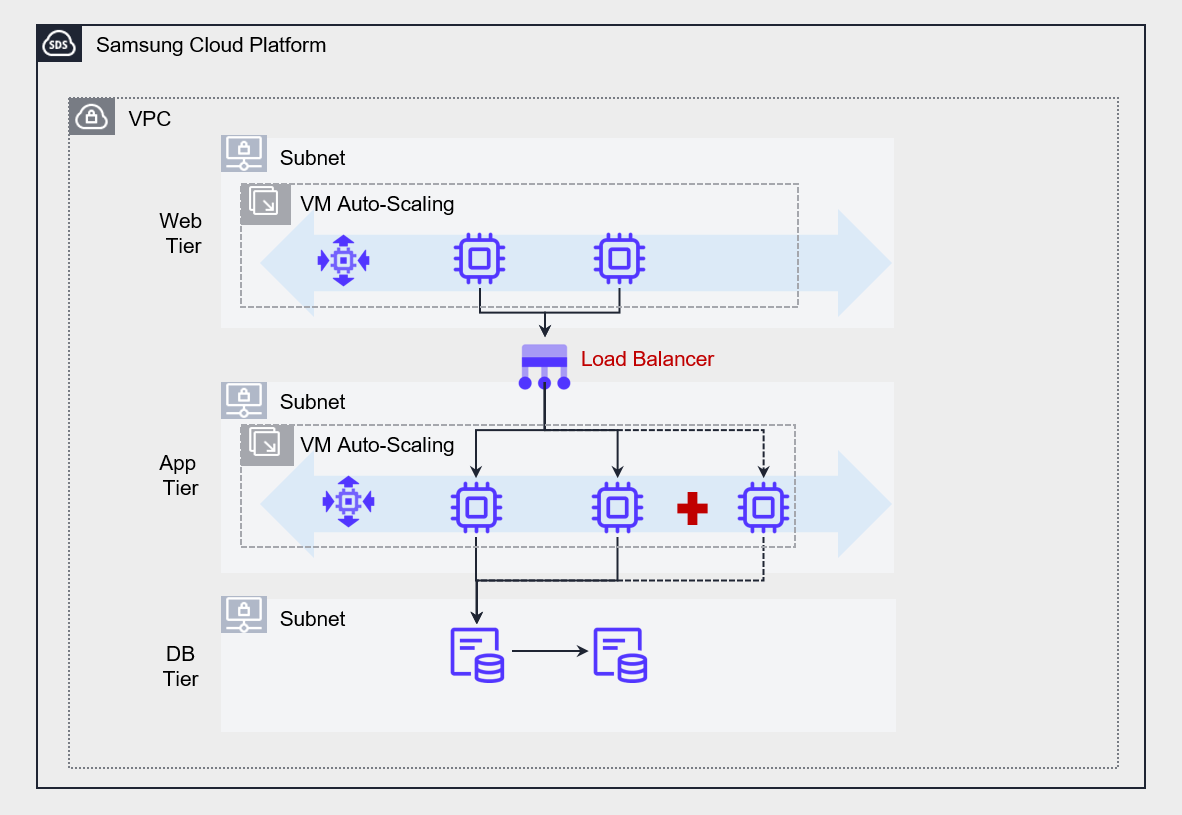
The figure below is an example of an architecture that decouples the web and application layers using a Load Balancer.
If you directly connect the web server and the application server, the dependency between components increases, making it difficult to implement scalability such as auto-scaling.
Accordingly, by placing a Load Balancer in the middle, we reduced the dependency between the web and the application, and improved the scalability of the entire system.
If there is no Load Balancer between the web layer and the Application layer, the web layer must directly specify the server IP address of the Application layer to forward the request.
This approach causes strong coupling between servers, and if one of the Application layer servers goes down, requests directed to that server cannot be processed and are inevitably lost.
This may be perceived as a service disruption by some users, and it reduces the overall system stability.
On the other hand, placing a Load Balancer between the web layer and the application layer provides a single entry point for handling client requests, allowing requests to be flexibly forwarded without hardcoding server IPs.
Especially when applying Auto-Scaling functionality to the Application layer, you can automatically distribute requests to server instances that are dynamically created or deleted, thereby ensuring the system’s scalability and elasticity.
As such, the Load Balancer is suitable for real-time request processing based on synchronous communication, and contributes to ensuring high availability by distributing traffic among multiple servers that perform the same function.
For example, you can effectively use a Load Balancer placed in front of the Web server group and the App server group to distribute traffic among the servers within the group.
However, if you want to implement decoupling between services more robustly, using a Message Queue Service is more suitable.
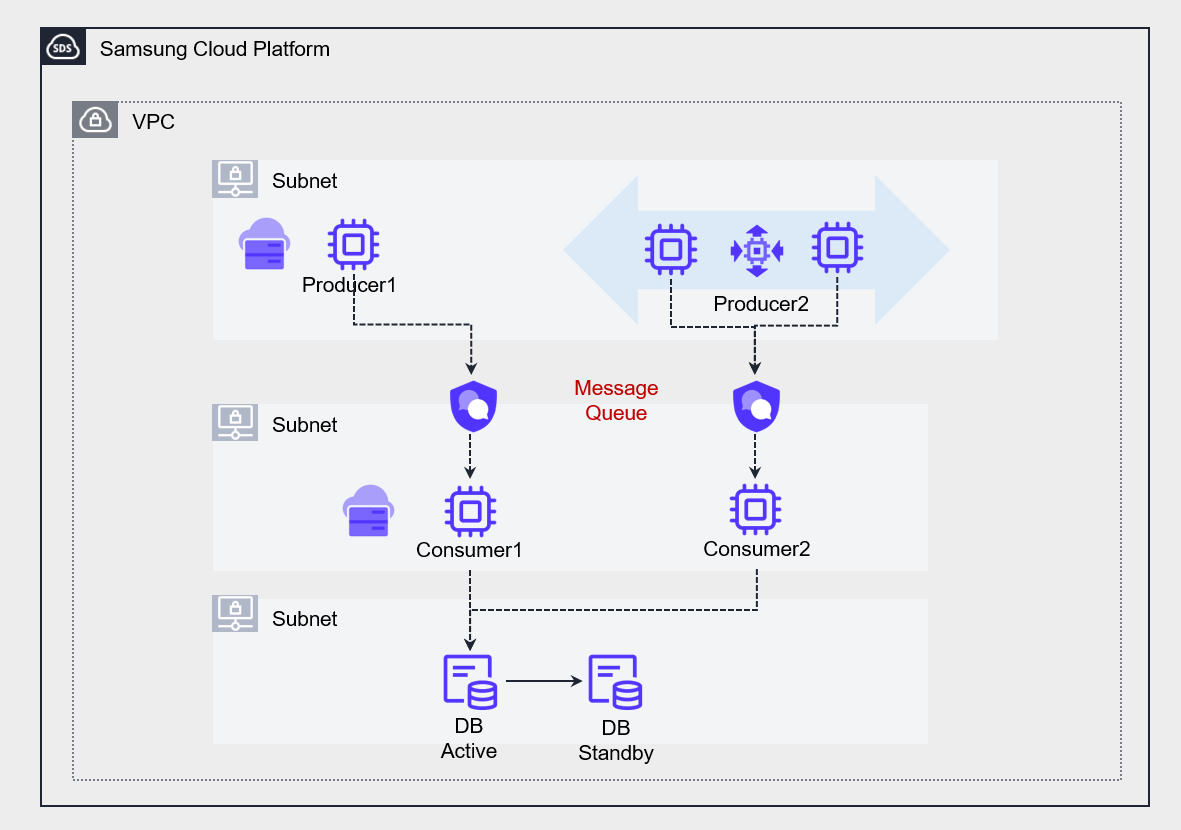
The figure below shows an architecture that uses a Message Queue to convert the strong coupling between two applications into a loosely coupled structure.
Message Queue Service enables asynchronous (Asynchronous) communication between multiple servers that perform different functions.
At this point, the processing speed or capacity of the producer (Producer) and consumer (Consumer) does not need to match.
As a result, each service can operate independently, and even if temporary failures or delays occur, they do not affect the entire system.
Also, because messages are safely stored in the queue, they can be processed when the consumer is ready, ultimately enabling the implementation of a resilient system architecture.
Stateless (Stateless) Application Development
State refers to internal service information that affects processing responses to client requests.
To be more precise, the values of variables or data structures that make up the state depend on the history of requests processed by the service.
A stateful application uses various dependencies such as locally cached data to perform tasks.
As a result, this cache data and dependencies are all loaded into memory, increasing the server resource utilization.
However, if the rate of request increase exceeds the server’s processing speed, the server will gradually slow down and may eventually stop operating.
To solve this, you can add a new server with Auto-Scaling.
However, if request tasks have already accumulated on the existing server, adding a new server may not bring the expected performance improvement.
- Implement the Application as stateless (Stateless).
- Implement a state management database outside the service.
Stateless Application does not store information locally, but processes tasks by storing them in an external State Management Database.
When a user request comes in, first store the request in the state management database, and when the CPU processes the request, it reads the request from the state management database and processes it.
In this architecture, the server does not store state and operates only to process requests.
If a new server is added to the server pool, it can immediately read and process requests from the state management database.
This method quickly distributes the workload across all servers, enabling effective implementation of high availability and scalability.
For state management databases, NoSQL that allows fast read/write is mainly used. In particular, for applications that require high performance, the use of CacheStore (DBaaS) is recommended.
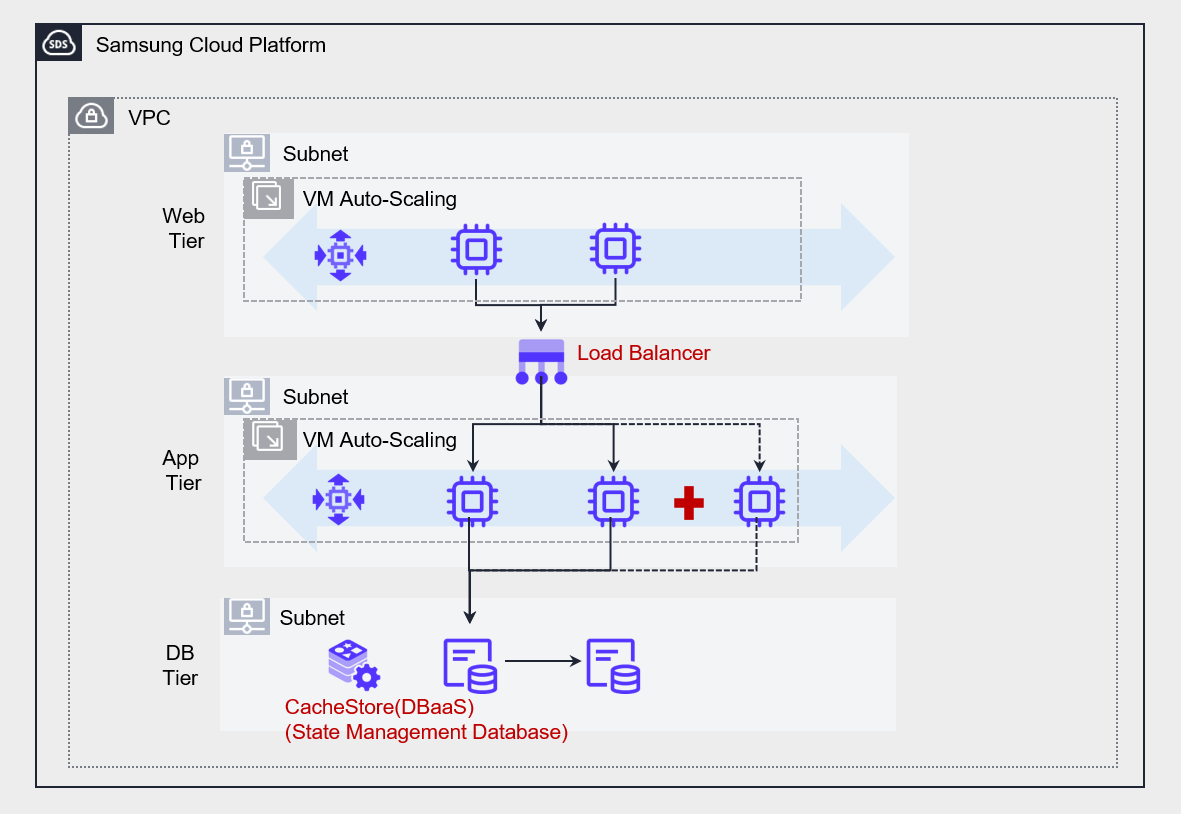
Designing Cloud Architecture for High Availability
Network Design for Scalability and Availability
- Network design considering failure occurrence
For users to access the service reliably, not only must the server operate stably, but the network connecting to the server must also be reliably operated.
Even if a failure occurs in some network segments of the service path, you should either select a service that inherently supports redundancy to prevent service interruption, or duplicate the network connections yourself to prepare for failures.
- Network design considering increased demand
All cloud services have certain limits on the resources that users can configure.
For example, in Samsung Cloud Platform, you can create up to 5 VPCs per Account, and each VPC can be configured with up to 3 subnets.
These restrictions should be thoroughly reviewed to ensure that capacity limits do not become an obstacle when expanding resources due to future demand increases.
Therefore, in the initial network design phase, you must carefully consider which scope (Account, VPC, subnet, etc.) to deploy the system in.
If the geographic scope of the service is wide, you should consider a Global CDN.
If the service’s users are distributed across a wide geographic area, it is necessary to configure a Global CDN to reduce content delivery latency in order to provide an improved user experience.
- Network design considering connections with other information systems and networks
When connecting to information systems of other networks, you must carefully consider whether to go through a public network or configure a protected connection via a private network.
If you want to connect via a private network to protect the transmission, you must ensure that the private IP address ranges used on both networks do not overlap.
When setting the private IP address of a newly configured system, you should check the IP range of the existing network and design the address range so that it does not overlap.
Also, you need to consider the network topology depending on the number of points where you configure the private connection.
Private connections increase in cost as the number of connection points grows, and the complexity of network control policies and routing also increases.
Therefore, to reduce this complexity, it is advisable to configure a centrally concentrated connection structure using the hub-and-spoke method.
- To prepare for failures, configure a redundant network connection or choose a network that supports high availability.
- Design a network suitable for current and future information systems, taking into account the limited capacity of cloud services.
- When connecting to other information systems, design so that IP address ranges do not overlap, and preferably configure a hub-and-spoke topology.
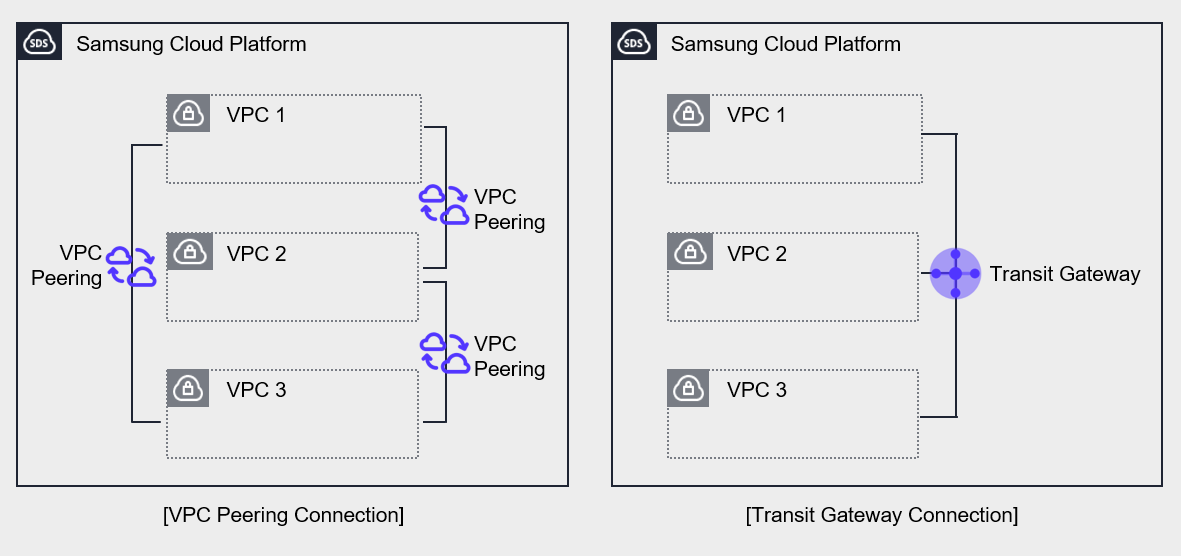
In the case of an organization that has multiple VPCs, you need to establish an IP address plan at the VPC level in order to design the overall network architecture.
The above figure shows the network on the Samsung Cloud Platform composed of multiple VPCs.
Both left and right have three VPCs configured on the Samsung Cloud Platform, and in both cases the connections are set up to allow private communication between VPCs.
The left side was configured to connect VPCs using VPC Peering.
VPC Peering supports 1:1 connections, so to connect all VPCs, 3 connections need to be established.
In contrast, Transit Gateway allows multiple VPCs to be managed as a single configuration.
Connect three VPCs to a single Transit Gateway and configure routing between the three VPCs.
The Transit Gateway on the right centralizes network connections, simplifying connections and making them easy to manage.
Use Managed Service
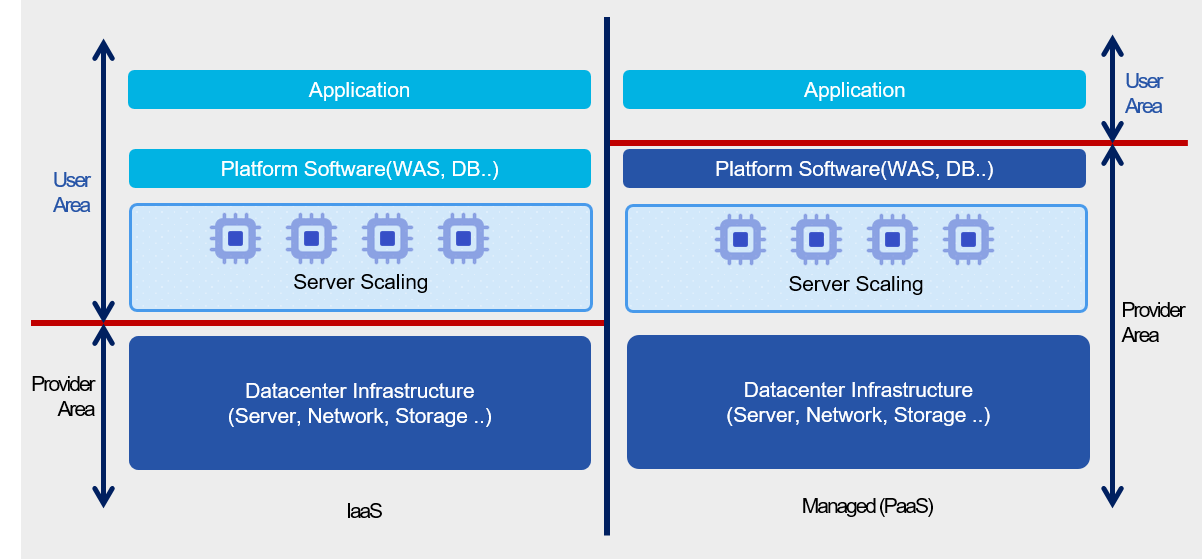
Managed Service (Managed Service) is a service provided on top of the infrastructure that the cloud provider operates and manages.
The areas managed by the cloud provider include the underlying server operating system, security, storage, and network.
Users can focus only on the Application functions provided by the service without the burden of installing and operating the underlying infrastructure.
Because the cloud provider manages it, services can be provided stably, and design and operation for high availability are implemented.
Therefore, by using managed services, users can reduce the high‑availability design and operational burden for the component.
Serverless Computing Cloud Functions is a representative example of a managed service, and when handling simple repetitive tasks, using it instead of a Virtual Server can effectively achieve high availability.
Through this, users can minimize the possibility of failures without separate design or management burdens, and can flexibly respond to increased demand.
In the case of databases, it is assumed that for MySQL high availability, more than two servers are created and the operating system’s basic patches are applied.
After installing MySQL on each server, configure HA (High Availability) or Replica with InnoDB Cluster.
In this process, various tasks such as configuring the network between servers, security settings for data protection, and backup configuration must be performed separately, all of which correspond to the implementation stage.
Even after that, continuous management tasks are required in the operation phase.
If you use a managed service like MySQL (DBaaS), you can significantly simplify this process.
When configuring a database, you can automate high-availability configuration using only option settings, and you can also achieve high flexibility and efficiency from an operational perspective.
- Simple repetitive tasks are implemented using Cloud Functions to realize Serverless Computing.
- Implement high availability using Database services.
Microservice Architecture Implementation
Monolithic Architecture and Microservice Architecture
Monolithic Application refers to a single-tier software Application where multiple modules are combined into a single program.
The figure below is an example of an e-commerce application architecture.
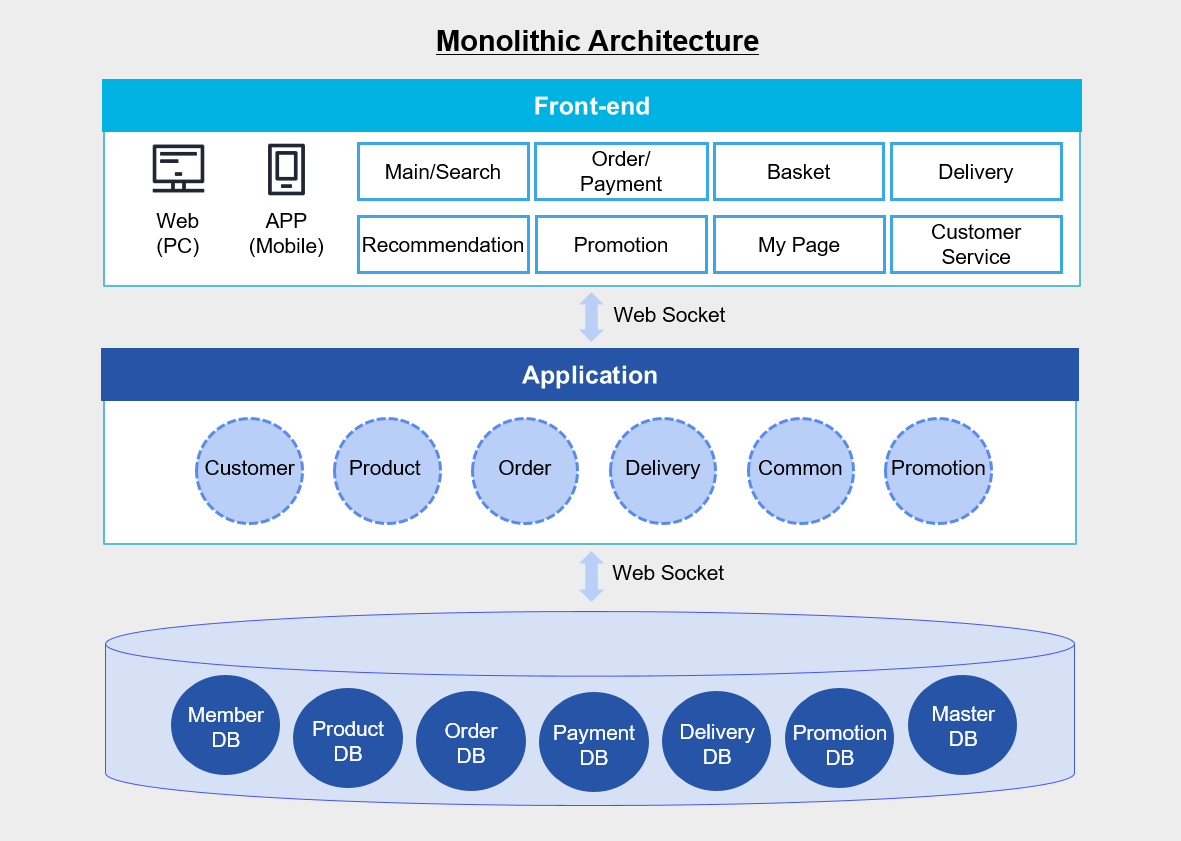
In the figure above, the Application integrates various modules such as customers, products, and orders into a single unit, and the database also consists of member DB, product DB, order DB, etc., configured on a single DB server.
If you develop as a monolithic application like this, you can easily deploy the application simply by copying the packaged application to the server.
Since all modules share resources such as CPU, memory, and disk, there is an advantage that functions such as logging, caching, and security can be integrated and managed as a single solution.
Also, because calls between modules occur within the same server, it is advantageous in terms of performance.
But as time passes and the application becomes larger and more complex, managing changes becomes difficult, deployment also becomes more complex than at the beginning, and operational burden increases.
Especially, errors or changes occurring in a single module are likely to lead to a total system failure.
As a result, a lot of time and cost are inevitably required for management and testing.
On the other hand, the Microservice architecture consists of small unit applications with their own architecture and business logic, each independently implementing a single function or a set of functions.
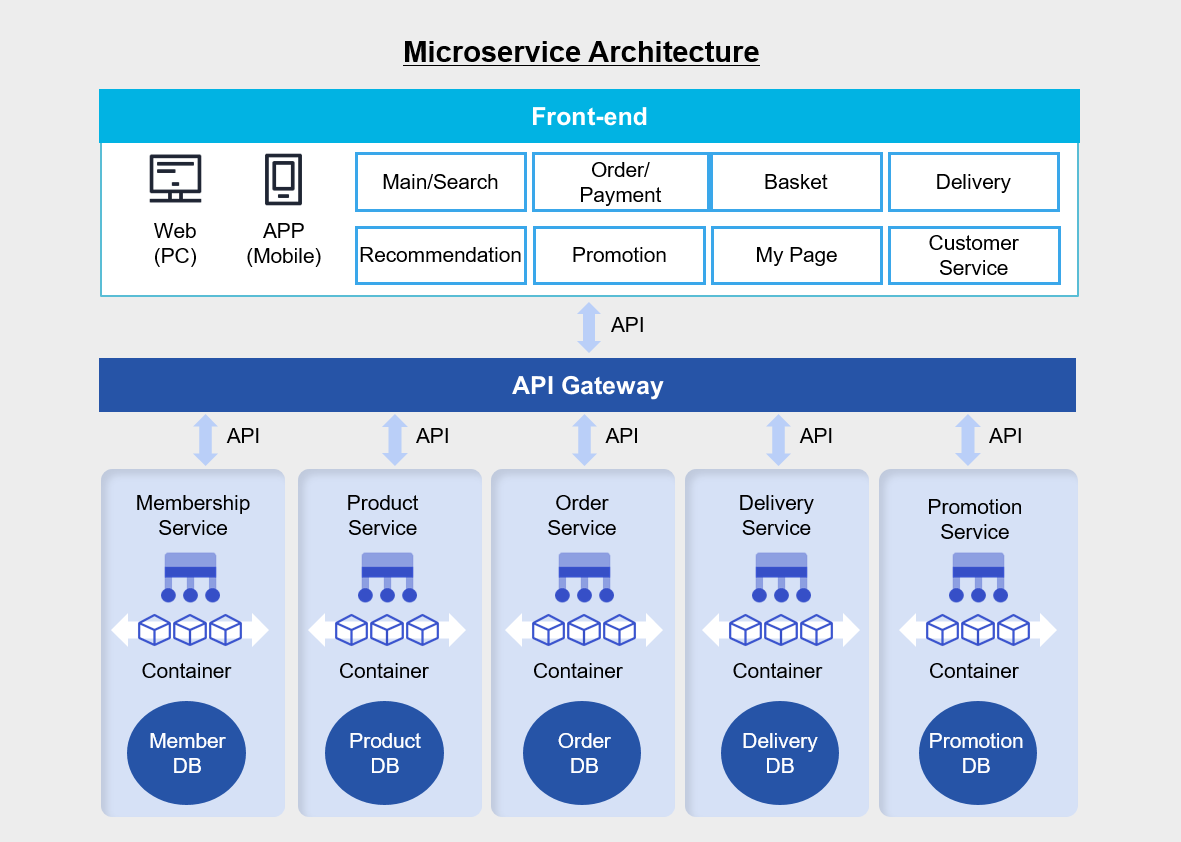
In a monolithic architecture, each business logic module is gathered on a single application server, and multiple databases are integrated into a single database server.
And the web, Application, and database are connected via socket communication.
On the other hand, in the Microservice architecture above, business logic and databases are independently organized for each business logic, and they are connected to the frontend via API.
If you develop by separating the Application into several manageable units, the development speed of each function will increase and the overall structure can be managed more easily.
Since the functions are composed independently, there is no need to develop all functions in the same language, and they are not affected by changes to other functions’ frameworks.
Therefore, it is easy to improve each function’s code and logic individually.
Also, because functions can be operated in isolation from each other, the impact of failures or overloads in other functions can be excluded or minimized.
However, since communication between each function must be done through an API, a separate inter-service communication mechanism must be implemented.
Also, because the service flow is performed across multiple functions and a database transaction occurs in each function, it can be difficult to track the state if a call fails or is delayed.
The more independent components there are, the more you have to manage each element individually, which inevitably increases the operational burden.
Microservice Architecture Suitability Review
To determine whether applying a microservice architecture to the application you want to build is appropriate, you should consider the following.
- Can a business domain be divided into multiple independent subdomains (Sub Domain)? (Based on the core principles of Domain-driven design (DDD))
- Can the development/operations organization be divided into multiple teams, each responsible for a “service unit”? (DevOps) and as part of the core principles of microservice architecture (MSA) strategy)
- Predict partial traffic hotspots, and is there clearly a stable domain that requires a high availability (HA) strategy?
- Does each service (or microservice) within the organization have its own rate of change, release cycle, and requirements?
- Can the operational automation system (CI/CD, monitoring, logging, tracing, etc.) be applied in terms of improving operational maturity and strengthening incident response?
- Are you considering strategic goals that pursue long-term growth of the organization and product, and independent development by domain?
Microservice Architecture Implementation Example
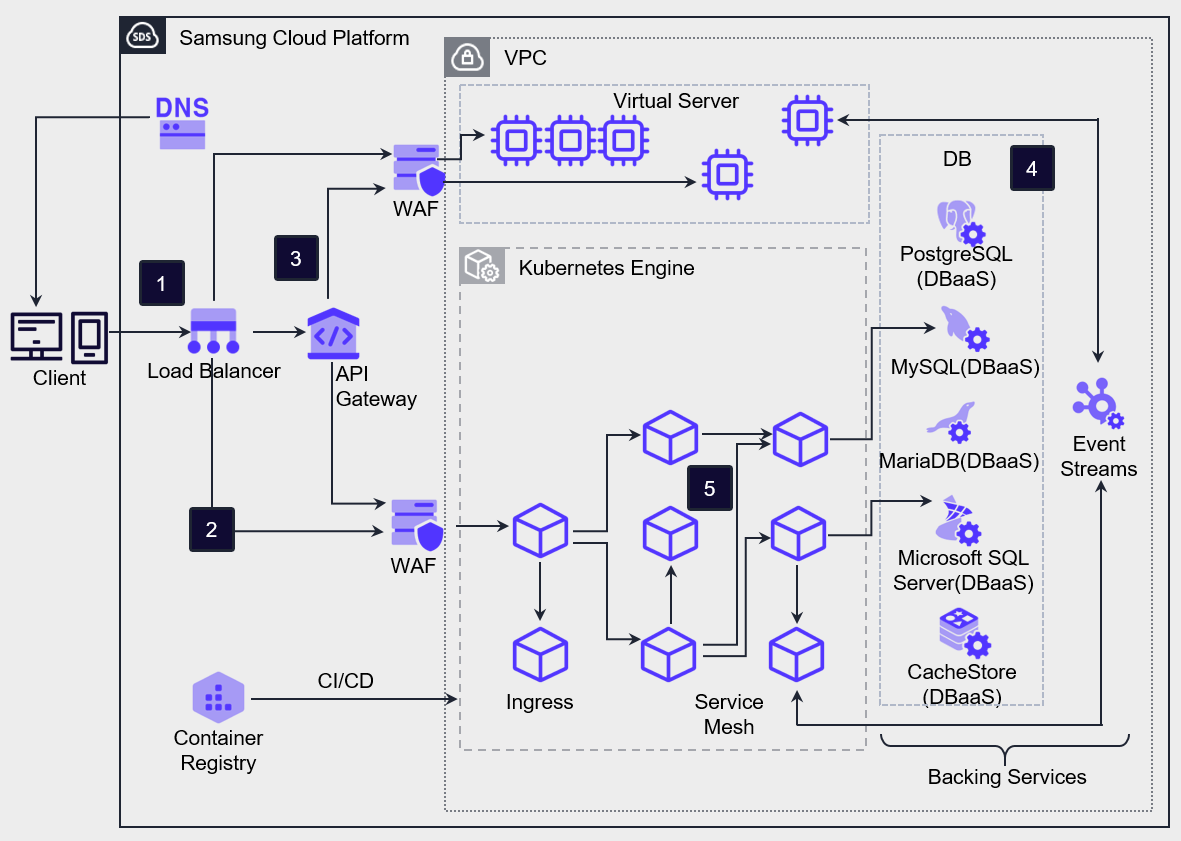
Client requests are delivered to VM/Container workloads and API Gateway services via the Load Balancer.
Client requests, except for API requests, are forwarded to the ingress provided by Kubernetes Engine, and Kubernetes Engine routes the incoming requests through the ingress to the mapped service Pods.
To handle client API requests, the API Gateway is positioned at the front and performs authentication and service routing for all incoming API calls from external sources.
Microservice Architecture configures a database separated into structured service units.
Service Mesh technology can be used to control the network between Microservice components, and through this, it is possible to manage and trace various network configurations and data flows between partitioned Applications.
If you configure a separate data store for each service, you gain the flexibility to choose the database that best fits the characteristics of that service.
For example, for a website traffic management service that requires scalability, you can use highly scalable NoSQL, and for an order processing service, you can use a relational database (RDBMS) to ensure data integrity and transaction consistency.
Also, if you set up a separate build system for each service, you can more easily apply changes per service and create an environment that allows rapid deployment of new features.
This approach has the advantage of being able to quickly improve the quality of individual services without affecting other services by improving only the necessary code.
For communication between services, you can use APIs to manage services by domain and route requests appropriately.
Especially when introducing an API Gateway, you can centrally manage and deploy service contracts, and you can also receive a feature that limits requests (Throttling) to a certain level when excessive requests occur.
If you configure an Application in the container environment of Kubernetes Engine, faster deployment and flexible scaling become possible.
Each container can set limits on CPU and memory usage, preventing a specific service from using resources excessively.
Also, in Kubernetes, the Probe feature continuously checks whether a container is operating normally, and if a problem occurs, it can automatically restart to prepare for errors.
In a Serverless Computing environment, you can build an architecture that uses Cloud Functions to handle simple and repetitive tasks in an event-driven manner.
Additionally, by storing web content in Object Storage, you can distribute the load caused by web content requests from the server, promoting efficient resource management.
Adjustment according to demand
The availability issue of a service does not only occur when the service stops due to a component failure. When unexpected external factors increase request load, causing the operating server’s capacity to reach its limit and the service to stop, this also is one of the important factors affecting usability.
On-premises requires a lot of prior preparation and thorough management to respond to such overload situations, but the cloud environment provides infrastructure that can respond to demand fluctuations agilely and flexibly.
- Implement server scaling/downsizing through Virtual Server’s Image management.
- Use managed services with no/low burden of infrastructure resource capacity management.
Virtual Server can vertically scale up by increasing the specifications of the server type according to demand, and can horizontally scale out by registering a server created from an Image to a Load Balancer, or horizontally scale in by deleting a server.
When using Auto-Scaling, you can automatically scale out or scale in the number of servers horizontally according to the configured policy without manual effort.
By using managed services, the cloud provider directly manages the scaling and shrinking of infrastructure, enabling flexible architecture design.
Serverless Computing such as Cloud Functions can configure event-driven computing without limitations of underlying infrastructure, and by utilizing services such as Object Storage, you can build a data repository without capacity limits.
Database service cannot scale the number of servers according to demand, but can easily vertically scale the specifications of the database server, and can also improve read performance through replicas.
Resource Coordination Automation
The cloud provides useful tools to flexibly prepare for changes in demand, and Auto-Scaling is a representative service that supports automatic resource adjustment according to demand changes.
Elasticity, the most important feature of the cloud, is a function that can flexibly adjust resources according to demand by providing additional physical resources when service demand increases, and reclaiming resources when there is excess capacity.
Elasticity is activated through automated operation based on specific indicators.
In Samsung Cloud Platform, Auto-Scaling works on Virtual Server and Container.
- Implement metric-based Auto-Scaling to achieve horizontal scaling/downsizing of Virtual Server.
- Enable automatic scaling of the Kubernetes Engine Node Pool to implement automatic resource scaling.
- Auto-Scaling Auto-Scaling is a computing service that automatically creates or deletes VMs based on resource usage according to predefined conditions or schedules. Through this, users can maintain stable services and operate servers efficiently.
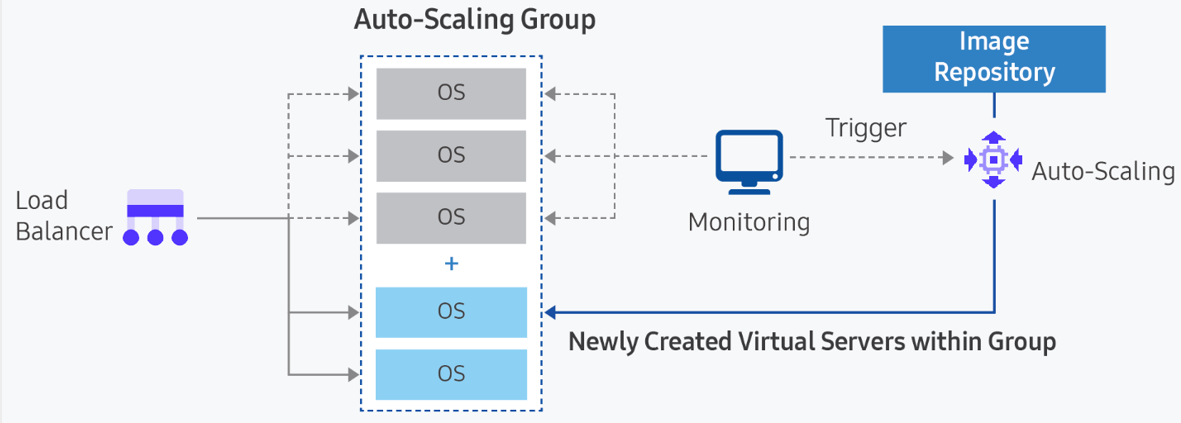
Register VMs as a server group in the Load Balancer, delivering request load to each VM. According to the pre-defined policy, we either create a new VM and add it, or delete an existing VM. The metrics that can be set by policy are CPU, memory, disk usage, network traffic, etc.
- Container
Because containers run on a runtime engine hosted on a VM, two decisions are required to automatically scale containers. First, you need to determine whether an additional container is required for the current workload. Second, you need to decide whether a new container can be assigned to a node in the existing node pool, or whether it must be assigned to a new node. To have new nodes automatically allocated, you need to use the node pool auto-scaling (Auto-Scaling) option when creating a node pool in Kubernetes Engine.
Managing bottlenecks that limit scalability
To apply Auto-Scaling for automatic response to increased demand in the service architecture, you must pre-identify resources that could become bottlenecks due to the service’s capacity limits.
- Identify points in the service flow that cannot be expanded.
- Consider alternatives that can handle increased demand during expansion.
There are also applications that scale vertically by adding CPU cores, memory, or network bandwidth to a single VM instance to handle increased load.
These applications have strictly limited scalability, often requiring manual configuration to handle increased load.
For example, relational databases cannot be horizontally scaled.
Database services cannot implement horizontal scaling because, even if redundancy is implemented, they support Active–Standby.
In this case, you can consider vertical scaling by increasing the specifications of CPU and memory, taking into account the maximum capacity in advance, and you can also consider offloading read load through replicas or caching.
Design for stepwise level degradation and load mitigation during load surge
Even if the load spikes and the server becomes overloaded, it must be designed so that the service does not get interrupted.
You must regulate traffic so that even if low-quality responses are returned to users, the service does not completely stop.
Also, it must be designed so that the service can operate even under overload conditions.
Detect overload in the service and either return low-quality responses to users, or partially pause or drop traffic so that the entire service does not completely stop due to overload.
- Configure the connection queue using a large-scale connection control solution.
- Configure a static web page to provide temporary responses to user requests.
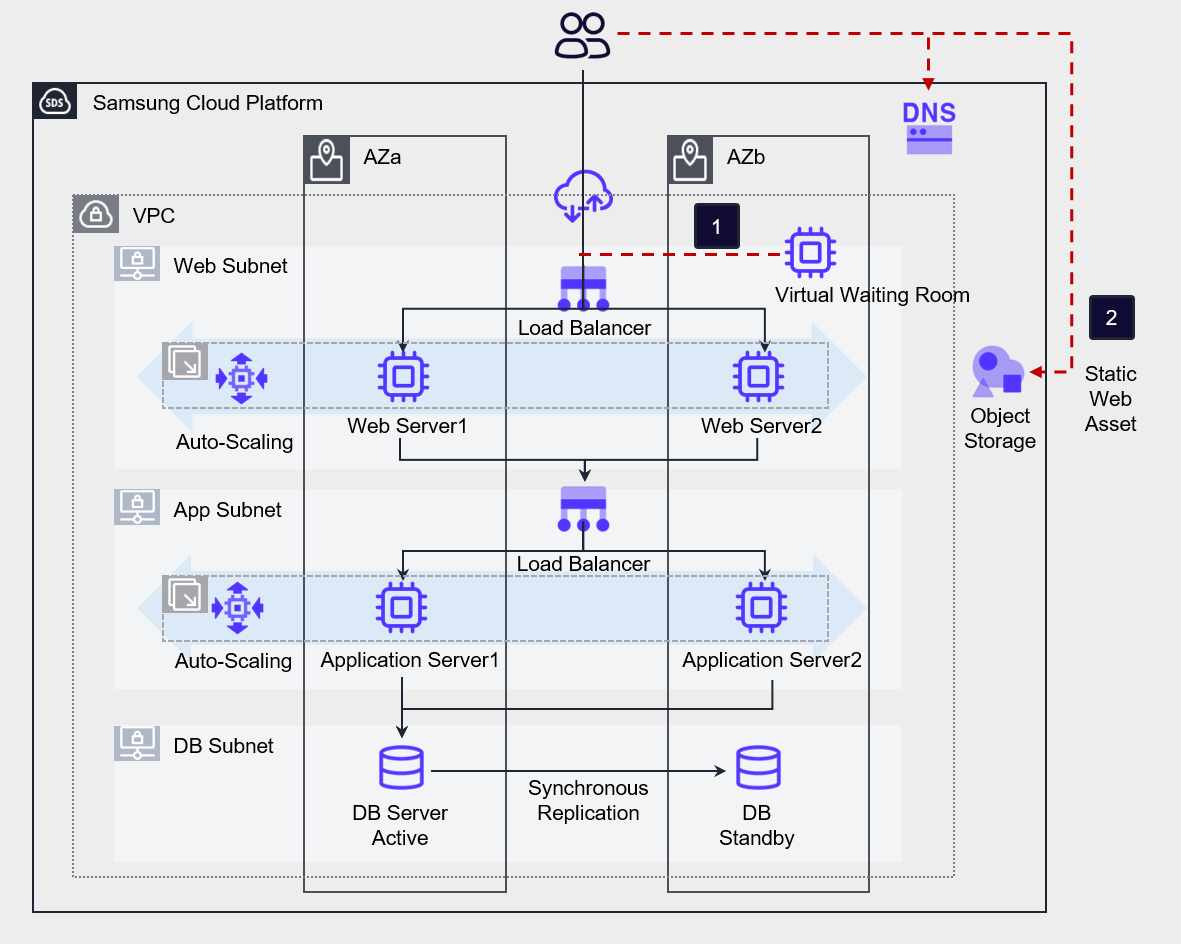
Use third‑party solutions such as a large‑scale access control solution (Virtual Waiting Room) to create a user queue so that the load of massive concurrent connections can be processed in stages.
Also, you can store static web assets in Object Storage to reduce the load on the web server.
Design of components for fault response
Resource Redundancy and Multi-AZ Configuration
A highly reliable system must not have a single point of failure. To achieve this, resources should be configured redundantly to prevent such failures in advance.
By utilizing the fault avoidance options inherently provided by the service, it prevents service interruption caused by physical faults, and through redundant resource placement, it ensures that when a fault occurs in one resource, another resource can handle the task.
Deploy workload data and resources to Multi-AZ so that the service is not interrupted even if a failure occurs in a specific availability zone.
Also, to avoid a single point of failure at the physical infrastructure level, resources are redundantly deployed across Multi-AZ.
- Virtual Server is redundantly deployed together with Load Balancer. If the requirements allow, configure Auto-Scaling to implement automated redundancy configuration.
- Apply Anti-Affinity to the server group to prevent the Virtual Server’s service from being interrupted due to host failures.
- Deploy resources across Multi-AZ to respond to Single-AZ failures.
- Configure the database redundantly through Database service’s high availability (HA) and replication (Replica).
The AZs of Multi-AZ are composed of independent physical infrastructure and are designed not to be affected by failures in other availability zones.
Therefore, even if a failure occurs, it only affects the specific AZ and does not affect other AZs.
When you select Multi-AZ and deploy resources, you will be able to prepare for various disasters.
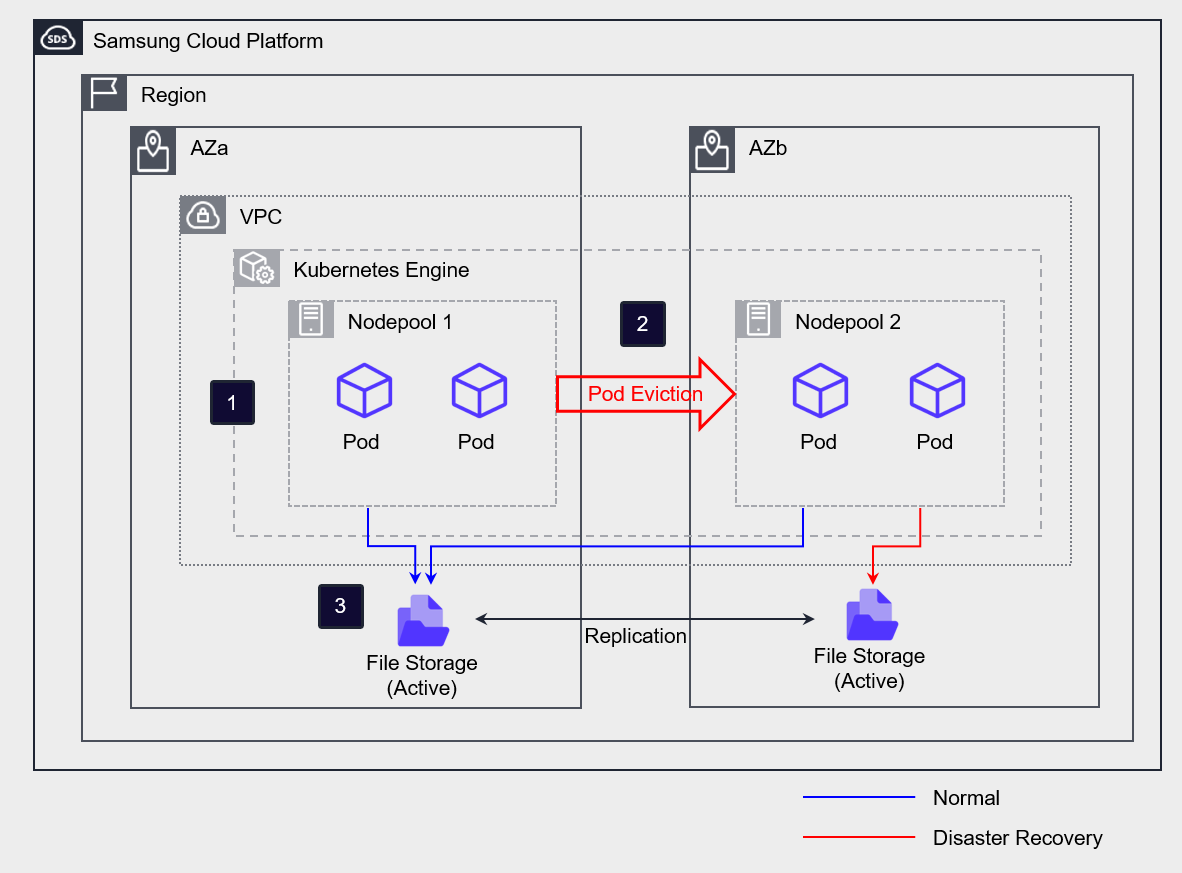
If you configure File Storage as Multi-AZ, the primary and replica are created in each AZ, and the data between the primary and replica is synchronized in real time.
Configure the Kubernetes Engine and create a separate node pool in each AZ.
In normal operation, use AZa’s Active Storage on all nodes and Pods.
If a disaster occurs in AZa, the Pod running in AZa will be moved (Eviction) to the AZb node, and the storage access path will also be switched to AZb Standby Storage.
Even if there is a case where it must be deployed on a single server, it should be designed so that if a failure occurs on that server, it does not lead to a failure of the entire service.
Implementing high-availability services requires that the elements that make up the main flow of the service be implemented using redundancy or multiplicity methods.
Due to specific constraints, for applications that consist of a single server, you must deploy them so that even if that server experiences a failure, it does not affect the main flow of the service.
The figure below is an example of a three-tier application.
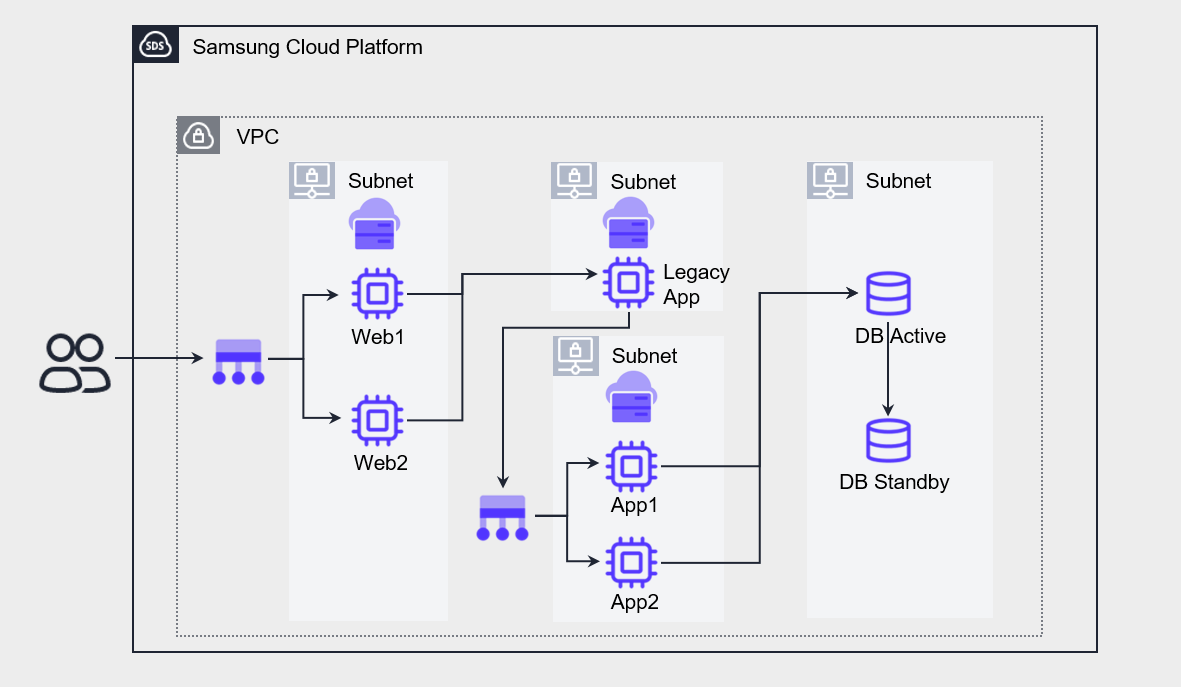
The service flow of this Application is composed of Web - Legacy App – App – DB.
Web, App, DB are configured for high-availability redundancy, but the Legacy App, due to certain constraints (inability to modify source code for redundancy, software license constraints, etc.), has to be configured on a single server.
In such cases, if a failure occurs on the Legacy App server, the entire service will be stopped.
As a result, that server becomes a single point of failure, reducing the overall service availability.
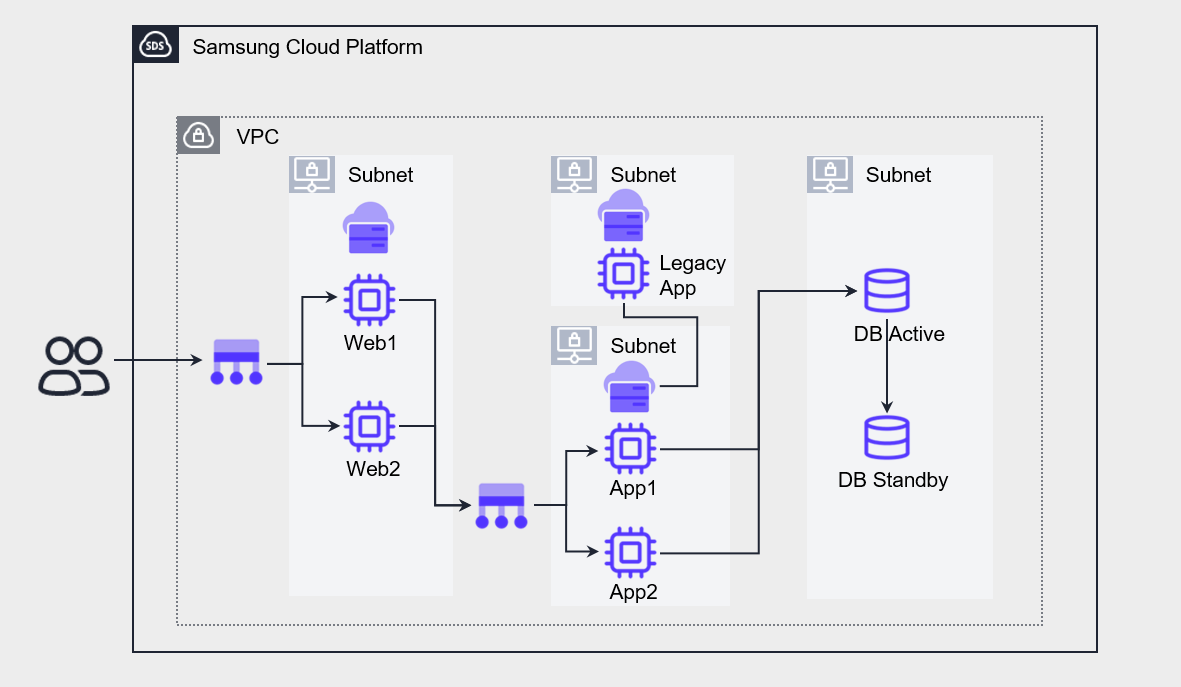
The above architecture is configured to separate the Legacy App from the main flow and reference it from the App.
If configured this way, even if a failure occurs on the Legacy App server, only some functions will be limited, and the overall service will be minimally affected.
Normal resource creation for fault response
Configure a mechanism that can recover when a resource failure occurs using the inherent functions of cloud resources or automatic recovery configuration.
- Use Auto-Scaling to recover abnormal resources.
- Enable the Kubernetes Engine node auto-recovery feature to respond to failures.
If the minimum number of instances for Auto-Scaling is set to 2, and a VM is excluded from the service due to a failure, the Load Balancer detects this, and the Auto-Scaling group automatically creates a new VM instance to maintain the minimum quantity.
Through this method, you can configure automatic fault response for Virtual Server.
In the case of Container, if you enable the node auto-repair feature in the Node Pool of Kubernetes Engine, automatic recovery is performed when a node failure occurs.
Recovery is initiated when a node continuously reports a NotReady state for a certain period (threshold about 10 minutes) or fails to report its state at all.
However, if the initial node creation does not reach the normal operating (Running) state and remains in the creating (Creating) state, or if four or more abnormal nodes occur in the same node pool, automatic recovery may be limited.
Protecting services from malicious attacks
Various measures can be taken to prevent services from being interrupted due to security breaches.
- Automatically respond to security attacks through managed security services.
- Automatically respond to denial attacks through Auto-Scaling.
- Establish a rapid response system through security event notifications.
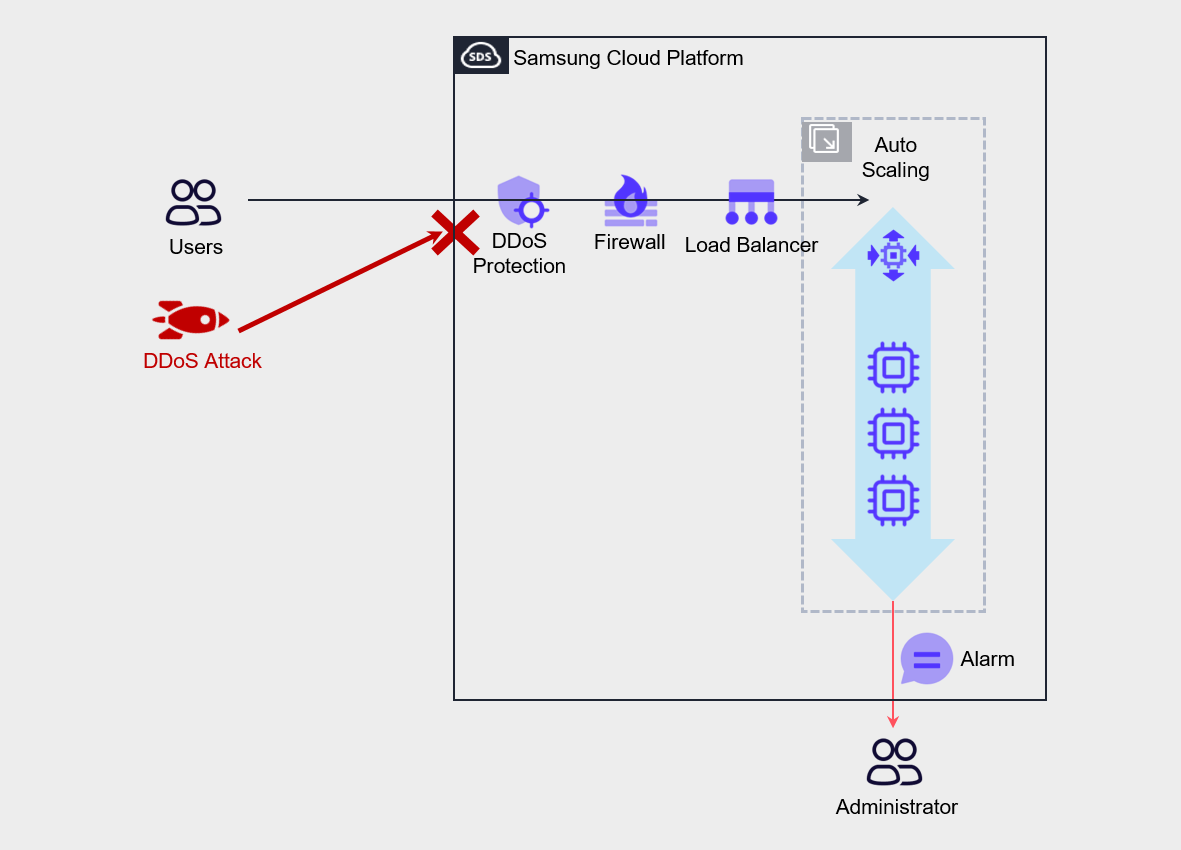
DDoS Protection, WAF, etc. perform a role in mitigating security attacks, and are security services managed by Samsung Cloud Platform rather than directly managed by the user.
Through this, you can respond quickly to malicious attacks.
In the case of service denial attacks such as DDoS attacks, configure Auto-Scaling so that the service can continue.
Additionally, you can configure admin alerts to enable blocking abnormal traffic on the firewall.