
Kubernetes Engine Performance Tuning Guide
Kubernetes Engine Performance Tuning Guide
Overview
Samsung Cloud Platform Kubernetes Engine (hereafter SKE) node OS is built from the standard OS image provided by Samsung Cloud Platform, with the OS parameters recommended for Kubernetes operation pre‑configured.
kernel.pid_max=4194304
net.core.somaxconn=16384
net.ipv4.conf.all.accept_redirects=0
net.ipv4.conf.all.forwarding=1
net.ipv4.conf.all.route_localnet=1
net.ipv4.conf.default.forwarding=1kernel.pid_max=4194304
net.core.somaxconn=16384
net.ipv4.conf.all.accept_redirects=0
net.ipv4.conf.all.forwarding=1
net.ipv4.conf.all.route_localnet=1
net.ipv4.conf.default.forwarding=1The above configuration applies to the node’s host network namespace. The net.* parameters are mostly isolated per network namespace, so this value is not directly applied to the application pod. For more details, refer to sysctl scope.
If there are specific performance optimization requirements for the Linux OS, SKE can modify the default settings of certain cluster components.
sysctl scope
Before changing a sysctl parameter, you must verify whether the item is isolated on a per‑network‑namespace basis. The location (node or pod) where the configuration is applied and the method of application vary depending on whether isolation is enabled.
namespaced sysctl: An item that can be set independently for each pod, and most net.* parameters belong here. Pods use their own network namespace, so changing the value on the node does not propagate to the pod. To apply it to a pod, you must set it per pod.
unnamespaced sysctl(node level): An item that has only a single value across the entire node. It cannot be set differently per pod like net.netfilter.nf_conntrack_max; it must be changed directly on the node.
Kubernetes categorizes namespaced sysctls into safe and unsafe, and the application method varies depending on the classification.
| Category | Main item | How to apply |
|---|---|---|
| namespaced / safe | net.ipv4.ip_local_port_range, net.ipv4.tcp_syncookies, net.ipv4.tcp_keepalive_time, net.ipv4.tcp_keepalive_intvl, net.ipv4.tcp_keepalive_probes | Set the pod’s securityContext.sysctls field without privileges |
| namespaced / unsafe | net.core.somaxconn, net.ipv4.tcp_max_syn_backlog | Set a privileged initContainer for each pod |
| unnamespaced | net.netfilter.nf_conntrack_max | Set as a DaemonSet or custom image on the node |
The safe list has been expanded according to the Kubernetes version. The net.ipv4.tcp_keepalive_* items have been included in the safe list starting with Kubernetes 1.29, so clusters with earlier versions must configure them using the same method as unsafe items.
To set an unsafe item in securityContext.sysctls, you must allow that item with the kubelet’s --allowed-unsafe-sysctls option. However, because SKE is a managed service and you cannot change kubelet options, set the unsafe items using a privileged initContainer.
net.core.somaxconn is a namespaced and unsafe item. Therefore, raising the node’s value further will not be propagated to the application pod. The pod’s network namespace is initialized at creation with the kernel constant SOMAXCONN value (4096 on kernel 5.4 and later). To adjust the Backlog of an application pod, use the method from 파드 성능 최적화.Custom Node Configuration Method
Operating System (OS) Customization
SKE provides a list of operating systems supported for each cluster version, and a single cluster can mix different operating systems. Check the supported operating system and cluster version combinations in the Kubernetes Engine User Guide. To optimize the node, use the following methods.
Custom Image (Custom Image) Creation: Node updates such as security patches for images or Kubernetes versions are provided by Samsung Cloud Platform. If additional configuration is required for the customer’s environment, you can permanently apply the settings by creating a custom image for the node.
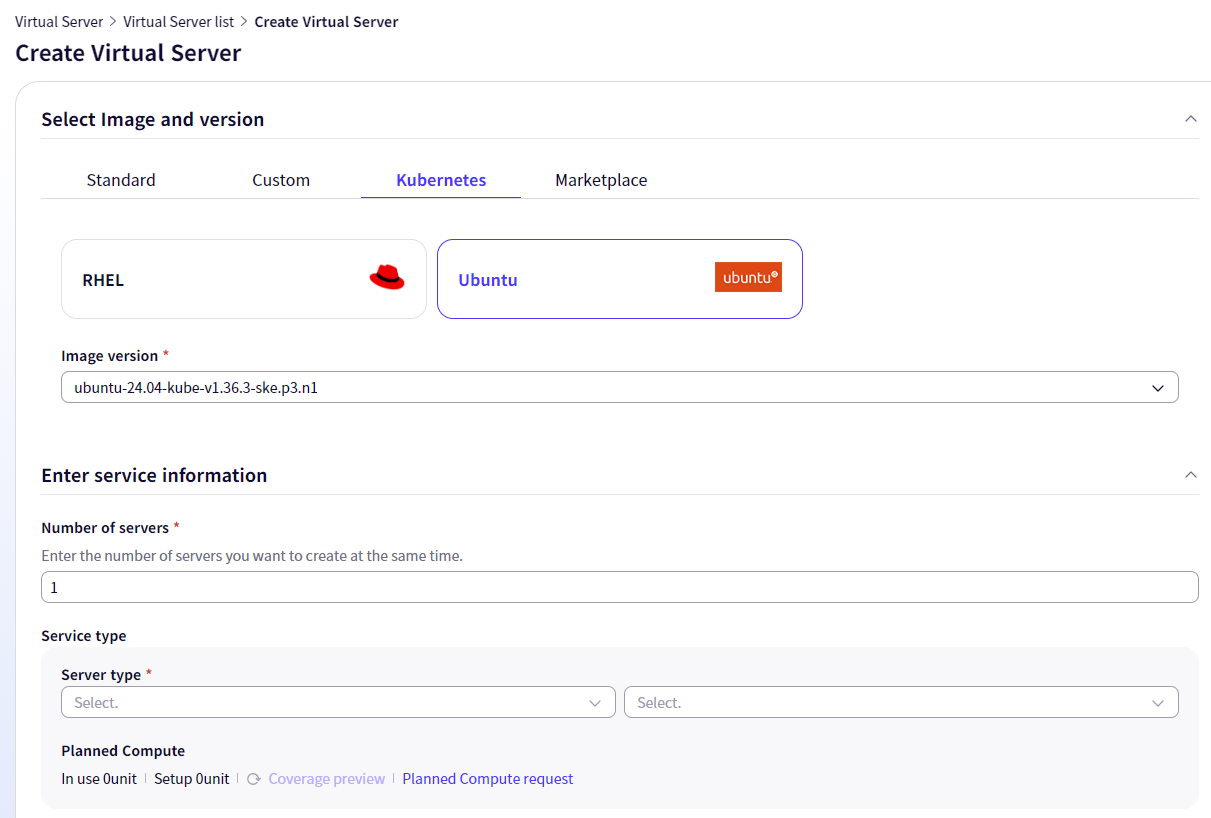
Virtual Server You can create a node pool using the user’s Custom Image. To create a node pool using a Custom Image, refer to the following procedure.
- Create a Virtual Server that includes the SKE image.
- Use the Virtual Server’s Custom Image feature to register the image.
- Select the registered Custom Image and create a node pool.
Custom images are applied at node boot time, giving them the advantage of always being reflected before application pods. If you need to apply node-level settings reliably, prioritize using a custom image over a DaemonSet.
Temporary change
If you access a pod or modify the node settings through another process, the changes will only be applied temporarily. If node operations such as automatic recovery, restart, update, or replacement occur, all changes revert to the default settings.
Automatic reapplication using DaemonSet
To ensure that the configuration persists throughout the node lifecycle tasks, create a DaemonSet that uses an initContainer. A DaemonSet restarts pods whenever a node is added or rebooted, and at that time the initContainer reapplies the configuration. Detailed instructions are explained in Node configuration changes for performance optimization.
Node configuration adjustments for performance optimization
Modify Node Kernel Network Settings
If there are performance optimization requirements, you can change the default settings for the Linux kernel’s sysctl parameters on the node. Nodes are automatically provisioned with optimized kernel performance by default. However, applying a custom DaemonSet that includes an init container (initContainer) can change the default settings. When a DaemonSet is applied, the configuration of all existing nodes is modified, and the same configuration is applied to any nodes added later.
Since the daemonset in this section runs with hostNetwork: true, it applies the setting only to the node’s host network namespace. It is effective for processes running directly on the host and for hostNetwork pods, but it does not apply to regular application pods that use their own network namespace. To tune the application pod, refer to 파드 성능 최적화.
Also, DaemonSets will not be scheduled onto node pools with a taint unless they are configured to tolerate the taint. To target all nodes in the cluster, also check the workload’s taint configuration.
Example scenario: TCP communication backlog shortage
You can use the netstat command to verify whether the OS is experiencing a TCP communication backlog shortage. This is a metric that must be checked if application response delays or abnormal connection drops occur.
netstat -s | grep -E -i "overflow|drop"
TcpExt:

    1380 times the listen queue of a socket overflowed
    1380 SYNs to LISTEN sockets dropped
netstat -s | grep -E -i "overflow|drop"
TcpExt:
1380 times the listen queue of a socket overflowed
1380 SYNs to LISTEN sockets droppedTo check the current Backlog usage per listening socket, use the ss command. Recv-Q is the number of connections waiting for accept, and Send-Q is the Backlog size set for that socket. When the two values become similar, the backlog is close to saturation.
ss -lnt
State    Recv-Q   Send-Q   Local Address:Port   Peer Address:Port
LISTEN   0        4096     0.0.0.0:8080         0.0.0.0:*
ss -lnt
State Recv-Q Send-Q Local Address:Port Peer Address:Port
LISTEN 0 4096 0.0.0.0:8080 0.0.0.0:*The backlog shortage can be resolved by adjusting the sysctl parameters net.core.somaxconn and net.ipv4.tcp_max_syn_backlog.
The characteristics of the two parameters are as follows.
net.ipv4.tcp_max_syn_backlog: Maximum SYN backlog size that stores SYN packet information during the initial connection step when a client connects to a server. To increase the net.core.somaxconn value, you must also increase the tcp_max_syn_backlog value.
net.core.somaxconn: The maximum Listen Backlog value allowed per socket. Listen Backlog is a queue that stores connection information and waits until the connection with the application is completed (accept) after the 3-way handshake is finished. If the number of concurrent connections is low, a small Backlog size is not an issue, but if application latency causes the number of pending connections to exceed the Backlog size, the remaining connections are rejected (Drop) by the OS.
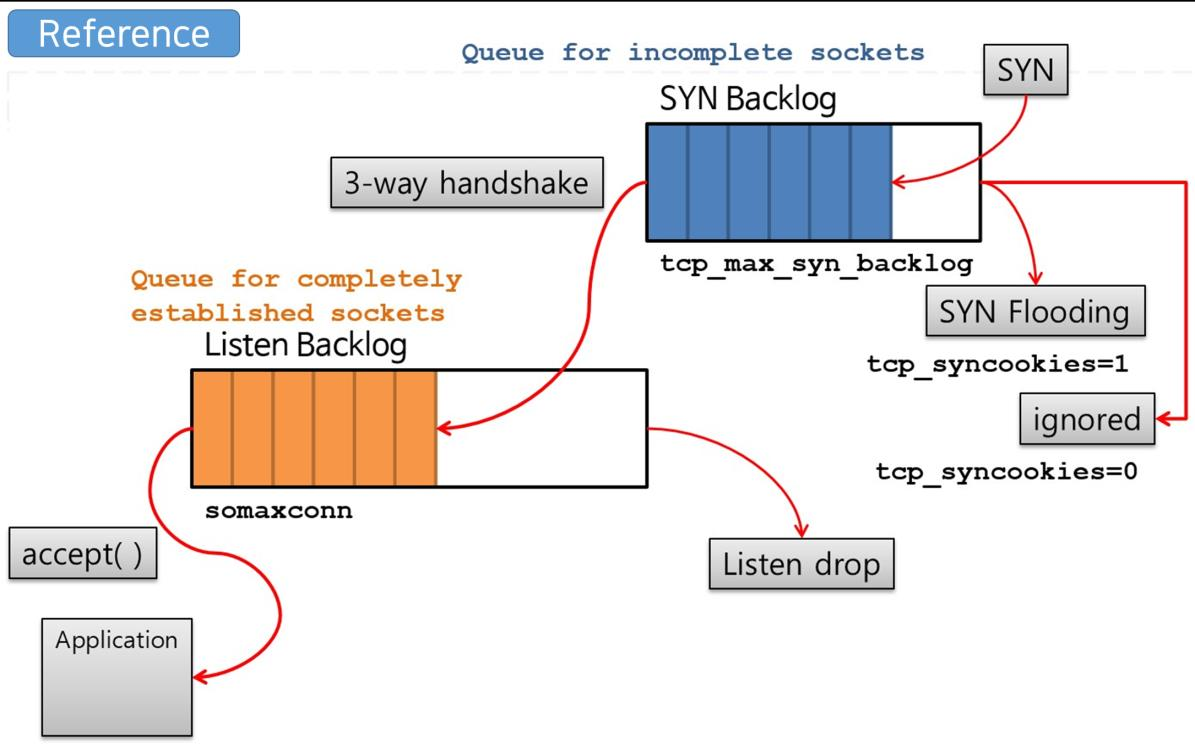
net.core.somaxconn and net.ipv4.tcp_max_syn_backlog are both namespaced items isolated per network namespace, but they are unsafe sysctls not on the Kubernetes safe list, so they can only be applied directly through a privileged pod.
To adjust the net.core.somaxconn value of the host network namespace, save a YAML file with the following content. Add the field and value of the sysctl parameter you want to adjust in the spec.template.spec.initContainers section.
The following example DaemonSet modifies the default maximum allowed connections net.core.somaxconn. As explained above, when raising net.core.somaxconn, you must also raise net.ipv4.tcp_max_syn_backlog, so when applying it, add sysctl -w net.ipv4.tcp_max_syn_backlog=<값> to the initContainer’s command in the same way.
apiVersion: apps/v1
kind: DaemonSet
metadata:
  name: node-tuning
  namespace: kube-system
  labels:
    app: node-tuning
spec:
  selector:
    matchLabels:
      name: node-tuning
  template:
    metadata:
      labels:
        name: node-tuning
    spec:
      hostNetwork: true
      hostPID: true
      hostIPC: true
      initContainers:
        - command:
            - sh
            - -c
            - sysctl -w net.core.somaxconn=32768;
          image: alpine:3.24
          imagePullPolicy: IfNotPresent
          name: sysctl
          resources: {}
          securityContext:
            privileged: true
            capabilities:
              add:
                - NET_ADMIN
          volumeMounts:
            - name: modifysys
              mountPath: /sys
      containers:
        - resources:
            requests:
              cpu: 0.01
          image: alpine:3.24
          name: sleepforever
          command:
            - sleep
            - infinity
      volumes:
        - name: modifysys
          hostPath:
path: /sysapiVersion: apps/v1
kind: DaemonSet
metadata:
name: node-tuning
namespace: kube-system
labels:
app: node-tuning
spec:
selector:
matchLabels:
name: node-tuning
template:
metadata:
labels:
name: node-tuning
spec:
hostNetwork: true
hostPID: true
hostIPC: true
initContainers:
- command:
- sh
- -c
- sysctl -w net.core.somaxconn=32768;
image: alpine:3.24
imagePullPolicy: IfNotPresent
name: sysctl
resources: {}
securityContext:
privileged: true
capabilities:
add:
- NET_ADMIN
volumeMounts:
- name: modifysys
mountPath: /sys
containers:
- resources:
requests:
cpu: 0.01
image: alpine:3.24
name: sleepforever
command:
- sleep
- infinity
volumes:
- name: modifysys
hostPath:
path: /sysApply the DaemonSet to the node.
kubectl apply -f node-tuning.yamlkubectl apply -f node-tuning.yamlTo revert the node sysctl parameters to their default values, follow the steps below.
- Delete the DaemonSet. 1. The DaemonSet pod is removed, and the configuration will not be reapplied to nodes added thereafter. 1. However, the sysctl values of nodes that have already been applied will not revert simply by deleting them.
kubectl delete ds node-tuning -n kube-systemkubectl delete ds node-tuning -n kube-system- Reboot all nodes in the cluster. 2. The default value is applied to the node.
Pod performance optimization
If a particular workload has performance requirements, you can change the default settings for the Linux kernel sysctl parameters of the pod’s network namespace. Since the kernel settings of an application pod are independent of the node settings, you should use the methods in this section when tuning application performance.
To optimize the kernel settings of an application pod, add an initContainer patch to objects with pod templates such as DaemonSet, ReplicaSet(ReplicaSet), Deployment(Deployment), and StatefulSet(StatefulSet). Since the initContainer shares the same network namespace as the application container, values changed in the initContainer are applied to the pod’s application container.
spec.template, the patch below cannot be applied as is. Also, the initContainers field of a running pod cannot be changed. Instead of editing the pod directly, modify the parent workload object to recreate the pod.Save the following initContainer patch content to a pod-patch.yaml file, and add the field and value of the sysctl parameter you want to adjust. In this example, the default maximum number of allowed connections net.core.somaxconn and the temporary port range net.ipv4.ip_local_port_range are changed via an initContainer.
spec:
  template:
    spec:
      initContainers:
      - command:
        - sh
        - -c
        - sysctl -e -w net.core.somaxconn=32768; sysctl -e -w net.ipv4.ip_local_port_range="1025 65535";
        image: alpine:3.24
        imagePullPolicy: IfNotPresent
        name: sysctl
        resources: {}
        securityContext:
privileged: truespec:
template:
spec:
initContainers:
- command:
- sh
- -c
- sysctl -e -w net.core.somaxconn=32768; sysctl -e -w net.ipv4.ip_local_port_range="1025 65535";
image: alpine:3.24
imagePullPolicy: IfNotPresent
name: sysctl
resources: {}
securityContext:
privileged: truePrivileged containers are denied in namespaces where the Pod Security Admission baseline or restricted policy is applied. Before applying the patch, verify the policy level of the target namespace and, if necessary, allow only that workload as an exception.
Meanwhile, among the two items in the above example, net.ipv4.ip_local_port_range is included in the Kubernetes safe list, so if only this value needs to be changed, it can be set via the pod’s securityContext.sysctls field without a privileged initContainer. Since it does not require privileges and is not subject to Pod Security Admission constraints, use this method if possible. Use privileged initContainer only for unsafe items such as net.core.somaxconn.
Apply patches to deployment and other pod deployment objects. --patch option receives a patch string, so a patch saved to a file must be specified with the --patch-file option.
kubectl patch deployment <deployment_name> -n <namespace> --patch-file pod-patch.yamlkubectl patch deployment <deployment_name> -n <namespace> --patch-file pod-patch.yamlWhen the patch is applied, the pod is recreated. Check whether the value is actually reflected inside the pod.
kubectl exec -n <namespace> <pod_name> -- sysctl net.core.somaxconn
net.core.somaxconn = 32768
kubectl exec -n <namespace> <pod_name> -- sysctl net.core.somaxconn
net.core.somaxconn = 32768If you change the net.core.somaxconn value in the kernel settings, most applications will automatically use the updated value. However, some applications may need to manually change that value in the application code to match the kernel value. For example, when tuning the performance of a pod running an nginx application, you must also adjust the backlog field value in the nginx application code to match the kernel settings.
Network keepalive sysctl configuration optimization
If a pod has long-lived TCP connections and experiences intermittent disconnections while idle, changing the pod’s sysctl keepalive settings may help.
The reason idle connections are dropped is usually because the Load Balancer, NAT, or firewall along the path clears sessions that have no traffic for a certain period. Since TCP keepalive periodically sends packets during idle periods to keep the session alive, net.ipv4.tcp_keepalive_time should be set to a value smaller than the idle timeout of devices along the path for it to be effective. For example, if the Load Balancer’s idle timeout is 60 seconds, tcp_keepalive_time must be set to a shorter value.
The meanings of the three parameters are as follows.
net.ipv4.tcp_keepalive_time: The waiting time (in seconds) before sending the first keepalive packet after the connection becomes idle.
net.ipv4.tcp_keepalive_intvl: the interval (seconds) for retransmitting when there is no response to a keepalive packet.
net.ipv4.tcp_keepalive_probes: the number of times to retransmit keepalive packets without a response before deciding to terminate the connection.
SO_KEEPALIVE option is enabled on the socket. This option is disabled by default and must be explicitly enabled in the application or the connection pool library being used. If you only change the sysctl and do not enable keepalive in the application, there will be no effect.As described earlier in 성능 최적화를 위한 노드 설정 수정, using a DaemonSet allows you to set sysctl network values on a node. However, because the keepalive setting is a namespaced sysctl, the node’s value is not propagated to pods, and there is a limitation that the connection-persistence setting cannot be uniformly applied to already deployed pods. Therefore, it must be set at the pod level.
To configure each pod, you can apply a privileged initContainer. For applications that need to apply sysctl network values, configure the initContainer using the example below.
apiVersion: apps/v1
kind: Deployment
metadata:
  name: test-sysctl
  namespace: test-ns
  labels:
    run: test-sysctl
spec:
  replicas: 2
  selector:
    matchLabels:
      run: test-sysctl
  template:
    metadata:
      labels:
        run: test-sysctl
    spec:
      initContainers:
      - command:
        - sh
        - -c
        - sysctl -e -w net.ipv4.tcp_keepalive_time=40; sysctl -e -w net.ipv4.tcp_keepalive_intvl=15; sysctl -e -w net.ipv4.tcp_keepalive_probes=6;
        image: alpine:3.24
        imagePullPolicy: IfNotPresent
        name: sysctl-init
        resources: {}
        securityContext:
          privileged: true
      containers:
      - name: test-sysctl
        image: alpine:3.24
        command:
        - sleep
- infinityapiVersion: apps/v1
kind: Deployment
metadata:
name: test-sysctl
namespace: test-ns
labels:
run: test-sysctl
spec:
replicas: 2
selector:
matchLabels:
run: test-sysctl
template:
metadata:
labels:
run: test-sysctl
spec:
initContainers:
- command:
- sh
- -c
- sysctl -e -w net.ipv4.tcp_keepalive_time=40; sysctl -e -w net.ipv4.tcp_keepalive_intvl=15; sysctl -e -w net.ipv4.tcp_keepalive_probes=6;
image: alpine:3.24
imagePullPolicy: IfNotPresent
name: sysctl-init
resources: {}
securityContext:
privileged: true
containers:
- name: test-sysctl
image: alpine:3.24
command:
- sleep
- infinitynet.ipv4.tcp_keepalive_time, net.ipv4.tcp_keepalive_intvl, net.ipv4.tcp_keepalive_probes have been included in the safe list since Kubernetes 1.29. If the cluster version is 1.29 or higher, we recommend declaring the three items in the pod’s securityContext.sysctls field instead of using a privileged initContainer as shown above. Since it is applied without privileges, it can be used even in namespaces where the Pod Security Admission’s baseline or restricted policies are enforced.
The example values (40 seconds, 15 seconds, 6 times) assume an environment with an idle timeout of approximately 60 seconds. Adjust the actual value to align with the equipment’s idle timeout on the path and the application’s connection characteristics.