
Sentinel usage Redis Availability configuration
Sentinel usage Redis Availability configuration
Overview
Redis is an in-memory key-value store that is widely used as a cache to improve performance.
- Use the data if it is in the cache
- If the data is not in the cache, use the DB data.
- Store data retrieved from the DB in the cache
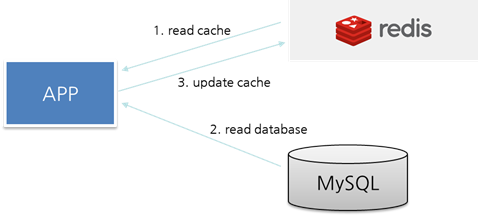
Additionally, when configuring WAS Session Clustering, Redis is commonly used as the Session Data store. Therefore, high‑availability configuration for Redis has become more important. This document will cover configuring and operating Redis high availability using Sentinel.
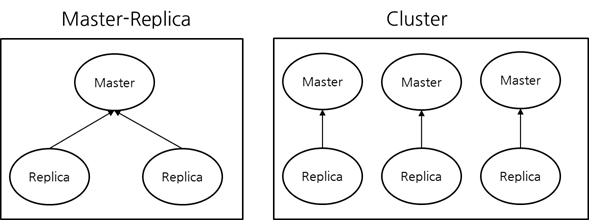
Redis High Availability Configuration Architecture Comparison
The architectures for configuring Redis high availability are Master-Replica and Cluster configurations.
Sentinel Architecture and Features
Because Sentinel makes decisions based on a quorum, a basic set of three instances is required for high availability. Sentinel monitors Redis, and when the Redis master fails, it promotes a replica to the new master and provides the client with the information about the newly promoted master so that the service can continue.
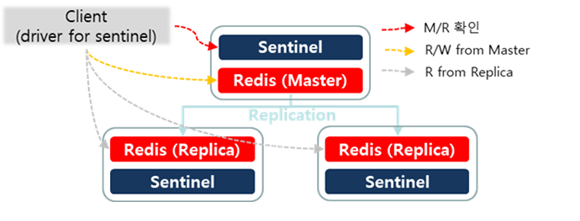
The main features are as follows.
- Monitoring Sentinel continuously verifies that Master and Replica instances are operating as expected.
- Notification Sentinel can notify system administrators or other programs (Client) via the API that there is a problem with a Redis instance.
- Automatic Failover If the Master does not operate as expected, Sentinel promotes a Replica to Master; if there are additional Replicas, they are reconfigured to use the new Master, and a failover process is started to inform Clients using the Redis server of the new address they should use.
- Configuration Provider The client currently connects to Sentinel to check the master’s address. If a failover occurs, Sentinel informs the client of the new address.
Sentinel main configuration
sentinel monitor <master-group-name> <ip> <port> <quorum>
, : Redis Master IP, Port : Number of sentinels that must agree to start failover when the Master fails Typically, configure Sentinel with three instances and set the quorum to two.
down-after-milliseconds <millisecond>
If communication with the Redis Master fails for the configured period, Sentinel initiates a failover.
Check Sentinel configuration
sentinel-cli> info sentinel
You can view the Sentinel configuration information.

- name: myredis (Master Group Name)
- status: ok
- ok : normal
- sdown : Subjective Down
- odown : Objective Down
- address: 192.168.10.5:6378 (Redis Master IP, Port is displayed) slaves: 2 (Number of Replicas registered in the Redis Master, including down Replicas) sentinels: 3 (the number of Sentinels monitoring Redis (including down Sentinels))
sentinel-cli> sentinel get-master-addr-by-name <master-group-name>
You can check the Redis Master IP/Port information.

sentinel-cli> sentinel ckquorum <master-group-name>
Check whether the current Sentinel configuration can reach the quorum required for master failover.

Sentinel Client
If you use Sentinel, the client must not connect directly to Redis. Because the Redis master can change during a failure, you must always connect to Redis through Sentinel. Therefore, you need to configure Sentinel information in the client settings.
Most client libraries support Sentinel. In the Java ecosystem, the most widely used Redis client libraries are Jedis and Lettuce. As shown in the example below, you need to configure the Sentinel IP/Port instead of the Redis IP/Port.
/**
 * Jedis
 */
@Bean
public RedisConnectionFactory jedisConnectionFactory() {
  RedisSentinelConfiguration sentinelConfig = new RedisSentinelConfiguration()
  .master("mymaster")
  .sentinel("127.0.0.1", 26379)
  .sentinel("127.0.0.1", 26380);
  return new JedisConnectionFactory(sentinelConfig);
}

/**
 * Lettuce
 */
@Bean
public RedisConnectionFactory lettuceConnectionFactory() {
  RedisSentinelConfiguration sentinelConfig = new RedisSentinelConfiguration()
  .master("mymaster")
  .sentinel("127.0.0.1", 26379)
  .sentinel("127.0.0.1", 26380);
  return new LettuceConnectionFactory(sentinelConfig);
}
Source: https://docs.spring.io/spring-data/data-redis/docs/current/reference/html/#redis:sentinel