Configuring Redis High Availability using Sentinel
Configuring Redis High Availability using Sentinel
Overview
Redis is an in-memory Key-Value store often used as a cache for performance enhancement.
- If data is in the cache, use it
- If data is not in the cache, use DB data
- Store DB data in the cache
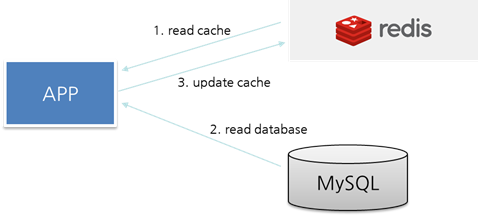
Additionally, Redis is often used as a session data store when configuring WAS Session Clustering. Therefore, configuring high availability for Redis has become more important. This document will discuss configuring Redis high availability using Sentinel.
Comparing Redis High Availability Architecture
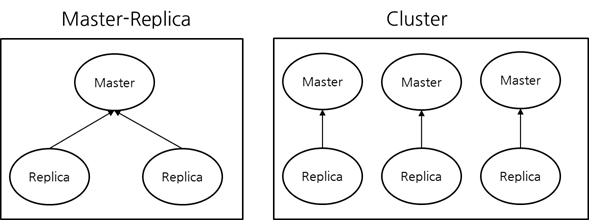
There are two architectures for configuring Redis high availability: Master-Replica and Cluster.
Sentinel Architecture and Function
Sentinel uses Quorum-based decision-making, so at least three instances are required for high availability configuration. Sentinel monitors Redis and promotes a Replica to Master if the Redis Master fails, allowing the service to continue.
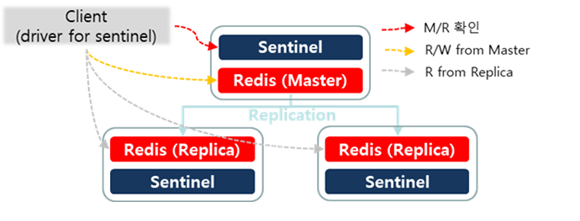
The main features are as follows:
- Monitoring Sentinel continuously checks if Master and Replica instances are working as expected.
- Notification Sentinel can notify system administrators or other programs (Clients) of issues with Redis instances via APIs.
- Automatic Failover If the Master fails, Sentinel promotes a Replica to Master and reconfigures other Replicas to use the new Master, starting a failover process to notify Clients of the new address.
- Configuration Provider Clients can connect to Sentinel to determine the current Master address. If a failover occurs, Sentinel notifies the Client of the new address.
Sentinel Main Settings
sentinel monitor <master-group-name> <ip> <port> <quorum>
: redis cluster name , : Redis Master IP, Port : number of Sentinels required to agree on starting failover when the Master fails Typically, three Sentinels are configured, and quorum is set to 2.
down-after-milliseconds <millisecond>
If communication with the Redis Master is lost for the specified time, Sentinel starts the failover process.
Checking Sentinel Configuration
sentinel-cli> info sentinel
You can check the Sentinel configuration information.

- name: myredis (Master Group Name)
- status: ok
- ok : normal
- sdown : subjective Down
- odown : objective Down
- address: 192.168.10.5:6378 (Redis Master IP, Port is displayed)
- slaves: 2 (number of Replicas registered with the Redis Master, including those that are down)
- sentinels: 3 (number of Sentinels monitoring Redis, including those that are down)
sentinel-cli> sentinel get-master-addr-by-name <master-group-name>
You can check the Redis Master IP/Port information.

sentinel-cli> sentinel ckquorum <master-group-name>
You can check if the current Sentinel configuration can reach the quorum required for Master failover.

Sentinel Client
When using Sentinel, Clients should not connect directly to Redis. In case of a failure, the Redis Master may change, so Clients must always connect through Sentinel. Therefore, Client settings should include Sentinel information.
Most Client libraries support Sentinel. In the Java ecosystem, Jedis and Lettuce are the most commonly used Redis Client libraries. As shown in the example below, the Redis IP/Port should be set to the Sentinel IP/Port instead.
/**
 * Jedis
 */
@Bean
public RedisConnectionFactory jedisConnectionFactory() {
  RedisSentinelConfiguration sentinelConfig = new RedisSentinelConfiguration()
  .master("mymaster")
  .sentinel("127.0.0.1", 26379)
  .sentinel("127.0.0.1", 26380);
  return new JedisConnectionFactory(sentinelConfig);
}

/**
 * Lettuce
 */
@Bean
public RedisConnectionFactory lettuceConnectionFactory() {
  RedisSentinelConfiguration sentinelConfig = new RedisSentinelConfiguration()
  .master("mymaster")
  .sentinel("127.0.0.1", 26379)
  .sentinel("127.0.0.1", 26380);
  return new LettuceConnectionFactory(sentinelConfig);
}
Source: https://docs.spring.io/spring-data/data-redis/docs/current/reference/html/#redis:sentinel