Redis Performance Monitoring and Tuning
Redis Performance Monitoring and Tuning
Overview
Redis is an in-memory key-value store that is widely used as a cache function to improve performance. Since Redis is used for performance, performance monitoring and tuning are very important factors. This document explains how to understand the Redis architecture related to performance and how to perform performance monitoring and tuning.
Redis architecture features
Single Thread
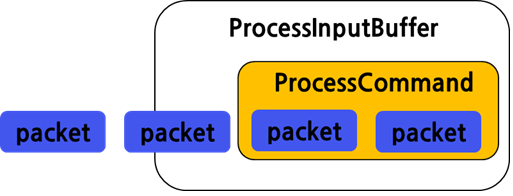
Because Redis operates with a single thread, if one request becomes a bottleneck, subsequent requests will continue to wait. Since it works by receiving data in packet units and executing when a command is completed, it is necessary to monitor whether unnecessarily long-running commands (keys, hgetall) are frequently executed in the production environment.
SlowLog
From the client side, the response time is measured slowly at 100ms ~ 300ms, but there are cases where the Redis side does not accumulate SlowLog. This suggests that Redis is not slow, but did Redis really respond quickly? To put it simply, Redis gave a delayed response. This is a problem caused by the different intervals at which Redis measures SlowLog.
Client response time from the client’s perspective means the time to call Redis and receive Redis’s response. In the figure below, the time from ① to ② is what we usually call response time. Therefore, if this time exceeds 100ms, it is generally perceived as slow by the client.
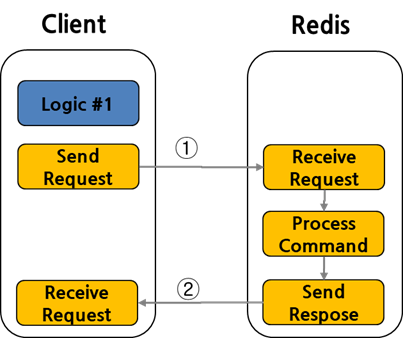
From Redis’s perspective, SlowLog judges based only on the processing time of the Process Command part highlighted in red below. Therefore, when a Long Command is executed, other requests wait in the client queue, and this waiting time is excluded from SlowLog judgment. As a result, the client response time is slow, but the Redis SlowLog does not accumulate.
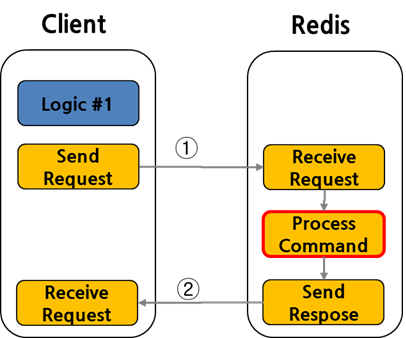
Because Redis is Single Thread, you must necessarily consider time complexity when executing commands. If multiple requests arrive simultaneously, a delay in the execution time of one task will cause subsequent requests to be delayed as well. Therefore, you should be careful with commands that perform O(N) operations, and the representative command examples are as follows. “ KEYS, FLUSHALL, FLUSHDB, Delete COlLECTIONS, Get All Collections “
Slow command/operation monitoring
SlowLog
SlowLog records when the execution time of any command exceeds the configured threshold. The execution time includes only the time the command is processed by Redis. The time it takes for the command to arrive from the client to Redis and the time to send the result back to the client are not included.
[How to enable settings]
Activation uses the two parameters in redis.conf.
It can be dynamically reflected with the config set command, and it is enabled by default.
slowlog-log-slower-than:
Record commands that exceed the time (microseconds) set here
The unit is microseconds
default is 10000(10ms)
If set to 0 (zero), record all commands.
Set to a negative (minus) number to disable.

slowlog-max-len:
It stores as much as set here. The default is 128.
When full, it erases the older ones first and records the new ones.
[slow query lookup]
redis-cli > slowlog get 128
29) 1) (integer) 31            <- ID: increasing serial number
    2) (integer) 1660542153    <- execution time(Linux timestamp)
    3) (integer) 10859         <- execution time(microseconds)
    4) 1) "HGETALL"            <- perform command
Looking at the query results, the HGETALL command is taking 10.859 ms. This command retrieves all the data, but we can consider whether it is possible to fetch only the needed data with HGET
Latency Monitor
Latency Monitor (Response Time Monitor) sets the time to microseconds, and if the execution time of commands/operations running in Redis exceeds the set time, it records it for analysis, making it a Redis performance analysis tool.
The difference with SlowLog is that it does not show command details, but collects data at the command/operation level below. https://redis.io/docs/reference/optimization/latency-monitor/
- command: regular commands.
- fast-command: O(1) and O(log N) commands.
- fork: the fork(2) system call.
- rdb-unlink-temp-file: the unlink(2) system call.
- aof-fsync-always: the fsync(2) system call when invoked by the appendfsync allways policy.
- aof-write: writing to the AOF - a catchall event for write(2) system calls.
- aof-write-pending-fsync: the write(2) system call when there is a pending fsync.
- aof-write-active-child: the write(2) system call when there are active child processes.
- aof-write-alone: the write(2) system call when no pending fsync and no active child process.
- aof-fstat: the fstat(2) system call.
- aof-rename: the rename(2) system call for renaming the temporary file after completing BGREWRITEAOF.
- aof-rewrite-diff-write: writing the differences accumulated while performing BGREWRITEAOF.
- active-defrag-cycle: the active defragmentation cycle.
- expire-cycle: the expiration cycle.
- eviction-cycle: the eviction cycle.
- eviction-del: deletes during the eviction cycle.
[How to enable settings]
Activation uses a single parameter in redis.conf.
It can be dynamically applied with the config set command, and it is disabled by default.
latency-monitor-threshold:
Record commands/operations that exceed the time set here
The unit is millisecons
default is disabled as 0
[latency lookup]
redis-cli > latency latest
1) 1) "command"             <- event name
   2) (integer) 1463729306  <- Last command execution start Linux timestamp
   3) (integer) 400         <- response time of the last command execution (ms)
   4) (integer) 1000        <- the time with the largest (max) response time
It has the advantage of being able to check which operation is slow, but you cannot see detailed commands for the command, so it is recommended to use it together with SlowLog.
Client List
You can view the information and statistics of clients connected to Redis. Among the retrieved fields, you need to pay close attention to qbuf (query buffer length). As explained earlier, because Redis is single-threaded, when a long command is executed, the other commands wait. Through qbuf, you can check the amount of data that has not yet been processed and is waiting. If qbuf continues to increase or does not decrease, you can determine that many commands are waiting.
redis-cli > client list
Performance Tuning Parameters
Persistence off
Redis is an In-Memory Cache that stores all data in memory. To retain data even when Redis restarts, you can configure AOF (Append Only File) or RDB (Redis Database) mode. The AOF setting is a file that records every command as it is executed. Therefore, data loss is minimal, but performance slows down. The RDB file is a setting that writes the entire Redis data in memory to disk at specific intervals. It is used when taking backups at certain points in time. In the case of RDB settings, the impact on performance is smaller than that of AOF settings.
After understanding the use case of Redis, if persistence settings are not needed (e.g., session store), it is better to turn that setting off.
[Setting off method]
- redis.conf
appendonly no    <- AOF off
save “”          <- RDB off
Max Clients
You can set the maximum number of clients that can connect to the Redis server. The default is 10000. Since Redis internally uses 32, you should set it taking this into account. When the maximum is reached, a newly connecting client receives the “max number of clients reached” error message and can connect. If there are many concurrent client connections, this setting should be set higher.
[Setup method]
- redis.conf
maxclients 3000
TCP Backlog
In environments with many requests per second, a high backlog is needed to avoid slow client connection issues. The default setting is 511, but to receive more requests simultaneously, it needs to be set higher. At this time, the Linux kernel parameters /proc/sys/net/core/somaxconn and tcp_max_syn_backlog also need to be configured.
[Setup method]
- redis.conf
tcp-backlog 2048
- /etc/sysctl.conf
net.core.somaxconn = 4096
net.ipv4.tcp_max_syn_backlog = 4096
Organize
After applying performance tuning parameters, you need to remove unnecessary Long Commands through monitoring (slow log, latency, client list). If the required throughput and response time are still not achieved, consider separating Redis by business and configuring each separately, or review Redis Cluster products that can scale out.