
Kafka_SASL_SCRAM Authentication based
Kafka_SASL_SCRAM Authentication based
Overview
Apache Kafka is a distributed messaging platform developed to quickly process large‑scale, high‑volume message data, and Samsung Cloud Platform (hereafter SCP) provides a service that automatically deploys Kafka clusters and offers monitoring functions, metrics, logs, and authentication management. Generally, authentication means allowing users based on ID/Password or token to use the service. Since Kafka operates by default in an unauthenticated mode, authentication using SASL (Simple Authentication and Security Layer) and SCRAM (Salted Challenge Response Authentication Mechanism) is required to ensure security when clients connect. This document introduces how to connect a Kafka client using SASL_SCRAM authentication.
DB Service APACHE KAFKA server authentication configuration
SASL authentication
Kafka and Zookeeper operate by default in an unauthenticated mode, so authentication settings must be configured for security. Among the authentication methods provided by Kafka and Zookeeper, SASL is a method that authenticates users based on an ID and password. To configure SASL authentication for Kafka and Zookeeper servers, create a configuration file as shown below.
[ Kafka authentication file ]
KafkaServer {
org.apache.kafka.common.security.scram.ScramLoginModule required
username="kafka 계정"
password="kafka 패스워드"
};
SCRAM encryption
After SASL authentication with the Kafka server, account information is transmitted in plaintext as PLAINTEXT. For security, the account information must be encrypted before sending. Kafka provides encryption using SCRAM-256 and SCRAM-512 methods.
[ SASL_SCRAM configuration in Kafka server settings ]
listeners=SASL_PLAINTEXT://:9092
security.inter.broker.protocol=SCRAM-SHASHA-256
sasl.enabled.mechanisms=SCRAM-SHA-256
DB service Apache Kafka server authentication
The Apache Kafka service is configured with SASL_SCRAM authentication. Account information is generated based on the Zookeeper and Kafka SASL details shown on the service application screen below. To connect as a client, you must refer to the sections below in this document, configure accordingly, and then proceed.
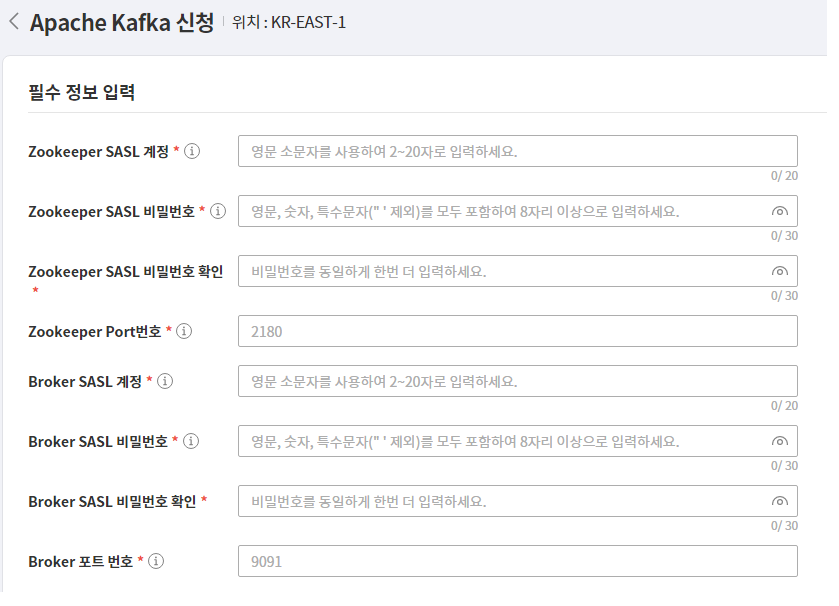
Create SASL_SCRAM configuration file
Creating SASL authentication file
The SASL authentication file for the client is created with a .conf extension, and the file contains a KafkaClient parameter. KafkaClient handles authentication for Kafka. The parameter must be assigned an authentication class, and KafkaClient sets the class for SCRAM. Enter the ID and password you provided when applying for the Apache Kafka DB service product as the Kafka connection information. (https://docs.confluent.io/platform/current/kafka/authentication_sasl/authentication_sasl_scram.html#security-considerations-for-sasl-scram)
[ Kafka SASL authentication file ]
KafkaClient {
org.apache.kafka.common.security.scram.ScramLoginModule required
username="Kafka 유저정보"
password="Kafka 패스워드"
};
Create protocol configuration file
Kafka client requires a protocol configuration file when connecting via SASL_SCRAM. The file extension is properties, and its contents define the SASL authentication protocol and the SCRAM encryption class. [ Kafka protocol configuration file ]
security.protocol=SASL_PLAINTEXT
sasl.mechanism=SCRAM-SHA-256
Register authentication environment variables
Register the OS environment variable so that the Kafka client recognizes the SASL authentication file created in the previous step. The variable name is KAFKA_OPT, and its value specifies the path to the SASL authentication file in the authentication class. [ SASL environment variables ]
KAFKA_OPTS=Djava.security.auth.login.config="SASL 인증파일 경로"
Kafka client connection
Kafka client and Java installation
Apache Kafka client is downloaded from https://kafka.apache.org/downloads according to the server version, then extracted to the desired location for installation. For DB service, Apache Kafka version 3.1 with Scala 2.13 is used, so download that version. Download JDK version 11 or later, extract it, and register the JAVA_HOME environment variable. The bin directory of the installed Kafka client contains clients matching the OS version. The .sh extension is for Linux, and the .bat extension is for Windows.
Kafka parameter query
In the Kafka client, you can use the kafka-configs.sh program to view and modify Kafka-related settings and parameters. To run this program, you must first create SASL and protocol configuration files and register the environment variables. The protocol configuration file should be set in command-config so that the SASL_SCRAM setting is applied.
[ View all parameters of a specific broker within a Kafka cluster ]
./kafka-configs.sh --bootstrap-server “kafka 서버 IP”:”kakfa 서버 Port”
--entity-type brokers --entity-name “Kafka 서버 ID”
--describe all --command-config “프로토콜 설정 파일”


All configs for broker 1 are:
log.cleaner.min.compaction.lag.ms=0 sensitive=false
synonyms={DEFAULT_CONFIG:log.cleaner.min.compaction.lag.ms=0}
offsets.topic.num.partitions=50 sensitive=false
synonyms={DEFAULT_CONFIG:offsets.topic.num.partitions=50}
sasl.oauthbearer.jwks.endpoint .refresh.ms=3600000 sensitive=false
synonyms={DEFAULT_CONFIG:sasl.oauthbearer.jwks.endpoint.refresh.ms=3600000}
log.flush.interval.messages=9223372036854775807 sensitive=false
synonyms={DEFAULT_CONFIG:log.flush.interval.messages=9223372036854775807}
…
Kafka Topic Management
Kafka client can create and manage topics and partitions using the kafka-topics.sh program. As with other clients, configuration files and environment variable registration must be performed beforehand.
[sdstopic Create Topic]
./kafka-topics.sh --bootstrap-server “kafka 서버 IP”:”kakfa 서버 Port”
--create topic sdstopic --replication-factor 1 --partitions 8 --command-config “프로토콜 설정 파일”

Created topic sdstopic.
[sdstopic Topic Partition Lookup]
./kafka-topics.sh --bootstrap-server “kafka 서버 IP”:”kakfa 서버 Port”
--describe-topic sdstopic --command-config “ 프로토콜 설정 파일 ”


Topic: sdstopic TopicId: jVevO5k_Quek1xP4sAYgJw PartitionCount: 10
ReplicationFactor: 2
Configs:
Topic: sdstopic Partition: 0 Leader: 1 Replicas: 1,2 Isr: 1,2
Topic: sdstopic Partition: 1 Leader: 1 Replicas: 1,2 I sr: 1,2
Topic: sdstopic Partition: 2 Leader: 1 Replicas: 1,2 Isr: 1,2
Topic: sdstopic Partition: 3 Leader: 1 Replicas: 1,2 Isr: 1,2
Topic: sdstopic Partition: 4 Leader: 2 Replicas: 2,3 Isr: 2,3
Topic: sdstopic Partition: 5 Leader: 2 Replicas: 2,3 Isr: 2,3
Topic: sdstopic Partition: 6 Leader: 2 Replicas: 2,3 Isr: 2,3
Topic: sdstopic Partition: 7 Leader: 3 Replicas: 3,1 Isr: 1,3
Topic: sds topic Partition: 8 Leader: 3 Replicas: 3,1 Isr: 1,3
Topic: sdstopic Partition: 9 Leader: 3 Replicas: 3,1 Isr: 1,3
Java client connection
For Java SASL_SCRAM configuration, create a SASL_SCRAM-based properties file first In the Kafka connection class, set the relevant information on the producer and consumer objects. Initialize the Kafka connection class according to the project environment, and in the properties file… You can add information required for connection.
[ Java properties file ]
classname= org.apache.kafka.common.security.scram.ScramLoginModule required
username=”kafka 유저정보”
password=”kafka 패스워드”
broker=”kafka IP:Port”
protocol=SASL_PLAINTEXT
mechanism=SCRAM-SHA-256
- Set class and mechanism to SCRAM for SCRAM connection
- Protocol is SASL authentication setting
- Configure the ID/password and broker information using the Apache Kafka product application details.
[ Kafka connection class example ]
@PropertySource(value = { "classpath:kafka.properties"
public class kafkaInit {
@Autowired
private static Environment env;
private static Properties props;
private static Producer<String, String> producer;
private static Consumer<String, String> consumer;
public static void init() {
props = new Properties();
String jaas = String.format("%s username= username=\"%s \" password=\"%s\";"
,env.getProperty("classname")
,env.getProperty("username")
,env.getProperty("password")
props.put("bootstrap.servers", env.getProperty("brokers"));
props.put("security.protocol", env.getProperty("protocol"));
props.put("sasl.mechanism", env.getProperty("mechanism"));
props.put("sasl.jaas.config", jaas);
producer = new KafkaProducer<String, String>(props);
consumer = new KafkaConsumer<String, String>(props);
}