Kafka SASL SCRAM Authentication
Kafka SASL SCRAM Authentication
Overview
Apache Kafka is a distributed messaging platform developed to process large-scale message data quickly, and Samsung Cloud Platform (hereinafter referred to as SCP) provides a service that automatically deploys Kafka clusters and offers monitoring functions, metrics, logs, and authentication management. In general, authentication refers to allowing users to use services based on ID/Password or Token. Since Kafka operates in an unauthenticated manner by default, authentication using SASL (Simple Authentication and Security Layer) and SCRAM (Salted Challenge Response Authentication Mechanism) is necessary to secure client connections. This document introduces the method of connecting to Kafka clients based on SASL SCRAM authentication.
Database Service Apache Kafka Server Authentication Settings
SASL Authentication
Kafka and ZooKeeper operate in an unauthenticated manner by default, so authentication settings are required for security. Among the authentication methods provided by Kafka and ZooKeeper, SASL is a method that authenticates users based on ID and password. To set up SASL authentication for Kafka and ZooKeeper servers, you need to create a configuration file as follows.
[ Kafka Authentication File ]
KafkaServer {
org.apache.kafka.common.security.scram.ScramLoginModule required
username="kafka account"
password="kafka password"
};
SCRAM Encryption
Kafka server communicates in plaintext when using SASL authentication after connection. For security, account information must be encrypted. Kafka provides SCRAM-256 and SCRAM-512 encryption methods.
[ Kafka Server Settings for SASL_SCRAM ]
listeners=SASL_PLAINTEXT://:9092
security.inter.broker.protocol=SCRAM-SHA-256
sasl.enabled.mechanisms=SCRAM-SHA-256
DB Service Apache Kafka Server Authentication
Apache Kafka service has SASL_SCRAM authentication settings. Account information is created based on the Zookeeper and Kafka SASL information in the service application screen below, and you must set up and proceed according to the contents of this document to connect as a client.
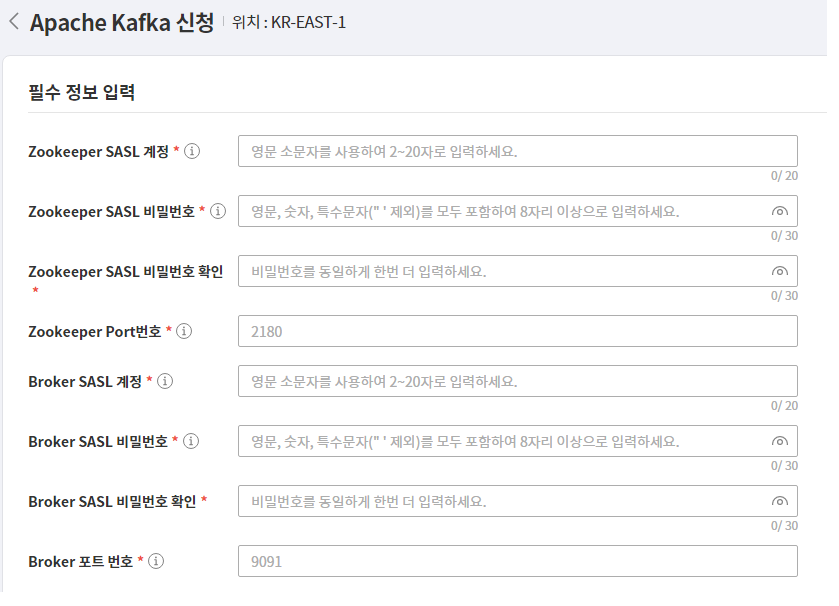
Creating SASL_SCRAM Settings File
Creating SASL Authentication File
The SASL authentication file for the client is created with a conf extension, and it contains the KafkaClient parameter. KafkaClient is in charge of Kafka authentication. The parameter must assign an authentication class, and KafkaClient sets the SCRAM class. Kafka connection information is the id/pw information entered when applying for the Apache Kafka DB service product. (https://docs.confluent.io/platform/current/kafka/authentication_sasl/authentication_sasl_scram.html#security-considerations-for-sasl-scram)
[ Kafka SASL Authentication File ]
KafkaClient {
org.apache.kafka.common.security.scram.ScramLoginModule required
username="Kafka User Information"
password="Kafka password"
};
Protocol setting file creation
Kafka client requires a protocol setting file when connecting with SASL_SCRAM. The file extension is properties, and the content includes the SASL authentication protocol and SCRAM encryption class. [ Kafka protocol setting file ]
security.protocol=SASL_PLAINTEXT
sasl.mechanism=SCRAM-SHA-256
Registration of authentication environment variables
When running the Kafka client, register the SASL authentication file created in the previous step to the OS environment variable so that it can be recognized. The variable name is KAFKA_OPT, and the content is the path to the SASL authentication file. [ SASL environment variable ]
KAFKA_OPTS=-Djava.security.auth.login.config="SASL authentication file path"
Kafka client connection
Kafka client and Java installation
Download the Apache Kafka client from https://kafka.apache.org/downloads that matches the server version, and install it by unzipping it to the desired path. For the DB service, Apache Kafka 3.1 version and Scala 2.13 version are used, so download the corresponding version. Download JDK version 11 or higher, unzip it, and register the JAVA_HOME environment variable. The installed Kafka client has client files for each OS version in the bin path. The .sh extension is used for Linux, and the .bat extension is used for Windows.
Kafka parameter inquiry
The Kafka client can use the kafka-configs.sh program to inquire and modify Kafka-related settings and parameters. To run this program, the SASL and protocol setting file creation and environment variable registration must be done first. The protocol setting file should be set in the command-config to apply the SASL_SCRAM setting.
[ Inquiry of all parameters of a specific Broker in the Kafka Cluster ]
./kafka-configs.sh --bootstrap-server “Kafka server IP”:”Kafka server Port”
--entity-type brokers --entity-name “Kafka server ID”
--describe all --command-config “Protocol setting file”


All configs for broker 1 are:
log.cleaner.min.compaction.lag.ms=0 sensitive=false
synonyms={DEFAULT_CONFIG:log.cleaner.min.compaction.lag.ms=0}
offsets.topic.num.partitions=50 sensitive=false
synonyms={DEFAULT_CONFIG:offsets.topic.num.partitions=50}
sasl.oauthbearer.jwks.endpoint.refresh.ms=3600000 sensitive=false
synonyms={DEFAULT_CONFIG:sasl.oauthbearer.jwks.endpoint.refresh.ms=3600000}
log.flush.interval.messages=9223372036854775807 sensitive=false
synonyms={DEFAULT_CONFIG:log.flush.interval.messages=9223372036854775807}
Kafka Topic Management
Kafka clients can create and manage topics and partitions using the kafka-topics.sh program. As with other clients, setting files and environment variable registration must be done in advance.
[Create sdstopic Topic]
./kafka-topics.sh --bootstrap-server “Kafka server IP”:”Kafka server Port”
--create topic sdstopic --replication-factor 1 --partitions 8 --command-config “Protocol setting file”

Created topic sdstopic.
[Query sdstopic Topic Partition]
./kafka-topics.sh --bootstrap-server “Kafka server IP”:”Kafka server Port”
--describe --topic sdstopic --command-config “Protocol setting file”


Topic: sdstopic TopicId: jVevO5k_Quek1xP4sAYgJw PartitionCount: 10
ReplicationFactor: 2
Configs:
Topic: sdstopic Partition: 0 Leader: 1 Replicas: 1,2 Isr: 1,2
Topic: sdstopic Partition: 1 Leader: 1 Replicas: 1,2 Isr: 1,2
Topic: sdstopic Partition: 2 Leader: 1 Replicas: 1,2 Isr: 1,2
Topic: sdstopic Partition: 3 Leader: 1 Replicas: 1,2 Isr: 1,2
Topic: sdstopic Partition: 4 Leader: 2 Replicas: 2,3 Isr: 2,3
Topic: sdstopic Partition: 5 Leader: 2 Replicas: 2,3 Isr: 2,3
Topic: sdstopic Partition: 6 Leader: 2 Replicas: 2,3 Isr: 2,3
Topic: sdstopic Partition: 7 Leader: 3 Replicas: 3,1 Isr: 1,3
Topic: sdstopic Partition: 8 Leader: 3 Replicas: 3,1 Isr: 1,3
Topic: sdstopic Partition: 9 Leader: 3 Replicas: 3,1 Isr: 1,3
Java Client Connection
To set up Java SASL_SCRAM, create a properties file based on SASL_SCRAM and set the corresponding information in the Kafka connection class for producer and consumer objects. The initialization method of the Kafka connection class varies depending on the project environment, and you can add connection information to the properties file.
[Java properties file]
classname= org.apache.kafka.common.security.scram.ScramLoginModule required
username=”kafka user information”
password=”kafka password”
broker=”kafka IP:Port”
protocol=SASL_PLAINTEXT
mechanism=SCRAM-SHA-256
- SCRAM connection requires class and mechanism to be set to SCRAM
- Protocol is set to SASL authentication
- Id/pw and broker information are set using Apache Kafka product application information
[ Kafka connection class example ]
@PropertySource(value = { "classpath:kafka.properties"
public class kafkaInit {
@Autowired
private static Environment env;
private static Properties props;
private static Producer<String, String> producer;
private static Consumer<String, String> consumer;
public static void init() {
props = new Properties();
String jaas = String.format("%s username= username=\"%s \" password=\"%s\";"
,env.getProperty("classname")
,env.getProperty("username")
,env.getProperty("password")
props.put("bootstrap.servers", env.getProperty("brokers"));
props.put("security.protocol", env.getProperty("protocol"));
props.put("sasl.mechanism", env.getProperty("mechanism"));
props.put("sasl.jaas.config", jaas);
producer = new KafkaProducer<String, String>(props);
consumer = new KafkaConsumer<String, String>(props);
}