
Elasticsearch Performance Optimization
Elasticsearch Performance Optimization
Overview
Elasticsearch is a Java open-source distributed search engine based on Apache Lucene. Elasticsearch can operate with the Lucene library on its own, allowing you to store, search, and analyze massive amounts of data quickly, almost in real time (NRT, Near Real Time). This document explains how to understand the Elasticsearch architecture and how to optimize Elasticsearch for use.
Elasticsearch Architecture
In Elasticsearch, a single data unit is called a Document. Compared to an RDBMS, it is equivalent to a Row. A collection of Documents is called an Index. From version 7 onward, it is easier to understand the concept of an Index by viewing it as a table in an RDBMS. Additionally, an Index is partitioned into Shards, distributing the data (Document) across nodes.
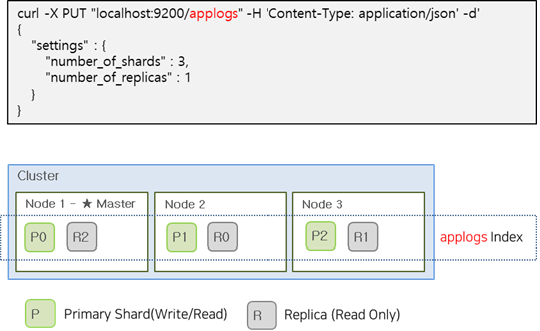
To maintain service continuity of an Elasticsearch cluster, shards are managed by dividing them into Primary and Replica. Because a Replica shard holds the same data as the Primary shard, it can also respond to user search requests. If a failure occurs in the Primay shard, the Replica shard is promoted to Primary, ensuring the service continues. The Primary shard supports both read and write operations, whereas the Replica shard is read‑only.
| Category | role |
|---|---|
| Primary Shard | Shard that provides CRUD |
| Replica Shard | Replica of the Primary Shard for disaster recovery. |
The image below is an example of creating the applogs index with Primay Shard 3, Replica Shard 1.
Shard optimal size and placement
The number of Primary Shards for an index is fixed at index creation time and cannot be changed, but the number of Replica Shards can be altered at any time without interrupting query operations. Therefore, you need to consider the number and size of Primary Shards before creating the index.
Shard Size
All shards in the cluster are managed by the master node. Consequently, as the number of shards increases, the load on the master node also rises. The increased load on the master node can slow down indexing and search operations and increase the likelihood of memory issues. Additionally, if the shard size is too large, data moves at the shard level during a failure, which can negatively affect recovery operations.
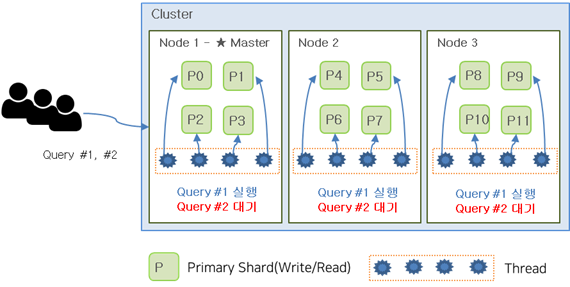
Generally, having more Primary Shards improves search performance. Searches are executed independently on each Shard and then combined into a single result, so the more Shards the workload is distributed across, the faster the performance. However, having an unlimited number of Shards is not always beneficial. In Elasticsearch, a single query runs on one Shard using one Thread. The issue is that the number of Threads is limited, so if there are too many Shards, they may not receive Thread allocation and can experience waiting. Therefore, you must determine an appropriate Shard size through testing in advance.
As shown in the image below, when an index with 12 shards is created, each node is assigned 4 shards. If each node has 4 threads and a user executes Query #1 and #2 almost simultaneously, the first-requested Query #1 will occupy all threads. (All 12 threads are used to process Query #1) In this case, Query #2 must wait until Query #1 finishes.
If there were 6 shards, Query #1 and #2 could have been executed simultaneously as shown in the image below. Having too many shards can also cause problems.
Generally, a shard size of 20–40 GB is recommended, and it should not exceed 50 GB. Also, the number of shards should be kept below 20 per 1 GB of heap allocated to a node. Therefore, a node with a 30 GB heap can have up to 600 shards, but it is better to maintain far fewer than that.
Replica Shard
Unlike the Primary Shard, the number of Replica Shards can be changed while the system is running. Generally, it is advisable to have at least one Replica Shard for fault tolerance. There is a trade‑off relationship with the number of Replica shards. As the number of Replicas increases, indexing performance decreases while read performance improves. Conversely, with fewer Replicas, indexing performance is good but read performance suffers. The reason this relationship occurs is that when a Replica Shard is created, it must also transfer the indexed data and perform a write to the file. Consequently, a large number of replicas can degrade indexing performance, but they can improve read performance by enabling greater distributed processing.
By default, it is recommended to have at least one Replica Shard, and if read performance is important, it is advisable to increase it further.
Shard deployment
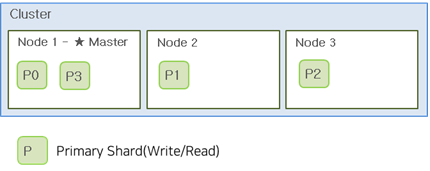
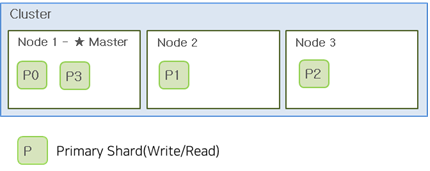
If there are 3 nodes and 4 shards, they are allocated as shown below. The Master node automatically performs shard allocation and distributes them as evenly as possible. With the allocation shown below, Node1 uses more disk and receives more client requests. Therefore, it is advisable to consider the number of nodes when creating shards. Generally, the number of shards per index should start at a multiple of the number of nodes. If you plan to add nodes, using the least common multiple of the current node count and the total node count after addition ensures that shards can be evenly distributed across all nodes in the future.
Disk Size per Node
If the data source is log data and you use it as a HOT node, we recommend a utilization of 70–75% on up to 3 TB disks per node. If the disk becomes insufficient, you should secure additional storage by adding nodes rather than increasing the disk size. Also, when a node fails, the shards assigned to that node are redistributed to the remaining nodes. This capacity should also be taken into account when determining the disk size.
Master Node Separation
Elasticsearch nodes can be classified as Master or Data.
Master Node Index Metadata, Shard allocation, and Cluster state information are managed. When installed separately, a relatively lower-spec CPU, RAM, and Disk can be used compared to Data nodes.
- One node in the cluster always serves as the Master node.
- The master node is responsible for the configuration and changes of the entire cluster. . indices creating/deleting . adding/removing nodes . allocating shards to nodes
- Monitor the status of all nodes in the cluster with a heartbeat check
Data Node Disk I/O is important, and when installing separately, it is advisable to use relatively higher-spec CPU, RAM, and Disk compared to the Master node. In particular, using SSDs for Disk is recommended.
- Store the shards containing the documents created by the index on the Data node.
- CRUD, execute data-related tasks such as search and aggregation
- I/O, CPU, memory-intensive → It is important to expand the Data node through resource monitoring
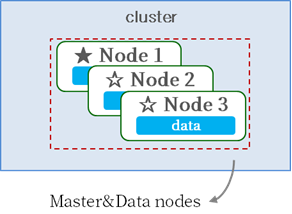
You can configure Master and Data on separate nodes, or configure a single node to serve both Master and Data roles.
[Master/Data Integrated Configuration]
[Master/Data Separation Configuration]
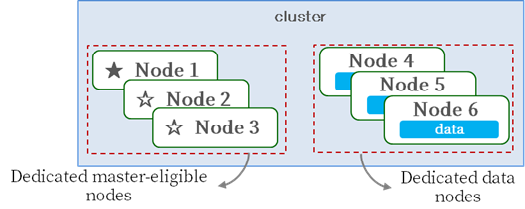
The master node manages index metadata, shard allocation, and cluster state information, and sufficient resources must be secured so it can effectively perform its master role. The most reliable way to prevent the master from becoming overloaded by other tasks is to configure a dedicated master node.
If the cluster consists of a very small number of nodes or has low load, it can operate well without configuring a dedicated Master node, but when the cluster is composed of a handful of nodes or more and the load is high, it is advisable to configure a dedicated Master node.