Elasticsearch Performance Optimization
Elasticsearch Performance Optimization
Overview
Elasticsearch is a distributed search engine based on Apache Lucene. It allows for fast, near real-time storage, search, and analysis of large amounts of data. This document explains how to understand Elasticsearch architecture and optimize its performance.
Elasticsearch Architecture
In Elasticsearch, a single data unit is called a Document, similar to a row in a relational database management system (RDBMS). A collection of Documents is called an Index. From version 7 onwards, an Index can be thought of as a table in an RDBMS. An Index is divided into Shard units, which are distributed across nodes to store data (Documents).
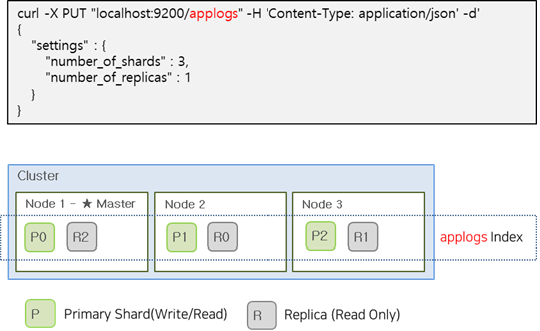
To maintain service continuity in an Elasticsearch Cluster, Shards are divided into Primary and Replica Shards. Replica Shards contain the same data as Primary Shards and can respond to search requests from users. If a Primary Shard fails, a Replica Shard can be promoted to a Primary Shard to maintain service continuity. Primary Shards allow both read and write operations, while Replica Shards are read-only.
| Category | Role |
|---|---|
| Primary Shard | Provides CRUD operations |
| Replica Shard | Replica of Primary Shard for failover |
The image below shows an example of creating an applogs index with 3 Primary Shards and 1 Replica Shard.
Optimal Shard Size and Placement
The number of Primary Shards in an Index is fixed at creation time and cannot be modified. However, the number of Replica Shards can be changed at any time without interrupting query operations. Therefore, it’s essential to consider the number and size of Primary Shards before creating an Index.
Shard Size
All Shards in a cluster are managed by the master node. As the number of Shards increases, the load on the master node also increases, potentially slowing down indexing and search operations. Additionally, if a Shard is too large, it can negatively impact recovery operations when a failure occurs.
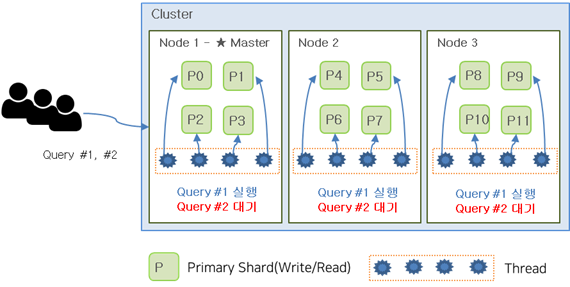
In general, having more Primary Shards can improve search performance, as searches are performed independently on each Shard and the results are combined. However, having too many Shards is not ideal, as it can lead to thread allocation issues and increased latency.
The image below shows an example of creating an Index with 12 Shards, resulting in each node being assigned 4 Shards. If a user performs two queries simultaneously, the first query may occupy all available threads, causing the second query to wait until the first query completes.
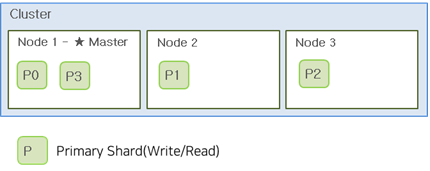
If the Index had 6 Shards instead, both queries could be executed simultaneously, as shown in the image below.
In general, the recommended Shard size is between 20-40GB, with a maximum size of 50GB. Additionally, the number of Shards per node should not exceed 20 per 1GB of heap size. Therefore, a node with 30GB of heap can have up to 600 Shards, but it’s recommended to keep this number much lower.
Replica Shard
Unlike Primary Shards, the number of Replica Shards can be changed during operation. In general, it’s recommended to have at least one Replica Shard for failover purposes.
The number of Replica Shards has a trade-off relationship. Having more Replicas can decrease indexing performance but improve read performance. On the other hand, having fewer Replicas can improve indexing performance but decrease read performance.
This relationship occurs because creating a Replica Shard involves transferring and writing index data, which can impact indexing performance. However, having more Replicas can improve read performance by allowing for more distributed processing.
By default, it’s recommended to have at least one Replica Shard, and additional Replicas can be added to improve read performance.
Shard Placement
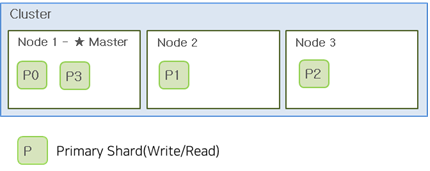
When a node has 3 nodes and 4 Shards, the Shards are allocated as shown in the image below. Shard allocation is performed automatically by the master node, which attempts to distribute the Shards evenly. However, this can result in some nodes having more Disk usage and receiving more client requests. Therefore, it’s essential to consider the number of nodes when creating Shards. In general, the number of Shards per Index should be a multiple of the number of nodes.
If nodes are to be added in the future, it’s recommended to use the least common multiple of the current and future total number of nodes to ensure that Shards are evenly distributed across all nodes.
Disk Size per Node
For log data sources using HOT nodes, it’s recommended to have a maximum Disk size of 3TB with a usage rate of 70-75%. If Disk space is insufficient, it’s recommended to add nodes instead of increasing the Disk size. Additionally, when a node fails, the Shards allocated to that node are redistributed to other nodes, which should also be considered when determining Disk size.
Separating Master Nodes
Elasticsearch nodes can be divided into Master and Data roles.
Master Node Manages Index metadata, Shard allocation, and Cluster state information. Master nodes can have relatively lower specifications than Data nodes.
- One node in the Cluster always acts as the Master node
- Master node is responsible for Cluster settings and changes . indices creating/deleting . adding/removing nodes . allocating shards to nodes
- Monitors the state of all nodes in the Cluster through heartbeat checks
Data Node Disk I/O is crucial, and Data nodes should have relatively higher specifications than Master nodes, especially for Disk (SSD is recommended).
- Stores shards containing documents created in the Index
- Performs data-related operations such as CRUD, search, and aggregation
- I/O, CPU, and memory-intensive → Resource monitoring is essential for scaling Data nodes
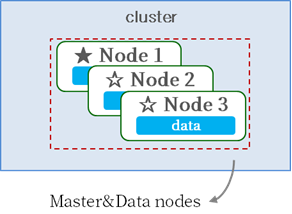
Master and Data roles can be configured on separate nodes or combined on a single node.
[Master/Data Integrated Configuration]
[Master/Data Separated Configuration]
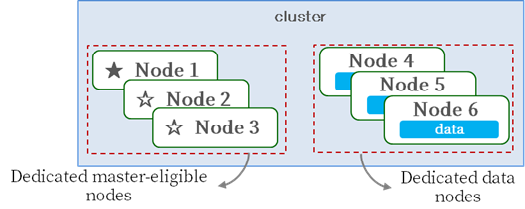
Master nodes manage Index metadata, Shard allocation, and Cluster state information, requiring sufficient resources to perform these tasks. The most stable way to prevent Master nodes from becoming overloaded is to configure a dedicated Master node.
For small Clusters with low loads, a dedicated Master node may not be necessary. However, for larger Clusters with high loads, it’s recommended to configure a dedicated Master node to ensure optimal performance.