
Disaster Recovery Guide Using Cross-Region Replication
Disaster Recovery Guide Using Cross-Region Replication
Overview
If a failure that cannot be quickly recovered—such as an earthquake, fire, or other disaster—occurs in the cloud infrastructure, you can restore IT services by leveraging cloud resources from another region.
DR (Disaster Recovery) is a system that ensures business continuity for companies in the event of a disaster. By leveraging cloud resources, you can configure a DR environment according to the service’s importance and recovery objectives.
In the Samsung Cloud Platform, we design the DR configuration considering the following disaster recovery objectives.
- RPO (Recovery Point Objective, Recovery Point Objective): The maximum allowable period of data loss when a failure occurs.
- RTO (Recovery Time Objective, Recovery Time Objective): It is the target time to restore the service after a failure occurs.
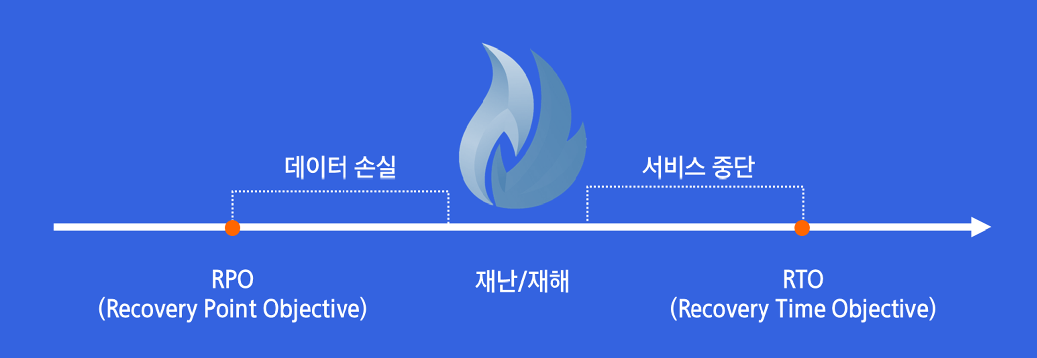
This document explains the following two configurations as examples. The achievable RPO and RTO depend on backup and replication frequency, data volume, network conditions, and recovery procedures.
| Configuration method | RPO target example | Configuration Overview |
|---|---|---|
| Warm Standby | 30 minutes | Preconfigure the resources required for the DR environment and replicate data periodically. |
| Backup & Restore | 24 hours | Back up the data and, in the event of a disaster, configure the server to recover from the backup. |
RTO is set considering the customer’s DR policy, the resources prepared in advance, and the level of recovery automation.
Architecture diagram
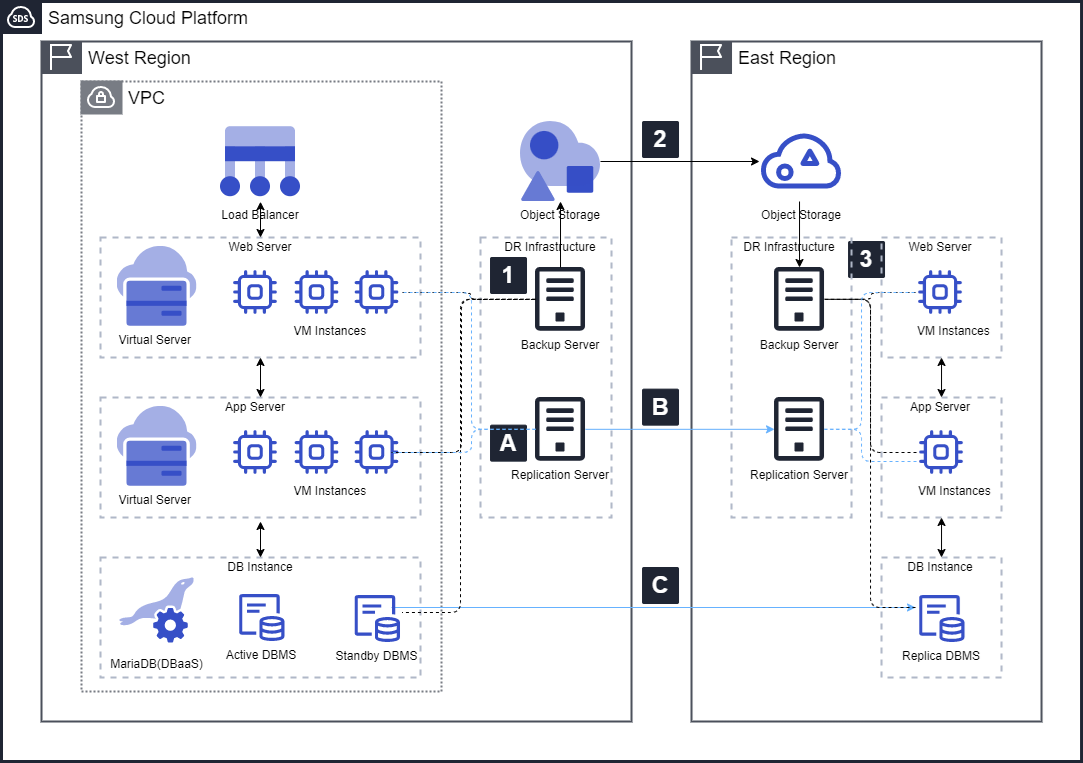
Warm Standby: RPO 30-minute target
- Configure a software-based synchronization solution on the Web Server and Application Server, and set a replication policy that meets the RPO target.
- Synchronize the server’s replication target data through the inter‑region replication link.
- MariaDB (DBaaS) synchronizes data using an asynchronous replication solution.
Backup & Restore: RPO 24-hour target
- Install the Backup Agent on the target backup server and configure backup policies and schedules that meet the RPO objectives.
- Replicate the Object Storage data, which contains backup copies, to the DR Region via a replication line between regions.
- In the event of a disaster, create a Virtual Server in the DR Region, recover the OS image backed up in Object Storage along with the necessary data, and resume the service.
Use Cases
Service recovery in case of Samsung Cloud Platform West Region failure
If IT resources in the West Region cannot be used due to earthquakes, fires, etc., the service is restored by utilizing resources that have been backed up or replicated in another region.
If the allowable data loss window is long and you can accommodate server provisioning and recovery times, you can consider a Backup & Restore approach.
This approach reduces the cost of continuously operating resources by storing backups in Object Storage instead of maintaining a dedicated DR service server. The operating costs of a separate backup infrastructure must be considered together.
Service recovery when another public cloud’s Seoul region experiences an outage
If the public cloud provider you are using offers only a single region domestically, configuring disaster recovery using another domestic region within the same provider may be limited.
If a failure in the Seoul region persists for an extended period, you can consider a configuration that restores the service by using resources that were backed up or replicated in advance on the Samsung Cloud Platform.
You can consider Samsung Cloud Platform East Region as a DR site candidate, and you must verify geographic separation from the original service location, shared disaster risk, network connectivity, and recovery compatibility.
Requirements
Prepare the following resources in advance based on the selected DR configuration method.
- Object Storage: In the Backup & Restore configuration, request storage for storing backup copies.
- Backup Infrastructure: Prepare the components required for the backup solution, such as Backup Agent software licenses, Master Server, Proxy Server, etc.
- Replication infrastructure: Prepare the components required for the replication solution, such as replication software licenses, DB replication software licenses, replication servers, etc.
- Replication Policy: Set backup and replication intervals that meet the RPO objectives.
Limitations
- To use agent-based backup, you must install a separate backup infrastructure.
- Using Object Storage replication across regions requires a separate service request.
Considerations
Replication Traffic and Cost
When configuring replication between regions, you should estimate the replication link’s traffic usage based on data size and change volume, and incorporate this into the overall DR cost.
When replicating data from another public cloud to Samsung Cloud Platform, you should review both the source cloud provider’s outbound data transfer fees and network costs.
Backup and replication schedule
Backup policies and replication intervals must be set to meet the RPO target. Verify whether the goal can be met, taking into account the time required for backup and replication tasks and replication latency.
Recovery Procedure and Validation
We establish server preparation, data recovery, application startup, and service transition procedures to meet the RTO target. By conducting regular DR drills, we verify the actual recovery time and the data recovery point.
Related products
- Virtual Server
- Block Storage
- Object Storage
- Backup
- Load Balancer
- MariaDB (DBaaS)