
Guide to Replication and Recovery in Bare Metal Storage Environments
Guide to Replication and Recovery in Bare Metal Storage Environments
Overview
Block Storage (BM) is a storage service that can be used on Bare Metal servers. The storage space of a Bare Metal server is used for applications that handle important data such as databases. To ensure business continuity, you can use a storage replication solution to set up backup, recovery, and disaster recovery environments.
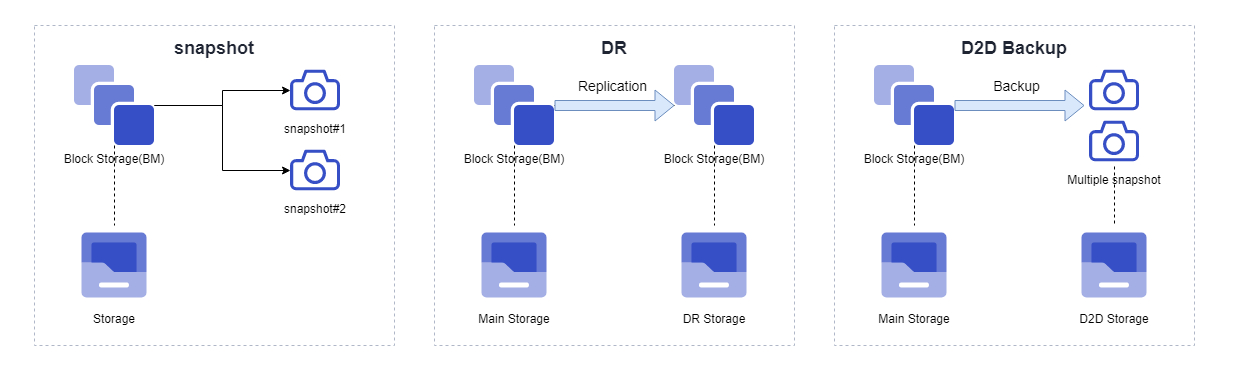
This document describes the three replication features and recovery methods.
| function | Purpose |
|---|---|
| Snapshot | Save a specific point in time of the volume and restore the data from that point. |
| DR (Disaster Recovery) | Disaster recovery through replication between zones or regions |
| D2D (Disk to Disk) backup | Replicate data to backup storage within the same zone and recover from the backup. |
Snapshot
Snapshot is a feature that saves the state of a volume at a specific point in time. Snapshot is the simplest way to back up data, usable on volumes that are online, and it completes creation within seconds.
Snapshot storage space
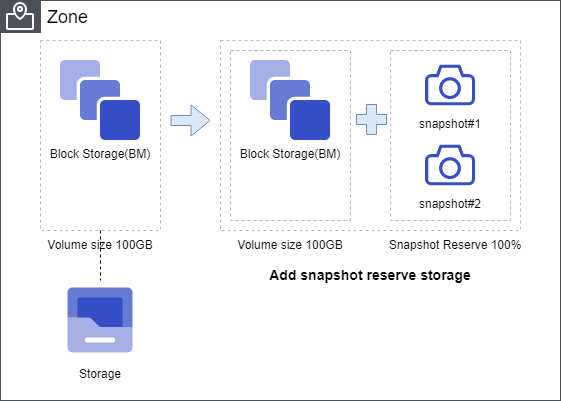
Snapshot storage space is allocated according to the creation capacity (%) specified at the time of request. For example, if you set the snapshot creation capacity of a 100 GB volume to 100%, a separate storage space of 100 GB is allocated for the snapshot.
Generally, a snapshot uses less than 10% of the total volume size, so it does not occupy much space. However, if data changes frequently or the snapshot creation interval is short, the changed data will occupy snapshot space, so you must be careful about storage usage.
Snapshot Recovery Method
The volume recovery method using snapshots is divided into recovery of the original volume and recovery using a clone volume.
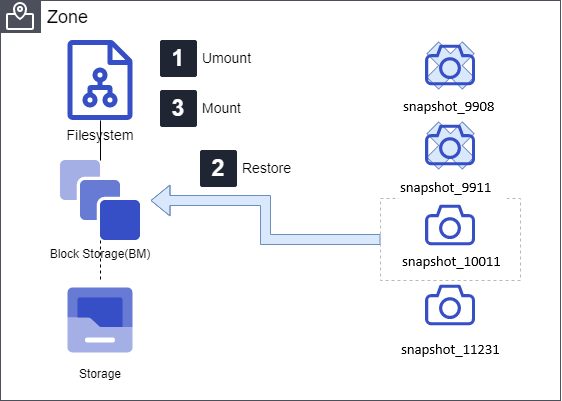
Recover the original volume from a snapshot at a specific point in time
Restores the original volume’s data to the state at the selected snapshot point. This operation must be performed in an offline state with the file system unmounted.
Note: The data of the original volume will be changed to the state at the selected point in time, and any Snapshots created after that point will be deleted.
- Unmount the file system of the original volume on the user server.
- In the SCP console, select the snapshot at the desired point in time and perform a recovery.
- Mount the file system of the recovered volume on the user server.
Recovery using Clone volume
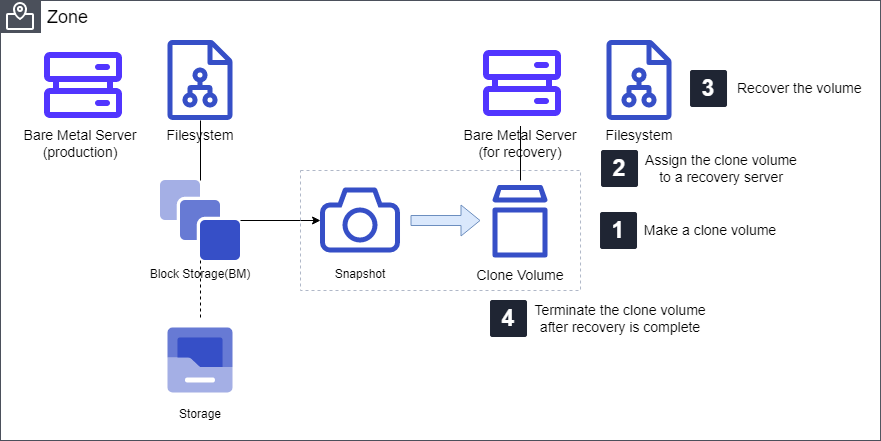
Using a snapshot, you can create a Clone volume that supports both read and write. Create a clone volume from a snapshot at the desired point in time, assign it to a separate recovery server, mount the file system, and recover the data.
The volume group (VG) activation step in the following procedure applies to environments that use LVM. Replace <vgname> with the name of the volume group to be recovered.
Create a cloned volume from a snapshot at the desired point in time in the SCP console. 1. (SCP console)
Assign a Clone volume to the recovery server via the SCP console. 2. (SCP console)
Activate the volume group (VG) on the recovery server. 3. (user server)
vgchange -ay <vgname>Mount the file system of the Clone volume on the recovery server and restore the necessary data. 4. (user server)
When the recovery is complete, unmount the file system of the Clone volume on the recovery server. 5. (user server)
Cancel the Clone in the SCP console. 6. (SCP console)
Disaster Recovery (DR)
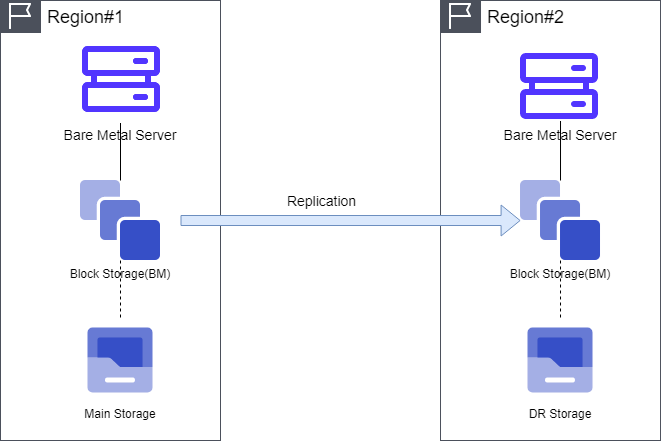
Disaster Recovery (DR) is a feature that supports replication between zones and regions. When you configure DR, a replica of the original volume is created on the storage at the DR site.
During the initial setup, the data of the source volume is fully replicated. After that, only the changed data is transmitted according to the specified schedule.
Since DR operates based on snapshots, you must configure the snapshot storage space during setup.
How to restore DR volume
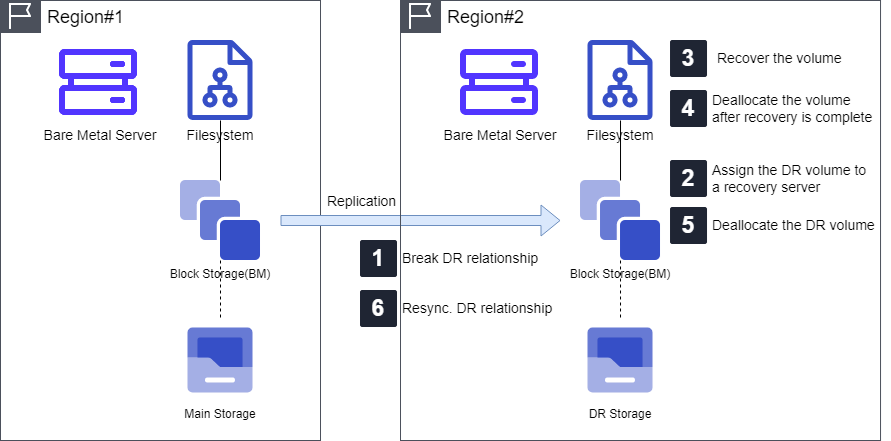
The manual recovery for DR testing and training, as well as the recovery procedures for actual failure scenarios, are as follows.
The volume group (VG) activation step in the following procedure applies to environments that use LVM. Replace <vgname> with the name of the volume group to be recovered.
Manual Recovery: DR Test and Training
Terminate the DR replication relationship in the SCP console (DR Relationship Break - SCP Console).
Assign a DR volume to the recovery server in the SCP console. 2. (SCP console)
Activate the volume group (VG) on the recovery server. 3. (user server)
vgchange -ay <vgname>Mount the file system of the DR volume on the recovery server and perform recovery or testing. 4. (user server)
When the task is completed, unmount the file system of the DR volume on the recovery server. 5. (user server)
Unassign the DR volume allocated to the recovery server in the SCP console. 6. (SCP console)
Resynchronize the DR replication relationship in the SCP console (DR Relationship Resync - SCP Console)
Actual Failure Situation
Assign a DR volume to the recovery server in the SCP console.
Activate the volume group (VG) on the recovery server.
vgchange -ay <vgname>Mount the file system of the DR volume on the recovery server.
Resume services on the recovery server.
Complete the recovery of the production site.
I am submitting a service request (SR) to normalize storage failover and replication.
D2D (Disk to Disk) backup
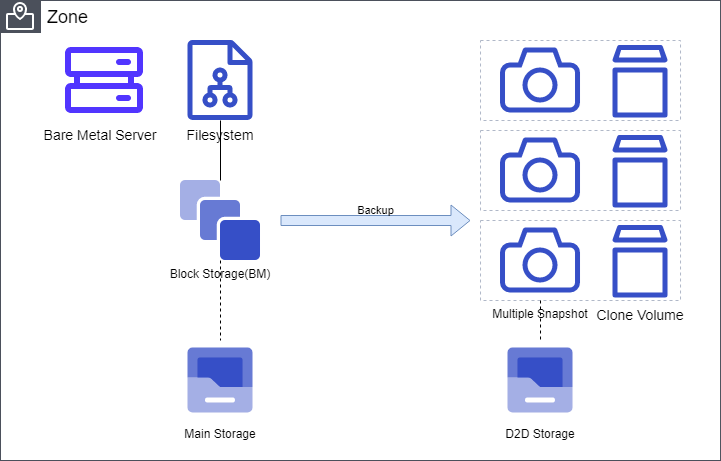
D2D backup is a feature that replicates Block Storage data to backup storage within the same zone.
Set up D2D backup for the target volume, and specify the number of backup copies to retain and the backup schedule. Snapshots are stored in the backup storage according to the configured number of backup copies and the schedule.
During recovery, a Clone volume that can read and write from the stored Snapshot is created. You can assign the created Clone volume to the recovery server just like a regular volume to restore data.
D2D backup recovery method
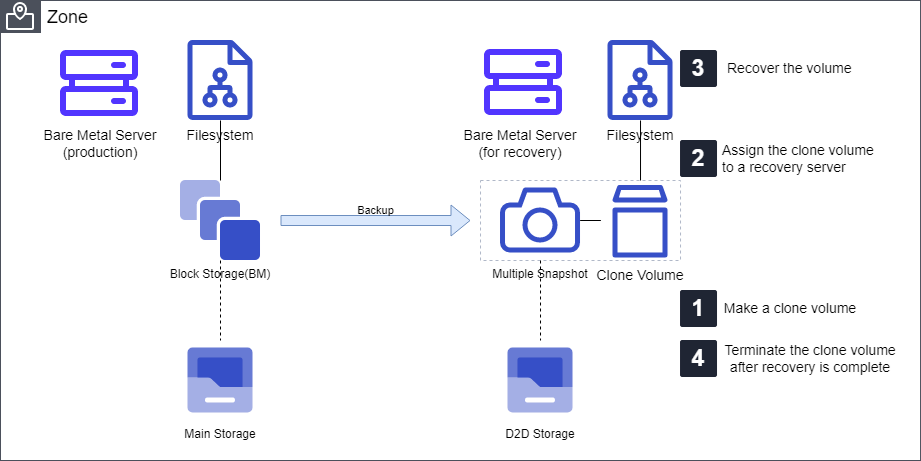
Recovery using clone volume
Create a clone volume from a backup snapshot at the desired point in time, assign it to a separate recovery server, mount the file system, and recover the data.
The volume group (VG) activation step in the following procedure applies to environments that use LVM. Replace <vgname> with the name of the volume group to be recovered.
Create a clone volume from a backup snapshot at the desired point in time in the SCP console. 1. (SCP console)
Assign a Clone volume to the recovery server in the SCP console. 2. (SCP console)
Activate the volume group (VG) on the recovery server. 3. (user server)
vgchange -ay <vgname>Mount the file system of the Clone volume on the recovery server and restore the necessary data. 4. (user server)
When the recovery is complete, unmount the file system of the Clone volume on the recovery server. 5. (user server)
Cancel the Clone in the SCP console. 6. (SCP console)
Conclusion
Block Storage (BM) provides snapshot, DR, and D2D backup capabilities for Bare Metal servers. When configuring applications where business continuity is critical, such as databases, you can use the storage replication features described in this document to set up backup, recovery, and disaster recovery environments.