
KAFKA CONNECT Distributed mode success vector
KAFKA CONNECT Distributed mode success vector
Overview
Recently, Apache Kafka has emerged as a core technology for managing and operating data pipelines in the fields of data integration and streaming. Kafka Connect, one of the key components of Apache Kafka, provides a service that integrates and processes streaming data in real time between external systems and an Apache Kafka cluster. This document aims to help users effectively configure Kafka Connect distributed mode on Samsung Cloud Platform (hereinafter SCP). By doing so, users will be able to perform reliable data integration between data sources and Kafka clusters more easily and efficiently.
Kafka Connect Distributed Mode Configuration Guide
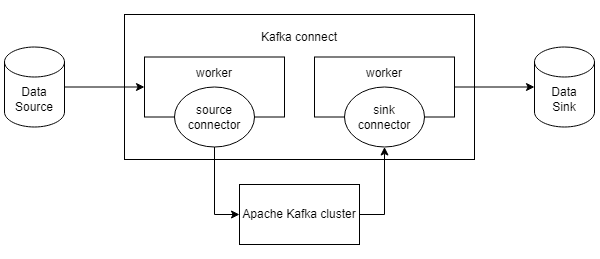
Kafka Connect is a free open-source component of Apache Kafka that serves as a centralized data hub for simple data integration between databases, key-value stores, search indexes, and file systems. Using Kafka Connect, you can quickly create connectors that stream data between Apache Kafka and other data systems and move large data sets in and out of Kafka. Kafka Connect has a single mode (Standalone) that uses only one Connect and a distributed mode (Distributed) that groups multiple Connect instances into a single cluster. This document introduces how to configure the distributed mode (Distributed).
Source Connector, Sink Connector
Source Connector: A connector that puts the data contained in the data source into an Apache Kafka topic, acting as a Producer. Sink Connector: a connector that acts as a consumer, sending data contained in an Apache Kafka topic to a specific data source.
File Download
Apache Kafka packages can be downloaded from the official website ( https://kafka.apache.org/download ), and Kafka Connect installation can also be performed through it. Currently, the Apache Kafka versions provided by SCP are 3.8.0 and 3.5.0, and using the same versions for Kafka Connect is recommended.
connect-distributed.properties configuration
Modify the configuration values of the connect-distributed.properties file provided by default in {kafka_dir}/config.
bootstrap.servers={kafka_ip1}:{port},{kafka_ip2}:{port},{kafka_ip3}:{port}

group.id=connect-cluster

key.converter=org.apache.kafka.connect.json.JsonConverter
value.converter=org.apache.kafka.connect.json.JsonConverter
key.converter.schemas.enable=true
value.converter.schemas.enable=true

offset.storage.topic=connect-offsets
offset.storage.replication.factor=3

config.storage.topic=connect-configs
config.storage.replication.factor=3

status.storage.topic=connect-status
status.storage.replication.factor=3

offset.flush.interval.ms=10000

listeners=HTTP://{connect_ip}:{connect_port}

rest.advertised.port={connect_port}

sasl.jaas.config=org.apache.kafka.common.security.scram.ScramLoginModule required username="username" password="password";
sasl.mechanism=SCRAM-SHA-256
security.protocol=SASL_PLAINTEXT

producer.sasl.jaas.config=org.apache.kafka.common.security.scram.ScramLoginModule required username="username" password="password";
producer.sasl.mechanism=SCRAM-SHA-256
producer.security.protocol=SASL_PLAINTEXT

consumer.sasl.jaas.config=org.apache.kafka.common.security.scram.ScramLoginModule required username="username" password="password";
consumer.sasl.mechanism=SCRAM-SHA-256
consumer.security.protocol=SASL_PLAINTEXT

connector.client.config.override.policy=All
Main config description
- bootstrap.servers: Specify the location of the Kafka broker
- group.id: Role of grouping workers within a Kafka Connect cluster. In distributed mode, this value must be set identically for cluster configuration.
- key.converter / value.converter: Specify the conversion class for the message’s key and value. JsonConverter is the default.
- offset.storage.topic: Set the topic where the offset will be stored
- config.storage.topic: topic setting where config will be stored
- status.storage.topic: Set the topic where the state will be stored listener: Set the host name and port of the REST API endpoint that the Kafka Connect worker will use. The endpoint is used for connector configuration and management. SASL configuration: Use the SASL_PLAINTEXT security protocol with the Apache Kafka service currently provided by SCP.
- connector.client.config.override.policy: Policy that allows the Connector to override Kafka client settings
Connect execution
Execution method
After connecting to the Connect server, you can run it in the form ‘connect-distributed.sh
/{kafka_dir}/bin/connect-distributed.sh /{kafka_dir}/config/connect-distributed.properties
Execution check
curl –X GET http://{connect_ip}:{connect_port}

{"version":"3.1.0","commit":"c97b88d5db4de28d","kafka_cluster_id":"3Xxgk_3wSjq9OdEUIar6Aw"}
Check Connect topic
During Connect configuration, you can connect to the Apache Kafka broker server specified in bootstrap.servers and verify that the Connect-related topics have been created.
/{kafka_dir}/bin/kafka-topics.sh --bootstrap-server {ip}:{port} --list --command-config {client_authentication_properties_file_path}

__consumer_offsets
connect-configs
connect-offsets
connect-status
| Topic Name | Description |
|---|---|
| connect-configs | Stores the configuration information of Kafka Connect. This includes the configuration settings of each Connector, and all nodes within the Kafka Connect cluster use this information to determine which Connector should be running. |
| connect-offsets | The Source Connector is used to track the position (offset) of the last data it read. This topic allows Kafka Connect to resume reading from the exact position after a pause and restart, without duplication or data loss. |
| connect-status | This is the topic where the state information of Connectors and tasks is stored. It includes the status of each Connector and task (e.g., RUNNING, PAUSED, FAILED, etc.). This information is used to monitor and manage Kafka Connect tasks. |
Frequently used REST API
Connector API
| Connector API | Description |
|---|---|
| List view | curl -X GET "http://{connect_ip}:{connect_port}/connectors/" |
| View detailed information | curl -X GET “http://{connect_ip}:{connect_port}/connectors?expand=status&expand=info” |
| Config lookup | curl -X GET "http://{connect_ip}:{connect_port}/connectors/{connector_name}/config" |
| Restart | curl -X POST "http://{connect_ip}:{connect_port}/connectors/{connector_name}/restart" |
| Pause (pause) | curl -X PUT "http://{connect_ip}:{connect_port}/connectors/{connector_name}/pause" |
| Return (resume) | curl -X PUT "http://{connect_ip}:{connect_port}/connectors/{connector_name}/resume" |
| Delete | curl -X DELETE "http://{connect_ip}:{connect_port}/connectors/{connector_name}" |
Task API
| Task API | Description |
|---|---|
| List view | curl -X GET "http://{connect_ip}:{connect_port}/connectors/{connector_name}/tasks" |
| Check status | curl -X GET "http://{connect_ip}:{connect_port}/connectors/{connector_name}/tasks/{task_id}/status" |
| Restart | curl -X POST "http://{connect_ip}:{connect_port}/connectors/{connector_name}/tasks/{task_id}/restart" |
File Connector Utilization
FileStreamSourceConnector
Config and creation
curl --request POST '{connect_ip}:{connect_port}/connectors' \
--header 'Content-Type: application/json' \
--data-raw '{
    "name": "file-source-connector",
    "config": {
        "connector.class": "org.apache.kafka.connect.file.FileStreamSourceConnector",
        "tasks.max": "1",
        "topic": "{topic_name}",
        "file": "{source_file_path}"
    }
}'
FileStreamSinkConnector
Config and creation
curl --request POST '{connect_ip}:{connect_port}/connectors' \
--header 'Content-Type: application/json' \
--data-raw '{
    "name": "file-sink-connector",
    "config": {
        "connector.class": "org.apache.kafka.connect.file.FileStreamSinkConnector",
        "tasks.max": "1",
        "topics": "{topic_name}",
        "file": "{sink_file_path}",
        "key.converter": "org.apache.kafka.connect.storage.StringConverter",
        "value.converter": "org.apache.kafka.connect.storage.StringConverter"
    }
}'
Check Connector
curl -X GET {connect_ip}:{connect_port}:/connectors

[“file-sink-connector”, “file-source-connector”]
Connector detailed status check
Through the Connector detailed information lookup REST API, you can check the status of a created Connector, its task status, and information about the running Worker node.
curl -X GET {connect_ip}:{connect_port}/connectors?expand=status |python -m json.tool
{
    "file-sink-connector": {
        "status": {
            "connector": {
                "state": "RUNNING",
                "worker_id": "{connect_ip}:{connect_port}"
            },
            "name": "file-sink-connector",
            "tasks": [
                {
                    "id": 0,
                    "state": "RUNNING",
                    "worker_id": "{connect_ip}:{connect_port}"
                },
                {
                    "id": 1,
                    "state": "RUNNING",
                    "worker_id": "{connect_ip}:{connect_port}"
                }
            ],
            "type": "sink"
        }
    },
    "file-source-connector": {
        "status": {
            "connector": {
                "state": "RUNNING",
                "worker_id": "{connect_ip}:{connect_port}"
            },
            "name": "file-source-connector",
            "tasks": [
                {
                    "id": 0,
                    "state": "RUNNING",
                    "worker_id": "{connect_ip}:{connect_port}"
                }
            ],
            "type": "source"
        }
    }
}
test
Enter data into the source file of the Worker node with the file-source-connector
echo test_message1 » {source_file_path}
echo test_message2 » {source_file_path}
Verify the content entered in the source file in the Apache Kafka topic data.
{kafka_dir} /kafka-console-consumer.sh –bootstrap-server {kafka_ip}:{kafka_port} –topic “{topic_name}” –consumer.config {client_ authentication_properties_file_path} –from-beginning
{“schema”:{“type”:“string”,“optional”:false},“payload”:“test_message1”}
{“schema”:{“type”:“string”,“optional”:false},“payload”:“test_message2”}
Verify data output to the Sink file on the Worker node with the file-sink-connector
cat {sink_file_path}
{“schema”:{“type”:“string”,“optional”:false},“payload”:“test_message1”}
{“schema”:{“type”:“string”,“optional”:false},“payload”:“test_message2”}
Other Connector
Kafka Connect can integrate with various external systems not only through the File Connector but also via a variety of other connectors, and you can find connectors through the official website (https://www.confluent.io/product/connectors/) or other open‑source communities. The official site provides usage instructions, configuration examples, and related documentation for each connector.