
Samsung Cloud Platform Service basedof Web Hosting success
Samsung Cloud Platform Service basedof Web Hosting success
Overview
Through a content management system (CMS) that lets us use various themes and plugins, we can create websites easily and quickly.
Among the CMS widely used on large and small websites worldwide, WordPress is a representative example, and it requires a LAMP environment—that is, a Linux, Apache Web Server, MySQL, PHP‑based setup.
This document demonstrates how to quickly and easily set up a WordPress environment using the Virtual Server and MySQL offered by Samsung Cloud Platform, and also considers leveraging CacheStore.
I will explain the architecture for building and hosting a website.
Architecture Diagram
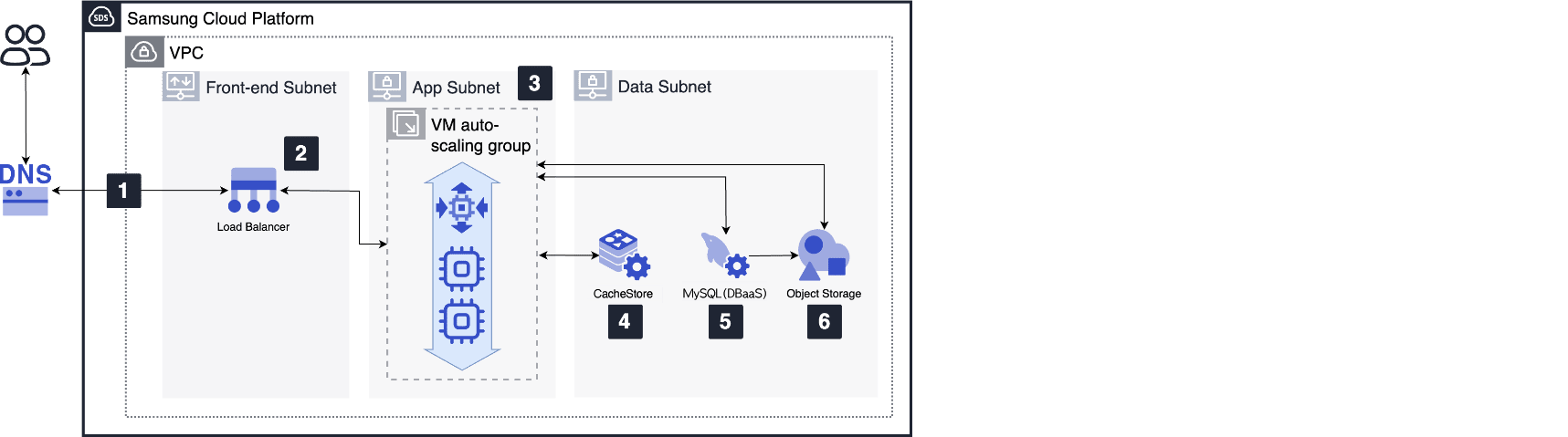
- By configuring a VPC, you can create a basic network environment that provides connectivity between Virtual Servers and between Virtual Servers and the Internet.
Within the VPC, separate the areas into Front-end, App, and Data subnets to allow only minimal communication
- The Load Balancer located in the Front-end Subnet distributes web request traffic to the Virtual Servers in the VM Auto Scaling group.
- Create a Virtual Server or VM Auto Scaling group in the App Subnet, select a Linux image, and launch the server. Install the latest versions of WordPress, Apache web server, PHP, and OPcache on the launched Virtual Server.
- Select the DBaaS MySQL service to configure the database.
- In such cases where the database has a high read load, you can configure a CacheStore service in front of the database to provide frequently accessed data as a cache.
- Configure it so that Virtual Servers can share WordPress data, PHP files, settings, plugins, etc., by using the Object Storage service.
Use Cases
Start web hosting quickly without the burden of hardware investment
You can use Samsung Cloud Platform services to build instantly when needed and pay only for what you use, without the cost of hardware investment or long lead times.
Web service infrastructure that can flexibly respond to changes in usage
If a usage spike is expected during a specific period, you can respond flexibly by horizontally or vertically scaling resources, such as VM Auto Scaling or changing the Virtual Server type.
Prerequisites
None
Constraints
The use of the VM Auto Scaling service is limited to Virtual Server resources and does not apply to other services within the Compute service family (e.g., Bare Metal Server).
Considerations
Ensuring web server security
To secure a web server exposed to the Internet, you can configure and use the following cloud security solutions.
- A WAF service that monitors website traffic to detect and block attacks.
- DDoS Protection service that detects and blocks DDoS attacks that generate concentrated traffic on web servers to disable the service.
- A web vulnerability assessment service that uses a scanning tool to check for potential vulnerabilities on web pages.
Related service
This is a list of Samsung Cloud Platform services that are associated with the features or configurations described in this guide. Refer to it when selecting and designing services.
| service group | service | Detailed description |
|---|---|---|
| Compute | Virtual Server | Virtual server optimized for cloud computing |
| Compute | VM Auto-Scaling | A service that automatically scales resources up or down based on demand |
| Database | MySQL | A service that easily creates and manages the small but powerful open-source relational database MySQL. |
| Database | CacheStore | Key-value in-memory data store with fast data processing capability |
| Networking | Load Balancer | A service that automatically distributes server traffic load. |
| Networking | VPC | A service that provides an isolated virtual network in a cloud environment |
| Storage | Object Storage | Object storage that simplifies data storage and retrieval |