Configuring Web Hosting Based on Samsung Cloud Platform Services
Configuring Web Hosting Based on Samsung Cloud Platform Services
Overview
We can easily and quickly create a website using a content management system (CMS) that utilizes various themes and plugins.
One of the most widely used CMS is WordPress, which requires a LAMP environment, namely Linux, Apache Web Server, MySQL, and PHP.
In this document, we will explore how to configure a WordPress environment using Samsung Cloud Platform’s Virtual Server and MySQL, and discuss the architecture for building and hosting a website, considering additional features like CacheStore.
Architecture Diagram
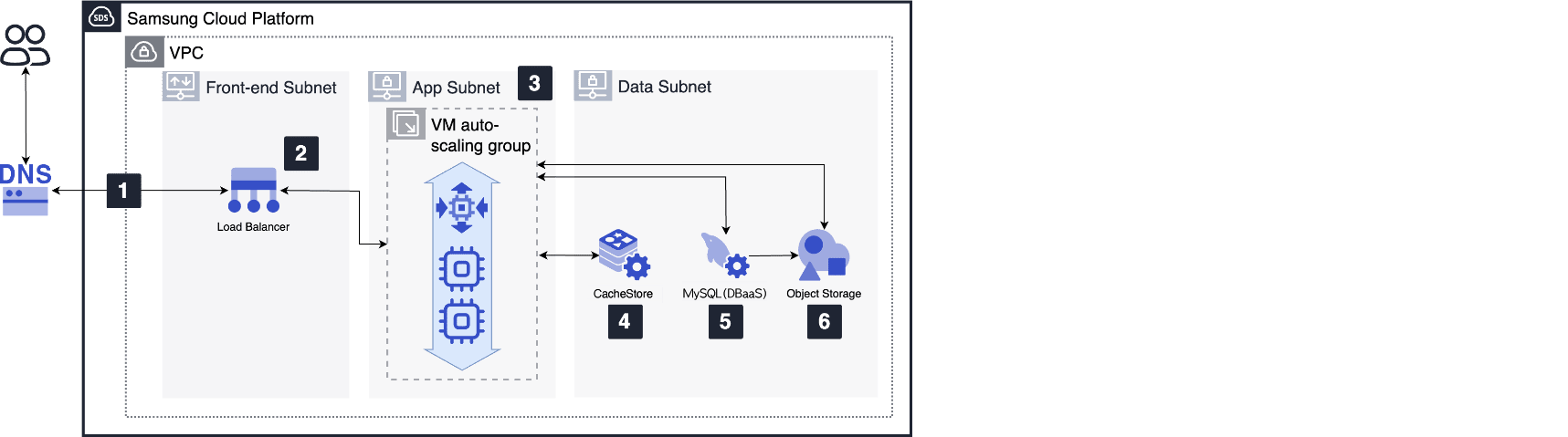
- Create a basic network environment using VPC configuration, enabling connections between Virtual Servers and between Virtual Servers and the internet.
VPC is divided into Front-end, App, and Data Subnets to minimize communication
- The Load Balancer in the Front-end Subnet distributes web request traffic to Virtual Servers in the VM Auto Scaling group.
- Create a Virtual Server or VM Auto Scaling group in the App Subnet, select a Linux image, and install the latest version of WordPress, Apache web server, PHP, and OPcache.
- Configure a Database using the DBaaS MySQL service.
- If the Database has a high read load, configure CacheStore in front of the Database to provide frequently called data as a cache.
- Use the Object Storage service to enable Virtual Servers to share WordPress data, PHP files, settings, and plugins.
Use Cases
Quickly start web hosting without hardware investment
Use Samsung Cloud Platform services to build and use web hosting without hardware investment costs and long lead times.
Web service infrastructure that can respond flexibly to changes in usage
If a surge in usage is expected during a specific period, respond flexibly by scaling VM Auto Scaling and Virtual Server types horizontally and vertically.
Pre-requisites
None
Limitations
The use of VM Auto Scaling services is limited to Virtual Server resources and does not apply to other services in the Compute service group (e.g., Bare Metal Server).
Considerations
Securing web server security
Configure and use cloud security solutions to secure web servers with internet access, such as:
- WAF service to monitor website traffic, detect, and block attacks
- DDoS Protection service to detect and block DDoS attacks that overwhelm web servers
- Web vulnerability scanning service to check for potential vulnerabilities in web pages
Related Services
This is a list of Samsung Cloud Platform services related to the features or configurations described in this guide. Refer to this list when selecting and designing services.
| Service Group | Service | Detailed Description |
|---|---|---|
| Compute | Virtual Server | Virtual server optimized for cloud computing |
| Compute | VM Auto-Scaling | Service that automatically scales resources up or down according to demand |
| Database | MySQL | Service that easily creates and manages a powerful open-source relational database, MySQL |
| Database | CacheStore | In-memory data store with fast data processing capabilities |
| Networking | Load Balancer | Service that automatically distributes server traffic |
| Networking | VPC | Service that provides an independent virtual network in a cloud environment |
| Storage | Object Storage | Object storage that is convenient for data storage and retrieval |