
SingleID SAML Authentication useone SDA campus link implementation
SingleID SAML Authentication useone SDA campus link implementation
Overview
Recently, employees have been handling work not only in the office but also in various locations such as remote work, field assignments, and mobile offices, causing corporate network environments to evolve rapidly. Accordingly, network infrastructure is trending toward a flexible shift to an SDN (Software-Defined Networking) based architecture.
In this changing environment, companies face the challenge of integrating network authentication with business system account management while also strengthening security. Simple ID/password authentication alone is insufficient, and an integrated authentication environment where network access and application access are seamlessly connected has become necessary.
To address these issues, this document explains a solution that uses SingleID’s SAML authentication to integrate network authentication and business system account management with a single account. It introduces a method that enhances security while improving user convenience.
What is SAML authentication?
It is a standard protocol for securely exchanging authentication and authorization information between different systems. It enables SSO(Single Sign-On) technology, allowing a user to log in once and use the same authentication result across other applications without separate logins.
Architecture Diagram
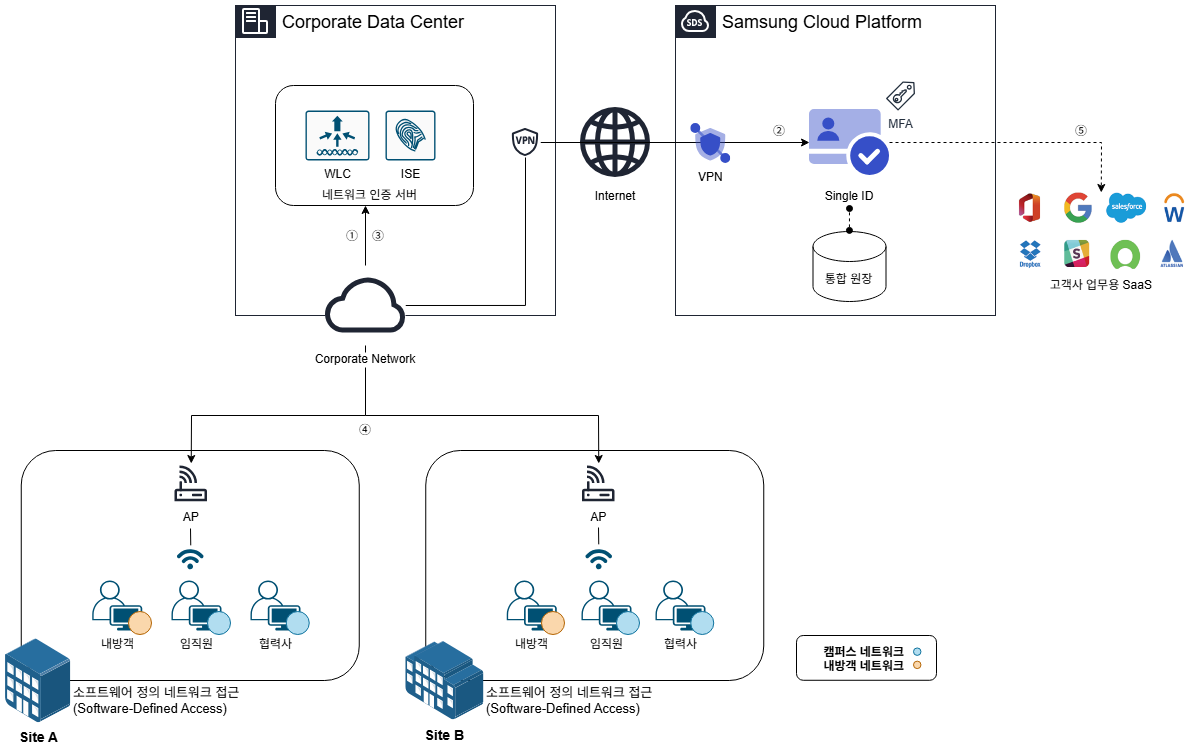
The user connects to the wireless network to access the corporate network. The network authentication server receives the user’s request and delivers the predefined web authentication redirection policy to the user’s device.
The user device runs web authentication provided by SCP SingleID. The user enters an ID and password, and completes additional security through multi-factor authentication (MFA, Multi-Factor Authentication).
Once all authentication procedures are completed, SingleID delivers the user authentication result to the network authentication server via the user’s PC. At this time, the user’s group information (e.g., company, department, etc.) is also transmitted.
The network authentication server assigns an appropriate VLAN to the user based on the received group information. This allows the user to connect to a network that matches their role and permissions.
After the network connection is established, users can access the business system using SingleID authentication information without a separate authentication request.
Use Cases
User group-based network access control
You can finely configure network access permissions based on user groups. For example, you can categorize users as employees, partners, or visitors and restrict access so that each group can only access the resources appropriate for them.
Through this, you can comply with the organization’s security policies, strengthen data protection and access control. Additionally, because group policies can be managed and applied centrally, efficient policy management is possible.
Support same VLAN when moving between workplaces
Users can maintain a consistent network environment by being assigned the same VLAN even when moving between multiple office locations within the company. This enables users to access the same network services and resources at all locations without any additional configuration.
Since no additional configuration is required when changing locations, user convenience is greatly improved, and the administrator’s network management efficiency also increases.
SSO-based network and internal system integrated authentication
Users receive an integrated SSO environment that covers network authentication to internal system access through web authentication. With a single authentication, they are granted access rights to related services and can conveniently use resources without additional login procedures.
This enables us to enhance user convenience, maintain security, and maximize operational efficiency.
Prerequisites
The network communication between the user PC and SingleID must function correctly. This is a prerequisite for smooth authentication and VLAN assignment processes.
If this communication path is not secured, network access and the authentication process may not function properly.
Constraints
SDN(Software-Defined Networking) devices can be used with Cisco ISE(Identity Services Engine).
For other cases where integration with SDN equipment is required, prior consultation is necessary.
Considerations
For web authentication, a temporary VLAN is assigned, the device connects to the network, and web authentication is performed first; after authentication completes, the device is reassigned to the VLAN appropriate for the user.
During this process, the time required for VLAN reallocation (network connection latency) may occur. The latency varies depending on the network environment and can affect the user experience.
Considering this, it is advisable to display a user guidance page during the IP reallocation period to inform users of the progress. This helps prevent user confusion and greatly contributes to providing a smooth experience.
Related service
This is a list of Samsung Cloud Platform services that are associated with the features or configurations described in this guide. Refer to it when selecting and designing services.
| service group | service | Detailed description |
|---|---|---|
| Security | SingleID | Security services offering integrated authentication (AM), account management (IM), multi-factor authentication (MFA), abnormal behavior detection (ADM), and cloud access management (CAM) |
| Networking | VPN | A service that connects the customer’s network to the Samsung Cloud Platform via an encrypted virtual private network. |