Implementation of SDA campus integration using SingleID SAML authentication
Implementation of SDA campus integration using SingleID SAML authentication
Overview
Recently, employees are handling work not only in the office but also in various places such as remote work, field work, and mobile office, and the corporate network environment is rapidly changing. Accordingly, network infrastructure is also trending toward flexible conversion based on SDN (Software-Defined Networking).
In these changes, companies face the challenge of integrating network authentication and business system account management while simultaneously strengthening security. Simple ID/password authentication alone is insufficient, and an integrated authentication environment where network access and application access are naturally connected has become necessary.
To solve these problems, this document explains a method of integrating network authentication and business system account management into a single account by utilizing SingleID’s SAML authentication. Through this, we introduce a way to enhance security while also improving user convenience.
What is SAML authentication?
It is a standard protocol for securely exchanging authentication and authorization information between different systems. It is an SSO (Single Sign-On) technology that allows a user to log in once and use the same authentication result in other applications without separate logins.
Architecture Diagram
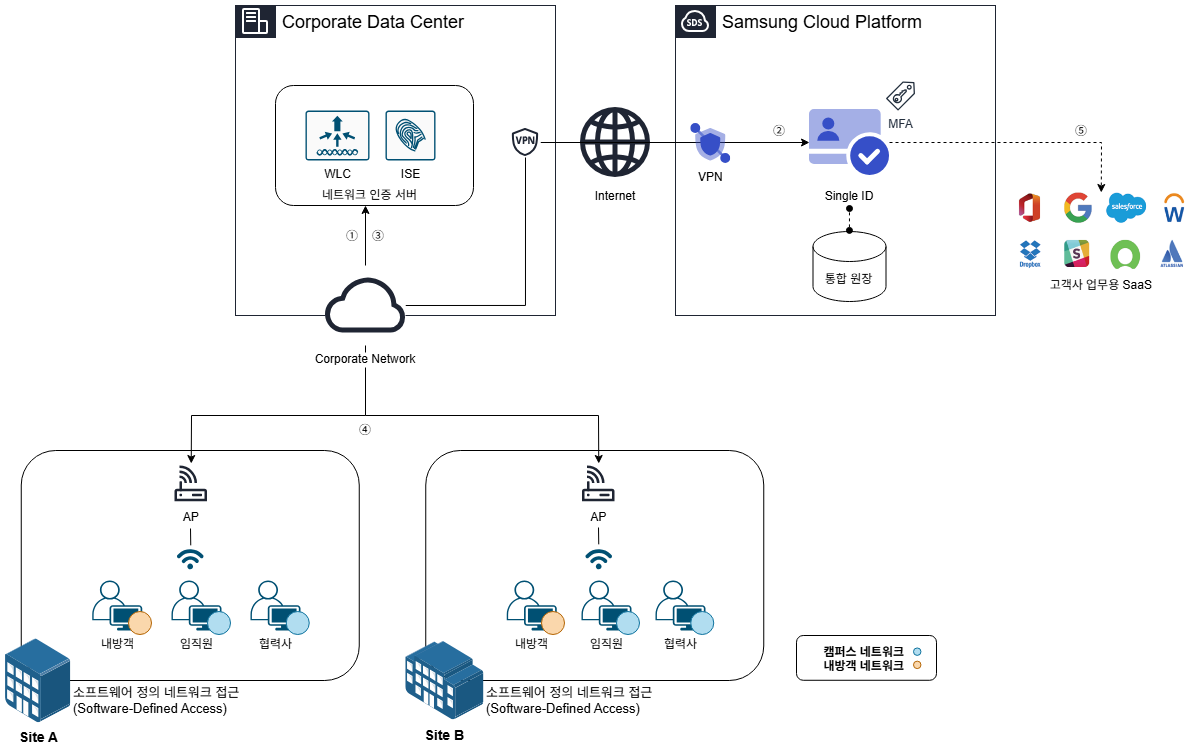
The user connects to the wireless network to access the corporate network. The network authentication server receives the user’s request and delivers the predefined web authentication redirection policy to the user’s device.
The user device runs the web authentication provided by SCP SingleID. The user enters the ID and password, and completes additional security through multi-factor authentication (MFA, Multi-Factor Authentication).
Once all authentication procedures are completed, SingleID delivers the user authentication result to the network authentication server via the user’s PC. At this time, the user’s group information (e.g., company, department, etc.) is also transmitted.
The network authentication server assigns a suitable VLAN to the user based on the received group information. This allows the user to connect to a network that matches their role and permissions.
After the network connection is completed, the user can access the business system using SingleID authentication information without a separate authentication request.
Use Cases
User Group Based Network Access Control
You can finely set network access permissions according to user groups. For example, you can classify users as employees, partners, and visitors, and restrict them to access only the resources appropriate for each group.
Through this, you can comply with the organization’s security policies, strengthen data protection and access control, and manage and apply group policies centrally for efficient policy management.
Support same VLAN when moving between workplaces
Users can maintain a consistent network environment by being assigned the same VLAN even when moving between multiple work locations within the company. This allows users to access the same network services and resources at all work locations without any additional configuration.
No additional settings are required due to location changes, greatly improving user convenience, and increasing the administrator’s network management efficiency.
SSO-based network and internal system integrated authentication
Users receive an integrated SSO environment that provides everything from network authentication to internal system access through web authentication. With a single authentication, access rights to related services are granted, and users can conveniently utilize resources without additional login procedures.
Through this, you can increase user convenience, maintain security, and also maximize work efficiency.
Preliminary matters
Network communication between the user PC and SingleID must be normal. This is a necessary condition for smooth authentication and VLAN assignment processes.
If this communication path is not secured, network access and authentication processes may not operate correctly.
Constraints
SDN(Software-Defined Networking) equipment can be used with Cisco ISE(Identity Services Engine).
If integration with other SDN equipment is required, prior consultation is necessary.
Considerations
For web authentication, a temporary VLAN is assigned and the web authentication is performed first while connected to the network, and after authentication is completed, a logic that reassigns to a VLAN appropriate for the user is applied.
In this process, the time required for VLAN reallocation (network connection latency) may occur. The latency varies depending on the network environment and may affect user experience.
Considering this, it is advisable to consider displaying a user guidance page during the IP reallocation time to inform about the progress. This helps prevent user confusion and greatly assists in providing a smooth experience.
Related Services
This is a list of Samsung Cloud Platform services that are connected to the functions or configurations described in this guide. Please refer to it when selecting and designing services.
| Service Group | Service | Detailed Description |
|---|---|---|
| Security | SingleID | Security services providing integrated authentication (AM), account management (IM), multi-factor authentication (MFA), abnormal behavior detection (ADM), cloud access management (CAM) |
| Networking | VPN | A service that connects the customer’s network and Samsung Cloud Platform through an encrypted virtual private network. |