
Interactive Query Service Based on Quick Query
Interactive Query Service Based on Quick Query
Overview
Quick Query is an interactive query service that enables easy and fast analysis of large-scale data using standard SQL. It is automatically installed on a standard Kubernetes cluster and provides quick and easy access to various data sources such as Cloud Hadoop, Object Storage, and RDBs for data retrieval and processing.
You can use it independently in the Kubernetes Engine cluster environment of Samsung Cloud Platform, or together with other application software.
Architecture Diagram
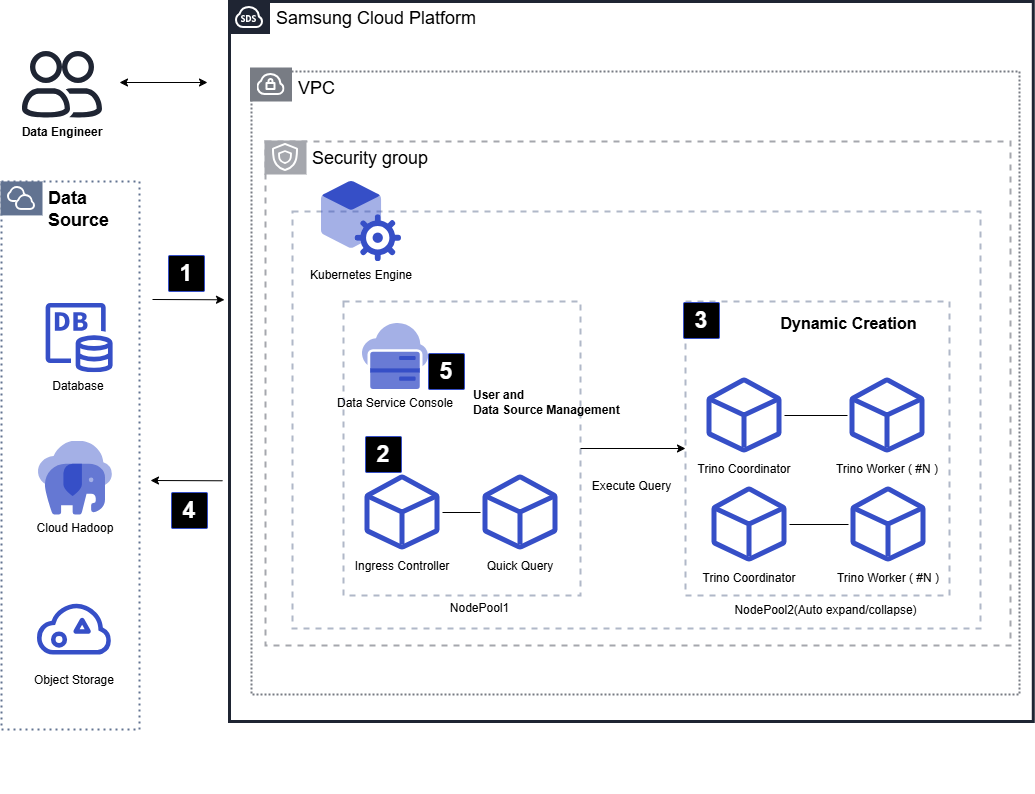
Data Engineer uses Quick Query to query data from various data sources (RDB, Cloud Hadoop, Object Storage, etc.) or perform cross‑source data joins.
A Data Engineer can easily cleanse, transform, and merge standard SQL data using Quick Query.
Quick Query processes user queries quickly using a Trino engine–based large-scale parallel distributed processing method. As workload increases, Kubernetes nodes and the query engine automatically scale to handle faster and larger data processing.
Data for completed queries is stored in Object Storage by default, and can be saved back to the original data source area according to SQL syntax. You can also retrieve and use data stored in Object Storage again.
Quick Query’s user information and Data Source metadata are centrally managed in the Data Service Console, and user authentication is performed through the Data Service Console’s authentication server.
Use Cases
Real-time data join for this model without requiring data collection
In a Data Warehouse system, when customer reference information is stored in MySQL(DBaaS) and sales data is stored in PostgreSQL(DBaaS), data can be joined via Quick Query without loading it into an integrated repository. Using a memory‑based approach, heterogeneous data can be joined and transformed in real time, and the resulting data can be loaded into the integrated repository or another Data Source.
Equipment process log data retrieval and conversion
If CSV-format log data generated in the equipment process is stored in Object Storage, it can be queried directly with SQL in Quick Query without any separate data collection tasks. By specifying the stored path as the source path, you can create a table and query/transform it with SQL to store it in a separate RDB.
Prerequisites
Quick Query Installation requires a Kubernetes Cluster that meets the minimum specifications.
Constraints
When Quick Query is installed, a new Kubernetes cluster and node pool are installed together.
Considerations
None
Related service
This is a list of Samsung Cloud Platform services that are associated with the features or configurations described in this guide. Refer to it when selecting and designing services.
| service group | service | Detailed description |
|---|---|---|
| Storage | File Storage | Storage that enables multiple client servers to share files over a network connection. |
| Storage | Object Storage | Object storage that simplifies data storage and retrieval |
| Container | Kubernetes Engine | Kubernetes container orchestration service |
| Networking | Load Balancer | A service that automatically distributes server traffic load. |