Quick Query-based Interactive Query Service
Quick Query-based Interactive Query Service
Overview
Quick Query is an interactive query service that allows for easy and fast analysis of large-scale data using standard SQL. It is automatically installed on a standard Kubernetes cluster and provides easy and fast access to various data sources, including Cloud Hadoop, Object Storage, and RDB, enabling data retrieval and processing.
The Quick Query service can be used independently in the Samsung Cloud Platform’s Kubernetes Engine cluster environment or in conjunction with other application software.
Architecture Diagram
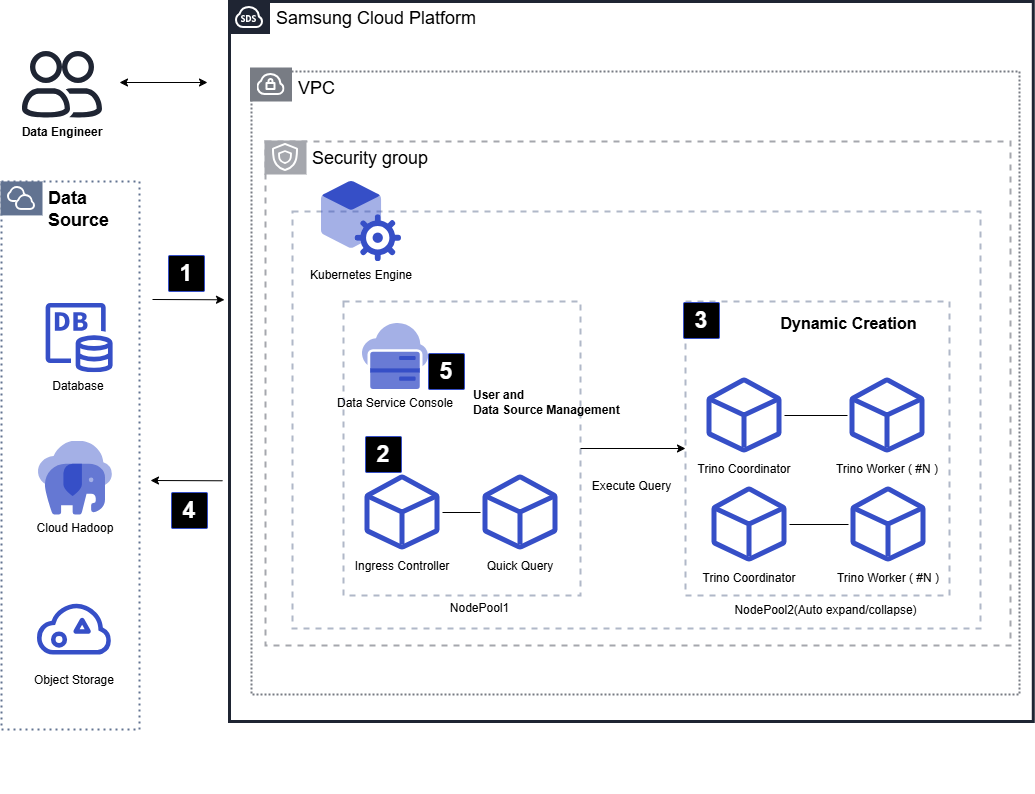
Data Engineers can use Quick Query to retrieve data from various data sources (RDB, Cloud Hadoop, Object Storage, etc.) or perform cross-data joins.
Data Engineers can use Quick Query to easily refine, transform, and merge standard SQL data.
Quick Query uses a Trino engine-based large-scale parallel distributed processing method to quickly process user queries. As the workload increases, Kubernetes nodes and query engines automatically expand to perform faster and more extensive data processing.
Once the query is complete, the data is stored in Object Storage by default and can be stored again in the original data source area according to SQL syntax. Additionally, data stored in Object Storage can be retrieved and used again.
Quick Query user information and data source metadata are managed collectively in the Data Service Console, and user authentication is performed through the Data Service Console’s authentication server.
Use Cases
Real-time Cross-Data Join without Data Collection
In a Data Warehouse system where customer reference information is stored in MySQL(DBaaS) and sales data is stored in PostgreSQL(DBaaS), Quick Query enables data joining without the need for a data collection process. Memory-based cross-data joining and transformation can be performed in real-time, and the resulting data can be stored in a unified storage or other data sources.
Retrieval and Transformation of Facility Process Log Data
If log data in CSV format generated from facility processes is stored in Object Storage, Quick Query allows for direct retrieval using SQL without additional data collection work. By designating the stored path as the source path, a table can be created, and data can be retrieved and transformed using SQL, then stored in a separate RDB.
Prerequisites
A Kubernetes Cluster with minimum specifications or higher is required for Quick Query installation.
Limitations
A new Kubernetes Cluster and node pool are installed together when installing Quick Query.
Considerations
None
Related Services
The following is a list of Samsung Cloud Platform services related to the features or configurations described in this guide. Please refer to this list when selecting and designing services.
| Service Group | Service | Detailed Description |
|---|---|---|
| Storage | File Storage | Storage for sharing files among multiple client servers through network connections |
| Storage | Object Storage | Object storage suitable for data storage and retrieval |
| Container | Kubernetes Engine | Kubernetes container orchestration service |
| Networking | Load Balancer | Service that automatically distributes server traffic loads |