
Sending messages using Message Hub
Sending messages using Message Hub
Overview
Message Hub is an integrated messaging service that reliably delivers messages and notifications to various systems and users. The application delivers events and notification messages to end users in real time through various channels such as SMS, email, and mobile application push notifications.
When an application directly integrates with carriers for each channel, each channel must individually implement and operate its own integration specifications and sender authentication procedures. Message Hub integrates outbound channels on a single platform and handles sender information management and outbound tasks, allowing applications to send notifications with a single API call without the burden of channel-specific implementation. It also provides consistent messaging services even in large-scale service environments through reliable message delivery and a scalable architecture.
Message transmission is performed by the Publisher (sender) calling the channel-specific transmission API of the Message Hub, and the Message Hub delivers the message to the Subscriber (receiver) in that channel format. APIs are provided as either a Public URL, which is called over the Internet, or a Private URL, which is called via a Private Endpoint within VPC resources.
Architecture diagram
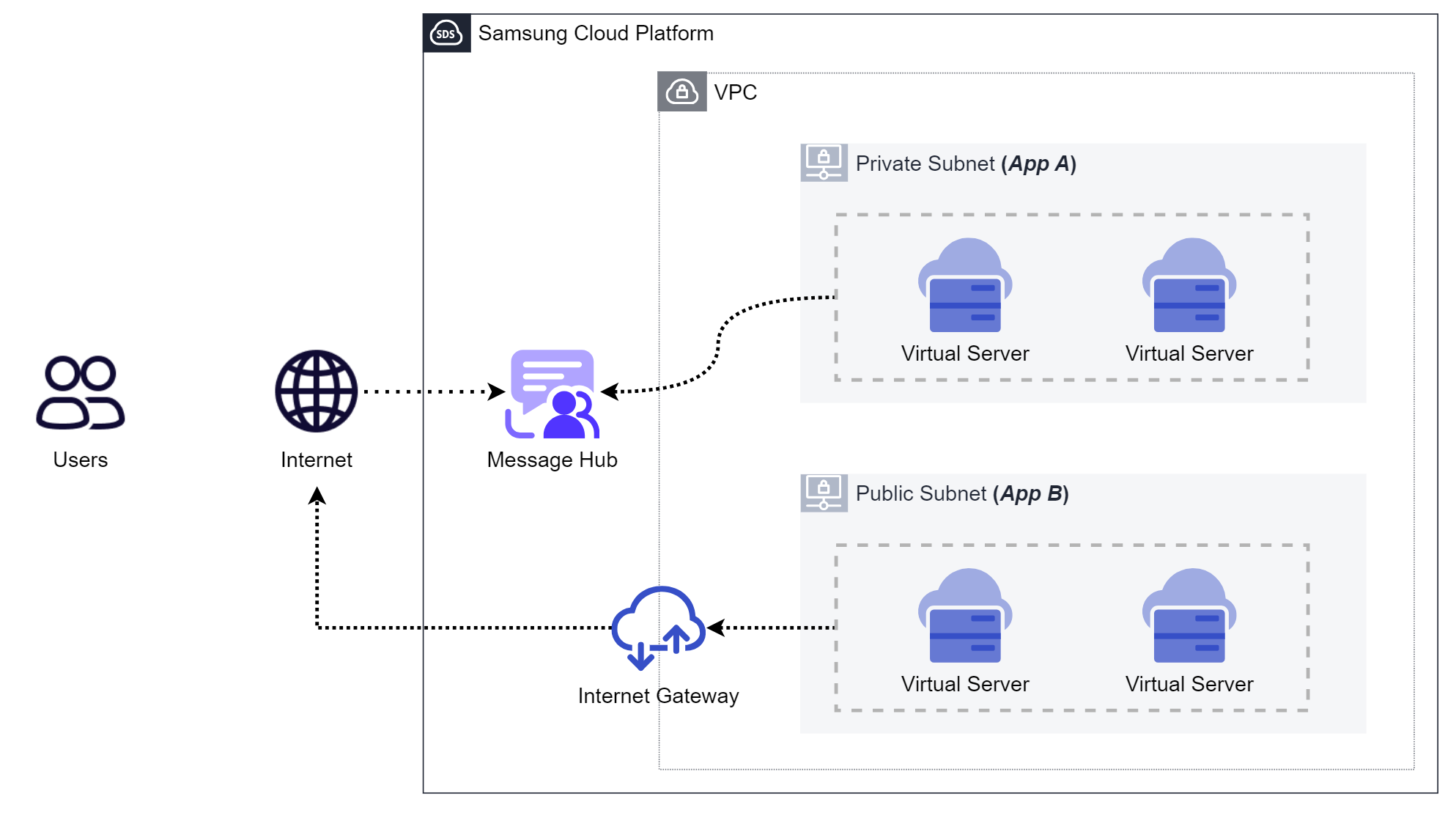
Use Cases
Development using Message Hub focuses on separating application logic from notification delivery channels. The application focuses only on “what to inform”, and delegates “which channel and how to deliver” to the Message Hub.
Each case is a use case based on Message Hub’s core strengths of channel integration, sender authentication delegation, and a scalable delivery architecture.
Event-based user notification
Delivers events generated in the application to end users in real time.
Transaction Notification
We immediately notify the results of user actions such as order completion, payment approval, and shipping status changes. The application simply calls the channel-specific transmission API of Message Hub when an event occurs.
Authentication and Security Notification
We deliver time-sensitive messages such as verification codes, new device login detections, and password changes via SMS or email.
Operation and Monitoring Notification
It notifies the responsible party of status changes that occur during system operation.
Send events such as batch job failures, resource threshold exceedances, and fault detections to the operator’s phone number or email to accelerate response time.
Prerequisites
Before calling the message sending API, you must first add the resources (Email, phone number, Push Application) to be used for sending in the Console and complete authentication. If you attempt to send using an unauthenticated sending resource, a 400 AccessDeniedException error occurs.
Prepare outbound resources per channel
Phone number (SMS)
After adding the phone number to be used for outgoing calls in Phone Book, you must complete the outgoing number verification.
Authentication documents are registered through Support Center > Service Request, and depending on the applicant, a business registration certificate, telecommunications service usage certificate, employment verification, and consent form are required. The telecommunications service usage certificate must be unmasked, and only documents issued within the past three months can be uploaded, so include the document preparation period in the schedule.
When the document verification and authentication are completed, the sender number verification status is displayed as verified, and you can set that number as the sender number to send SMS.
From Email Management > Domain, add a sending Email domain, and through Support Center > Service Request complete domain verification. Since registering DNS records such as SPF, DKIM, and DMARC is required during the domain verification process, prior coordination with the DNS administrator is necessary.
Afterwards, in Email Management > Email, add the outgoing Email address and enter the verification code sent to the owner’s Email to complete Email verification.
Determine call interval
The API URL varies depending on the production environment and region, and is divided into Public URL and Private URL based on the call segment.
- Public URL: Used when calling the Message Hub over the internet.
- Private URL: Used when calling from internal VPC resources via a Private Endpoint.
To use Private calls, you must enable the private endpoint and set the allowed private access resources in the {channel} Details > Access Control tab. Calling it in an unauthorized state results in a 400 AccessDeniedException error. The request headers and body are the same as a public call, and only the URL changes.
Constraints
Please refer to the Quota service.
Monthly outbound count
The channel’s monthly outbound count is limited as follows. If you want to increase the outbound limit, please proceed through Support Center > Service Request.
| channel | Monthly sending limit |
|---|---|
| SMS | 10,000 cases |
| 100,000 cases | |
| Push | 1,000,000 cases |
If the monthly sending quota is exceeded, a 429 LimitExceededException error is returned with a Retry-After header.
Request size and number of recipients
The total size of the request body for all message-sending APIs must not exceed 294,912 bytes, and the per-channel constraints are as follows.
| channel | Number of recipients | Body size |
|---|---|---|
| Minimum 1, maximum 100 | Body (body) maximum 262,144 bytes | |
| SMS | Minimum 1, maximum 100 | Body (text) up to 90 bytes |
| Push | Maximum 100 device tokens | data payload up to 1,024 bytes |
If the limit is exceeded, a 413 RequestEntityTooLarge error occurs, and exceeding the number of recipients returns a 400 InvalidParameterValue.
Channel-specific feature restrictions
- Push: sent only with a data-only payload. - Since the
dataobject cannot providetitleandbodyfields, the notification title and body must be placed in thedatapayload and displayed directly by the device application. - SMS: The recipient number follows the ITU-T E.164 format. - If there is no
+prefix, it is interpreted as a domestic (South Korea, country code 82) number, and-and spaces are removed. - Email: Domains with the domain protection feature enabled cannot be used in another Account. - When the domain is verified, the protection feature is automatically enabled.
Availability
The bulk message sending feature using Topics and Subscriptions is scheduled for release in November 2026. Until then, you must send by directly providing the recipient list to each channel’s transmission API.
Considerations
Securing lead time for outbound resource authentication
SMS sender number verification and Email domain verification undergo a document review process through Support Center > Service Request. Consider initiating the certification process early alongside application development, and before certification is completed, verify using short lead‑time channels such as Push channels in the development environment.
Designing sending with recipient count limits
You can deliver up to 100 recipients per channel in a single API call. If bulk sending is required, you need logic that splits the recipient list into batches of 100 for each call, and you should also design handling for the monthly sending quota depletion rate and retries for 429 responses. It is recommended to back off by respecting the Retry-After header value.
Calling via Private Endpoint
To call Message Hub from workloads inside a VPC without exposing to the internet, use a Private URL and a private endpoint. Disabling the private endpoint deletes the configured endpoint access control list, so caution is required when changing settings during operation.
When using a public endpoint, register up to 100 allowed public access IPs in CIDR format on the Access Control tab to restrict the callers. 0.0.0.0/0 and 127.0.1/32 cannot be added.