
Secret Vault useone OpenAPI temporary key issue and Management
Secret Vault useone OpenAPI temporary key issue and Management
Overview
Secret Vault provides an environment where customers can access Samsung Cloud Platform services and resources more securely by obtaining a hardened token‑based OpenAPI credential, instead of hardcoding security information in plain text, when using the Samsung Cloud Platform OpenAPI.
A Token is an authentication method for obtaining an OpenAPI token, composed of a Token ID and a Token Secret. Customers do not need to manage the OpenAPI token lifecycle themselves; Secret Vault automatically handles it according to the configured lifecycle.
Architecture Diagram
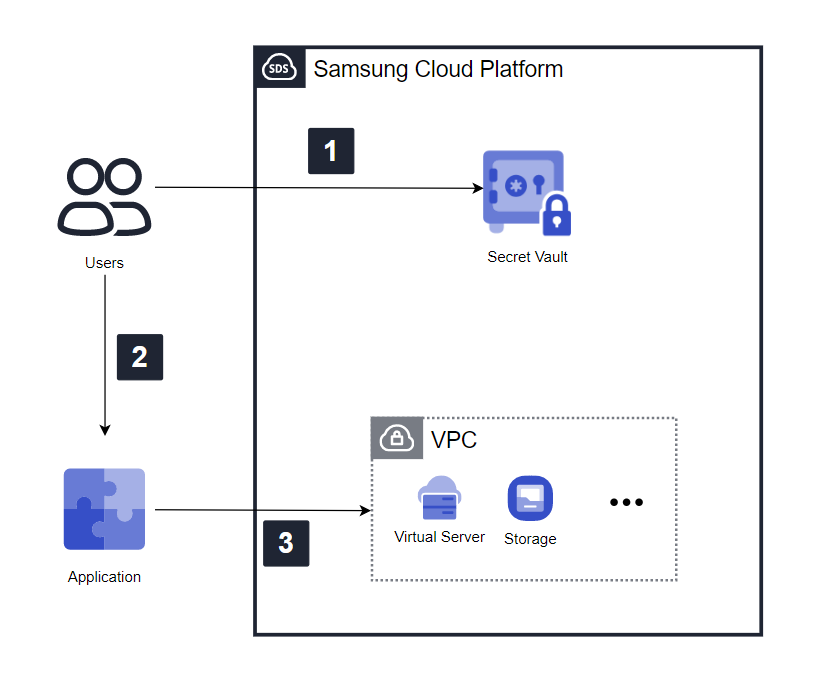
- The user uses the authentication key information obtained in advance through the Samsung Cloud Platform Console to request a token from Secret Vault, and Secret Vault generates and issues the token.
- Configure the issued token in the application.
- Obtain an OpenAPI access token via the API using token information, then use the issued token to access and utilize services and resources on the Samsung Cloud Platform.
Use Cases
Use of OpenAPI temporary key for a development project for a specific period
When developing a project using the resources and services of the Samsung Cloud Platform, the authentication key that grants access to those resources and services must be revoked after the project ends. By obtaining a token that is valid only for a specific period through Secret Vault and using a periodically rotated OpenAPI temporary key, you can conduct the project more securely without needing to revoke the authentication key.
Compliance with security regulations for using authentication keys
Using permanent authentication keys poses security risks of loss and theft. By using Secret Vault to set token access control and the OpenAPI key rotation interval, you can reduce the risk of loss and theft, and by removing hard‑coded authentication keys from application source code, you can safely use Samsung Cloud Platform services and resources.
Prerequisites
To issue and manage OpenAPI temporary keys via Secret Vault, you must first generate an authentication key in the Samsung Cloud Platform Console.
Constraints
Within an account, each user can create up to two authentication keys, and one Secret Vault service can be requested per authentication key. To use the Secret Vault service, you must set the authentication method to ‘temporary authentication’ in Samsung Cloud Platform Console - My Info – Key Management – Security Settings.
Considerations
After setting the token’s validity period to a specific duration, once it expires, OpenAPI issuance is not possible, so the customer must obtain a new one and replace it before expiration.
Related service
This is a list of Samsung Cloud Platform services that are associated with the features or configurations described in this guide. Refer to it when selecting and designing services.
| service group | service | Detailed description |
|---|---|---|
| Management | IAM | A service that controls the scope of access to services and resources by verifying the identity of users registered on the Samsung Cloud Platform and granting access permissions. |