Utilizing Secret Vault for OpenAPI Temporary Key Issuance and Management
Utilizing Secret Vault for OpenAPI Temporary Key Issuance and Management
Overview
Secret Vault provides an environment where customers can safely access Samsung Cloud Platform services and resources using a security-enhanced token-based OpenAPI temporary key without hardcoding security information in plain text when using Samsung Cloud Platform OpenAPI.
The token consists of a Token ID and Token Secret and serves as an authentication method for obtaining an OpenAPI temporary key. Secret Vault automatically manages the lifecycle of the OpenAPI temporary key according to the set period, eliminating the need for customers to manage it directly.
Architecture Diagram
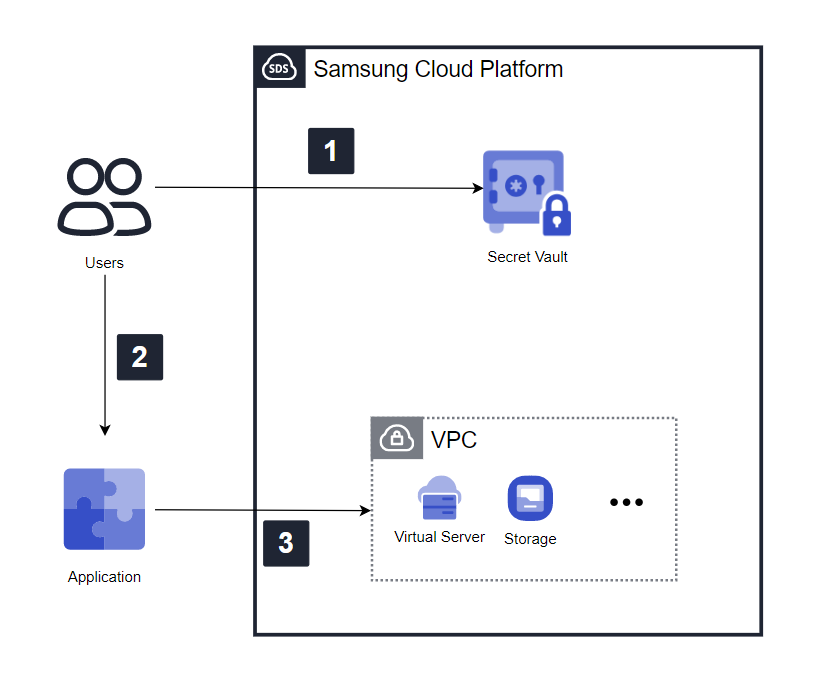
- The user requests a token from Secret Vault using the authentication key information obtained in advance through the Samsung Cloud Platform Console, and Secret Vault generates and issues the token.
- The issued token is set up in the application.
- The application uses the token information to obtain an OpenAPI temporary key through the API and accesses Samsung Cloud Platform services and resources using the obtained OpenAPI temporary key.
Use Cases
Using OpenAPI Temporary Keys for Development Projects with Specific Durations
When using Samsung Cloud Platform resources and services for development projects, the authentication key must be revoked after the project is completed. By using Secret Vault to issue tokens with specific durations and periodically replacing OpenAPI temporary keys, customers can ensure security without having to revoke authentication keys.
Compliance with Security Regulations for Authentication Key Usage
Using permanent authentication keys poses security risks due to potential loss or theft. By using Secret Vault to set up token access control and OpenAPI temporary key replacement cycles, customers can reduce the risk of loss or theft and safely use Samsung Cloud Platform services and resources by removing authentication key hardcoding from application source code.
Prerequisites
To issue and manage OpenAPI temporary keys using Secret Vault, customers must create an authentication key in the Samsung Cloud Platform Console in advance.
Restrictions
Up to two authentication keys can be created per user account, and one Secret Vault service can be applied per authentication key. To use the Secret Vault service, the authentication method must be set to ‘Temporary Key Authentication’ in the Samsung Cloud Platform Console - My Info - Authentication Key Management - Security Settings.
Considerations
Since OpenAPI temporary key issuance is not possible after the token expires, customers must directly obtain and replace new tokens before they expire.
Related Services
The following is a list of Samsung Cloud Platform services related to the features or configurations described in this guide. Please refer to this list when selecting and designing services.
| Service Group | Service | Detailed Description |
|---|---|---|
| Management | IAM | A service that controls access to services and resources by verifying the identity of registered users and granting access permissions |