
Legacy Containerof Migration
Legacy Containerof Migration
Overview
Kubernetes is a platform that provides the ability to automate and manage multiple container applications. Through Kubernetes, you can automate various tasks such as container deployment, management, and scaling for container-based applications, enabling you to build and operate them.
Kubernetes Engine, a Kubernetes product offered by Samsung Cloud Platform, is a platform that can deploy and manage containerized applications.
This document introduces the process of migrating third‑party Kubernetes‑based applications and platforms to Samsung Cloud Platform as a prerequisite for using the Kubernetes Engine product.
Architecture Diagram
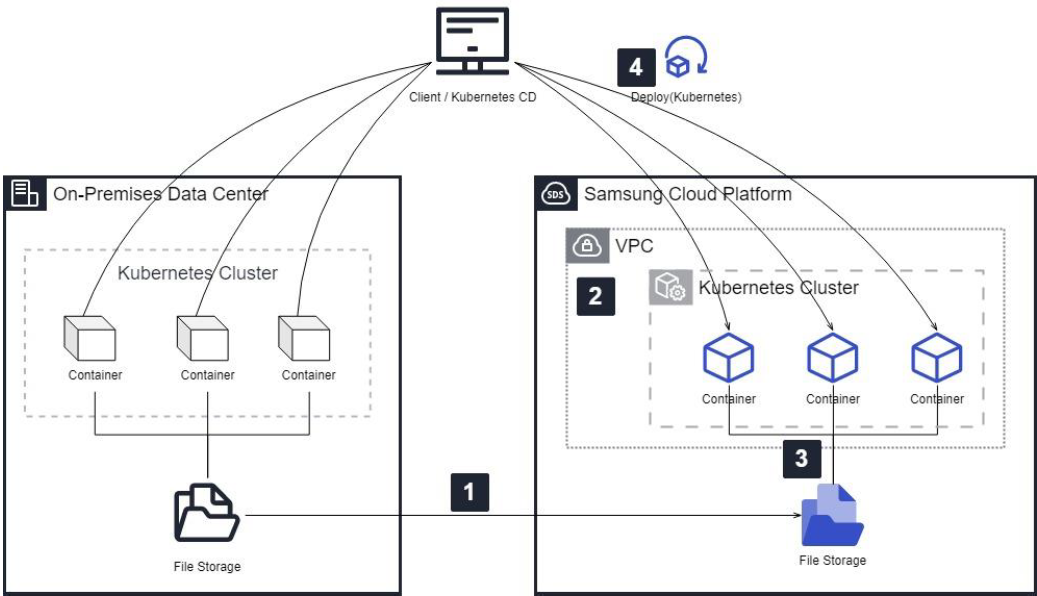
- Migrate the storage currently used in the existing Kubernetes environment to the Samsung Cloud Platform environment.
- Apply for the Kubernetes Engine product based on the migrated storage and create a node pool.
- Create PV(Persistent Volume) and PVC(Persistent Volume Claim) objects for services within the Kubernetes Engine cluster to prepare storage connections.
- Deploy a Kubernetes Object to a Kubernetes Engine cluster from a kubectl command-line client environment or a Kubernetes deployment environment.
Use Cases
A. Migration work in an environment that manages Kubernetes Manifest files
You can use the previously managed Kubernetes Manifest files to deploy to a Kubernetes Engine cluster and perform the migration. By applying your own Kubernetes deployment environment and CD tools (Helm, ArgoCD, etc.) directly to the Samsung Cloud Platform’s Kubernetes Engine cluster environment, you can deploy Kubernetes Objects in the same way as before, enabling a more stable and efficient migration.
When creating a Kubernetes service based on the existing data of the transferred storage, PV and PVC objects may need to be created manually using manifest files rather than a CD tool.
B. Migration tasks in environments that do not manage Kubernetes Manifest files
If you have not been managing Kubernetes Manifest files, you can extract the Manifest files from the existing Kubernetes cluster environment and migrate them to the Kubernetes Engine cluster of Samsung Cloud Platform.
Extract the Kubernetes Object(manifest) information from the existing environment as a .yaml file, refine it to suit the Kubernetes Engine environment, and then deploy it using kubectl commands for migration.
Prerequisites
Before creating a Kubernetes Engine service, you need to create and configure related resources (VPC, Subnet, Security Group, Load Balancer, File Storage, etc.)
You need to connect the kubectl client environment and the Kubernetes deployment environment to the Samsung Cloud Platform’s Kubernetes cluster (network, kube config, etc.).
When creating PV and PVC, a manifest file refinement is needed with information about the transferred storage.
Service type:LoadBalancer To use it, you need a Load Balancer product that can be integrated with the Kubernetes Engine offering.
Constraints
The maximum number of Worker Nodes that can be created in Kubernetes Engine is limited to the available IP range in the Subnet, and up to 100 can be created.
Worker nodes created in Kubernetes Engine may be assigned IPs that differ from those in the existing environment.
Considerations
Verification of the list of services to be transferred is required.
If you are managing Kubernetes manifest files with a CD tool that deploys services, you need to decide whether to use the CD tool when deploying the service.
Sizing work is required for products related to Kubernetes Engine (Storage, LB, Node(VM), etc.)
After creating a Kubernetes Engine service, you must consider in advance the integrated resources (LB, storage, etc.) that cannot be modified.
Depending on the version of the supported Kubernetes Engine product, major or minor updates may be required when necessary.
Related service
This is a list of Samsung Cloud Platform services that are associated with the features or configurations described in this guide. Refer to it when selecting and designing services.
| service group | service | Detailed description |
|---|---|---|
| Container | Kubernetes Engine | Kubernetes container orchestration service |
| Networking | VPC | A service that provides an isolated virtual network in a cloud environment |
| Networking | Security Group | Virtual firewall that controls VM traffic |
| Storage | File Storage | Storage that enables multiple client servers to share files over a network connection. |
| Compute | Virtual Server | Virtual server optimized for cloud computing |
| Networking | Load Balancer | A service that automatically distributes server traffic load. |