
Distributed Application Architecture Using Queue Service
Distributed Application Architecture Using Queue Service
Overview
QS (Queue Service) is a fully managed message queue (queue) service that enables microservices, distributed systems, and serverless applications to be decoupled and scaled. In distributed systems, reliable data flow is a key factor that determines an application’s reliability and scalability. Through QS, you can relay messages between producers and consumers, and by using the API you can store and retrieve messages in the queue to implement a latency‑free processing flow. Messages processed in QS are received on a polling (Polling) basis and stored in the queue for up to 14 days. QS adopts a Point-to-Point approach, ensuring that a single message is processed by only one receiver, and the receiver has full control to receive, process, and delete the message.
Architecture Diagram
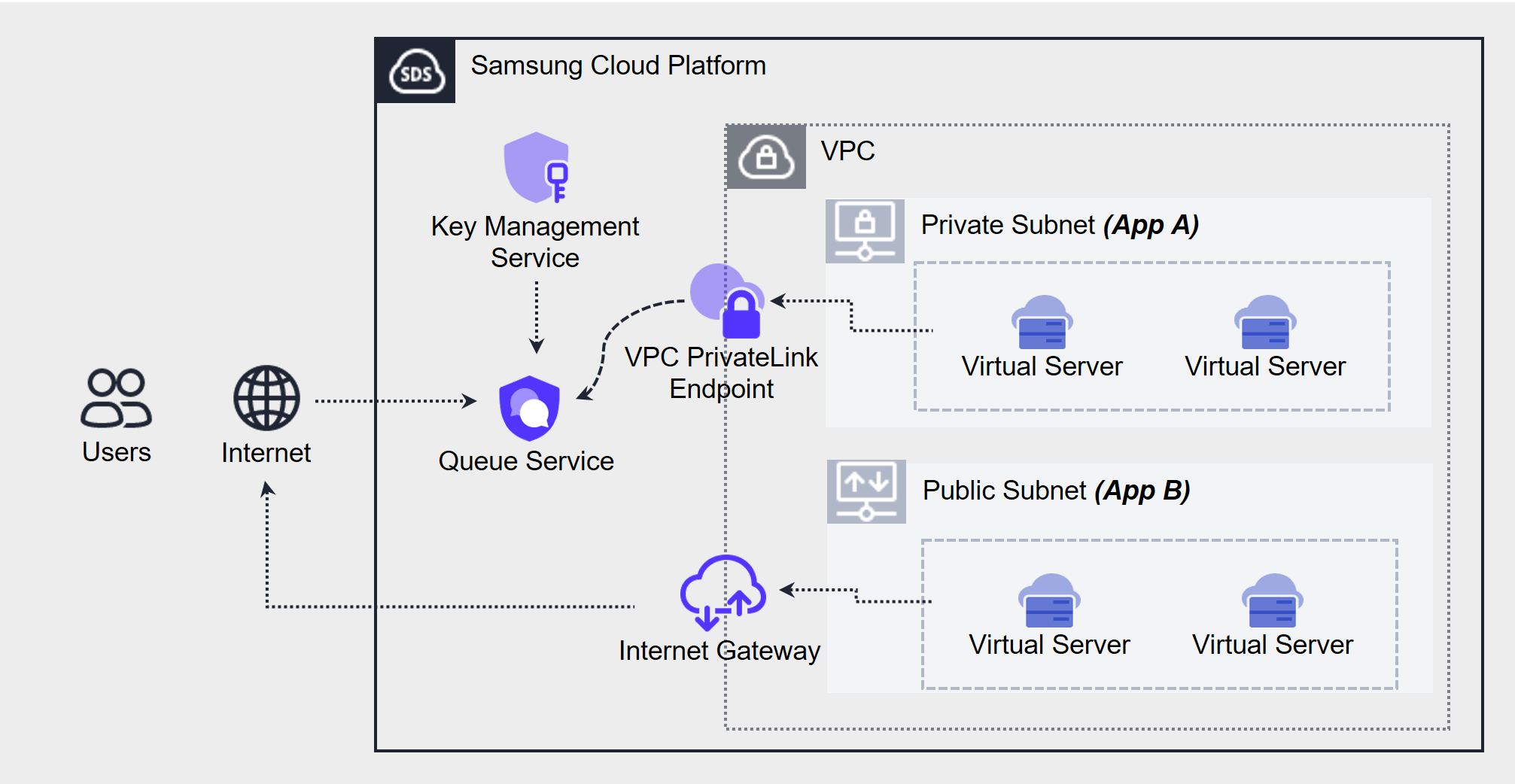
If you separate the Producer and Consumer through a message queue, each component can operate independently, minimizing interdependencies. As a result, the producer’s load or consumer failures do not propagate to the entire system, ensuring asynchronous and reliable task processing.
The components that make up the SQS messaging system can be broadly divided into three categories.
- Producer and Consumer (distributed application server)
- Queue (queue)
- message
The components above interact as follows.
- Producer creates message and sends it to Queue.
- Queue stores message for a certain period.
- Conumer polls the queue periodically to detect new message, and processes it immediately once confirmed.
- Consumer sends an acknowledgment (Ack) to the Queue after processing the message is complete.
- Queue removes a message from Queue when it receives the acknowledgment (Ack) for the message ID.
Use Cases
Development using Samsung Queue Service (QS) mainly focuses on lowering inter-system coupling (Decoupling) and implementing reliable asynchronous communication. QS ensures reliable message flow in microservice architectures or distributed systems, and can enhance the independence of producers and consumers.
Each case is a use case based on QS’s core strengths of asynchronous processing, scalability, and fault tolerance.
Asynchronous communication between microservices
The most common use case is to achieve loose coupling between services in a complex microservices environment.
Loose Coupling (Loose Coupling)
The order service publishes messages to the QS queue without directly depending on the payment or inventory management services. Each service polls messages from the queue and processes them independently, minimizing the impact of changes on the entire system.
Scalability and Fault Tolerance
Even during traffic spikes or individual service failures, messages are safely stored in the queue, keeping the entire system stable. Independent scaling per service is possible as needed.
Background tasks and long-running task processing
Provide an immediate response to the user while offloading time‑consuming tasks to run asynchronously.
Media processing:
When a user uploads a high-resolution image, the frontend immediately returns a success response and sends a processing task message to the QS queue.
A separate worker (e.g., a VS or SCF function) polls the queue to perform image resizing, encoding, and other tasks in the background.
Large-scale data processing:
Queue complex analysis or report generation requests, process them in the background, and reduce user wait times.
Prepare for traffic surge (spike traffic handling)
Maintains system stability during sudden load increases.
When traffic spikes occur, as with large e-commerce platforms, use QS’s unlimited throughput (Standard Queue) and message retention (up to 14 days) to alleviate overload. Messages are buffered in the queue, allowing the consumer to process them reliably.
Prerequisites
Queue selection
QS supports Standard and FIFO queues. The characteristics of each queue are as follows.
Standard Queue (Standard Queue)
Standard queues support near‑unlimited message transmission. Guarantees at-least-once delivery (At-Least-Once-Delivery). However, depending on the situation, messages may be sent redundantly, and there may be cases where messages are out of order. However, the standard queue aims to preserve order as much as possible. (Best-Effort-Ordering)
Therefore, when developing with the standard queue, the application should be designed so that processing a message twice does not have a negative impact.
FIFO queue (First In First Out Queue)
FIFO queues guarantee message order. The message is sent once, and the recipient receives it only once. (Exactly-Once Processing). Duplicate messages are not allowed. However, to ensure this arrival order, it maintains a limited number of transactions compared to the standard queue.
Queue selection considerations
Message Ordering (Message Order)
If order is essential, choose FIFO. Standard is flexible but does not guarantee a perfect order.
Delivery (delivery method)
If the environment allows duplicate handling, Standard is efficient. If you need strict exactly-once processing, use FIFO.
Throughput (throughput)
In high-load environments, Standard’s unlimited throughput is advantageous. FIFO is suitable for small-scale or order-centric tasks due to its limitations.
Use Cases (Use Cases)
Standard is suitable for most scenarios where duplicates or ordering errors can be handled at the app level. (e.g., log processing, notification system)
FIFO is suitable for sensitive environments where order and duplication are absolutely prohibited, such as financial transactions and order processing.
Constraints
Please refer to the Quota service.
Considerations
KMS (Key Management Service) related to encryption
To use KMS encryption keys, the Key administrator must create the Master Key in advance.
When using the Data Key of SCP KMS with SSE, additional SCP KMS costs are incurred depending on the reuse time (default ***, **seconds~**minutes can be set).
Using SQS from workloads in a user VPC
To poll SQS from a Private Network, you need to use the SCP VPC PrivateLink Endpoint product.
After creating the VPC PrivateLink Endpoint, please request the connection via SR according to the user guide.
Related service
This is a list of Samsung Cloud Platform services that are related to the features or configurations described in this guide. Refer to this when selecting and designing services.
| Service group | service | Detailed description |
|---|---|---|
| Compute | Cloud Functions | A service that runs application code in a serverless computing environment |
| Security | Key Management Service | A service that easily creates encryption keys and securely stores and manages them. |
| Network | VPC Private Link Endpoint | A service that provides private communication between the user VPC and the SCP service without exposing the user VPC to the internet. |