
Samsung Cloud Platform migration using DevOps Service
Samsung Cloud Platform migration using DevOps Service
Overview
When migrating to the Samsung Cloud Platform, you may need to operate in parallel with the existing on-premises environment for a certain period to maintain service continuity and validate the new environment.
By using the DevOps Service to build a hybrid CI/CD environment, you can deploy applications to each environment through separate CI/CD pipelines even during the transition period when Samsung Cloud Platform and the existing on-premises environment coexist.
Architecture Diagram
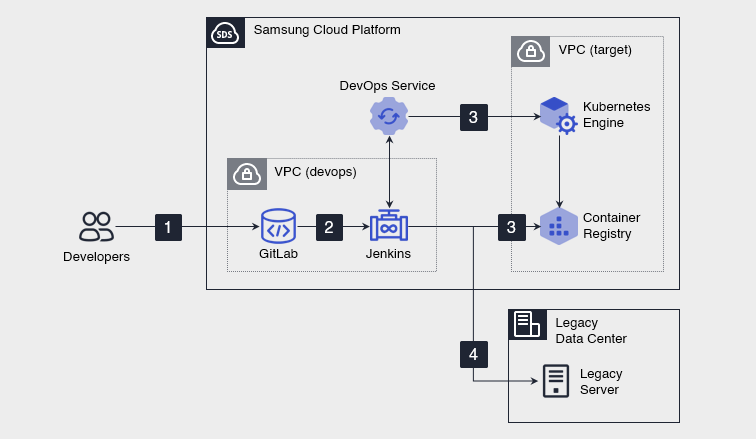
- The developer pushes the modified source code to GitLab (source code repository).
- GitLab detects push events and triggers the Jenkins container deployment pipeline and the legacy server deployment pipeline linked via a webhook, each separately.
- The container deployment pipeline builds the source code to create a container image and pushes it to the Container Registry. 3. Then, in conjunction with the DevOps Console, deploy the image to the Kubernetes Engine of Samsung Cloud Platform.
- The legacy server deployment pipeline deploys the deployment package generated from the same source code version to the legacy server in the user’s on-premises environment. 4. The two pipelines are executed and managed independently.
Use Cases
Application migration from an on-premises environment to Samsung Cloud Platform
By using the DevOps Service to build a hybrid CI/CD environment, you can deploy applications concurrently to the Samsung Cloud Platform and on-premises environments through separate CI/CD pipelines.
Prerequisites
- GitLab and Jenkins must be connected via Webhook.
- To integrate Jenkins with the DevOps Console, you must pre-register application deployment targets such as Kubernetes Engine and on‑premises legacy servers in the DevOps Console.
- If a private connection between the on‑premises environment and Samsung Cloud Platform is required, configure network services such as Direct Connect.
Constraints
- Since Jenkins and GitLab are not managed services, users must install, configure, and operate them themselves. - Version control, security patches, backups, availability management, and incident response are the user’s responsibility.
- The GitLab you previously used can be registered in the DevOps Console for continued use.
- The Jenkins you previously used may not be able to be registered in the DevOps Console, or errors may occur during the integration process after registration. - To use the features of the DevOps Console reliably, it is recommended to install Jenkins anew and register it.
Considerations
You must identify the customer’s cloud security requirements and incorporate them into the architecture.
Related service
This is a list of Samsung Cloud Platform services that are related to the features or configurations described in this guide. Refer to this when selecting and designing services.
| Service group | Service | Detailed description |
|---|---|---|
| DevOps Tools | DevOps Service | A service that easily configures development environments and simplifies build and deployment. |
| Container | Kubernetes Engine | Kubernetes container orchestration service |
| Container | Container Registry | A service that easily stores, manages, and shares container images |
| Networking | VPC | A service that provides an isolated virtual network in a cloud environment |
| Networking | Direct Connect | A service that securely and quickly connects the customer network with Samsung Cloud Platform |