
Setting up a CI/CD tool environment to utilize DevOps Service
Setting up a CI/CD tool environment to utilize DevOps Service
Overview
DevOps Service automates the build, test, and deployment processes of applications, increasing development productivity. Additionally, you can improve code quality by integrating CI/CD tools that support source code version control and code verification.
Users can install CI/CD tools on the Samsung Cloud Platform or on-premises, and integrate them with the DevOps Service to configure CI/CD pipelines that meet environment requirements.
Architecture Diagram
Install CI/CD tools on Samsung Cloud Platform
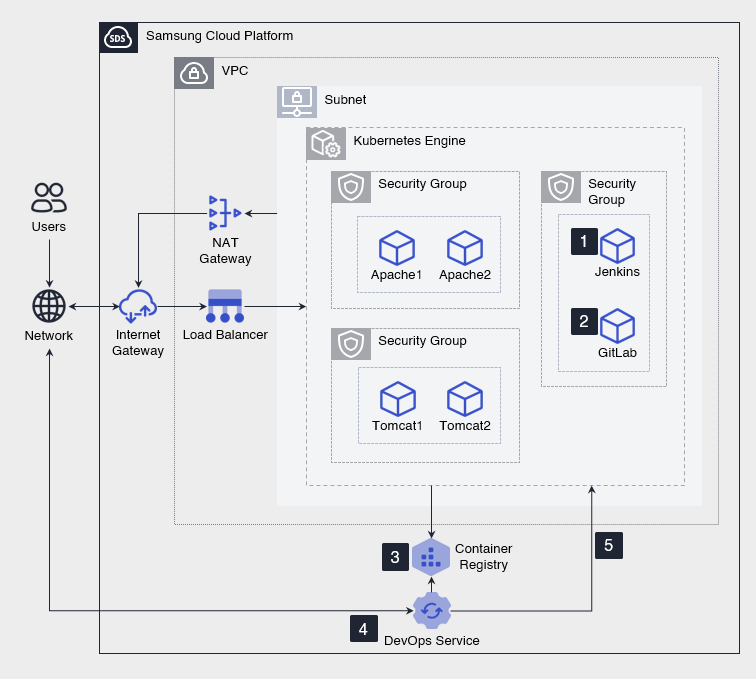
- Install Jenkins through the Marketplace.
- Install GitLab (source code repository) via the Marketplace.
- Apply for a Container Registry to store the application container images generated in the CI/CD pipeline.
- Register Jenkins, GitLab, Kubernetes Engine, and Container Registry in the DevOps Console.
- Inbound communication accessing CI/CD tools from the DevOps Console uses an Internet Gateway and a Load Balancer, while outbound communication from the CI/CD tools to the DevOps Console or external services uses a NAT Gateway.
- Create a CI/CD pipeline that automates the build, test, and deployment of applications using the CI/CD tools registered in the DevOps Console.
- Continuously build, test, and deploy the updated application using the created CI/CD pipeline.
Install CI/CD tools on-premises
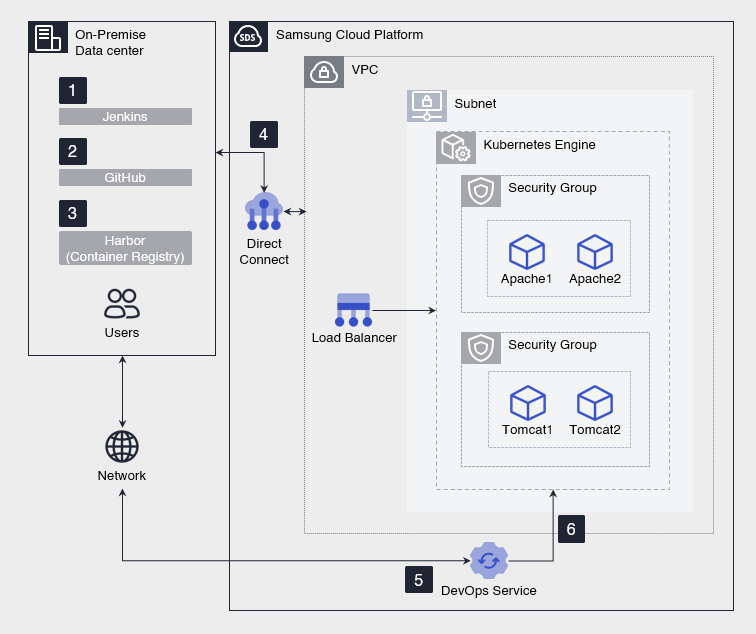
- Install Jenkins in an on-premises environment.
- Install GitHub Enterprise Server (source code repository) in an on-premises environment.
- Install Harbor (image registry) in an on‑premises environment and store the application container images generated by the CI/CD pipeline.
- Apply for Direct Connect to link the on‑premises environment with the VPC that the Samsung Cloud Platform’s Kubernetes Engine resides in, enabling the engine to pull container images from the on‑premises Harbor.
- In addition to the Harbor access path via Direct Connect, configure a network route that connects to the Samsung Cloud Platform’s public endpoint so that on-premises CI/CD tools can communicate with the DevOps Console.
- Register Jenkins, GitHub Enterprise Server, Kubernetes Engine, and Harbor in the DevOps Console.
- Create a CI/CD pipeline that automates the build, test, and deployment of applications using the CI/CD tools registered in the DevOps Console.
- Continuously build, test, and deploy the updated application using the created CI/CD pipeline.
Use Cases
Flexible CI/CD tool configuration according to environmental requirements
Depending on the organization’s security, network, and operational policies, CI/CD tools such as Jenkins, source code repositories, and image registries can be configured on the Samsung Cloud Platform or on‑premises. You can integrate with Kubernetes Engine while maintaining your existing on-premises CI/CD tools, allowing you to continue leveraging your current tools and operating environment.
Build and deployment automation through CI/CD tool integration
You can register source code repositories, build tools, image registries, and deployment targets in the DevOps Console to configure an integrated CI/CD pipeline. You can automate repetitive tasks from source code changes to build, test, and deployment, reducing manual effort and applying a consistent deployment process.
Prerequisites
None
Constraints
- Jenkins, GitLab, GitHub Enterprise Server, and Harbor are not managed services, so users must install, configure, and operate them themselves. - Version control, security patches, backups, availability management, and incident response are the user’s responsibility.
- GitLab, GitHub Enterprise Server, and Harbor that you previously used can be registered in the DevOps Console and continue to be used.
- The Jenkins you previously used may not be able to be registered in the DevOps Console, or errors may occur during the integration process after registration. - To use the DevOps Console features reliably, it is recommended to install Jenkins anew and register it.
Considerations
Connecting DevOps Console and CI/CD Tools
To register CI/CD tools in the DevOps Console, you must configure network routes so that the DevOps Console and each tool can communicate in the required direction. Limit the publicly exposed endpoint to allow only the required IP addresses and ports.
- If the CI/CD tool is installed on the Samsung Cloud Platform, use an Internet Gateway and Load Balancer for external inbound traffic, and a NAT Gateway for outbound traffic.
- If the CI/CD tool is installed on-premises, configure the network and firewall policies so that the on-premises network can access the Samsung Cloud Platform’s public endpoint.
Connecting on-premises with Samsung Cloud Platform
- To connect CI/CD tools installed on-premises to the Samsung Cloud Platform’s Kubernetes Engine, you must apply for Direct Connect.
- When requesting Kubernetes Engine, you must configure the VPC subnet IP address range so that it does not overlap with the customer’s network IP address range.
- You must configure VPC firewall and Security Group rules so that the node pool of the Kubernetes Engine can connect to the customer’s on-premises Container Registry.
Related service
This is a list of Samsung Cloud Platform services associated with the features or configurations described in this guide. Refer to this when selecting and designing services.
| service group | service | Detailed description |
|---|---|---|
| DevOps Tools | DevOps Service | A service that easily sets up development environments and streamlines build and deployment. |
| Container | Kubernetes Engine | Kubernetes container orchestration service |
| Container | Container Registry | A service that easily stores, manages, and shares container images. |
| Networking | VPC | A service that provides an isolated virtual network in a cloud environment |
| Networking | Security Group | Virtual firewall that controls VM traffic |
| Networking | Load Balancer | A service that automatically distributes server traffic load |
| Networking | Direct Connect | A service that securely and quickly connects the customer’s network to the Samsung Cloud Platform. |