Configuring CI/CD Tool Environment for DevOps Service
Configuring CI/CD Tool Environment for DevOps Service
Overview
DevOps Service supports the CI/CD (build/deployment) of applications to increase development productivity. It automates the build-test-deployment process, increasing development productivity, and enhances code quality through integration with CI/CD tools that support source history management and source code verification.
Additionally, it supports connection with CI/CD tools in On-Premise and Samsung Cloud Platform internal environments, allowing users to freely choose and configure CI/CD tool installation environments.
Architecture Diagram
Installing CI/CD Tools on SCP
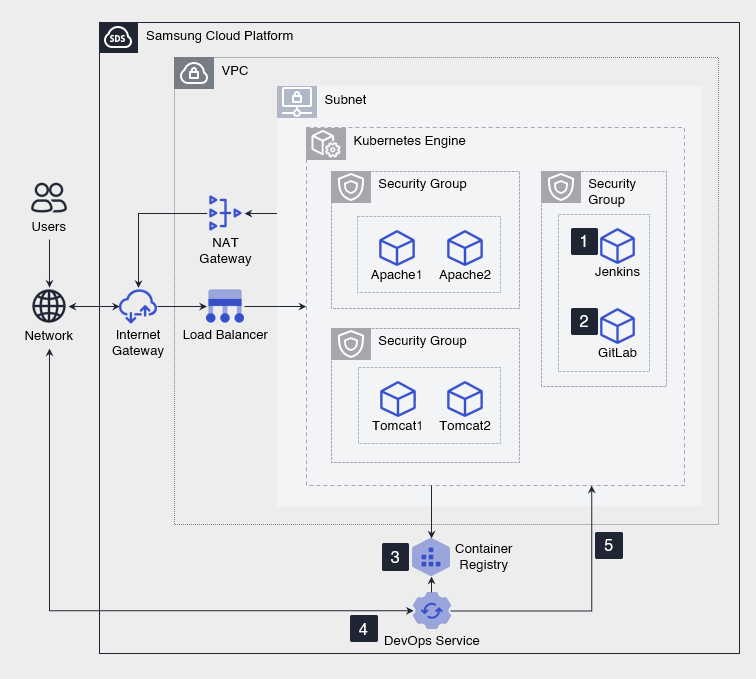
- Apply for the marketplace service to install Jenkins.
- Apply for the marketplace service to install GitLab (source code repository).
- Apply for the Container Registry service to store the container image of the application built in DevOps.
- Register Jenkins, GitLab, Kubernetes Engine, and Container Registry in DevOps Service.
- To register CI/CD tools (GitLab, Jenkins), bidirectional communication with DevOps Console is required, so Internet Gateway, Load Balancer, NAT Gateway services are used.
- Create a CI/CD Pipeline that utilizes the registered CI/CD tools to build-test-deploy applications.
- Use the created CI/CD Pipeline in DevOps Service to continuously deploy developed applications.
Installing CI/CD Tools on On-Premise
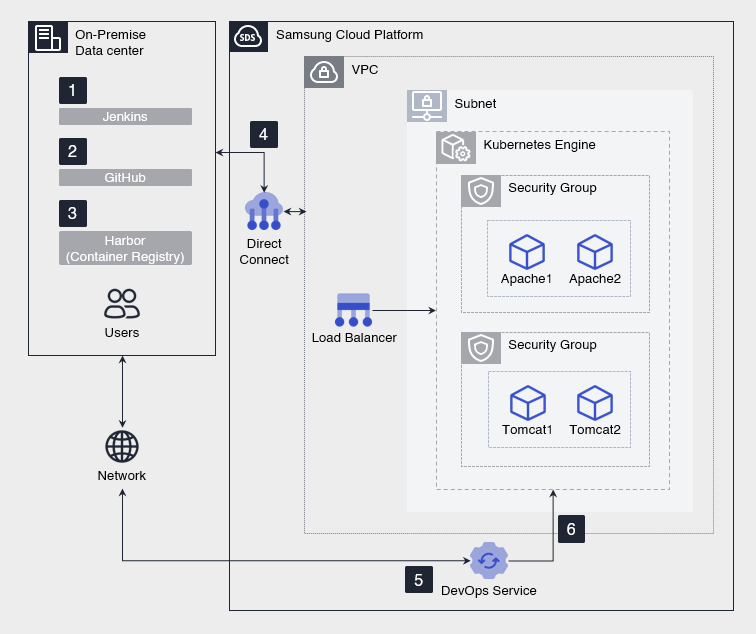
- Install Jenkins in the On-Premise environment.
- Install GitHub (source code repository) in the On-Premise environment.
- Install Harbor (image registry) in the On-Premise environment and store the container image of the application built in DevOps.
- Apply for the Direct Connect service to connect the On-Premise environment with the Kubernetes Engine in Samsung Cloud Platform, allowing the application container to be executed.
- Additionally, CI/CD tools and DevOps Service require bidirectional communication, so On-Premise and Samsung Cloud Platform Public Endpoint are connected via Network.
- Register Jenkins, GitHub, Kubernetes Engine, and Harbor in DevOps Service.
- Create a CI/CD Pipeline that utilizes the registered CI/CD tools to build-test-deploy applications.
- Use the created CI/CD Pipeline in DevOps Service to continuously deploy developed applications.
Use Cases
Developing a Defect Analysis System
The development environment construction period can be reduced from 2 days to within 5 minutes.
- Build an automated defect classification and analysis system in a container-based Kubernetes Engine environment.
- Utilize the automated CI/CD Pipeline of DevOps.
Converting a Management Information System to a Container
- The development environment configuration for the management information system typically takes 1-2 weeks, but can be configured immediately using DevOps Service.
- Automate the process of imaging and deploying developed applications, environment settings, and execution environments as containers, significantly improving development productivity.
Pre-requisites
None
Limitations
None
Considerations
Connecting DevOps Service and CI/CD Tools
To register and use CI/CD tools in DevOps Service, the CI/CD tools must be exposed to the external Network of Samsung Cloud Platform.
- If the CI/CD tools are installed on Samsung Cloud Platform, they must be connected to the external Network using Internet Gateway, NAT Gateway, Load Balancer services.
- If the CI/CD tools are installed on On-Premise, the On-Premise must be connected to the Samsung Cloud Platform Public Endpoint via Network.
Connecting On-Premise and SCP
To connect the CI/CD tools installed on On-Premise with the Kubernetes Engine in Samsung Cloud Platform, the Direct Connect service must be applied.
When applying for Kubernetes Engine, the VPC subnet IP address range used must not conflict with the customer’s Network IP address range.
- Additionally, the VPC firewall and Security Group must be registered to allow connection to the customer’s On-Premise Container Registry from the Kubernetes Engine Node Pool.
Related Services
This is a list of Samsung Cloud Platform services related to the functionality or configuration described in this guide. Refer to this list when selecting and designing services.
| Service Group | Service | Detailed Description |
|---|---|---|
| Container | Kubernetes Engine | Kubernetes container orchestration service |
| Container | Container Registry | Service for easily storing, managing, and sharing container images |
| Networking | VPC | Service providing an independent virtual network in the cloud environment |
| Networking | Load Balancer | Service automatically distributing server traffic |
| Networking | Direct Connect | Service safely and quickly connecting the customer network with Samsung Cloud Platform |