
CI/CD implementation for development, testing, and operational environments using DevOps Service
CI/CD implementation for development, testing, and operational environments using DevOps Service
Overview
You can integrate DevOps Service with CI/CD tools to create build and deployment pipelines for development, testing, and production environments.
This document explains how to create development, testing, and production environment branches in GitLab (source code repository), configure build and deployment pipelines for each branch, and deploy applications to the Kubernetes Engine of each environment.
Architecture Diagram
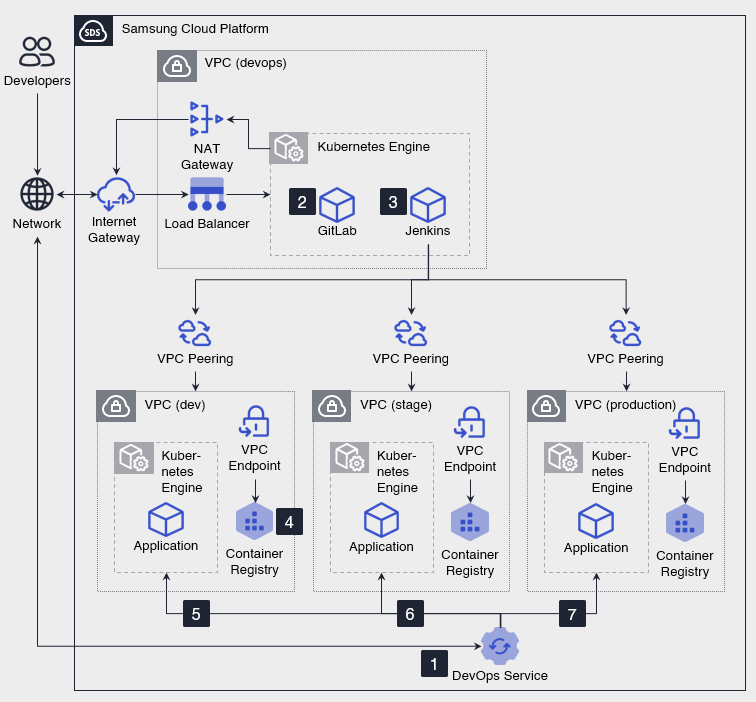
- After applying for the DevOps Service, configure CI/CD tools such as GitLab and Jenkins in the CI/CD VPC and integrate them with the DevOps Service. 1. CI/CD tools are exposed to the internet, as needed, through a Load Balancer and Internet Gateway to receive Git requests and Webhook calls originating from outside. 1. The Kubernetes Engine in development, testing, and production environments is not directly exposed to the internet. 1. The CI/CD tool accesses each environment’s Kubernetes Engine via a private network through VPC Peering to deploy applications. 1. When the CI/CD tool is in a private subnet and needs to connect to external source code repositories, package repositories, container image registries, etc., use a NAT Gateway for outbound communication.
- Developers push source code to a working branch (e.g.,
dev-feature-1) and then create a merge request (Pull Request or Merge Request) to the development branch (e.g.,dev) to deploy to the development environment. 2. When the code review is complete, merge the source code from the feature branch into the development branch. - When source code is merged into the development branch, the CI/CD pipeline runs, performing source code checkout, application build, and container image creation in order.
- Push the generated container image to the Container Registry.
- Deploy the container image created from the development branch to the development environment’s Kubernetes Engine and verify the results.
- After checking the deployment results in the development environment, perform the same steps as steps 2–5 on the verification branch (e.g.,
stage) to deploy the application to the verification environment. - After verifying the deployment results in the validation environment, perform the same steps as steps 2–5 on the production branch (e.g.,
prod) to deploy the application to the production environment.
Use Cases
Enhancing security and operational stability through environment segregation
Separate the CI/CD environment and the development, testing, and production environments into distinct VPCs to prevent the spread of failures and security threats between environments. It also minimizes unnecessary access to the production environment, enabling reliable operation of the service.
A safe and consistent deployment system centered on CI/CD
You can configure the CI/CD VPC and each environment’s VPC to be connected via VPC Peering so that deployment traffic does not go through the internet. You can unify the deployment path into a CI/CD pipeline, applying a consistent deployment process and control framework from development through operations.
Prerequisites
None
Constraints
- Since Jenkins and GitLab are not managed services, users must install, configure, and operate them themselves. - Version control, security patches, backups, availability management, and incident response are the user’s responsibility.
- You can register the GitLab you previously used in the DevOps Console and continue using it.
- The Jenkins you previously used may not be registerable in the DevOps Console, or errors may occur during the integration process after registration. - To use the DevOps Console features reliably, we recommend installing Jenkins anew and registering it.
Considerations
- Limit the external exposure point of CI/CD tools to a Load Balancer, and configure allowed IP addresses, ports, and authentication policies according to the principle of least privilege.
- Configure the Kubernetes API servers in development, testing, and production environments so they cannot be accessed directly from the Internet.
- Deployment communication between the CI/CD VPC and each environment VPC is allowed only through VPC Peering and security policies.
- The NAT Gateway is used for outbound communication from CI/CD tools to external services, and inbound communication from external sources to CI/CD tools is handled through a Load Balancer.
Related service
This is a list of Samsung Cloud Platform services related to the features or configurations described in this guide. Refer to this when selecting and designing services.
| service group | service | Detailed description |
|---|---|---|
| DevOps Tools | DevOps Service | A service that easily sets up development environments and streamlines build and deployment. |
| Container | Kubernetes Engine | Kubernetes container orchestration service |
| Container | Container Registry | A service that easily stores, manages, and shares container images |
| Networking | VPC | A service that provides an isolated virtual network in a cloud environment |
| Networking | Load Balancer | A service that automatically distributes server traffic load |