
Deploying Samsung Cloud Platform services using Terraform
Deploying Samsung Cloud Platform services using Terraform
Overview
Terraform is a IaC(Infrastructure as Code) tool that supports configuring and managing infrastructure resources through code. You can automatically provision and manage various resources of Samsung Cloud Platform by using the open-source Terraform tool and the Terraform Provider developed for Samsung Cloud Platform.
This document explains the preparatory steps and the process and methods for deploying multiple resources to the production Samsung Cloud Platform.
Architecture Diagram
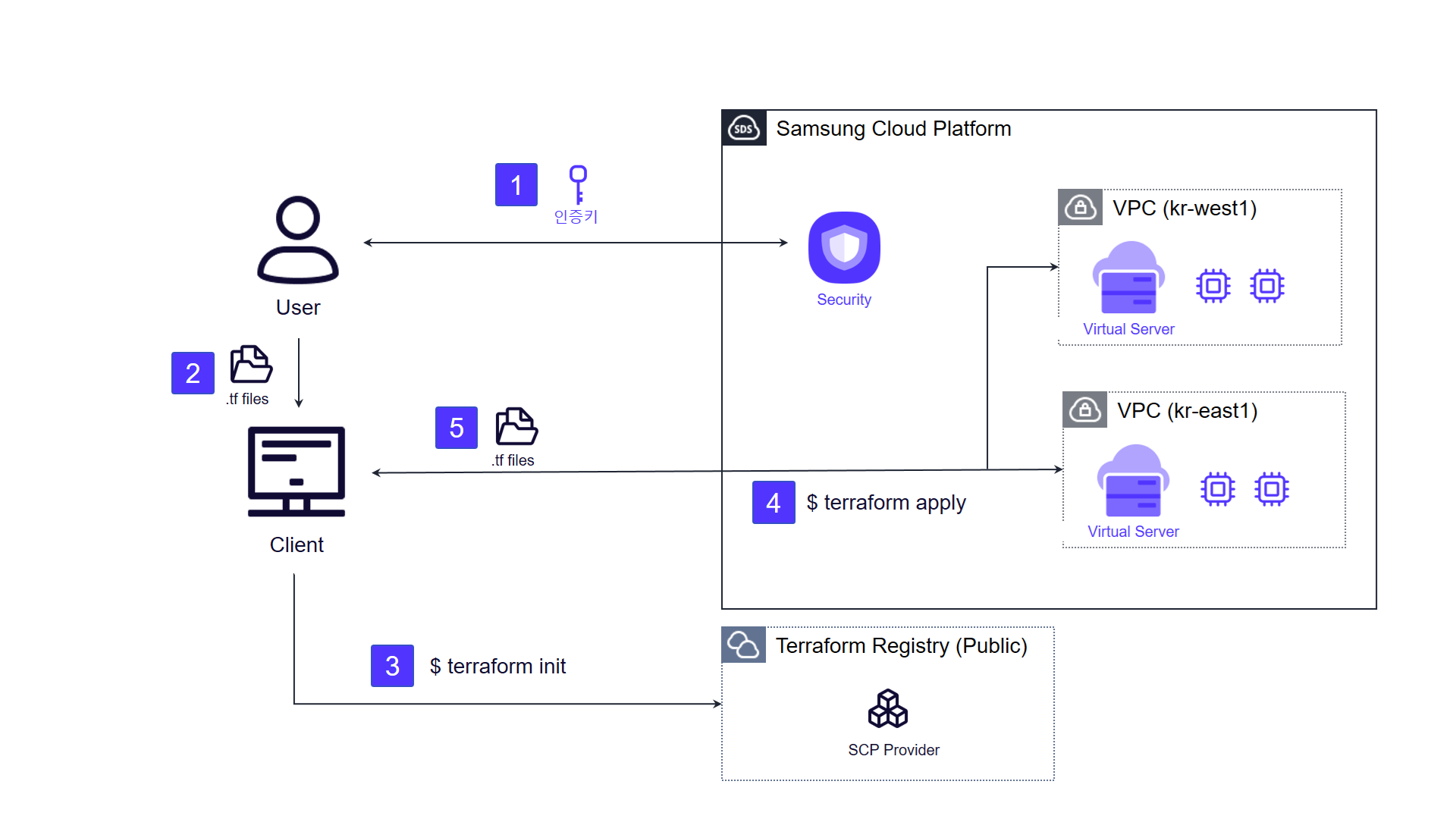
- Generate an authentication key for Terraform operations on Samsung Cloud Platform and configure the environment.
- Create the configuration for resources and environment to be deployed to Samsung Cloud Platform as code (.tf file).
- Fetch the Provider for the deployment environment from an external repository (Terraform Registry). 3. (
terraform init) - Execute Terraform commands to verify the resource creation plan on Samsung Cloud Platform and perform the infrastructure provisioning. 4. (
terraform plan→terraform apply) - Verify the creation of infrastructure resources through the console and the infrastructure state file (.tfstate). 5. (
terraform state list)
Use Cases
Configure identical work environment in Multi Region
When operating the same application environment across multiple domestic and international sites, you can use Terraform to deploy and manage resources simultaneously across multiple regions available in the Samsung Cloud Platform Project. By using a code-based deployment method, operators can reduce work time and minimize potential human errors that may occur during deployment and management.
Landing Zone configuration
When repeatedly setting up new services or affiliate environments, you can manage the Landing Zone—configured based on Samsung Cloud Platform best practices—as Terraform code, enabling rapid deployment across multiple environments with high reusability. Resources such as networking and workloads that require pre‑configuration for a user to deploy an application are pre‑written as Terraform code, and deploying that code automatically creates the predefined Landing Zone.
Prerequisites
- Terraform must be installed and an internet connection is required in the user’s work environment.
- API communication between the user’s work environment and the target Samsung Cloud Platform must be possible. * (443 port)
Constraints
The list of products that can be deployed to Samsung Cloud Platform using Terraform is continuously being added. For detailed information, please refer to the Samsung Cloud Platform Provider Documentation on the Terraform Registry.
Considerations
- Care must be taken to ensure that the Credential information for Samsung Cloud Platform used during Terraform operations is not exposed externally.
- Since the .tfstate file generated after the operation records all information about the created resources, please store it in a secure location.
Related service
This is a list of Samsung Cloud Platform services that are related to the features or configurations described in this guide. Refer to this when selecting and designing services.
| service group | service | Detailed description |
|---|---|---|
| Management | IAM | A service that controls the scope of access to services and resources by verifying user identity and granting access permissions. |
| Management | Organization | A service that organizes Accounts by organizational units, manages them hierarchically, and controls resource access permissions. |
| Management | Quota Service | A service that manages the maximum number of resources, tasks, or items (quotas) set for each service within an account |
| Management | Resource Groups | A service that groups resources for efficient management |
| Management | ServiceWatch | A service that collects metrics, logs, events, and other data from created resources for monitoring, and provides various tools that deliver observability across resources, including performance and operational status. |
| Management | Logging&Audit | A service that stores all user actions to support change tracking and auditing of cloud resources. |
| Management | Resource Explorer | A service that integrates search of created resources and manages tags |
| Compute | Virtual Server | Virtual server optimized for cloud computing |
| Compute | Bare Metal Server | A high-performance physical server that can be allocated and used exclusively with physically separated computing resources such as CPU and memory, without virtualization. |
| Compute | Block Storage | Storage that stores data in block units and is used for large-scale data processing and DB workloads. |
| Compute | Multi-node GPU Cluster | A server that provides physical GPU servers without virtualization for large‑scale, high‑performance AI computation. |
| Storage | Block Storage(BM) | Block storage used by connecting to a Bare Metal Server |
| Storage | File Storage | A storage solution that lets servers connected through a network easily store and share data. |
| Storage | Parallel File Storage | High-performance parallel file storage based on All NVMe that can process large-scale data quickly and efficiently. |
| Storage | Backup | A service that securely backs up user data and restores it in case of emergencies. |
| Networking | VPC | A service that provides a logically isolated, customer-dedicated private network space in a cloud environment. |
| Networking | Security Group | A virtual logical firewall that controls inbound/outbound traffic on virtual servers |
| Networking | Firewall | A virtual logical firewall service that controls traffic generated in VPCs and Load Balancers |
| Networking | Load Balancer | A service that automatically distributes traffic to available servers when traffic spikes or server failures occur that are difficult for users to predict. |
| Networking | GSLB | A service that automatically distributes network traffic to available neighboring regions based on DNS when traffic increases in a specific global region. |
| Networking | DNS | A service that converts domain names, which are convenient for people to recognize, into numeric IP addresses that the system can identify, allowing access to the service. |
| Networking | Direct Connect | A service that securely and quickly connects the customer network with Samsung Cloud Platform |
| Networking | VPN | A service that connects the customer network and Samsung Cloud Platform via an encrypted virtual private network. |
| Container | Kubernetes Engine | A service that provides lightweight virtual computing, containers, and a Kubernetes cluster to manage them. |
| Database | MySQL(DBaaS) | A service that easily creates and manages the open-source relational database (RDBMS) MySQL |
| Database | MariaDB(DBaaS) | A service that easily creates and manages MariaDB with high compatibility with MySQL |
| Database | PostgreSQL(DBaaS) | A service that easily creates and manages open-source PostgreSQL |
| Database | EPAS(DBaaS) | A service that easily creates and manages EPAS |
| Database | Microsoft SQL Server(DBaaS) | A service that easily creates and manages Microsoft SQL Server |
| Database | CacheStore(DBaaS) | Key-value in-memory data store with fast data processing capability |
| Data Analytics | Search Engine | A service that easily creates and manages Elasticsearch Enterprise and OpenSearch versions. |
| Data Analytics | Event Streams | A service that easily creates and manages Apache Kafka clusters |
| Data Analytics | Vertica(DBaaS) | Data Warehouse-based high-availability enterprise database for large-scale data analysis/processing |
| Security | Certificate Manager | A service that supports distribution and integrated management of SSL/TLS certificates issued to the user by a Certificate Authority (CA). |
| Financial Management | Planned Compute | A discount policy that allows using non‑contract resources at contract rates by committing to a usage period for a server type. |
| Financial Management | Cost Management | A service that manages service costs and enables efficient access to cost-related information. |