
DR configuration using Database Replica
DR configuration using Database Replica
Overview
DR(Disaster Recovery, disaster recovery) means the procedures, processes, and systems for restoring the IT environment when natural or man‑made disasters occur.
Even in cloud environments, disaster recovery setups are a key consideration, and cloud service providers are offering customers various solutions for DB DR configurations to protect data.
This document explains how to configure DR by using the Replica feature of MariaDB(DBaaS), MySQL(DBaaS), PostgreSQL(DBaaS), EPAS(DBaaS) among the Database services of Samsung Cloud Platform.
Architecture Diagram
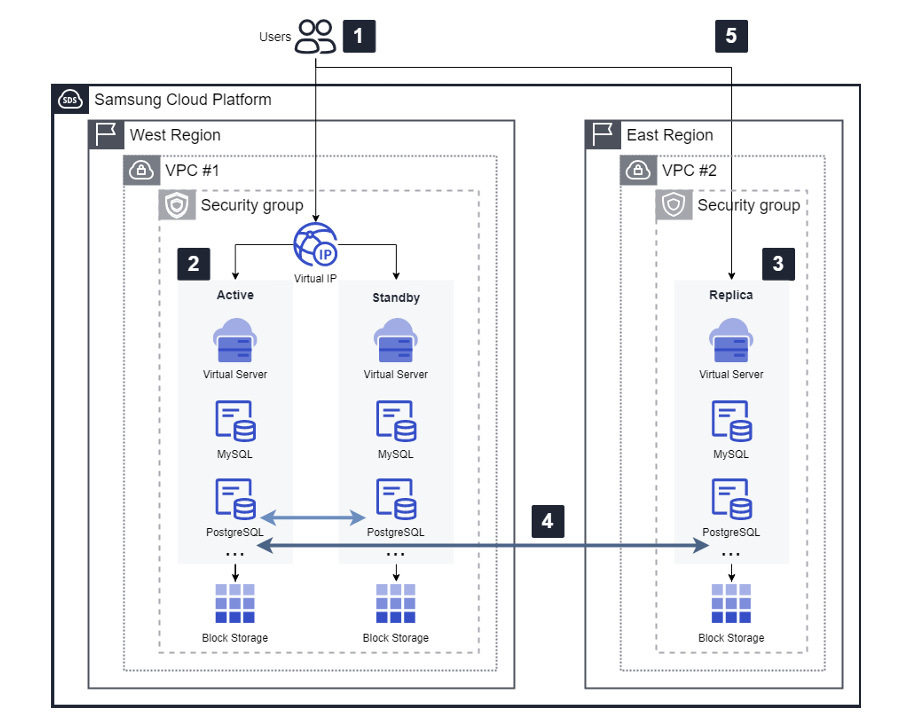
DR configuration procedure
Production VPC Setup and DB Deployment
- The user configures an operational VPC and deploys a Database Service (RDB) within that VPC.
- The databases that provide replica functionality for DR are MariaDB, MySQL, PostgreSQL, and EPAS.
Replica configuration in DB redundancy or single configuration
- In the production environment, a Replica can be configured in both redundant and single DB setups, and this architecture diagram is based on the redundant configuration.
Create Replica
- Replica can be configured when creating a DB in the production environment or from the detail view screen, but configuring a Replica for DR is only possible through the DB detail view screen.
Multi-Region network configuration
- For DR configuration, a pre‑established inter‑region network setup such as VPC Peering is required, and after creating the communication settings in advance, you select and apply them when configuring the replica.
DR Transition and Service Continuity Assurance
- The user can use the Endpoint (IP, Port) of the newly created DR replica to switch services according to the disaster recovery service transition policy, either to a separate DR-configured WEB/WAS or as required during a disaster.
- DB Replica supports the ability to switch a DR read‑only configuration to read/write usage.
Use Cases
Ensuring service continuity in the event of disasters or emergencies
- When natural disasters such as fire, earthquake, or regional destruction occur, you can promptly restore the customer’s service.
- The data and components of the replicated database are restarted according to the predefined DR process and system.
- Data is retained unchanged up to the point of failure and utilized by the service.
Extraction and storage of DB data
- By leveraging Replica’s DR (Multi Region deployment) feature, users can distribute DB data to remote regions.
- This allows you to retain identical data even if the original is lost, enabling dual or triple secure data management, including backups.
Prerequisites
- You must create one VPC per region in advance.
- To create a replica, the Database service (MariaDB, MySQL, PostgreSQL, EPAS) must be deployed in the relevant VPC.
- You must create VPC Peering, TGW Peering in advance for inter‑region communication.
Constraints
- The Multi-Region Replica configuration for DR is currently only available as Production (KR-WEST region/Sangam), DR (KR-EAST region).
- When creating a high‑availability database, an automatic failover feature is provided, but after a failure occurs, a separate check is required to verify whether the system is operating normally during failover.
Considerations
- Data replication (Replication) between the production DB and DR is based on asynchronous (Asynchronous) replication.
- DR conversion enables the customer to execute an operational transition (master promotion) from the Replica DB’s menu screen.
- At this point, the Replica DB can be switched from read‑only to read/write mode, enabling a service transition.
- However, when switched to read/write mode, data synchronization with the operational DB will no longer occur.
- For detailed information about Replica configuration, refer to the Samsung Cloud Platform User Guide.
Related service
This is a list of Samsung Cloud Platform services that are related to the features or configurations described in this guide. Refer to this when selecting and designing services.
| service group | Service | Detailed description |
|---|---|---|
| Database | EPAS(DBaaS) | A service that easily creates and manages EPAS in a web environment |
| Database | PostgreSQL(DBaaS) | A service that easily creates and manages open-source PostgreSQL in a web environment |
| Database | MariaDB(DBaaS) | A service that easily creates and manages MariaDB with high compatibility with MySQL |
| Database | MySQL(DBaaS) | A service that easily creates and manages the small yet powerful open-source relational database MySQL. |
| Networking | VPC | A service that provides an isolated virtual network in a cloud environment |