Using Database Replica for DR configuration
Using Database Replica for DR configuration
Overview
DR(Disaster Recovery, disaster recovery) refers to the procedures, processes, systems, etc. for restoring the IT environment in the event of natural or man-made disasters.
Even in cloud environments, disaster recovery is an important consideration, and cloud service providers are offering customers various solutions for DB DR configurations to protect data.
This document explains how to configure DR using the Replica feature of MariaDB(DBaaS), MySQL(DBaaS), PostgreSQL(DBaaS), EPAS(DBaaS) among the Database services of Samsung Cloud Platform.
Architecture Diagram
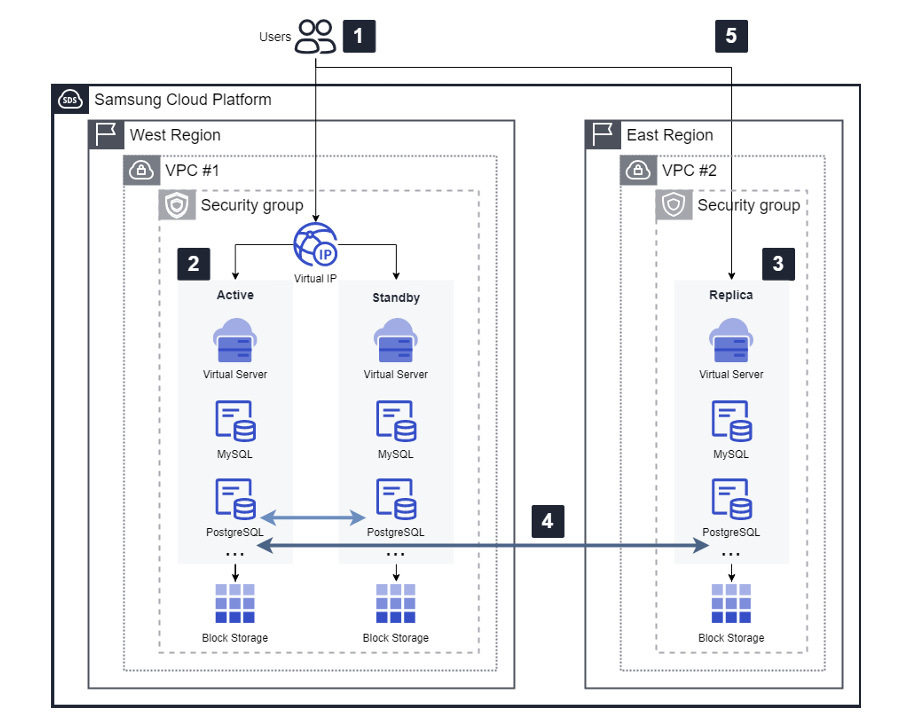
DR Configuration Procedure
Production VPC configuration and DB deployment
- The user configures the production VPC and deploys a Database Service (RDB) within that VPC.
- The databases that provide Replica functionality for DR are MariaDB, MySQL, PostgreSQL, and EPAS.
Replica Settings in DB Redundancy or Single Configuration
- The operating environment can configure replicas in both DB redundancy and single configurations, and this architecture diagram is based on redundancy.
Replica creation
- Replica can be set when creating a DB in the production environment or on the detail view screen, but configuring a Replica for DR is only possible through the DB detail view screen.
Multi-Region Network Configuration
- For DR configuration, prior network setup such as VPC Peering between regions is required, and after creating communication settings in advance, select and apply them when configuring the Replica.
DR conversion and service continuity assurance
- Users can use the Endpoint (IP, Port) of the newly created DR replica to switch services according to the service transition policy in case of disaster, either to a separate DR-configured WEB/WAS or as per the policy.
- DB Replica supports the ability to switch a DR read-only configuration to read/write mode.
Use case
Ensuring Service Continuity When Disasters and Emergencies Occur
- In case of natural disasters such as fire, earthquake, or regional destruction, we can quickly restore the customer’s service.
- The data and components of the replicated database are restarted according to the predefined DR process and system.
- The data is stored unchanged until just before a failure and is used in the service.
Generation and storage of DB data
- By utilizing Replica’s DR (Multi Region deployment) feature, users can disperse DB data to remote regions.
- Through this, even if the original data is lost, you can secure the same data, allowing dual and triple safe data management, including backup.
Preliminary matters
- You must pre-create one VPC per region.
- To create a replica, the Database service (MariaDB, MySQL, PostgreSQL, EPAS) must be deployed in the VPC.
- You must pre-create VPC Peering, TGW Peering for inter-region communication.
Constraints
- Multi-Region Replica configuration for DR is currently only available for operational (KR-WEST region/Sangam), DR (KR-EAST region).
- When creating a high-availability Database, it provides automatic failover functionality, but after a failure occurs, a separate check is required to verify system normalcy during failover.
Considerations
- Data replication between the operational DB and DR (Replication) defaults to asynchronous (Asynchronous) replication.
- DR conversion allows the customer to perform an operational transition (Master promotion) from the menu screen of the Replica DB.
- At this time, the Replica DB can be switched from read-only to read/write mode, enabling service transition.
- However, when switching to read/write mode, data synchronization with the operational DB will no longer occur.
- For detailed information about Replica configuration, please refer to Samsung Cloud Platform User Guide.
Related Services
This is a list of Samsung Cloud Platform services that are related to the functions or configurations described in this guide. Please refer to it when selecting and designing services.
| Service Group | Service | Detailed Description |
|---|---|---|
| Database | EPAS(DBaaS) | Service that easily creates and manages EPAS in a web environment |
| Database | PostgreSQL(DBaaS) | A service that easily creates and manages open-source PostgreSQL in a web environment |
| Database | MariaDB(DBaaS) | A service that easily creates and manages MariaDB with high compatibility with MySQL. |
| Database | MySQL(DBaaS) | A service that easily creates and manages the small yet powerful open-source relational database MySQL |
| Networking | VPC | Service that provides an independent virtual network in a cloud environment |