
Container-based Web Application
Container-based Web Application
Overview
Containers virtualize and provide the actual runtime environment of an application. Developers can easily and continuously deploy applications in any environment. Virtual machines virtualize the hardware stack, whereas containers virtualize at the operating system level, sharing the OS kernel, using far less memory, and can start up faster than an OS reboot.
Kubernetes is a platform that automates and manages numerous container applications, enabling flexible execution and management of distributed system environments. Kubernetes provides ease of scaling and failover for applications, offers an environment that enables easy and rapid continuous deployment, and helps you successfully build and operate web application systems.
Architecture Diagram
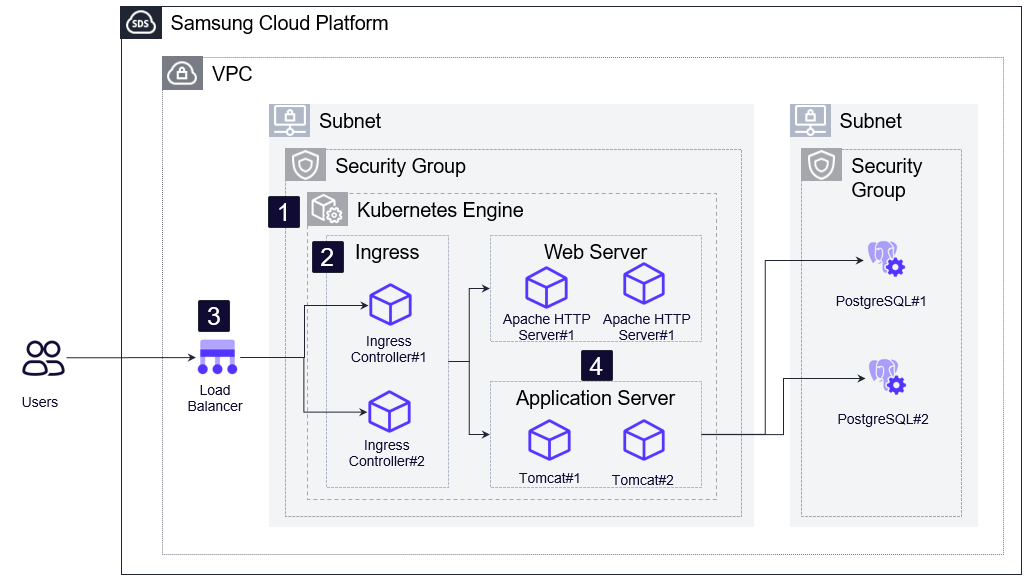
- Provision the Kubernetes Engine product service for container runtime management and orchestration.
- Install the Kubernetes Ingress Controller to expose the internal services’ HTTP and HTTPS paths to the outside of the cluster.
- To ensure the availability of the Ingress Controller, request a Load Balancer product and register the Worker Node IP to connect with the Ingress Controller.
- To configure a WEB/WAS application, run container images such as Apache HTTP Server and Tomcat.
Use Cases
Container transformation of management information systems
Applying container technology and standard open-source software typically reduces hardware resources by about 20% and cuts software license costs by roughly 80%. Because the applied technologies, software, and versions differ for each system, development and investment costs for the same functionality were incurred. By transitioning to containers, duplicate development can be minimized and the transition period can be shortened.
Container migration of systems that require resource expansion due to a surge in users
You can scale out WEB/WAS container resources in advance of the expected user surge to prepare for the spike.
To prepare for situations where a surge in users cannot be predicted, you can apply Kubernetes Auto Scaling so that when CPU or memory usage exceeds resource thresholds, container resources are automatically increased. Conversely, when it falls below the threshold, container resources are automatically released, enabling cost‑efficient system operation.
Prerequisites
None
Constraints
The maximum number of Worker Nodes that can be created in Kubernetes Engine is limited to the available IP range in the subnet, and up to 100 can be created.
Considerations
The container-based WEB/WAS configuration should be optimized according to the application’s characteristics. It is recommended to refer to the community that provides each container image when configuring image optimization and environment settings such as WEB/WAS.
When using an Ingress Controller, it is recommended to configure it to be served through a Load Balancer to ensure load balancing and availability, and because the Ingress Controller manages application containers based on domains, it should be used after the domain and DNS are registered.
To connect to the DB system from a WEB/WAS container, you must connect to the IP of the Worker Node where the container is running. When using a Security Group or DB access control, the Worker Node IP on which the container runs must be registered in order to connect to the DB system.
Related service
This is a list of Samsung Cloud Platform services that are related to the features or configurations described in this guide. Refer to this when selecting and designing services.
| Service group | service | Detailed description |
|---|---|---|
| Compute | Virtual Server | Virtual server optimized for cloud computing |
| Container | Kubernetes Engine | Kubernetes container orchestration service |
| Database | PostgreSQL(DBaaS) | A service that easily creates and manages open-source PostgreSQL. |
| Networking | VPC | A service that provides an isolated virtual network in a cloud environment. |
| Networking | Security Group | Virtual firewall that controls VM traffic |
| Networking | Load Balancer | A service that automatically distributes server traffic load |
| Storage | File Storage | A storage that enables servers connected via network to easily store and share data. |