
Container-based CI/CD Pipeline
Container-based CI/CD Pipeline
Overview
Container-based CI/CD pipelines provide an integrated development environment that supports application development convenience and collaboration efficiency to increase development productivity. In other words, it automates the build, test, and deployment processes to increase development productivity, and improves code quality through source history management and automated verification.
It also supports analyzing performance changes before and after application deployment through continuous monitoring, enabling early response to service incidents.
Architecture Diagram
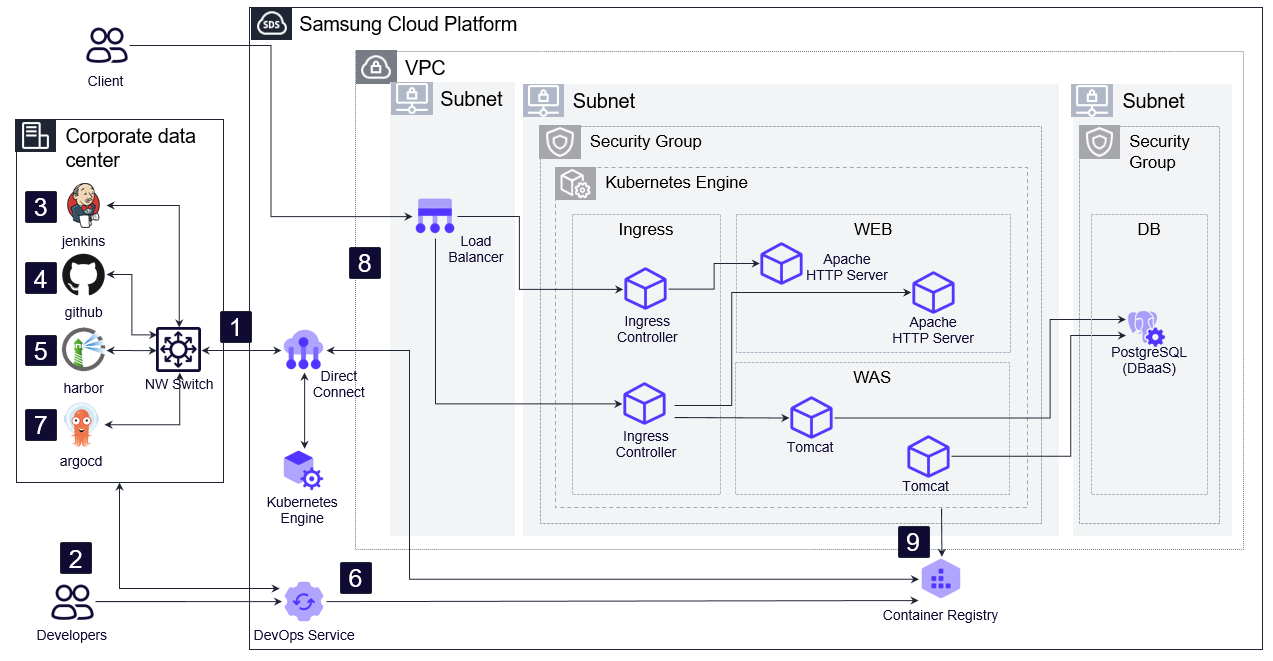
- Configure a Direct Connect connection to link with the On Premise environment.
- Configure a DevOps Service environment to automatically manage the setup of continuous integration (CI) and continuous deployment (CD) environments.
- Set up an environment for continuous integration (CI) and continuous deployment (CD) within the On Premise environment.
- Set up source configuration management within the On Premise environment.
- Build an image repository that enables applications developed within the on‑premise environment to be stored and managed as containers.
- If configuration is needed within the Samsung Cloud Platform, you can request the Container Registry product service to create container images of applications built in DevOps and store them in the Registry.
- Establish an environment for declarative application deployment within the On Premise Kubernetes environment.
- You can connect the on‑premise environment with Samsung Cloud Platform’s Kubernetes Engine through the Direct Connect service, enabling customer applications to be deployed to the Kubernetes Engine of Samsung Cloud Platform.
- You can use DevOps Service to continuously deploy container applications to Kubernetes Engine, reflecting the developed application.
Use Cases
Development environment of the defect analysis system
You can build an automated defect classification and analysis system on a container-based Kubernetes Engine environment and, by leveraging DevOps’ automated CI/CD pipeline, reduce the development environment setup time from two days to under five minutes..
Development environment for converting the management information system to containers
Setting up a development environment for a management information system typically takes more than 1~2 weeks, but it can be provisioned instantly using DevOps services. It automates the process of containerizing and deploying developed applications, configuration settings, and runtime environments, dramatically improving development productivity.
Prerequisites
None
Constraints
None
Considerations
When configured on-premises, the customer must directly set up the CI/CD software and pipeline on their hardware.
To connect an on‑premises CI/CD pipeline with the Kubernetes Engine, you must apply for the Direct Connect product, and when applying for the Kubernetes Engine, you must specify the VPC subnet IP address range so that it does not conflict with the customer’s network IP address range. Additionally, you can directly connect to the customer’s on‑premise image repository from the Kubernetes Engine node pool, and the VPC firewall and security group must be registered.
Related service
This is a list of Samsung Cloud Platform services that are related to the features or configurations described in this guide. Refer to this when selecting and designing services.
| service group | service | Detailed description |
|---|---|---|
| Networking | VPC | A service that provides an isolated virtual network in a cloud environment |
| Networking | Direct Connect | A service that securely and quickly connects the customer network with Samsung Cloud Platform |
| Database | PostgreSQL(DBaaS) | A service that easily creates and manages open-source PostgreSQL |
| Container | Kubernetes Engine | Kubernetes container orchestration service |
| Container | Container Registry | A service that easily stores, manages, and shares container images |
| DevOps Tools | DevOps Service | A service that easily configures development environments and simplifies build and deployment. |