
CloudML based AI Analytics Environment success
CloudML based AI Analytics Environment success
Overview
Machine Learning(hereinafter ML) is being applied to industry more frequently. In the past, data analysts performed all steps—from model development/training to model deployment—manually, but as the number of models being developed and operated increased, managing and operating the models required significant cost and effort. Therefore, a capability that automates management across the entire model lifecycle and enables easy operation is required.
CloudML is the name of a Samsung Cloud Platform product that provides modularized services based on Kubernetes for automated model lifecycle management. The main module functions are as follows.
- Notebook: Provides a service that allows you to easily set up and use the open-source Jupyter Notebook in the Samsung Cloud Platform environment.
- Studio: A no-code based ML model development platform that enables anyone to easily develop models using drag and drop in a visualized analysis environment, and to monitor the development process through a visualized UI.
- Experiments: We provide a model training experiment management service based on the open-source MLFlow. In addition to experiment management, we also offer Model Registry and Model Verification features.
- Pipeline: You can automate and manage the entire process from model development to training. Flexible resource and image allocation is possible for each execution stage, and sequential execution and scheduling functions are provided.
This document explains how to configure and use CloudML on the Samsung Cloud Platform.
Architecture Diagram
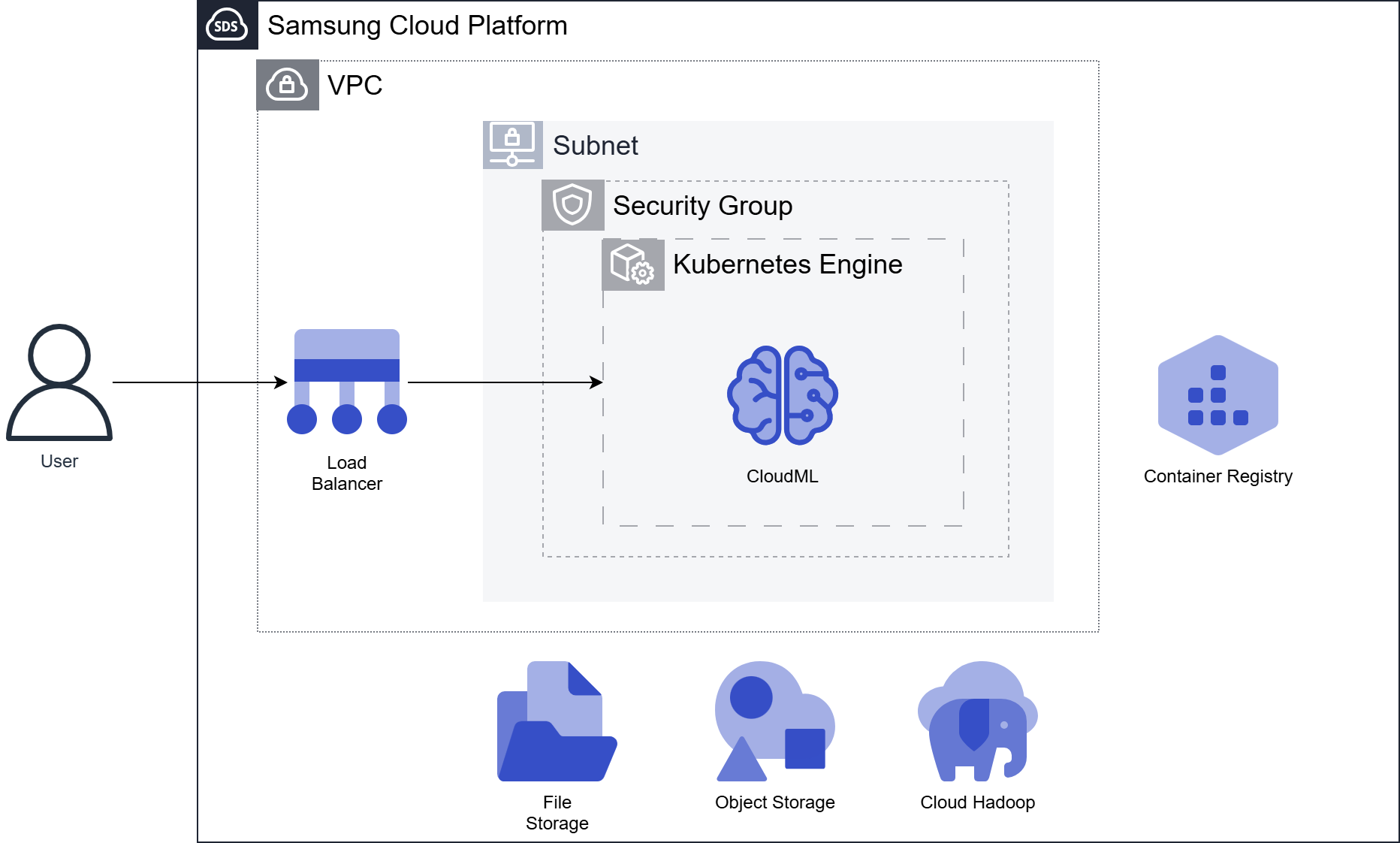
CloudML is deployed on Kubernetes. The user first creates a Kubernetes Engine product, and at that time the Persistent Volume (PV) of the Kubernetes cluster is created from the File Storage product.
Configure a Kubernetes Cluster in the user’s VPC and deploy CloudML to the same cluster. Once CloudML installation is complete, you can access the user view to use its features.
In the Kubernetes Cluster, we use the container image repository Container Registry to pull/push user container images.
In the CloudML product, you can integrate Object Storage or Cloud Hadoop for using and storing analysis data sets and model files.
Infrastructure configuration example
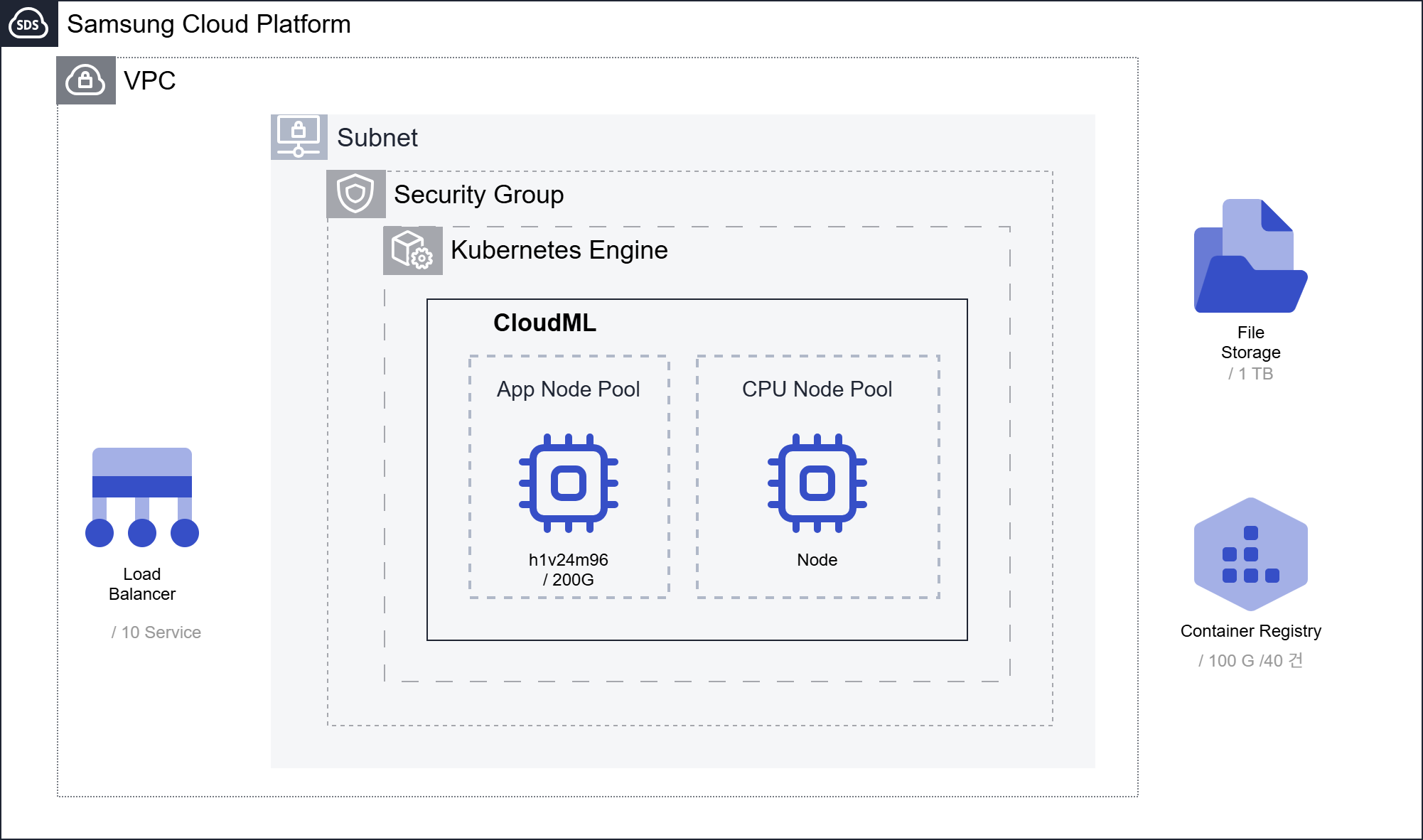
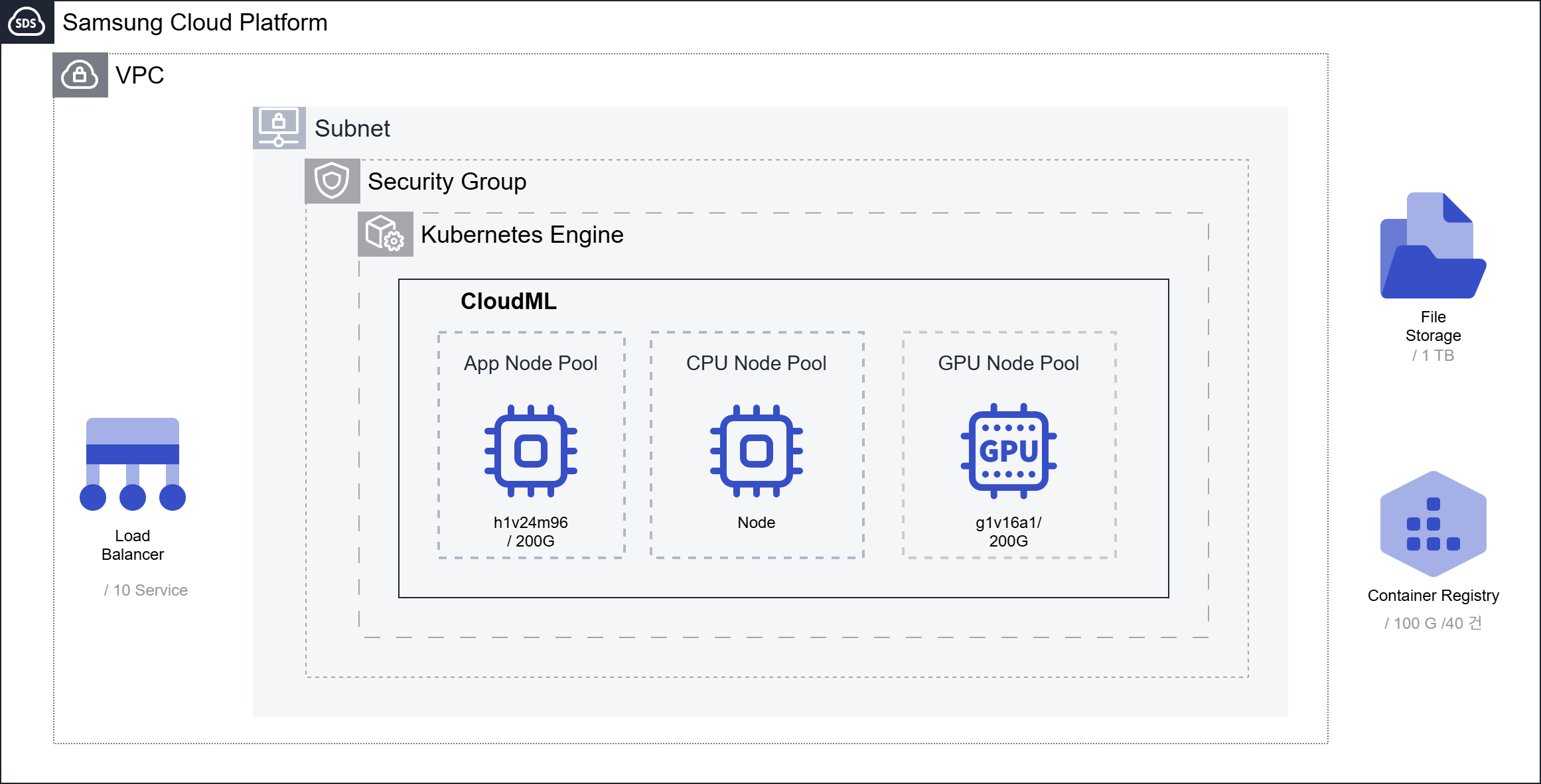
App Node Pool(24-Core) must be configured, and the Node Pool for analysis can be set up with CPU or GPU to match the analysis environment.
For the Copilot service, a GPU Node Pool composed of an additional 16 core CPU or one GPU is required.
Configured with CPU Node Pool only
Configured with CPU/GPU node pools (GPU environment setup for Copilot)
Use Cases
A. Building a No-Code AI-based Visual Collaborative Analysis System
CloudML provides a No-Code based visual analytics environment. By arranging visualized functions with Drag & Drop, even non‑experts can easily develop models. The developed model can be combined with Python code through Pipeline. This allows professional analysts and non‑experts to collaborate and develop services.
B. Automation of model optimization through the adoption of an analysis platform
Pipeline provides analysis process automation capabilities. In the past, we performed analysis and simulation tasks manually using Excel. However, by adopting CloudML and combining products, we can derive models that exhibit optimal performance through automatic data I/F and analysis model simulation. Switching to automation can reduce work time from several days to several hours.
Prerequisites
CloudML To install each product, a Kubernetes cluster and file storage that meet or exceed the minimum specifications provided for each product are required.
Constraints
CloudML To integrate each product, it must be deployed on the same Kubernetes Worker Node.
Considerations
You may consider configuring the Object Storage service for dataset, model usage, and storage. You may consider configuring the Container Registry service for using custom images.
Related Products
This is a list of Samsung Cloud Platform services that are associated with the features or configurations described in this guide. Refer to it when selecting and designing services.
| service group | service | Detailed description |
|---|---|---|
| Storage | File Storage | Storage that enables multiple client servers to share files over a network connection. |
| Storage | Object Storage | Object storage that simplifies data storage and retrieval |
| Container | Kubernetes Engine | Kubernetes container orchestration service |
| Container | Container Registry | A service that easily stores, manages, and shares container images |
| Networking | VPC | A service that provides an isolated virtual network in a cloud environment |
| Networking | Security Group | Virtual firewall that controls server traffic |
| Networking | Load Balancer | A service that automatically distributes server traffic load. |