CloudML based AI analysis environment configuration
CloudML based AI analysis environment configuration
Overview
Machine Learning (hereafter ML) is being increasingly applied in industry. In the past, data analysts performed all processes from model development/training to model deployment manually, but as the number of models being developed and operated increased, managing and operating the models required a lot of cost and effort. Therefore, a function that can automate management across the entire model lifecycle and operate it easily is needed.
CloudML is the name of a Samsung Cloud Platform product that provides modularized services based on Kubernetes for automated model lifecycle management. It describes the main module functions.
- Notebook: Provides a service that easily configures and uses the open-source Jupyter Notebook in the Samsung Cloud Platform environment.
- Studio: A no-code based ML model development platform that allows anyone to easily develop models by Drag and Drop in a visualized analysis environment, and view the development process with a visualized UI.
- Experiments: We provide a model training experiment management service based on the open-source MLFlow. In addition to experiment management, we also provide Model Registry and Model Verification features.
- Pipeline: You can automate and manage the entire process from model development to training. It allows flexible allocation of resources and images for each execution stage, and provides sequential execution and scheduling functions.
This document explains how to configure and use CloudML on the Samsung Cloud Platform.
Architecture Diagram
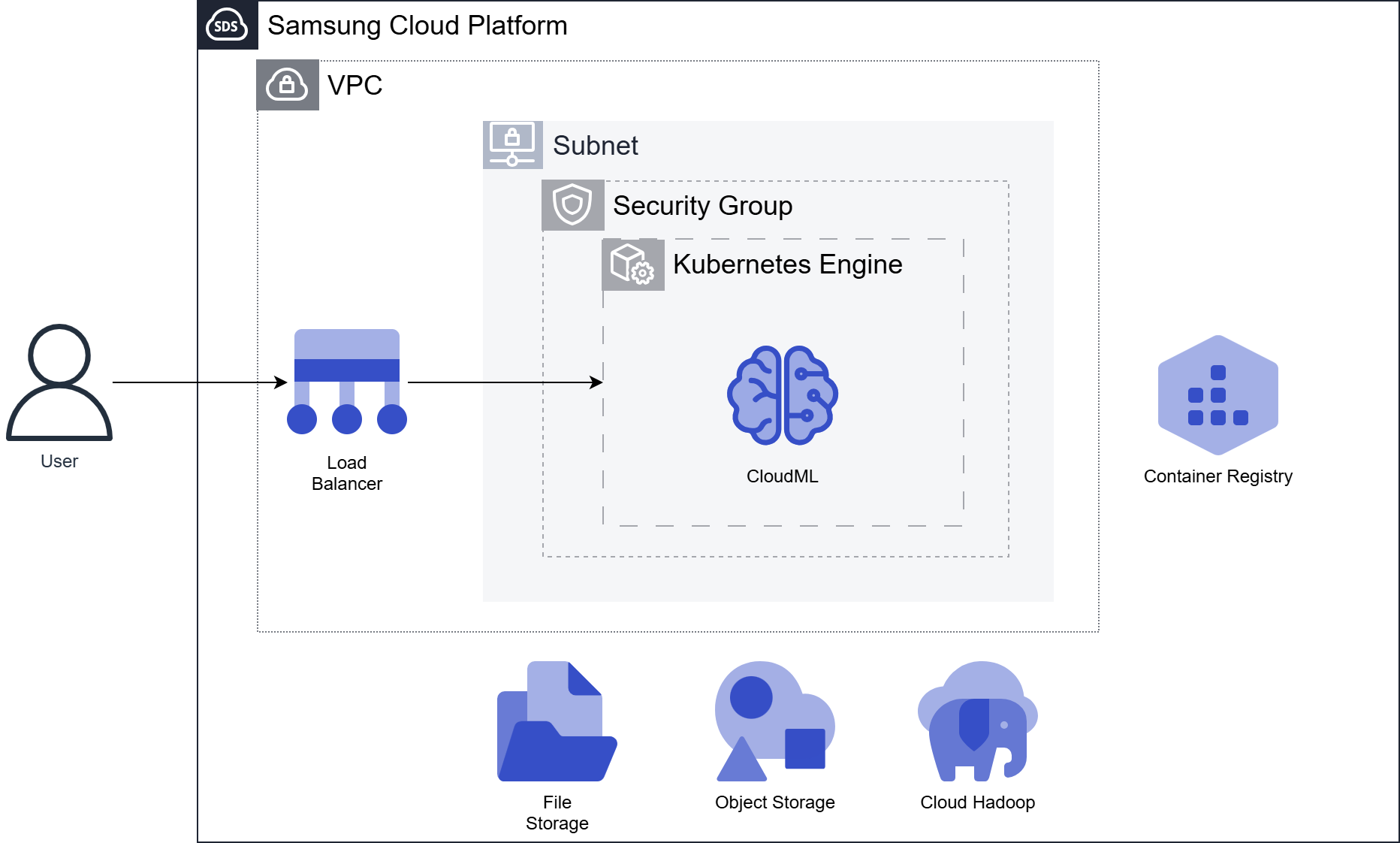
CloudML is deployed on Kubernetes. Users first create the Kubernetes Engine product, and at that time the Persistent Volume (PV) of the Kubernetes Cluster is created from the File Storage product.
Configure a Kubernetes Cluster in the user’s VPC and deploy CloudML to the same Cluster. Once CloudML installation is complete, you can access the user View to use the features.
In the Kubernetes Cluster, use the container image repository Container Registry to Pull/Push user Container Image.
CloudML can be linked with Object Storage or Cloud Hadoop for using and storing analysis data sets and model files.
Infrastructure Configuration Example
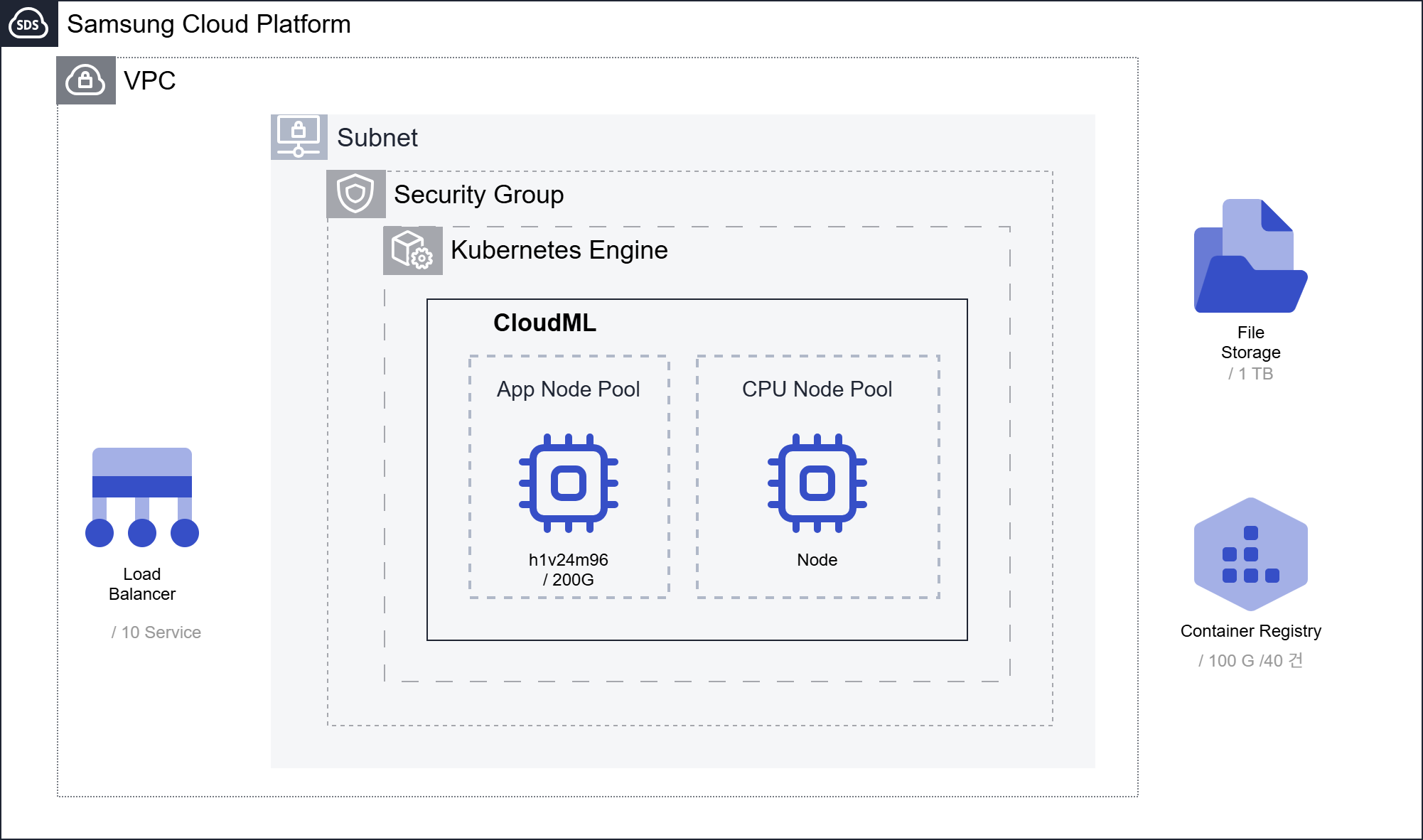
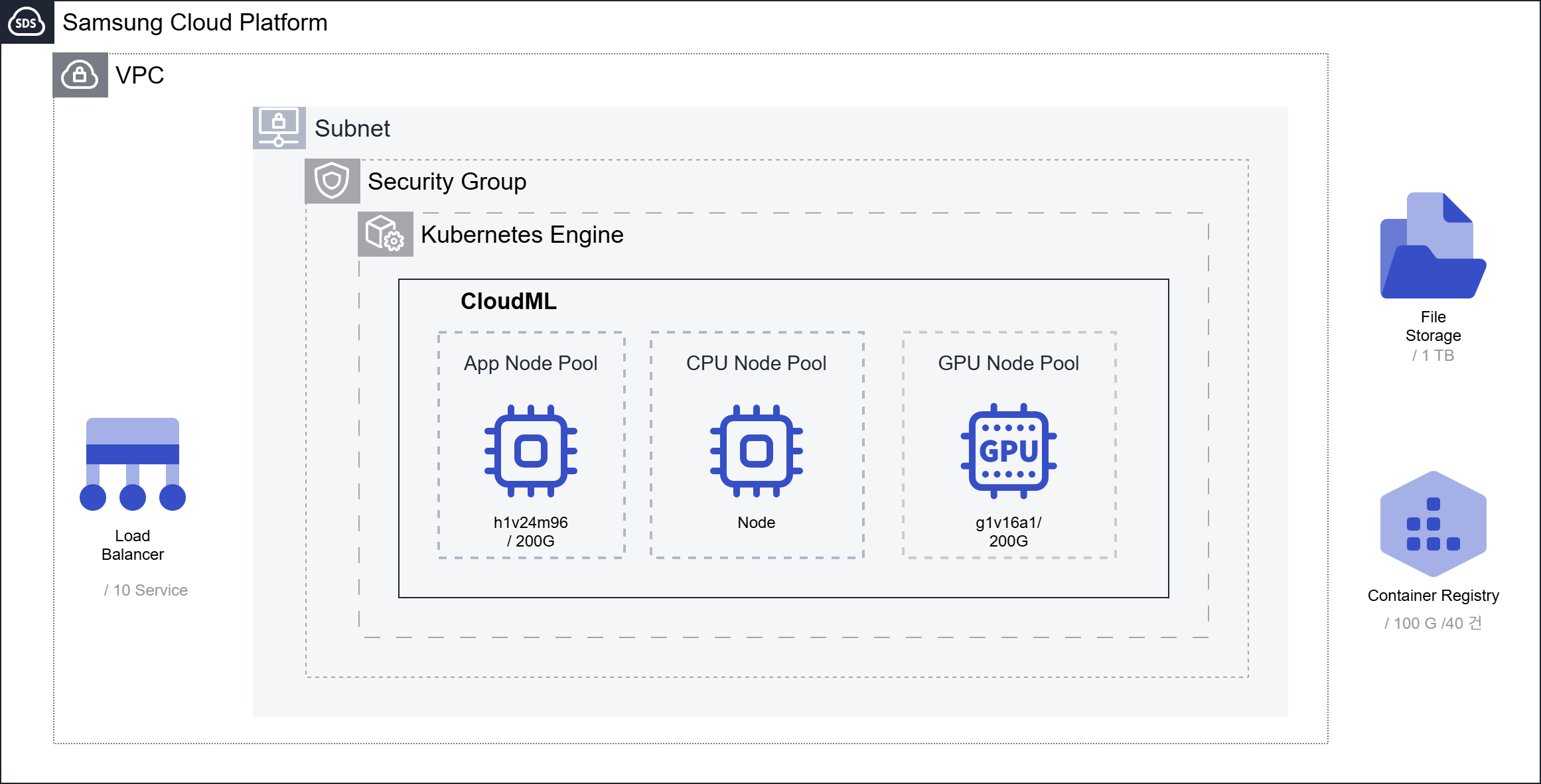
App Node Pool(24-Core) must be configured, and the Node Pool for analysis can be configured with CPU or GPU according to the analysis environment.
For the Copilot service, an additional GPU Node Pool consisting of a 16‑core CPU or one GPU is required.
Configured with CPU Node Pool only
Configured with CPU/GPU Node Pool (GPU environment setup for Copilot)
Use Cases
A. Construction of a visualized collaborative analysis system based on No-Code AI
CloudML provides a No-Code based visualized analysis environment. You can develop models easily even as a non-expert by arranging visualized functions with Drag & Drop. The developed model can be combined with Python code through Pipeline. Through this, professional analysts and non‑experts can collaborate and develop services.
B. Model Optimization Automation through Adoption of Analysis Platform
Pipeline provides analysis process automation capabilities. In the past, we performed analysis and simulation tasks manually based on Excel. However, by introducing CloudML and combining products, we can derive a model that shows optimal performance through automatic data I/F and analysis model simulation. Through automation conversion, we can reduce work time from several days to several hours.
Prerequisite items
CloudML A Kubernetes Cluster and File Storage that meet or exceed the minimum specifications provided by each product are required for installing each product.
Constraints
CloudML To integrate each product, it must be deployed on the same Kubernetes Worker Node.
Considerations
Data set, model utilization and storage can consider configuring the Object Storage service. To utilize custom images, consider configuring the Container Registry service.
Related Products
This is a list of Samsung Cloud Platform services that are related to the functions or configurations described in this guide. Please refer to it when selecting and designing services.
| Service Group | Service | Detailed Description |
|---|---|---|
| Storage | File Storage | Storage that shares files among multiple client servers through a network connection |
| Storage | Object Storage | Object storage that facilitates data storage and retrieval |
| Container | Kubernetes Engine | Kubernetes container orchestration service |
| Container | Container Registry | A service that easily stores, manages, and shares container images |
| Networking | VPC | A service that provides an independent virtual network in a cloud environment |
| Networking | Security Group | Virtual firewall that controls server traffic |
| Networking | Load Balancer | Service that automatically distributes server traffic load |