
Dedicated connection service between on‑premises and multi‑cloud
Dedicated connection service between on‑premises and multi‑cloud
Overview
Cloud Fabric Connect(CFC) is a multi‑cloud connectivity service that connects on‑premises data centers and customer networks such as branch offices and sites to Samsung Cloud Platform(SCP), AWS, Azure, and Google Cloud via a dedicated network.
Configure service settings for each data center at the Fabric level, and centrally manage customer access ports, connections, and policies through the portal. Connection is a logical connection unit that includes Cloud Links, BGP, and Port Binding, and manages the connection configuration from the customer access segment to the cloud connection segment.
You can choose between the L2 service that manages routing on the customer equipment and the L3 service that provides routing from the Fabric internal gateway. In L3 services, the allowed scope and priority of routes are controlled through policies.
Architecture Diagram
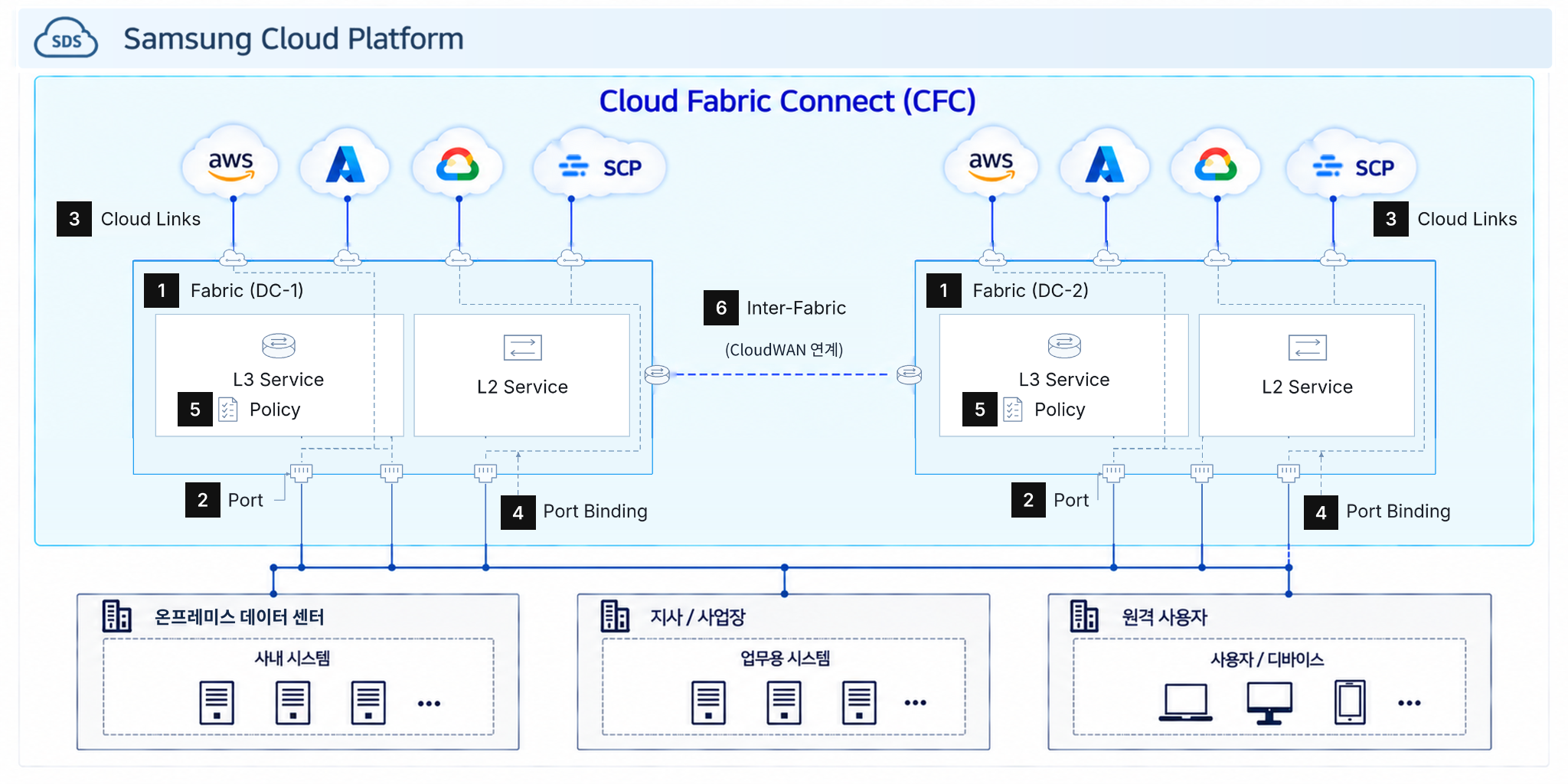
Configure the CFC service settings for each data center with Fabric.
- A Fabric is a logical unit that manages the CFC service settings and connected resources of the data center.
- Configure Port, Connection , L3 Gateway and Policy within the Fabric.
Configure the connection segment of the customer network using Port.
- It is a customer access Port that connects on-premises data centers and customer networks such as branch offices and business sites to the CFC.
- Configure the port’s capacity, connection method, and redundancy setup for connecting to the customer line.
Configure cloud connection with Cloud Links.
- Configure dedicated connections with target clouds such as AWS, Azure, Google Cloud, and SCP.
- Cloud Links manages cloud connection information, including connection targets and bandwidth.
- In the L3 service, routes are exchanged with the customer side and the cloud side through the Connection’s BGP settings. - In L2 services, routing to the cloud is configured directly on the customer’s equipment.
Map the customer’s Port and the connection target using Port Binding.
- In L2 service, the customer’s Port is connected to the corresponding Cloud Link.
- In the L3 service, the customer’s Port is connected to the internal Fabric Gateway, and the path is linked with Cloud Links through the Gateway.
Control the path of L3 services using Policy.
- Policy is applied only in L3 services and controls the inbound and outbound BGP paths on both the customer side and the cloud side.
- Define IP Prefix, Community, AS-PATH, etc., as Objects, and compose Rules to allow or block routes and modify their attributes.
- Group Rules into a Profile, and manage the allowed scope and priority of routes by applying them to the target BGP connection via an Attachment.
Inter-Fabric is an expansion architecture between fabrics via CloudWAN integration.
- Provides inter‑region communication by connecting the Fabric of different data centers with CloudWAN.
- We provide the Maximum high‑availability option through integration between DC Fabric.
Use Cases
A. ## Hybrid cloud configuration that connects on-premises and cloud
Connect the on-premises business system, SCP, and public cloud via a dedicated network.
You can configure a hybrid cloud environment that maintains the existing system while deploying new applications to the cloud, or gradually migrating systems by business unit.
B. ## Data and Application Integration Across Multi-Cloud
Connect applications and data resources deployed across different clouds to CFC’s L3 service.
You can selectively permit clouds that require communication and apply routing policies to configure data synchronization, analytics service integration, and distributed application environments.
C. ## Cloud connectivity expansion and routing policy standardization
Add Cloud Links to the existing Fabric and configure the relationship with the customer Port to expand the target cloud.
In the L3 service, you can standardize cloud-specific routing policies by configuring common routing policies as Object, Rule, and Profile, and applying them to the required BGP connections.
Prerequisites
- The customer must prepare the circuit connecting their data center or site to the CFC access point, as well as the required network equipment.
- Prepare the target cloud’s account, subscription, project, and network resources, and secure the permissions needed for connection approval and configuration.
- Depending on the connection method, you must predefine the interface, VLAN, IP address, BGP ASN, and the routes to advertise and receive.
Constraints
none
Considerations
- Verify whether IP addresses on-premises and in the cloud overlap, and review the routing policies of both the customer side and the cloud side together to prevent unintended route propagation and asymmetric routing.
- We review the bandwidth of the customer Port and Cloud Links together, and design a redundant configuration to ensure sufficient capacity even in the event of line or Port failures.