
Utilizing Archive Storage for long-term data retention
Utilizing Archive Storage for long-term data retention
Overview
From storing expired data for compliance purposes to storing massive amounts of data for analysis, data storage is a critical component of every organization. Storing and managing data can be costly and burdensome, but Archive Storage offered by Samsung Cloud Platform can address this.
Archive Storage is a low-cost storage service for long-term archival data that transfers data stored in Object Storage to a cheaper storage. Additionally, data recovery is performed immediately upon a user’s recovery request for the transferred data set.
Architecture Diagram
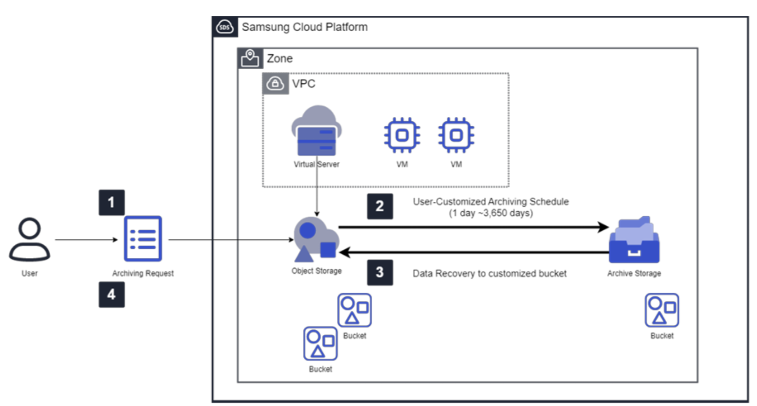
How to Use Archive
Create Archive bucket
- The user first applies for Object Storage in the SCP console and then creates a bucket.
- Create a bucket in Archive Storage to archive data stored in Object Storage that requires long-term retention.
Create Schedule
- Select the Object Storage bucket that serves as the replication source for the archiving target.
- The user selects the folder or file to be archived and sets a schedule for it (minimum 1 day to maximum 3,650 days).
- Archiving is performed daily according to the schedule, using the schedule creation time as the start time.
- The data specified by the user is stored in the Archive Storage bucket according to the policy.
Recovery Request
- If recovery is needed for data stored in Archive Storage, the recovery is performed to the bucket of Object Storage specified by the user.
- Select the file to recover from the folder list and request recovery.
Check History
- Through the Recovery History tab, you can view the archiving execution status and recovery status, and see the list of files that have completed processing.
Use Cases
Archiving data with expired retention periods
- Design and drawing data managed by the field office continuously generate new versions, and loading of previous versions is required.
- To store such large volumes of data cheaply and securely, you can use Archive Storage, which enables archiving of data after a specified period through a configured schedule.
Easy access to long‑term storage data through fast recovery functions
- When a user needs to quickly restore long-term archived data for audits or security purposes, the rapid recovery feature of Archive Storage helps them access the data required for their work.
Prerequisites
- Only data within the Object Storage bucket can be archived.
- Archive Storage provides the service as a regional offering, using the same storage within the region.
Constraints
- DR and Multi-AZ services for Archive Storage are not provided.
- If there is a large amount of archiving data and more than 24 hours have passed, the next day’s schedule is skipped, and the previous archiving continues to be performed.
Considerations
- Additional charges are applied for the recovery volume when a recovery request is made.
- When versioning is enabled, billing is applied to versioned data, so users should verify that they archive only the data needed for long-term retention.
Related Service
This is a list of Samsung Cloud Platform services that are related to the features or configurations described in this guide. Refer to this when selecting and designing services.
| Service group | service | Detailed description |
|---|---|---|
| Storage | Object Storage | Object storage that simplifies data storage and retrieval |
| Storage | Archive Storage | Storage suitable for long-term data retention |