Object Storage(sdt-migration)
Object Storage(sdt-migration)
Overview
This page is a guide on how to perform Live Migration using the API or CLI provided by Object Storage’s Live Migration. Live Migration is a technology that ensures data integrity and consistency by not only transferring existing data from source storage to target storage, but also transmitting changes in data that are added in real time.
Live Migration Process
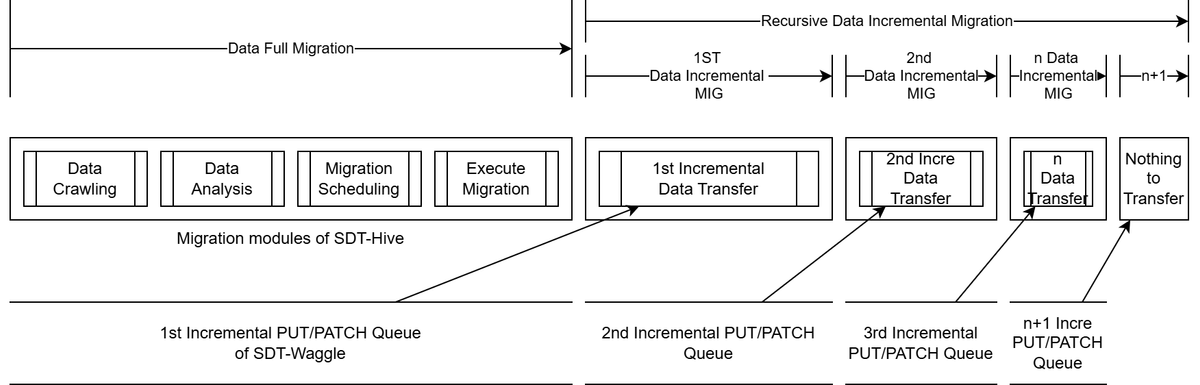
Full Migration
Full Migration, when a migration is requested, first involves transmitting existing data, and is divided into the following four detailed processes.
- Data Crawling: The process of retrieving data information from the source bucket.
- Data Analysis: It is the process of analyzing data based on the information retrieved from the source bucket.
- Migration Scheduling: It is a process of scheduling data transfer by subdirectory units of a bucket based on data analysis.
- Execute Migration: It is the process where data is actually transferred by directory according to the schedule order.
Incremental Migration
Incremental Migration is a process that runs after the transfer of existing data is completed with Full Migration, and it is the process of transmitting data changes that occur during migration. This process continues until the migration is terminated using the termination API provided by Live Migration.
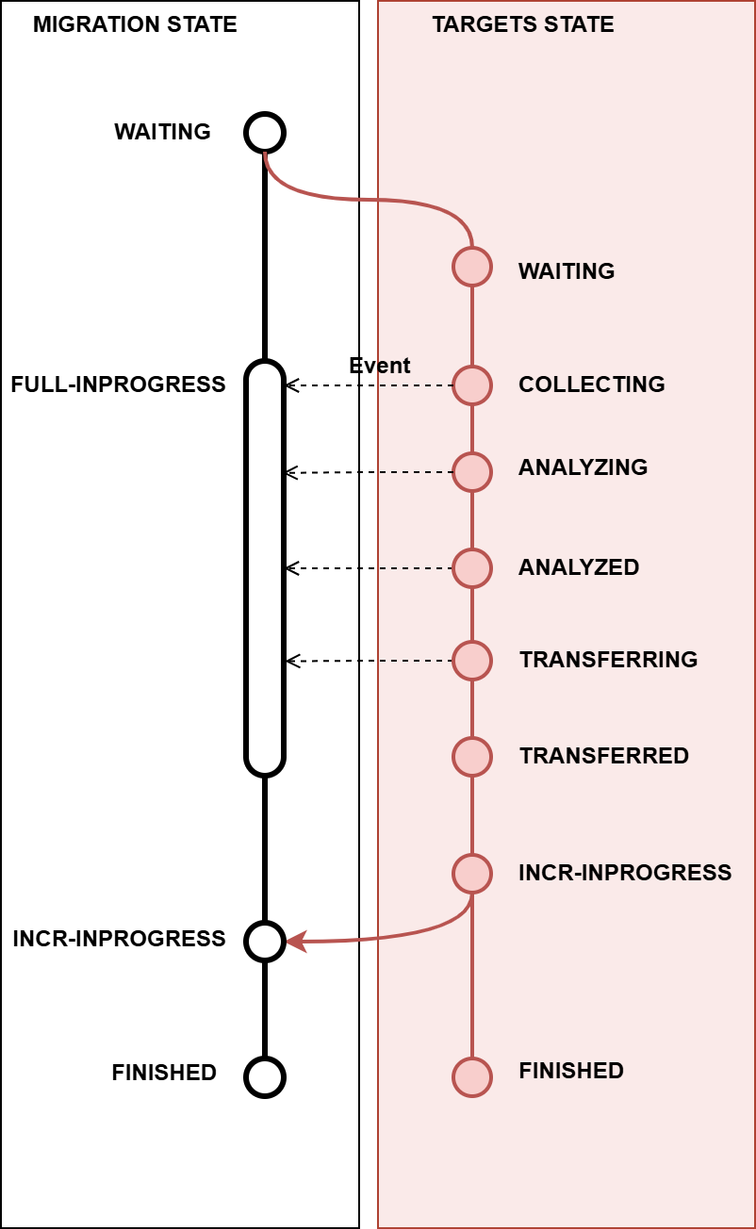
Migration State
When you execute the migration progress status query API provided by Live Migration, the content shown in the state is as follows.
| State | Description |
|---|---|
| WAITING | Migration request has been made but is in a waiting state |
| FULL-INPROGRESS | Full Migration is in progress |
| INCR-INPROGRESS | Incremental Migration is in progress |
| FINISHED | Incremental Migration has ended state |
| DELETED | Migration is in a deleted state |
| FAILED | Error occurred during migration resulting in a failed state |
When you run the migration information lookup API, you can obtain more detailed information. At this time, the content displayed in targets.state is as follows.
| State | Description |
|---|---|
| WAITING | Migration request has been made but is in a waiting state |
| COLLECTING | State of querying data information from the source bucket |
| ANALYZING | State of analyzing data based on information retrieved from the source bucket |
| ANALYZED | Data analysis completed based on information retrieved from the source bucket |
| TRANSFERRING | Transmitting existing data |
| TRANSFERRED | Full Migration completed state |
| INCR-INPROGRESS | State where Incremental Migration is in progress |
| FINISHED | Incremental Migration has ended |
| DELETED | Migration is in a deleted state |
| FAILED | Failed state due to an error occurring during migration |
The relationship between migration state and targest state is as follows.
Constraints
This is an explanation of the constraints for performing migration. Please be sure to familiarize yourself with them before performing migration.
1. Create target bucket and transfer limit
The target bucket must be pre-created, and it should be applied the same as the source bucket’s versioning or encryption options.
Also, the target bucket must not contain any data before the migration execution, and data changes via any path other than Live Migration must not occur. This can cause issues with the migration’s data integrity.
2. Delete Marker transmission limit
Delete Marker deletion is not transmitted. Therefore, during migration, deletion of Delete Marker in the source bucket must be restricted.
The first version of an object in a versioned bucket of storage can be a Delete Marker. In this case, that Delete Marker is not sent to the target bucket. Transmission is only possible if there is at least one version preceding the Delete Marker that is not a Delete Marker.
3. Transmission of Encrypted Data
The encryption key entered when requesting a migration can be entered on a per-bucket basis. Only data that uses the same key as the entered encryption key can be transferred. Therefore, all data in that bucket must be encrypted using the same key. Data that is not encrypted may also fail to be transferred.
If an object in the bucket uses a different key (or is not encrypted) than the entered encryption key, migration may fail.
If the source bucket is encrypted, the source encryption information must be entered, but the target bucket’s encryption information does not need to be entered. If the target bucket’s encryption information is not entered, it will be saved to the target bucket in an unencrypted state.
4. Simultaneous execution of the same source is not allowed
Migration for the same source bucket can only be performed one at a time. If a migration for the same source bucket is already in progress, an error message “Migration’s registered already. Check ‘mig_xxx’!” will be sent. In this case, you can run it after deleting the existing migration.
5. Delete Version
Deletion of a specific version of an object in a versioning bucket is not transmitted. Version deletion during migration should be restricted.
Pre-work
SDT Migration Module Installation
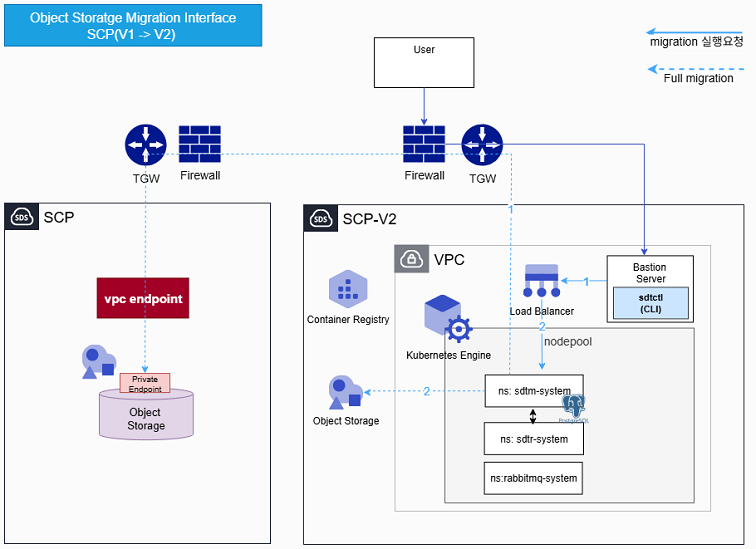
Requirement
K8s
| Node count | Node Spec | |
|---|---|---|
| minimum | 3 | v4m12 |
| recommended | 3 | v8m32 |
PostgreSQL
| Replica | Resource | |
|---|---|---|
| minimum | 1 | v2m4 |
| Recommended | 2 | v2m4 |
Preliminary preparation items
- K8s Cluster
- bastion server must have kubectl, helm pre-installed.
- Check connection to K8s cluster from bastion server. If necessary, need to add security group settings.
- Depending on the sdt-migration installation location, deployment of a VPC endpoint and pre-configuration are required to access Object storage. (This guide is based on v2 installation.)
- The Container image used in std-migration must be registered in an SCR that the K8s cluster to be installed can access.
- sdt-migration(sdt-migration.tar.gz) installation file must be present.
- Perform installation on a Private network where internet access is blocked.
- Extract the sdt-migration installation file.
tar xvf sdt-migration.tar.gz
rabbitmq operator
Prepare values.yaml file
Copy the rabbitmq values.yaml file and modify it.
cp ./sdt-migration/environments/standalone/tools/rabbitmq-cluster-operator-values.yaml .
| Variables | Example | Remarks |
|---|---|---|
| imagepull_secretname | scr-migration | Secret name to be created for image pull in SCR |
| registry_endpoint | migration-yqvcfsxh.scr.private.kr-west1.s.samsungsdscloud.com | SCR private endpoint containing the container image of sdt-migration |
| registry_username | username | username(access key) |
| registry_password | password | password(secret key) |
| registry_email | scp@samsung.com | |
| repository | "" | when installing on v1 “”, when installing on v2 repository |
# ------------------------------------------------------------------------------
# ENABLED COMPONENTS (tags)
# ------------------------------------------------------------------------------
tags:
  rabbitmq-cluster-operator: true

# ------------------------------------------------------------------------------
# SCR CREDENTIALS
# ------------------------------------------------------------------------------
imageCredentials:
  secretName: <<imagepull_secretname>>
  registry: <<registry_endpoint>>
  username: <<registry_username>>
  password: <<registry_password>>
  email: <<registry_email>>
# ------------------------------------------------------------------------------
# GLOBAL
# ------------------------------------------------------------------------------
global:
  image: <<registry_endpoint>>/<<repository>>
  imagePullSecrets:
    - <<imagepull_secretname>>

security:
    allowInsecureImages: true

# ------------------------------------------------------------------------------
# RABBITMQ-CLUSTER-OPERATOR CHART
# ------------------------------------------------------------------------------
rabbitmq-cluster-operator:
  rabbitmqImage:
    repository: rabbitmq
    tag: 4.1.2-debian-12-r1

  credentialUpdaterImage:
    repository: rmq-default-credential-updater
    tag: 1.0.7-debian-12-r1

  clusterOperator:
    image:
      repository: rabbitmq-cluster-operator
      tag: 2.16.0-debian-12-r0

  msgTopologyOperator:
    enabled: true
    image:
      repository: rmq-messaging-topology-operator
      tag: 1.17.3-debian-12-r0
install
kubectl create ns rabbitmq-system
helm install -n rabbitmq-system rmq ./sdt-migration/tools/ -f ./rabbitmq-cluster-operator-values.yaml
Deployment Check
kubectl -n rabbitmq-system get po

NAME                                                        READY   STATUS    RESTARTS   AGE
rmq-rabbitmq-cluster-operator-777f7b5f89-grrk4              1/1     Running   0          3h21m
rmq-rabbitmq-messaging-topology-operator-5b45d755fc-8cj2d   1/1     Running   0          3h21m
postgresql
Install the Database used in sdt-migration. Install it in the sdtm-system namespace and share it with sdtr.
| Variables | Example | Note |
|---|---|---|
| registry_endpoint | migration-yqvcfsxh.scr.private.kr-west1.s.samsungsdscloud.com | SCR private endpoint with postgresql container image |
| repository | migration | SCR repository with sdt-postgresql container image |
| database_user | sdtm | postgresql database username |
| database_name | sdtm | postgresql database name |
| database_password | password | postgresql database password |
create namspace
kubectl create ns sdtm-system
#### database credentials(secret) creation
Create credentials to be used in postgresql database.
psql-sdtm-secret.yaml
```yaml
apiVersion: v1
kind: Secret
metadata:
  name: psql-sdtm-secret
  namespace: sdtm-system
type: Opaque
stringData:
    postgres-password: <<database_password>>
    user-password: <<database_password>>
kubectl apply -f psql-sdtm-secret.yaml
imagePullSecret creation
environment where docker is installed
Check the docker login config file. First log in to the registry where the image is stored.
kubectl -n sdtm-system create secret generic regcred \
    --from-file=.dockerconfigjson=$HOME/.docker/config.json> \
    --type=kubernetes.io/dockerconfigjson
Create a secret using docker config.json.
environment where docker is not installed
kubectl create secret docker-registry regcred  -n sdtm-system \
  --docker-username={accountId} \
  --docker-password={accountPw} \
  --docker-server=<<registry_endpoint>>
values.yaml file preparation
Create the postgresql_values.yaml file.
global:
  imageRegistry: <<registry_endpoint>>/<<repository>>
  security:
    allowInsecureImages: true

auth:
  username: <<database_user>>
  database: <<database_name>>
  existingSecret: "psql-sdtm-secret"
  architecture: standalone
  secretKeys:
    adminPasswordKey: "postgres-password"
    userPasswordKey: "user-password"

image:
  repository: bitnami/postgresql
  pullSecrets:
    - regcred
primary:
  resourcesPreset: "medium"
  persistence:
    size: 10Gi
install
postgresql helm chart pre-registered in SCR (example)
helm install -n sdtm-system db oci://migrationtarget-yqvcfsxh.scr.private.kr-west1.s.samsungsdscloud.com/migration/helm_chart/postgresql --version 18.1.9 -f./postgresql_values.yaml
postgresql helm chart when it is local (example)
helm install -n sdtm-system db ./postgresql -f./postgresql_values.yaml
Deployment Check
 kubectl -n sdtm-system get po

NAME                          READY   STATUS    RESTARTS   AGE
sdtm-postgresql-0             1/1     Running   0          3h53m
sdtm
values.yaml file preparation
Copy the sdtm values.yaml file and modify it.
cp ./sdt-migration/environments/standalone/apps/sdtm-values.yaml .
| Variables | Example | Remarks |
|---|---|---|
| imagepull_secretname | scr-migration | Secret name to be created for image pull in SCR |
| registry_endpoint | migration-yqvcfsxh.scr.private.kr-west1.s.samsungsdscloud.com | SCR private endpoint containing the container image of sdt-migration |
| registry_username | username | username(access key) |
| registry_password | password | password(secret key) |
| registry_email | scp@samsung.com | |
| repository | "" | when installing on v1 “”, when installing on v2 repository |
| database_host | db-postgresql | Postgresql host address. If installed in the same namespace, use the postgresql service name. |
| database_port | 5432 | Postgresql port |
| database_name | sdtm | the database used during the above PostgreSQL installation |
| database_user | sdtm | the database_user used during the above PostgreSQL installation |
| database_password | password | the database password used during the above PostgreSQL installation |
| msgq_persistence_storageClassName | nfs-subdir-external-sc | Enter the storage class name provided by SKE |
| msgq_replicas | 1 | If you want HA configuration, 2 |
| msgq_persistence_storage | 5Gi | Storage size |
| scp-load-balancer-service-ip | 70.222.53.140 | Service IP to be used when sdtctl cli connects |
# ------------------------------------------------------------------------------
# ENABLED COMPONENTS (tags)
# ------------------------------------------------------------------------------
tags:
  sdtm: true

# ------------------------------------------------------------------------------
# APPLICATION NAME
# ------------------------------------------------------------------------------
# The application name is derived from the chart name and release name by default.
# The application name is defined in the root helper as `apps.fullname` and can be reused in sub charts when needed.
# It is also used as the name of the Ingress resource.

# To override this, set the `fullnameOverride` value.
#fullnameOverride:

# ------------------------------------------------------------------------------
# SCR CREDENTIALS
# ------------------------------------------------------------------------------
imageCredentials:
  secretName: <<imagepull_secretname>>
  registry: <<registry_endpoint>>
  username: <<registry_username>>
  password: <<registry_password>>
  email: <<registry_email>>

# ------------------------------------------------------------------------------
# GLOBAL
# ------------------------------------------------------------------------------
global:
  image: <<registry_endpoint>>/<<repository>>
  imagePullSecrets:
    - name: <<imagepull_secretname>>
  msgq:
    host: msgq
    port: 5672
    user: admin
    password: ENC(I4Ck4liRNBjWUktinQbJJ1WDmX9Ojd6l5fOG2CSO4J2wsb0=)

  database:
    host: <<database_host>>
    port: <<database_port>>
    name: <<database_name>>
    user: <<database_user>>
    password: <<database_password>>

  sidecar:
    busybox:
      image:
        repository: busybox
        tag: latest

# ------------------------------------------------------------------------------
# INGRESS
# ------------------------------------------------------------------------------
ingress:
  enabled: false

# ------------------------------------------------------------------------------
# MSGQ CHART (Rabbitmq Cluster)
# ------------------------------------------------------------------------------
msgq:
  enabled: true
  image:
    repository: rabbitmq
    tag: 4.1.2-debian-12-r1
  replicas: <<msgq_replicas>>
  service:
    type: NodePort
    nodePort:
      amqp: 30088
      management: 30089
  persistence:
    storageClassName: <<msgq_persistence_storageClassName>>
    storage: <<msgq_persistence_storage>>
  nodeAffinity:
    enabled: false
    key: sdt-node-role
    value: here
# ------------------------------------------------------------------------------
# QUEEN CHART
# ------------------------------------------------------------------------------
queen:
  enabled: true
  namespaceOverride: sdtm-system
  replicas: 1
  image:
    repository: sdt/sdt-queen
    tag: 1.0.1
  service:
    type: NodePort
    port: 8080
    nodePort: 30091
  job:
    scoutbee:
      image:
        repository: sdt/sdt-scoutbee
        tag: 1.0.1
    piping:
      image:
        repository: sdt/sdt-piping
        tag: 1.0.1
  waggleUrl: waggle.sdtr-system:80
  nodeSelector:
    enabled: false
    key: sdt-node-role
    value: here
# ------------------------------------------------------------------------------
# SCOUTBEE CHART
# ------------------------------------------------------------------------------
scoutbee:
  enabled: true
  filesize_criteria:
    medium: 5
    large: 10
  threadCount: 2

# ------------------------------------------------------------------------------
# PIPING CHART
# ------------------------------------------------------------------------------
piping:
  namespaceOverride: sdtm-system
  enabled: true
  job:
    bee:
      image:
        repository: sdt/sdt-bee
        tag: 1.0.4
  nodeSelector:
    enabled: false
    key: sdt-node-role
    value: here
bee:
  enabled: true
install
helm install -n sdtm-system sdtm ./sdt-migration/apps/ -f ./sdtm-values.yaml
#### Deployment Check
```bash
kubectl -n sdtm-system get po
NAME                          READY   STATUS    RESTARTS   AGE
db-postgresql-0               1/1     Running   0          43m
sdtm-msgq-server-0            1/1     Running   0          6m32s
sdtm-msgq-server-1            1/1     Running   0          6m32s
sdtm-queen-64fc4f9446-hp8qp   1/1     Running   0          7s
cli connection service creation
Create a separate service to connect to sdtctl cli via LoadBalance.
queen-lb.yaml
apiVersion: v1
kind: Service
metadata:
  name: queen-lb
  namespace: sdtm-system
  labels:
    app.kubernetes.io/instance: sdtm
    app.kubernetes.io/name: queen-lb
    app.kubernetes.io/version: 1.0.0
  annotations:
    service.beta.kubernetes.io/scp-load-balancer-service-ip: <<scp-load-balancer-service-ip>>
spec:
  ports:
  - appProtocol: tcp
    port: 80
    protocol: TCP
    targetPort: 8080
  type: LoadBalancer
  selector:
    app.kubernetes.io/instance: sdtm
    app.kubernetes.io/name: queen
$ kubectl -n sdtm-system apply -f queen-lb.yaml
$ kubectl -n sdtm-system get service queen-lb
NAME       TYPE           CLUSTER-IP     EXTERNAL-IP     PORT(S)        AGE
queen-lb   LoadBalancer   172.20.79.81   70.222.53.140   80:32075/TCP   29s
Check that the external IP has been assigned correctly. Use this IP when configuring the sdtctl CLI.
sdtr
values.yaml file preparation
Copy and modify sdtr’s values.yaml file.
cp ./sdt-migration/environments/standalone/apps/sdtr-values.yaml .
| Variables | Example | Remarks |
|---|---|---|
| imagepull_secretname | scr-migration | Secret name to be created for image pull in SCR |
| registry_endpoint | migration-yqvcfsxh.scr.private.kr-west1.s.samsungsdscloud.com | SCR private endpoint containing the container image of sdt-migration |
| registry_username | username | username(access key) |
| registry_password | password | password(secret key) |
| registry_email | scp@samsung.com | |
| repository | "" | When installed on v1 “”, when installed on v2 repository |
| database_host | db-postgresql | Postgresql host address. If installed in the same namespace, use the postgresql service name. |
| database_port | 5432 | Postgresql port |
| database_name | sdtm | the database used during the above PostgreSQL installation |
| database_user | sdtm | the database_user used during the above PostgreSQL installation |
| database_password | password | the database password used during the above PostgreSQL installation |
| msgq_persistence_storageClassName | nfs-subdir-external-sc | Enter the storage class name provided by SKE |
| msgq_replicas | 1 | If you want HA configuration, 2 |
| msgq_persistence_storage | 5Gi | Storage size |
# ------------------------------------------------------------------------------
# ENABLED COMPONENTS (tags)
# ------------------------------------------------------------------------------
tags:
  sdtr: true

# ------------------------------------------------------------------------------
# APPLICATION NAME
# ------------------------------------------------------------------------------
# The application name is derived from the chart name and release name by default.
# The application name is defined in the root helper as `apps.fullname` and can be reused in sub charts when needed.
# It is also used as the name of the Ingress resource.

# To override this, set the `fullnameOverride` value.
#fullnameOverride:

# ------------------------------------------------------------------------------
# SCR CREDENTIALS
# ------------------------------------------------------------------------------
imageCredentials:
  secretName: <<imagepull_secretname>>
  registry: <<registry_endpoint>>
  username: <<registry_username>>
  password: <<registry_password>>
  email: <<registry_email>>

namespaceOverride: sdtr-system
# ------------------------------------------------------------------------------
# GLOBAL
# ------------------------------------------------------------------------------
global:
  image: <<registry_endpoint>>/<<repository>>
  imagePullSecrets:
    - name: <<imagepull_secretname>>
  msgq:
    host: msgq
    port: 5672
    user: admin
    password: ENC(I4Ck4liRNBjWUktinQbJJ1WDmX9Ojd6l5fOG2CSO4J2wsb0=)

  database:
    host: <<database_host>>
    port: <<database_port>>
    name: <<database_name>>
    user: <<database_user>>
    password: <<database_password>>

  sidecar:
    busybox:
      image:
        repository: busybox
        tag: latest

# ------------------------------------------------------------------------------
# MSGQ CHART (Rabbitmq Cluster)
# ------------------------------------------------------------------------------
msgq:
  enabled: true
  image:
    repository: rabbitmq
    tag: 4.1.2-debian-12-r1
  replicas: <<msgq_persistence_replicas>>
  service:
    type: NodePort
    nodePort:
      amqp: 30098
      management: 30099
  persistence:
    storageClassName: <<msgq_persistence_storageClassName>>
    storage: <<msgq_persistence_storage>>
  nodeAffinity:
    enabled: false
    key: sdt-node-role
    value: here
# ------------------------------------------------------------------------------
# WAGGLE CHART
# ------------------------------------------------------------------------------
waggle:
  enabled: true
  image:
    repository: sdt/sdt-waggle
    tag: 1.2.8
  replicas: 1
  event:
    topicPushProtocol: amqp
    topicPushEndpoint: sdtr-msgq:5672
    notificationRetryLimit: 10
  replication:
    onlyVersioning: false
    requiredNamespace: false
  podAffinity:
    enabled: false

# ------------------------------------------------------------------------------
# WEBHOOK CHART
# ------------------------------------------------------------------------------
webhook:
  enabled: true
  image:
    repository: sdt/sdt-webhook
    tag: 1.0.0
  replicas: 1
  podAffinity:
    enabled: false

# ------------------------------------------------------------------------------
# BEE CHART
# ------------------------------------------------------------------------------
bee:
  enabled: true
  image:
    repository: sdt/sdt-bee
    tag: 1.2.2
  replicas: 1
  podAffinity:
    enabled: false
  extraArgs:
    - "--bee-mode=daemon"
  consume:
    request:
      exchange_name: bucket.replication.request.direct
      exchange_key: bucket.replication.request.key
      queue_name: bucket_replication_request_queue
    remove:
      exchange_name: bucket.replication.remove.direct
      exchange_key: bucket.replication.remove.key
      queue_name: bucket_replication_remove_queue
  publish:
    exchange_name: bucket.replication.response.direct
    exchange_key: bucket.replication.response.key
  retry_count: 1
install
kubectl create ns sdtr-system
helm install -n sdtr-system sdtr ./sdt-migration/apps/ -f ./sdtr-values.yaml
Deployment Check
kubectl -n sdtr-system get po

NAME                           READY   STATUS    RESTARTS   AGE
sdtr-bee-748bbc8455-hxnbj      1/1     Running   0          5h14m
sdtr-msgq-server-0             1/1     Running   0          5h14m
sdtr-waggle-7c6478854c-ktqls   1/1     Running   0          5h14m
sdtr-webhook-d97b58898-xzn22   1/1     Running   0          5h14m
sdtctl cli installation
Copy the received sdtctl file to the /usr/local/bin directory.
sudo cp ./sdtctl /usr/local/bin/.
sudo chmod 755 /usr/local/bin/sdtctl
Migration Procedure
1. CLI Configuration
To use sdtctl cli, you need to create a configuration file to connect to the installed sdt-migration server. The configuration file is stored at “{user home directory}/.config/sdtctl/config.yaml”.
config.yaml
queen:
  endpoint: {ip:port}
The ip:port of the endpoint set in the CLI is the ip:port connected to the NodePort of queen or the LoadBalancer set during module installation. [cli connection service creation](### cli 접속용 service생성) uses the external IP and port assigned to the deployed service.
The list of CLI commands is as follows.
| Binary | Command | Sub Command | Args | Flags | Description |
|---|---|---|---|---|---|
| sdtctl | mig | create | jsonargs | migration request | |
| ls(or search) | name | Migration list lookup | |||
| progress | id | Migration progress status query | |||
| get | id | Migration information lookup | |||
| delete | id | Delete migration | |||
| retry | id | Migration restart |
2. Migration Execution
Request data migration from the source bucket to the destination bucket.
Refer to the following table to create a json file.
Name _ | type | Required | Default value | Baundary value | Description | Remarks |
|---|---|---|---|---|---|---|
| name | String | Y | Migration name | |||
| description | String | Migration description | ||||
| src.endpoint | String | Y | origin endpoint | |||
| src.accessKey | String | Y | departure access key | |||
| src.secretKey | String | Y | source secret key | |||
| dst.endpoint | String | Y | destination endpoint | |||
| dst.access_key | String | Y | destination access key | |||
| dst.secret_key | String | Y | destination secret key | |||
| targets | Array | Y | Migration target information list | |||
| srcBucket | String | Y | Source Bucket name | |||
| srcEnc.type | String | Encryption type of source Bucket | e.g., SSE-C | |||
| srcEnc.algorithm | String | Encryption algorithm of the source bucket | e.g., AES256 | |||
| srcEnc.key | String | Encryption key of the source bucket | 32bytes string | |||
| dstBucket | String | Y | Destination Bucket name | |||
| dstEnc.type | String | Encryption type of destination bucket | e.g., SSE-C | |||
| dstEnc.algorithm | String | Encryption algorithm of the destination bucket | e.g., AES256 | |||
| dstEnc.key | String | Encryption key of the destination bucket | 32bytes string |
Json Example
{
    "name": "Migration Name",
    "description": "Migration description",
    "src":{
        "endpoint": "https://127.0.0.1:443",
        "accessKey": "access key string",
        "secretKey": "secret key string",
        },
    "dst":{
        "endpoint": "https://127.0.0.1:443",
        "accesskey": "access key string",
        "secretkey": "secret key string",
        },
    "targets":[{
        "srcBucket": "source bucket name",
        "srcEnc": { "type": "SSE-C", "algorithm": "AES256", "key": "key string"},
        "dstBucket": "target bucket name",
        "dstEnc": { "type": "SSE-C", "algorithm": "AES256", "key": "key string"}
        }]
"}
Command Example
sdtctl mig create --jsonargs={json file path}
*Response Example
{
    "id": "mig_xxx"
}
If the above result occurs, the migration has been successfully registered with the corresponding migration ID.
Error
HTTP status code | ErrorCode | Description |
|---|---|---|
| 400 | Bad Request | |
| 403 | Forbidden | |
| 500 | Internal Server Error |
{
    "Code": 500,
    "Message": "Migration's registered already. Check 'mig_xxx'!"
"}
If an error like the above occurs, the same source bucket is already registered in the migration. Therefore, if necessary, delete that migration and recreate it.
3. Migration List View
It is a command that queries the migration list using the migration name.
Command Example
sdtctl mig ls --name={migration name}
Response Example
ID         NAME                        STATE           START_DT                            END_DT
mig_xxx    migration name              WAITING         2025-06-24T16:15:24.423432+09:00    2025-06-24T16:15:24.423432+09:00
- ID: Migration ID
- NAME: Migration Name
- STATE: Migration status
- START_DT: Migration start time
- END_DT: Migration end time
The content displayed in the state is as follows.
| State | Description |
|---|---|
| WAITING | Migration request has been made but is in a waiting state |
| FULL-INPROGRESS | Full Migration is in progress |
| INCR-INPROGRESS | Incremental Migration is in progress |
| FINISHED | Incremental Migration has finished state |
| DELETED | Migration is in a deleted state |
| FAILED | Failed state due to an error occurring during migration |
4. Migration Progress Status Query
This is a command that queries the progress status information of a migration using the migration ID.
Command Example
sdtctl mig progress {Migration ID}
Response Example
The result is shown in the following JSON format.
{
    "id": "mig_xxx",
    "state": "COMPLETE",
    "failedAt": "scoutbee",
    "fullMigration": {
        "completedCount": 18,
        "totalCount": 18
        "completedSize": 50735188,
        "totalSize": 50735188
        },
    "incrementalMigration": {
        "completedCount": 0,
        "totalCount": 0
        "completedSize": 50735188,
        "totalSize": 50735188
        }
}
The contents of the filed of the above JSON are as follows in the table.
Name | type | Description | Remarks |
|---|---|---|---|
| id | String | Migration ID | |
| state | String | migration status | |
| failedAt | String | Failure location | |
| fullMigration.completedCount | number | Full migration object count (completed) | |
| fullMigration.totalCount | number | Full migration object count (total) | |
| fullMigration.completedSize | number | Full migration object size (completed) | |
| fullMigration.totalSize | number | Full migration object size (total) | |
| incrementalMigration.completedCount | number | Incremental migration object count (completed) | |
| incrementalMigration.totalCount | number | Incremental migration object count (total) | |
| incrementalMigration.completedSize | number | Incremental migration object size (completed) | |
| incrementalMigration.totalSize | number | Incremental migration object size (total) |
The content displayed in the state is as follows.
| State | Description |
|---|---|
| WAITING | Migration request has been made but is in a waiting state |
| FULL-INPROGRESS | Full Migration is in progress |
| INCR-INPROGRESS | Incremental Migration is in progress |
| FINISHED | Incremental Migration has finished state |
| DELETED | Migration is in a deleted state |
| FAILED | Failed state due to an error occurring during migration |
Error
HTTP status code | ErrorCode | Description |
|---|---|---|
| 400 | Bad Request | |
| 403 | Forbidden | |
| 500 | Internal Server Error |
5. Migration Information Lookup
This is a command that retrieves migration information using the migration ID.
Command Example
sdtclt mig get {Migration ID}
Response Example
The result is shown in the following JSON format.
{
    "id": "mig_xxx",
    "name": "DJ-Mig0423-001",
    "description": "Test",
    "targets": [
        {
            "migrationId": "mig_189",
            "seq": 1,
            "state": "FAILED",
            "retryCount": 4,
            "retryPoint": "scoutbee",
            "srcBucket": "sejun-test14",
            "srcEnc": {},
            "dstBucket": "sejun-test",
            "dstEnc": {}
        }
    ],
    "src": {
        "endpoint": "http://192.168.110.60:9000",
        "accessKey": "sejun",
        "secretKey": "rlatpwns"
        },
    "dst": {
        "endpoint": "http://192.168.110.60:9000",
        "accessKey": "sejun",
        "secretKey": "rlatpwns"
        },
    "startDt": "2025-05-13T10:04:37.265231+09:00",
    "endDt": "0001-01-01T08:27:52+08:27",
    "state": "FAILED",
    "failedAt": "scoutbee",
    "createdDt": "2025-05-13T10:04:37.267658+09:00"
"}
The contents of the field of the above JSON are as follows in the table.
| Name | type | Description | Remarks |
|---|---|---|---|
| id | String | Migration Id | |
| name | String | Migration name | |
| description | String | migration description | |
| targets | Array | Detailed List | |
| migrationId | String | Migration Id | |
| seq | Number | order | |
| state | String | status | |
| retryCount | Number | Number of retries | |
| retryPoint | String | retry location | |
| srcBucket | String | Source bucket name | |
| srcEnc.type | String | Source encryption type | |
| srcEnc.algorithm | String | Source encryption algorithm | |
| srcEnc.key | String | Origin encryption key | |
| dstBucket | String | Destination bucket name | |
| dstEnc.type | String | Destination encryption type | |
| dstEnc.algorithm | String | Destination encryption algorithm | |
| dstEnc.key | String | Destination encryption key | |
| src.endpoint | String | origin endpoint | |
| src.accessKey | String | origin access key | |
| src.secretKey | String | origin secret key | |
| dst.endpoint | String | destination endpoint | |
| dst.accessKey | String | destination access key | |
| dst.secretKey | String | destination secret key | |
| startDt | String | Start datetime | |
| endDt | String | Completion DateTime | |
| state | String | status | |
| failedAt | String | failure location | |
| createdDt | String | Creation Date/Time |
The content displayed in targets.state is as follows.
| State | Description |
|---|---|
| WAITING | Migration request has been made but is in a waiting state |
| COLLECTING | Querying data information from source bucket |
| ANALYZING | Analyzing data based on information retrieved from the source bucket |
| ANALYZED | Data analysis completed based on information retrieved from the source bucket |
| TRANSFERRING | Transferring existing data |
| TRANSFERRED | Full Migration is completed |
| INCR-INPROGRESS | Incremental Migration is in progress |
| FINISHED | Incremental Migration has ended |
| DELETED | Migration is in a deleted state |
| FAILED | Failed state due to an error occurring during migration |
Error
HTTP status code | ErrorCode | Description |
|---|---|---|
| 400 | Bad Request | |
| 403 | Forbidden | |
| 500 | Internal Server Error |
6. Migration End
This is a command that requests the termination of a migration using the migration ID.
Command Example
sdtctl mig finish {migration ID}
Response Example
{
    "id": "mig_XXX"
"}"
Error
HTTP status code | ErrorCode | Description |
|---|---|---|
| 400 | Bad Request | |
| 403 | Forbidden | |
| 500 | Internal Server Error |
7. Migration Deletion
This is a Command that requests migration deletion using the migration ID.
Command Example
sdtctl mig delete {migration ID}
Response Example
{
    "id": "mig_XXX"
}
Error
HTTP status code | ErrorCode | Description |
|---|---|---|
| 400 | Bad Request | |
| 403 | Forbidden | |
| 500 | Internal Server Error |
8. Migration Restart
This is a Command that requests a migration restart using the ID of a failed migration.
It can be executed only when the migration’s state is FAILED.
Command Example
sdtctl mig retry {Migration ID}
Response Example
{
    "id": "mig_XXX",
"}
Error
HTTP status code | ErrorCode | Description |
|---|---|---|
| 400 | Bad Request | |
| 403 | Forbidden | |
| 500 | Internal Server Error |