
Object Storage(rclone)
Object Storage(rclone)
Overview
This page provides a guide on how to replicate Object Storage using the open-source tool rclone.
Migration tool
Depending on the size and usage environment of the version cut being migrated, you can use the following tools.
| Tool | Live Migrataion | Type | Explanation |
|---|---|---|---|
| sdt-migration | O | CLI + k8s | Even during migration work, if source objects continue to undergo changes |
- If versioning is enabled on the source bucket and previous version objects also need to be migrated
- If you are already using a k8s cluster or have an environment where you can deploy a new k8s cluster |
| rclone | X | CLI | If the bucket changes are minimal during migration, or the environment allows stopping Apps and performing the migration
※ For buckets with versioning enabled, only the latest version is replicated. |
Rclone
rclone is an open-source, command-line based file management program that supports more than 70 different cloud storage products. It is designed to allow users to efficiently synchronize, copy, move, and manage multiple cloud services and local storage, and is sometimes called the “Swiss Army knife of cloud storage.”
Key Features
- Supports a variety of storage options: Amazon S3, Google Drive, Dropbox, Microsoft OneDrive, Azure Blob, FTP, WebDAV, and over 70 other cloud and storage protocols.
- File management commands: You can manage files using syntax similar to standard Unix commands such as rsync, cp, mv, ls, mount, etc.
- Data synchronization and backup: Provides a sync function that keeps the source and target identical, and a copy function for backup.
- Encryption and integrity verification: Checksums are validated to ensure data integrity during transmission, and files can be encrypted before upload.
- Bandwidth Optimization: Supports efficient data transfer with bandwidth limit settings and the ability to resume interrupted transmissions.
- Direct transfer between clouds: You can migrate data directly between cloud providers without using a local disk.
- Mount feature: You can mount cloud storage and use it like a local file system.
General use
- Large-scale data migration: Used when efficiently moving large amounts of data between cloud services or from on-premises to the cloud.
- Automated backup: You can automate scheduled backup tasks by using scripts.
- Media server integration: It is used to stream content stored in the cloud directly from media servers such as Plex and Emby.
You can find more detailed information and downloads on the rclone official website.
Preliminary work
- The server with rclone installed must be able to access v1 and v2 Object Storage buckets.
- Depending on the execution location of rclone, a VPC endpoint configuration is required to access Object Storage. - (When installing on v1, need to configure vpc endpoint on v2)
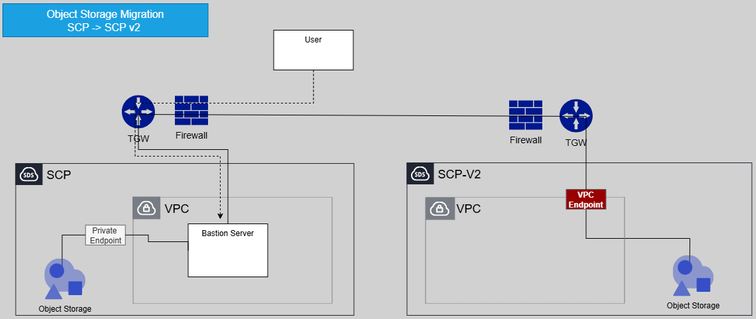
Migration Procedure
1. ## Configuration
Set the Object Storage connection information for both Source and Target to perform replication. Use the rclone config command or add the following contents to $HOME/.config/rclone/rclone.conf or a specific directory.
| Variables | example | Remarks |
|---|---|---|
| v1_object_storage_private_endpoint_url | https://obj1.skr-west-1.scp-in.com:8443 | SCP v1 Object Storage private endpoint url |
| v1_access_key | SCP v1 Object Storage authentication key-Access key | |
| v1_secret_key | SCP v1 Object Storage authentication key - Secret key | |
| v1_region | KR-WEST-1 | SCP v1 resion |
| v2_object_storage_private_endpoint_url | https://object-store.private.kr-west1.s.samsungsdscloud.com | SCP v2 Object Storage private endpoint url |
| v2_access_key | SCP v2 Access key | |
| v2_secret_key | SCP v2 Secret key | |
| v2_region | kr-west1 | SCP v2 region |
rclone.conf
[source]
type = s3
provider = Other
env_auth = true
access_key_id = <<v1_access_key(스토리지 인증키)>>
secret_access_key = <<v1_secret_key(스토리지 인증키)>>
region = <<v1_region>>
endpoint = <<v1_object_storage_private_endpoint_url>>
acl = private

[target]
type = s3
provider = Other
env_auth = true
access_key_id = <<v2_access_key>>
secret_access_key = <<v2_secret_key>>
region = <<v2_region>>
endpoint = <<v2_object_storage_private_endpoint_url>>
acl = private
2. ## Execution(Sync)
Execute replication using the sync or copy command. You must specify a bucket when replicating.
rclone --config="./rclone.conf" sync source:magicscenario001/ target:magicscenario001/ --progress --transfers=12 --checkers=24 --multi-thread-streams=12

Transferred:        3.092 GiB / 3.092 GiB, 100%, 20.547 MiB/s, ETA 0s
Checks:                 0 / 0, -, Listed 8587
Transferred:         4779 / 4779, 100%
Elapsed time:      4m31.0s
Key Options
--transfers : Controls the number of files to transfer simultaneously (parallelism). - The default is 4. - Increasing this value can improve copy speed, but memory and network usage will also increase.
--checkers : the number of threads that read the file list and quickly locate files to copy. - The default is 8. - When there are many recipients, setting this value very high speeds up list reading.
--multi-thread-stream : Even a large file is split and transmitted using multiple threads. - The default is 4. - Setting it to 1 or higher can increase the transfer speed of large files.
--buffer-size : The buffer size used to load a file into memory at once. - Increasing this value allows more data to be read at once, speeding up transfer, but also increases memory usage.
--progress : Shows the progress in real time. - You can instantly view the conversion status and the transfer status of each file.
3. ## Verification(Check)
After the transfer is complete, you can verify that the transferred object has no issues.
rclone --config="./rclone.conf" check source:magicscenario001/ target:magicscenario001/ --progress

2025/10/15 14:07:02 NOTICE: S3 bucket magicscenario001: 0 differences found
2025/10/15 14:07:02 NOTICE: S3 bucket magicscenario001: 1 hashes could not be checked
2025/10/15 14:07:02 NOTICE: S3 bucket magicscenario001: 4781 matching files
Transferred:              0 B / 0 B, -, 0 B/s, ETA -
Checks:              4781 / 4781, 100%, Listed 17178
Elapsed time:         5.8s