
Data Analytics Migration
Data Analytics Migration
Overview
There are two ways to migrate a Search Engine configured in the Samsung Cloud Platform environment to the Samsung Cloud Platform v2 environment. You can migrate using the Snapshot feature for backup/recovery and the CCR (Crosss Cluster Replication) feature for real-time replication. Each approach has its own pros, cons, and constraints, so you should use the method that aligns with the project requirements.
First, check the migration methods available for each Elasticsearch version.
| vmware | world | Migration Method |
|---|---|---|
| Elasticsearch 7.9.3 | Opensearch 2.17.1 | snapshot |
| Elasticsearch 7.9.3 | Elasticsearch 8.15.0 | snapshot |
| Elasticsearch 8.7.1 | Elasticsearch 8.15.0 | snapshot or CCR |
| Elasticsearch 8.10.4 | Elasticsearch 8.15.0 | snapshot or CCR |
| Elasticsearch 8.15.0 | Elasticsearch 8.15.0 | snapshot or CCR |
Migration Procedure
CCR(Cross Cluster Replication)
CCR refers to a technology that provides DR (Disaster Recovery) and HA (High Availability) through index-level replication between clusters. The feature was released starting with version 6.7, and it is currently available with a Platinum license. Using CCR, you can replicate a specific index from a single Elasticsearch cluster to one or more Elasticsearch clusters.
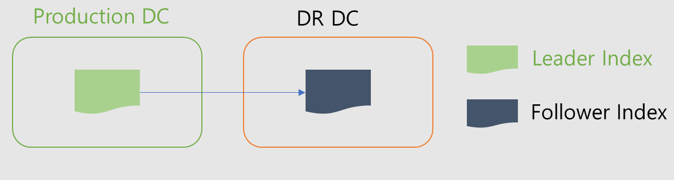
CCR uses an active-passive model. When you index into the leader index, the data is replicated to one or more read‑only follower indexes.
CCR operation
- The original Index is called the Leader Index, and the copied Index is called the Follower Index.
- Set replication at the index level, and the replicated follow index is in read-only state.
- To change a follower index to a regular index, you need to call the unfollow API.
- Data replication occurs at the shard level, so the replicated index also has the same number of shards as the original.
- Even if the Leader Index is deleted, the Follow Index is not deleted.
Constraints
Cross-cluster replication is designed to target only user‑created indices, and the following indices are not applicable.
- System Index Index template
- ILM, SLM policy
- Cluster configuration
- User Permissions and Mapping snapshot
CCR configuration pre‑setup
1. Network connection request
A secure connection between clusters is required to configure CCR. Since the current SCP Search Engine product does not automate this part, a security connection configuration request must be made through an SCP 1:1 inquiry.
2. Network connection check
After the network is connected, verify that the “mig_ccr” Remote Cluster is registered in the Kibana Stack Management > Remote Cluster menu.
Data Synchronization Settings
To enable real-time data replication, you must set the index as a follower index.
There are two ways to configure the Follower Index. You can register the index name explicitly or register it using a pattern. Generally, set the * pattern first, and configure automatic synchronization for newly created indexes. Existing indexes are explicitly configured as follower indexes by their index name.
| Category | Index Name (Add follower Index) | Pattern (Auto-follow patterns) |
|---|---|---|
| Registration method | Register as leader Index name | leader Index pattern registration e.g. log* |
| Notes | The leader Index must exist in the dictionary. | Only the leader index generated after the pattern is created is replicated. |
1. ILM, create index template
ILM, index templates, etc. that are not replicated via CCR should be created manually. You must create it before setting up replication.
2. Auto-follow patterns registration
Register the index pattern to be cloned. The precautions apply only to newly created indexes.
Stack Management > Cross-Cluster Replication > Auto -follow patterns
3. Follow Index setting
Explicitly register the index to be replicated.
Stack Management > Cross-Cluster Replication > Follower indices
It can also be performed via the API.
PUT /<follower_index>/_ccr/follow
{
  "remote_cluster" : "mig_ccr",
  "leader_index" : "<leader_index>"
}
4. Check data synchronization
You can verify that data synchronization is working correctly in Kibana.
If the status is Active, it is normal.
Stack Management > Cross-Cluster Replication
Disable data synchronization
A data-synchronized index (follower index) functions in read-only mode. When fully transitioning to the Search Engine of Samsung Cloud Platform v2, a data synchronization unfollow (unfollow) operation is required.
1. unfollow index (disable data synchronization) You can unfollow in bulk from Kibana.
Stack Management > Cross-Cluster Replication
2. promote datastream When using a datastream, after disabling data synchronization, you must perform the datastream promotion using the promote API. If this operation is not performed, the datastream rollover cannot be executed.
POST /_data_stream/_promote/my-datastream
After promotion, verify through the API below that “replicated”: false appears correctly.
GET /_data_stream/my-datastream
3. Change to enable alias write When using an alias, you must change it to a writeable alias after disabling data synchronization. If you do not perform this step, writing through the alias will be impossible.
POST _aliases
{
  "actions": [
    {
      "add": {
        "index": "app-log-000004",
        "alias": "app-logs",
        "is_write_index": true
      }
    }
  ]
}
After changing to a writable alias, verify through the API below.
GET _cat/aliases/app*?v

alias    index          filter routing.index routing.search is_write_index
app-logs app-log-000003 -      -             -              false
app-logs app-log-000004 -      -             -              true
Snapshot migration
Samsung Cloud Platform’s Search Engine stores backups in an Object Storage Bucket using the Snapshot feature. We will perform data migration by replicating this bucket to the Object Storage of Samsung Cloud Platform v2 and restoring it using the Search Engine of Samsung Cloud Platform v2.
Preliminary work
1. Bucket replication & Snapshot Repository creation request
- The Search Engine in the Samsung Cloud Platform environment must have backup settings configured.
- A backup bucket replication request is required via an SCP 1:1 inquiry.
2. Snapshot Repository Check
Verify that the “scp_migration_repo” repository is visible in Kibana.
2.1 Elasticsearch Stack Management > Snapshot and Restore > Repositories
2.2 Opensearch Snapshot Management > Repositories
Snapshot recovery operation
Elasticsearch / Opensearch common
1. Check snapshot to restore
GET _snapshot/scp_migration_repo/*
2. Check Index to Recover
GET _snapshot/scp_migration_repo/snapshot_202504241057
   "snapshots": [
   {
      "snapshot": "snapshot_202504241057",
      "uuid": "Xp4Ngd3rTpWPzThxLk0P0g",
      "version_id": 7090399,
      "version": "7.9.3",
      "indices": [
      "app-log-002",
      ".kibana_1",
      "app-log-001",
      "user-log-001",
      "user-log-002"
      ],
      "data_streams": [],
      "include_global_state": true,
      "state": "SUCCESS",
      "start_time": "2025-04-24T01:57:28.728Z",
      "start_time_in_millis": 1745459848728,
      "end_time": "2025-04-24T01:57:30.528Z",
      "end_time_in_millis": 1745459850528,
      "duration_in_millis": 1800,
      "failures": [],
      "shards": {
      "total": 5,
      "failed": 0,
      "successful": 5
      }
   }
   ]
3. Index Recovery
POST _snapshot/scp_migration_repo/snapshot_202504241057/_restore
{
"indices": "app-log*,user-log*",
"index_settings": {
   "index.number_of_replicas": 0
}
}