Data Analytics Migration
Data Analytics Migration
Overview
There are two ways to migrate the Search Engine configured in the Samsung Cloud Platform environment to the Samsung Cloud Platform v2 environment. You can migrate using the Snapshot function for backup/recovery or the CCR (Cross Cluster Replication) function for real-time replication. Each has its own advantages/disadvantages and constraints, so you can use the method that fits the project requirements.
Elasticsearch, first check the possible migration methods by version.
| vmware | nuri | Migration method |
|---|---|---|
| Elasticsearch 7.9.3 | Opensearch 2.17.1 | snapshot |
| Elasticsearch 7.9.3 | Elasticsearch 8.15.0 | snapshot |
| Elasticsearch 8.7.1 | Elasticsearch 8.15.0 | snapshot or CCR |
| Elasticsearch 8.10.4 | Elasticsearch 8.15.0 | snapshot or CCR |
| Elasticsearch 8.15.0 | Elasticsearch 8.15.0 | snapshot or CCR |
Migration Procedure
CCR(Cross Cluster Replication)
CCR means a technology that provides DR (Disaster Recovery) and HA (High Availability) through index-level replication between clusters, the feature was released from version 6.7, and is currently available with a Platinum license. Using CCR, you can replicate a specific index from one Elasticsearch cluster to one or more Elasticsearch clusters.
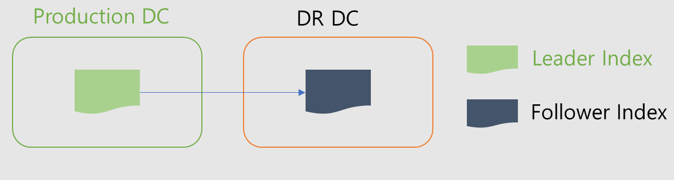
CCR uses an active-passive model. When indexing to the leader index, the data is replicated to one or more read-only follower indexes.
CCR operation
- The original Index is called Leader Index, and the copied Index is called Follower Index.
- Set replication per Index, and the replicated Follow Index is in Read Only state.
- To change the Follower Index to a regular Index, you need to call the unfollow API.
- Data replication is performed at the shard level, so the replicated index also has the same number of shards as the original
- Even if Leader Index is deleted, Follow Index is not deleted.
Constraints
Cluster-to-cluster replication is designed only for user-created indices, and the following indices are not applied.
- System Index
- Index template
- ILM, SLM policy
- Cluster Settings
- User permissions and mapping
- Snapshot
CCR Setup Preparation
1. Network connection request
To configure CCR, a secure connection setting between clusters is required. Since the current SCP Search Engine product does not automate this part, a request for secure connection setup is needed through an SCP 1:1 inquiry.
2. Network connection check
After the network is connected, check in the Kibana Stack Management > Remote Cluster menu whether the “mig_ccr” Remote Cluster is registered.
Data Synchronization Settings
To enable real-time data replication, you need to set the Index as a Follower Index.
There are two ways to set a follower index. You can register the index name explicitly or register using a pattern. Generally, set the * pattern first to automatically synchronize newly created indices. For indices that already exist, set them as follower indices explicitly by index name.
| Category | Index Name (Add follower Index) | Pattern (Auto-follow patterns) |
|---|---|---|
| Registration method | Register with leader Index name | Register with leader Index pattern ex. log* |
| Note | leader Index must exist beforehand | Only the leader Index created after Pattern generation is duplicated |
1. ILM, Create index template
ILM, index template, etc. Objects that are not replicated through CCR should be created manually. They must be created before setting up replication.
2. Auto-follow patterns registration
Register the index pattern to be replicated. Note that it applies only to newly created indexes.
Stack Management > Cross-Cluster Replication > Auto -follow patterns
3. Follow Index Setting
Explicitly register the index to be replicated.
Stack Management > Cross-Cluster Replication > Follower indices
It can also be performed with the API.
PUT /<follower_index>/_ccr/follow
{
  "remote_cluster" : "mig_ccr",
  "leader_index" : "<leader_index>"
}
4. Data synchronization check
You can verify that data synchronization works correctly in Kibana.
If Status is Active, it is normal.
Stack Management > Cross-Cluster Replication
Disable data synchronization
Data synchronization configured index (follower index) operates as read only. At the point of fully switching to Samsung Cloud Platform v2’s Search Engine, an unfollow (data synchronization release) operation is required.
1. unfollow index (Data synchronization disable) You can batch unfollow in Kibana.
Stack Management > Cross-Cluster Replication
2. promote datastream If you are using a datastream, after unsynchronizing the data you must perform the datastream promotion task using the promote API. If you do not perform this task, you cannot perform the datastream rollover.
POST /_data_stream/_promote/my-datastream
After promotion, verify through the API below that it correctly appears as “replicated”: false.
GET /_data_stream/my-datastream
3. Make alias write possible If you are using an alias, you must change it to a writeable alias after disabling data synchronization. If you do not perform this operation, writing through the alias will not be possible.
POST _aliases
{
  "actions": [
    {
      "add": {
        "index": "app-log-000004",
        "alias": "app-logs",
        "is_write_index": true
      }
    }
  ]
}
write after changing to a possible alias, check via the API below.
GET _cat/aliases/app*?v

alias    index          filter routing.index routing.search is_write_index
app-logs app-log-000003 -      -             -              false
app-logs app-log-000004 -      -             -              true
Snapshot Migration
The Search Engine of Samsung Cloud Platform stores in an Object Storage Bucket using the Snapshot function during backup. The bucket is replicated to the Object Storage of Samsung Cloud Platform v2, and data migration is performed by restoring it in the Search Engine of Samsung Cloud Platform v2.
Pre-work
1. Bucket replication & Snapshot Repository creation request
- Samsung Cloud Platform environment’s Search Engine must have backup settings.
- A backup bucket replication request is needed through an SCP 1:1 inquiry.
2. Snapshot Repository Check
In Kibana, check whether the “scp_migration_repo” repository is listed.
2.1 Elasticsearch
Stack Management > Snapshot and Restore > Repositories
2.2 Opensearch
Snapshot Management > Repositories
Snapshot Recovery Task
Elasticsearch / Opensearch Common
1. Check snapshot to restore
GET _snapshot/scp_migration_repo/*
2. Check Index to Recover
GET _snapshot/scp_migration_repo/snapshot_202504241057
   "snapshots": [
   {
      "snapshot": "snapshot_202504241057",
      "uuid": "Xp4Ngd3rTpWPzThxLk0P0g",
      "version_id": 7090399,
      "version": "7.9.3",
      "indices": [
      "app-log-002",
      ".kibana_1",
      "app-log-001",
      "user-log-001",
      "user-log-002"
      ],
      "data_streams": [],
      "include_global_state": true,
      "state": "SUCCESS",
      "start_time": "2025-04-24T01:57:28.728Z",
      "start_time_in_millis": 1745459848728,
      "end_time": "2025-04-24T01:57:30.528Z",
      "end_time_in_millis": 1745459850528,
      "duration_in_millis": 1800,
      "failures": [],
      "shards": {
      "total": 5,
      "failed": 0,
      "successful": 5
      }
   }
   ]
3. Index Recovery
POST _snapshot/scp_migration_repo/snapshot_202504241057/_restore
{
"indices": "app-log*,user-log*",
"index_settings": {
   "index.number_of_replicas": 0
}
}
If needed, the number of replicas can be adjusted.